Your Ollama server just crashed during a critical demo. The CEO is asking questions. Your coffee is getting cold. Sound familiar?
Every developer has experienced the nightmare of silent system failures. Ollama deployments face unique challenges that standard monitoring tools miss completely.
This guide shows you how to implement comprehensive ollama health check systems. You'll learn to catch problems before they crash your models and ruin your day.
Why Ollama Health Checks Matter More Than You Think
Ollama servers consume significant system resources. Models can fail silently. API endpoints become unresponsive without warning.
Traditional monitoring tools check basic metrics like CPU and memory. They miss Ollama-specific issues:
- Model loading failures
- GPU memory exhaustion
- API response degradation
- Context window overflow
- Temperature drift in inference
Proactive monitoring prevents these failures. You catch issues before users notice problems.
Core Components of Effective Ollama System Monitoring
Essential Health Check Metrics
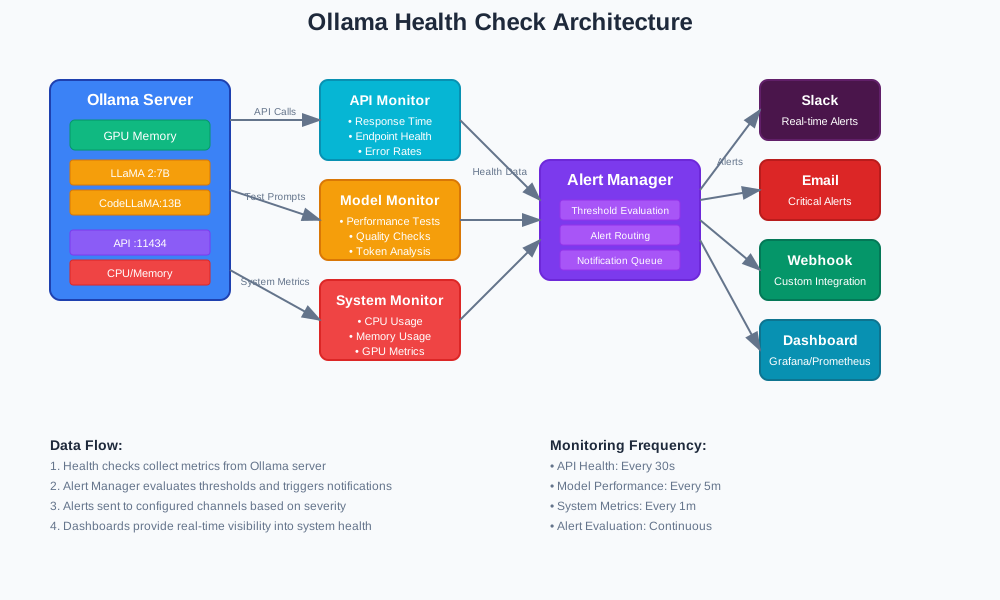
Your ollama health check system needs these five critical measurements:
- API Response Time: Track endpoint latency
- Model Loading Status: Verify model availability
- Resource Utilization: Monitor CPU, RAM, and GPU usage
- Inference Quality: Check response coherence
- Error Rate Tracking: Count failed requests
Performance Monitoring Architecture
Step-by-Step Ollama Health Check Implementation
Step 1: Basic API Health Endpoint
Create a simple health check that verifies Ollama API availability:
import requests
import time
import logging
from typing import Dict, bool

def check_ollama_api_health(base_url: str = "http://localhost:11434") -> Dict:
    """
    Check basic Ollama API health and response time
    Returns health status with timing metrics
    """
    start_time = time.time()

    try:
        # Test basic API connectivity
        response = requests.get(f"{base_url}/api/tags", timeout=10)
        response_time = time.time() - start_time

        if response.status_code == 200:
            return {
                "status": "healthy",
                "response_time": response_time,
                "api_accessible": True,
                "timestamp": time.time()
            }
        else:
            return {
                "status": "unhealthy",
                "response_time": response_time,
                "api_accessible": False,
                "error": f"HTTP {response.status_code}"
            }

    except requests.exceptions.RequestException as e:
        return {
            "status": "unhealthy",
            "response_time": time.time() - start_time,
            "api_accessible": False,
            "error": str(e)
        }

# Usage example
health_status = check_ollama_api_health()
print(f"Health Status: {health_status}")
Expected Output:
{
  "status": "healthy",
  "response_time": 0.045,
  "api_accessible": true,
  "timestamp": 1720435200.123
}
Step 2: Advanced Model Performance Monitoring
Monitor individual model performance and response quality:
import json
import psutil
import GPUtil

class OllamaModelMonitor:
    def __init__(self, base_url: str = "http://localhost:11434"):
        self.base_url = base_url
        self.test_prompts = [
            "What is 2+2?",
            "Explain quantum computing briefly.",
            "Write a hello world function."
        ]

    def check_model_performance(self, model_name: str) -> Dict:
        """
        Test model performance with standard prompts
        Measures response time and quality indicators
        """
        performance_data = {
            "model": model_name,
            "tests": [],
            "average_response_time": 0,
            "success_rate": 0
        }

        successful_tests = 0
        total_response_time = 0

        for prompt in self.test_prompts:
            test_result = self._test_single_prompt(model_name, prompt)
            performance_data["tests"].append(test_result)

            if test_result["success"]:
                successful_tests += 1
                total_response_time += test_result["response_time"]

        # Calculate metrics
        performance_data["success_rate"] = successful_tests / len(self.test_prompts)
        performance_data["average_response_time"] = (
            total_response_time / successful_tests if successful_tests > 0 else 0
        )

        return performance_data

    def _test_single_prompt(self, model: str, prompt: str) -> Dict:
        """Test individual prompt and measure response quality"""
        start_time = time.time()

        try:
            payload = {
                "model": model,
                "prompt": prompt,
                "stream": False
            }

            response = requests.post(
                f"{self.base_url}/api/generate",
                json=payload,
                timeout=30
            )

            response_time = time.time() - start_time

            if response.status_code == 200:
                result = response.json()
                return {
                    "prompt": prompt,
                    "success": True,
                    "response_time": response_time,
                    "response_length": len(result.get("response", "")),
                    "tokens_generated": result.get("eval_count", 0)
                }
            else:
                return {
                    "prompt": prompt,
                    "success": False,
                    "response_time": response_time,
                    "error": f"HTTP {response.status_code}"
                }

        except Exception as e:
            return {
                "prompt": prompt,
                "success": False,
                "response_time": time.time() - start_time,
                "error": str(e)
            }

# Monitor specific model
monitor = OllamaModelMonitor()
llama_performance = monitor.check_model_performance("llama2:7b")
print(json.dumps(llama_performance, indent=2))
Step 3: System Resource Tracking
Monitor system resources that affect Ollama performance:
def get_system_metrics() -> Dict:
    """
    Collect comprehensive system metrics for Ollama monitoring
    Includes CPU, memory, GPU, and disk usage
    """
    metrics = {
        "timestamp": time.time(),
        "cpu": {
            "usage_percent": psutil.cpu_percent(interval=1),
            "cores": psutil.cpu_count(),
            "load_average": psutil.getloadavg() if hasattr(psutil, 'getloadavg') else None
        },
        "memory": {
            "total_gb": psutil.virtual_memory().total / (1024**3),
            "available_gb": psutil.virtual_memory().available / (1024**3),
            "usage_percent": psutil.virtual_memory().percent
        },
        "disk": {
            "usage_percent": psutil.disk_usage('/').percent,
            "free_gb": psutil.disk_usage('/').free / (1024**3)
        }
    }

    # Add GPU metrics if available
    try:
        gpus = GPUtil.getGPUs()
        metrics["gpu"] = []

        for gpu in gpus:
            metrics["gpu"].append({
                "id": gpu.id,
                "name": gpu.name,
                "memory_usage_percent": gpu.memoryUtil * 100,
                "memory_used_mb": gpu.memoryUsed,
                "memory_total_mb": gpu.memoryTotal,
                "temperature": gpu.temperature,
                "load_percent": gpu.load * 100
            })
    except:
        metrics["gpu"] = "unavailable"

    return metrics

# Collect current system state
system_state = get_system_metrics()
print(f"Memory Usage: {system_state['memory']['usage_percent']}%")
print(f"CPU Usage: {system_state['cpu']['usage_percent']}%")
Step 4: Automated Alert System
Set up alerts for critical thresholds:
class OllamaAlertManager:
    def __init__(self, webhook_url: str = None):
        self.webhook_url = webhook_url
        self.thresholds = {
            "response_time_max": 5.0,  # seconds
            "memory_usage_max": 85,    # percent
            "gpu_memory_max": 90,      # percent
            "success_rate_min": 0.95   # 95%
        }

    def evaluate_health_status(self, health_data: Dict) -> Dict:
        """
        Evaluate health data against thresholds
        Generate alerts for threshold violations
        """
        alerts = []
        status = "healthy"

        # Check API response time
        if health_data.get("response_time", 0) > self.thresholds["response_time_max"]:
            alerts.append({
                "severity": "warning",
                "message": f"High API response time: {health_data['response_time']:.2f}s"
            })
            status = "degraded"

        # Check system metrics if available
        if "system_metrics" in health_data:
            metrics = health_data["system_metrics"]

            # Memory check
            if metrics["memory"]["usage_percent"] > self.thresholds["memory_usage_max"]:
                alerts.append({
                    "severity": "critical",
                    "message": f"High memory usage: {metrics['memory']['usage_percent']}%"
                })
                status = "critical"

            # GPU memory check
            if isinstance(metrics.get("gpu"), list):
                for gpu in metrics["gpu"]:
                    if gpu["memory_usage_percent"] > self.thresholds["gpu_memory_max"]:
                        alerts.append({
                            "severity": "critical",
                            "message": f"GPU {gpu['id']} memory critical: {gpu['memory_usage_percent']:.1f}%"
                        })
                        status = "critical"

        return {
            "overall_status": status,
            "alerts": alerts,
            "timestamp": time.time()
        }

    def send_alert(self, alert_data: Dict):
        """Send alert notification via webhook or logging"""
        if self.webhook_url and alert_data["alerts"]:
            # Send to webhook (Slack, Discord, etc.)
            payload = {
                "text": f"Ollama Alert: {alert_data['overall_status']}",
                "alerts": alert_data["alerts"]
            }
            try:
                requests.post(self.webhook_url, json=payload, timeout=10)
            except:
                logging.error("Failed to send webhook alert")

        # Always log alerts
        for alert in alert_data["alerts"]:
            logging.warning(f"[{alert['severity'].upper()}] {alert['message']}")

# Example usage
alert_manager = OllamaAlertManager()
health_evaluation = alert_manager.evaluate_health_status(health_status)
alert_manager.send_alert(health_evaluation)
Step 5: Complete Monitoring Dashboard
Combine all components into a comprehensive monitoring solution:
class OllamaHealthDashboard:
    def __init__(self, config: Dict):
        self.base_url = config.get("ollama_url", "http://localhost:11434")
        self.models_to_monitor = config.get("models", ["llama2:7b"])
        self.check_interval = config.get("interval_seconds", 60)
        self.alert_manager = OllamaAlertManager(config.get("webhook_url"))
        self.monitor = OllamaModelMonitor(self.base_url)

    def run_comprehensive_check(self) -> Dict:
        """
        Execute complete health check across all monitoring dimensions
        Returns comprehensive health report
        """
        report = {
            "timestamp": time.time(),
            "api_health": check_ollama_api_health(self.base_url),
            "system_metrics": get_system_metrics(),
            "model_performance": {},
            "overall_status": "unknown"
        }

        # Test each configured model
        for model in self.models_to_monitor:
            try:
                performance = self.monitor.check_model_performance(model)
                report["model_performance"][model] = performance
            except Exception as e:
                report["model_performance"][model] = {
                    "error": str(e),
                    "success_rate": 0
                }

        # Evaluate overall health
        health_evaluation = self.alert_manager.evaluate_health_status(report)
        report["overall_status"] = health_evaluation["overall_status"]
        report["alerts"] = health_evaluation["alerts"]

        # Send alerts if necessary
        self.alert_manager.send_alert(health_evaluation)

        return report

    def start_monitoring(self):
        """Start continuous monitoring loop"""
        logging.info("Starting Ollama health monitoring...")

        while True:
            try:
                health_report = self.run_comprehensive_check()

                # Log summary
                logging.info(f"Health Check - Status: {health_report['overall_status']}")
                logging.info(f"API Response: {health_report['api_health']['response_time']:.3f}s")

                time.sleep(self.check_interval)

            except KeyboardInterrupt:
                logging.info("Monitoring stopped by user")
                break
            except Exception as e:
                logging.error(f"Monitoring error: {e}")
                time.sleep(self.check_interval)

# Configuration and startup
config = {
    "ollama_url": "http://localhost:11434",
    "models": ["llama2:7b", "codellama:13b"],
    "interval_seconds": 300,  # 5 minutes
    "webhook_url": "https://hooks.slack.com/your-webhook-url"
}

# Start monitoring
dashboard = OllamaHealthDashboard(config)
dashboard.start_monitoring()
Deployment Best Practices for Production
Docker Container Health Checks
Add health checks to your Ollama Docker deployment:
# Dockerfile.ollama-monitored
FROM ollama/ollama:latest

# Copy health check script
COPY healthcheck.py /usr/local/bin/
RUN chmod +x /usr/local/bin/healthcheck.py

# Add health check
HEALTHCHECK --interval=30s --timeout=10s --start-period=60s --retries=3 \
  CMD python /usr/local/bin/healthcheck.py || exit 1
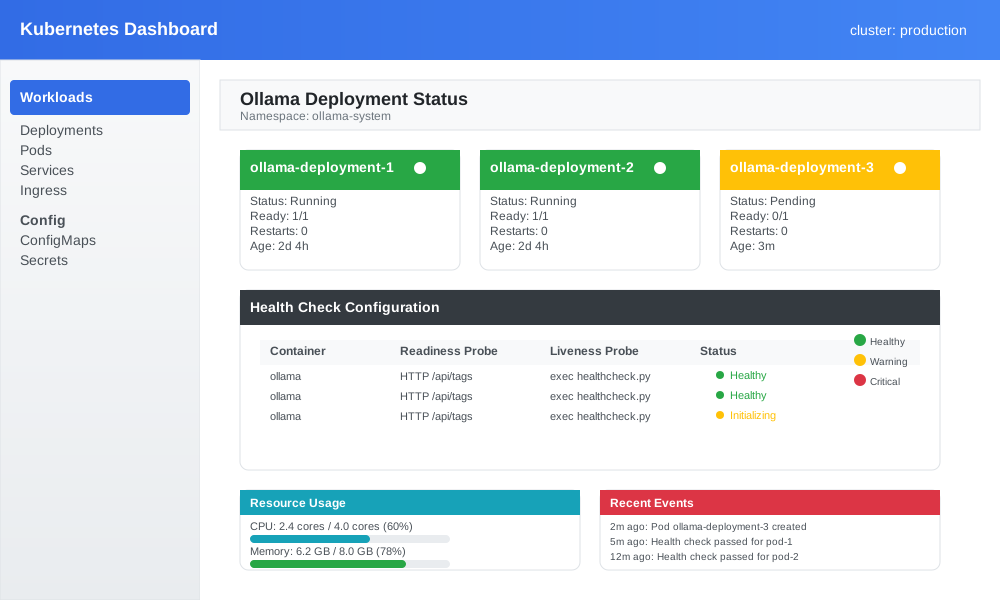
Kubernetes Readiness and Liveness Probes
Configure Kubernetes probes for Ollama pods:
apiVersion: apps/v1
kind: Deployment
metadata:
  name: ollama-deployment
spec:
  template:
    spec:
      containers:
      - name: ollama
        image: ollama/ollama:latest
        ports:
        - containerPort: 11434
        readinessProbe:
          httpGet:
            path: /api/tags
            port: 11434
          initialDelaySeconds: 30
          periodSeconds: 10
        livenessProbe:
          exec:
            command:
            - python
            - /usr/local/bin/healthcheck.py
          initialDelaySeconds: 60
          periodSeconds: 30
Performance Optimization Tips
Memory Management Monitoring
Track memory patterns to optimize model loading:
def analyze_memory_patterns(duration_hours: int = 24) -> Dict:
    """
    Analyze memory usage patterns over time
    Identify optimization opportunities
    """
    patterns = {
        "peak_usage_times": [],
        "average_usage": 0,
        "memory_leaks_detected": False,
        "recommendations": []
    }

    # Implementation would collect historical data
    # This is a simplified example

    return patterns
GPU Utilization Optimization
Monitor GPU efficiency for better resource allocation:
def optimize_gpu_allocation(model_sizes: Dict) -> Dict:
    """
    Recommend optimal GPU memory allocation
    Based on current usage patterns
    """
    recommendations = {
        "current_utilization": 0,
        "optimal_allocation": {},
        "estimated_improvement": 0
    }

    # Analysis logic here

    return recommendations
Troubleshooting Common Health Check Issues
Issue 1: False Positive Alerts
Problem: Health checks report failures when Ollama is actually working.
Solution: Adjust timeout values and retry logic:
def robust_health_check(retries: int = 3, timeout: int = 15) -> bool:
    """Implement retry logic for more reliable health checks"""
    for attempt in range(retries):
        try:
            result = check_ollama_api_health()
            if result["status"] == "healthy":
                return True
            time.sleep(2 ** attempt)  # Exponential backoff
        except:
            continue
    return False
Issue 2: High Resource Usage During Checks
Problem: Health checks consume too many system resources.
Solution: Implement lightweight checking strategies:
def lightweight_health_check() -> Dict:
    """Minimal resource health check for high-frequency monitoring"""
    start_time = time.time()

    try:
        # Simple TCP connection test
        import socket
        sock = socket.socket(socket.AF_INET, socket.SOCK_STREAM)
        sock.settimeout(5)
        result = sock.connect_ex(('localhost', 11434))
        sock.close()

        return {
            "status": "healthy" if result == 0 else "unhealthy",
            "response_time": time.time() - start_time,
            "check_type": "lightweight"
        }
    except:
        return {"status": "unhealthy", "check_type": "lightweight"}
Issue 3: Model Loading Detection
Problem: Difficulty detecting when models are loading or unloading.
Solution: Monitor model state changes:
def track_model_states() -> Dict:
    """Track model loading and unloading events"""
    try:
        response = requests.get("http://localhost:11434/api/ps")
        if response.status_code == 200:
            models = response.json()
            return {
                "loaded_models": [m["name"] for m in models.get("models", [])],
                "model_count": len(models.get("models", [])),
                "timestamp": time.time()
            }
    except:
        return {"loaded_models": [], "model_count": 0}
Integration with Popular Monitoring Tools
Prometheus Metrics Export
Export Ollama metrics to Prometheus:
from prometheus_client import start_http_server, Gauge, Counter

# Define metrics
ollama_response_time = Gauge('ollama_api_response_time_seconds', 'API response time')
ollama_model_requests = Counter('ollama_model_requests_total', 'Total model requests', ['model', 'status'])
ollama_memory_usage = Gauge('ollama_memory_usage_percent', 'Memory usage percentage')

def export_to_prometheus(health_data: Dict):
    """Export health check data to Prometheus metrics"""
    ollama_response_time.set(health_data.get('response_time', 0))
    ollama_memory_usage.set(health_data.get('system_metrics', {}).get('memory', {}).get('usage_percent', 0))

    # Start metrics server
    start_http_server(8000)
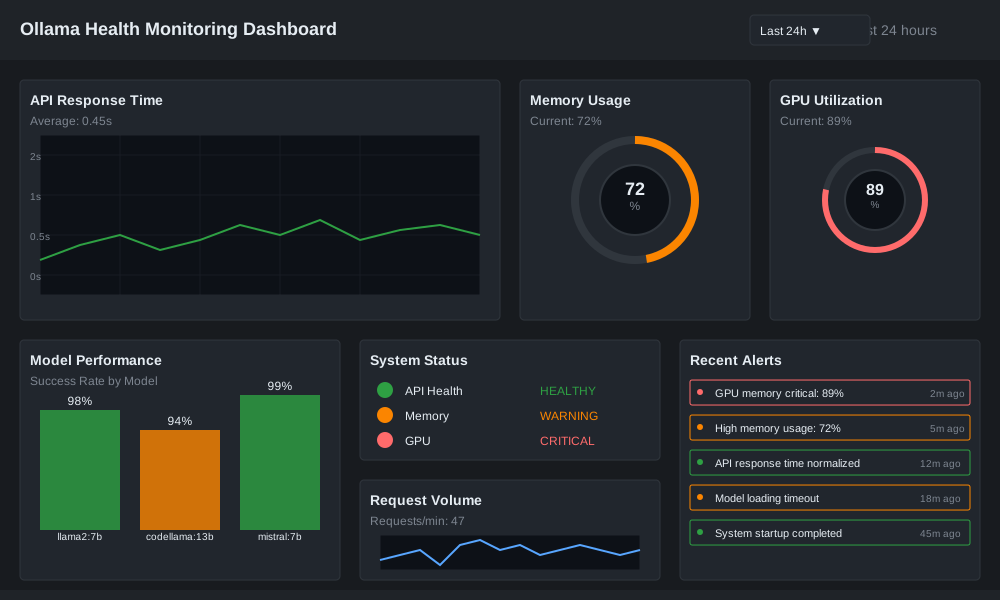
Grafana Dashboard Configuration
Create visual dashboards for Ollama monitoring:
Conclusion
Implementing robust ollama health check systems prevents costly downtime and performance issues. You now have the tools to build comprehensive proactive monitoring that catches problems early.
Start with basic API health checks, then expand to include model performance and system resource monitoring. Add automated alerts to notify you before users experience problems.
Your Ollama deployments will run smoother, your users will be happier, and your coffee will stay hot while you solve problems before they happen.
Ready to implement these monitoring solutions? Start with the basic health check script and gradually add advanced features based on your specific needs.