Why Most Ollama Documentation Fails (And Yours Doesn't Have To)
Picture this: A developer downloads Ollama, opens your documentation, and immediately feels like they're reading IKEA furniture instructions written in ancient Sanskrit. They close the tab and post angry questions on Stack Overflow instead.
Sound familiar? You're not alone. Most Ollama documentation fails because writers focus on what they know instead of what users need.
This guide shows you how to create Ollama documentation standards that users actually follow. You'll learn proven templates, writing techniques, and quality checks that reduce support tickets and increase user success.
What Makes Ollama Documentation Effective
The User-First Documentation Mindset
Effective Ollama documentation starts with understanding your audience. Users approach your docs with specific goals:
- Install Ollama quickly without errors
- Run their first model in under 10 minutes
- Solve specific problems with working code examples
- Understand configuration options for their use case
Your documentation should address these needs directly, not showcase your technical expertise.
Core Documentation Standards for Ollama Projects
Follow these documentation best practices to create guides that users trust:
Clarity Over Cleverness
- Use simple words instead of technical jargon
- Write short sentences (under 20 words)
- Structure content with clear headings
- Include expected outcomes for each step
Code-First Examples
- Show working code before explaining theory
- Add comments that explain the "why" not just the "what"
- Include error handling and troubleshooting
- Test all code examples before publishing
Essential Ollama Documentation Structure
Quick Start Section Template
Every Ollama guide needs a quick start section. Here's the proven structure:
## Quick Start: Run Your First Ollama Model

### Prerequisites
- Python 3.8+ installed
- 8GB RAM minimum
- Internet connection for model download

### Installation Steps

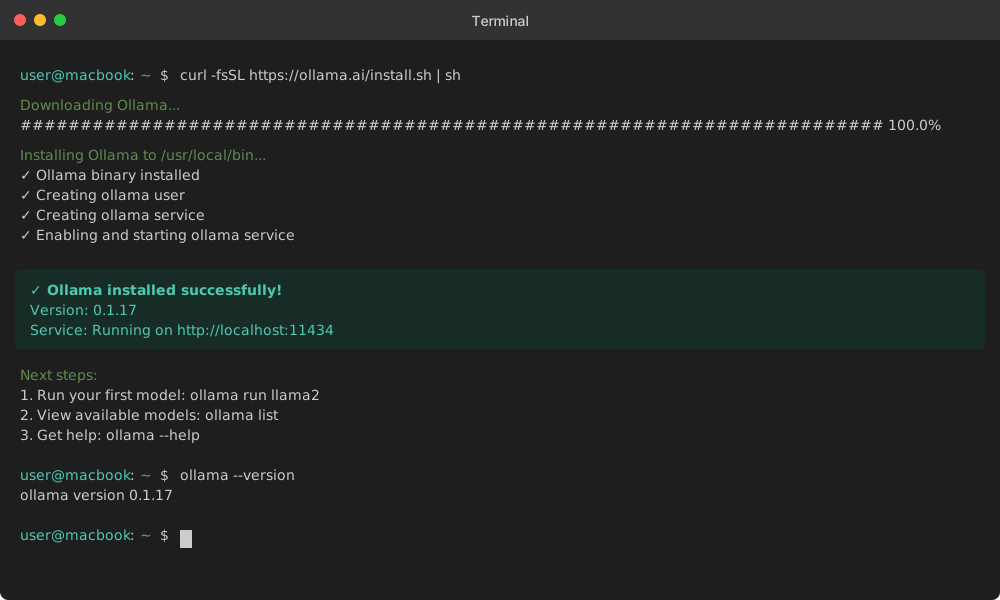
1. **Download Ollama**
   ```bash
   curl -fsSL https://ollama.ai/install.sh | sh
Expected result: "Ollama installed successfully" message
Verify Installation
ollama --versionExpected output: Version number (e.g., "ollama version 0.1.17")
Run Your First Model
ollama run llama2Expected result: Model downloads and starts interactive chat
API Documentation Format
Structure your API documentation with consistent patterns:
Model Management API
Pull Model
Downloads a model to local storage.
Endpoint: POST /api/pull
Request Body:
{
  "name": "llama2:7b",
  "insecure": false
}
Response:
{
  "status": "success",
  "message": "Model pulled successfully"
}
Code Example:
import requests

def pull_model(model_name):
    """Download an [Ollama](/ai-model-supply-chain-security/) model to local storage."""
    response = requests.post(
        "http://localhost:11434/api/pull",
        json={"name": model_name}
    )
    return response.json()

# Usage
result = pull_model("llama2:7b")
print(f"Status: {result['status']}")
Error Handling:
try:
    result = pull_model("invalid-model")
except requests.exceptions.RequestException as e:
    print(f"Network error: {e}")
except KeyError:
    print("Unexpected response format")
Configuration Guide Standards
Create user guides that solve real problems:
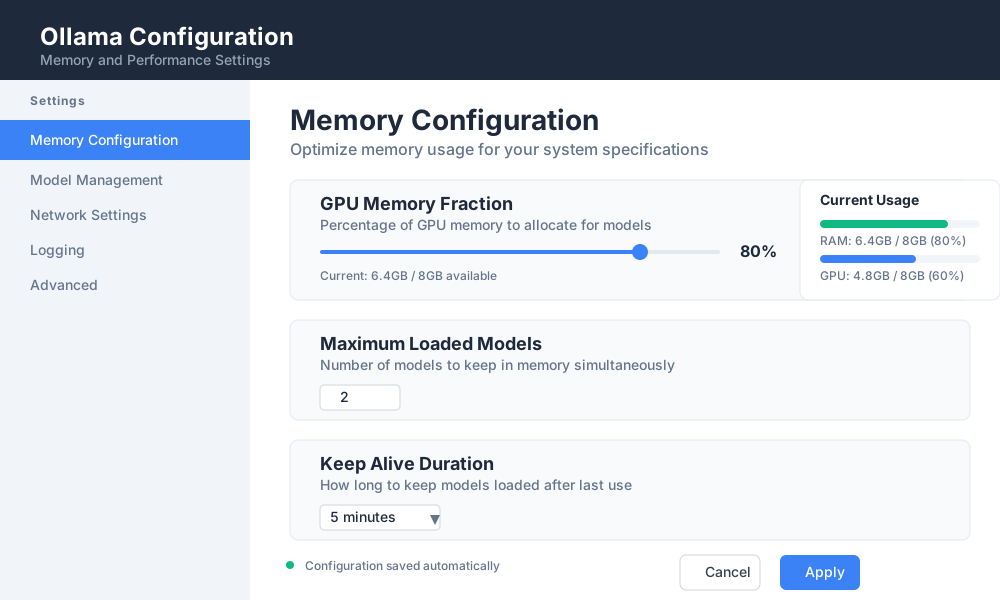
Ollama Configuration: Memory and Performance Settings
Problem: Ollama Runs Out of Memory
Symptoms:
- Models fail to load
- "Out of memory" errors in logs
- System becomes unresponsive
Solution: Adjust Memory Limits
Find Ollama Config File
# Linux/Mac
~/.ollama/config.json

# Windows
%USERPROFILE%\.ollama\config.json
Set Memory Limits
{
  "gpu_memory_fraction": 0.8,
  "max_loaded_models": 2,
  "keep_alive": "5m"
}
Restart Ollama Service
ollama serve --config ~/.ollama/config.json
Verification:
Check memory usage with:
[ollama](/ollama-coding-assistant-local/) ps
Expected output: List of loaded models with memory usage
Advanced Documentation Techniques
Write Troubleshooting Sections That Actually Help
Structure troubleshooting content around specific error messages:
Common Ollama Errors and Solutions
Error: "Model not found"
Full Error Message:
Error: pull model manifest: file does not exist
Cause: Model name is incorrect or model doesn't exist
Solution:
Check available models:
ollama listSearch for correct model name:
ollama search llamaUse exact model name:
ollama pull llama2:7b-chat
Prevention: Always verify model names before pulling
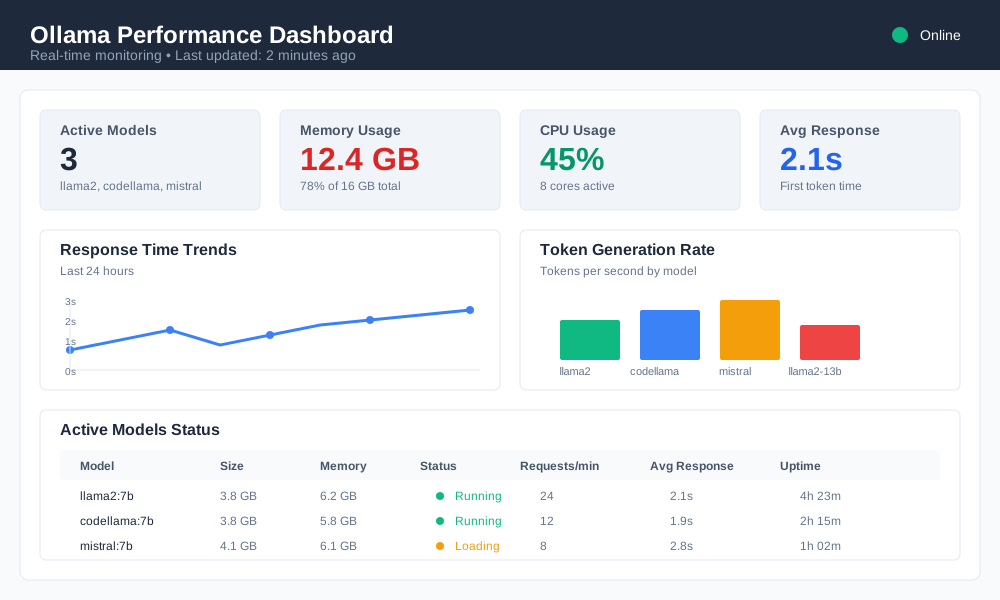
Include Performance Benchmarks
Add concrete performance data to help users set expectations:
Ollama Performance Benchmarks
Model Response Times (Average)
| Model | Size | RAM Usage | First Token | Completion |
|---|---|---|---|---|
| llama2:7b | 3.8GB | 6GB | 2.1s | 45 tokens/s |
| llama2:13b | 7.3GB | 12GB | 3.8s | 28 tokens/s |
| codellama:7b | 3.8GB | 6GB | 1.9s | 52 tokens/s |
Tested on: MacBook Pro M2, 16GB RAM
Create Comprehensive Code Examples
Show complete, working examples instead of code snippets:
#!/usr/bin/env python3
"""
Complete Ollama Chat Application
Demonstrates best practices for Ollama integration
"""

import requests
import json
import sys
from typing import Dict, List

class OllamaClient:
    def __init__(self, base_url: str = "http://localhost:11434"):
        """Initialize Ollama client with base URL."""
        self.base_url = base_url
        self.session = requests.Session()

    def chat(self, model: str, messages: List[Dict]) -> str:
        """Send chat request to Ollama API."""
        try:
            response = self.session.post(
                f"{self.base_url}/api/chat",
                json={
                    "model": model,
                    "messages": messages,
                    "stream": False
                },
                timeout=30
            )
            response.raise_for_status()
            return response.json()["message"]["content"]

        except requests.exceptions.RequestException as e:
            print(f"API request failed: {e}")
            return None
        except KeyError as e:
            print(f"Unexpected response format: {e}")
            return None

def main():
    """Example usage of Ollama client."""
    client = OllamaClient()

    # Test connection
    try:
        client.session.get(f"{client.base_url}/api/tags", timeout=5)
        print("✓ Connected to Ollama")
    except requests.exceptions.RequestException:
        print("✗ Cannot connect to Ollama. Is it running?")
        sys.exit(1)

    # Chat example
    messages = [
        {"role": "user", "content": "Explain machine learning in simple terms"}
    ]

    response = client.chat("llama2", messages)
    if response:
        print(f"AI: {response}")
    else:
        print("Failed to get response")

if __name__ == "__main__":
    main()
Documentation Quality Assurance
Testing Your Documentation
Apply these quality checks before publishing:
Content Accuracy
- All code examples run without errors
- Screenshots match current interface
- Links point to correct resources
- Version numbers are current
User Experience
- New users can complete quick start in under 15 minutes
- Each section has clear learning objectives
- Error messages include specific solutions
- Navigation flows logically from basic to advanced
SEO and Discoverability
- Target keywords appear in headings
- Meta descriptions under 160 characters
- Internal links use descriptive anchor text
- Images include alt text with keywords
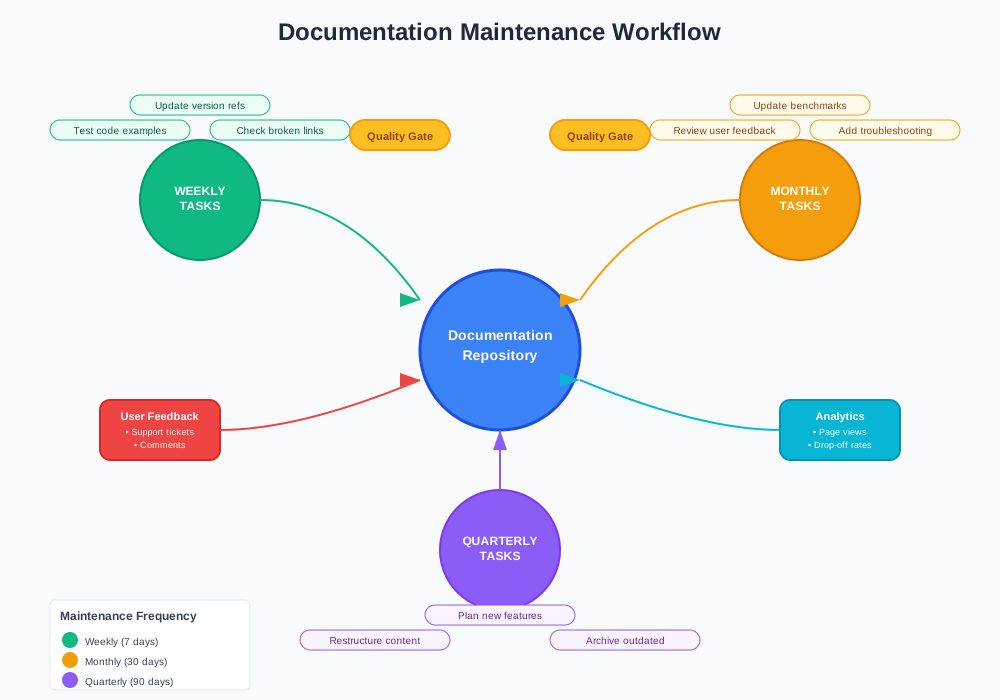
Documentation Maintenance Schedule
Keep your Ollama documentation current with regular updates:
Weekly:
- Test all code examples
- Check for broken links
- Update version references
Monthly:
- Review user feedback and questions
- Add new troubleshooting sections
- Update performance benchmarks
Quarterly:
- Restructure based on user analytics
- Archive outdated content
- Plan new documentation features
Measuring Documentation Success
Key Metrics to Track
Monitor these metrics to improve your Ollama documentation standards:
User Engagement
- Time spent on documentation pages
- Bounce rate from quick start guides
- Search queries within documentation
Support Impact
- Reduction in support tickets
- Faster issue resolution times
- User self-service success rate
Content Performance
- Most visited documentation sections
- Drop-off points in tutorials
- User completion rates for guides
User Feedback Integration
Create feedback loops to continuously improve documentation:
## Help Us Improve This Guide

**Was this helpful?** [Yes] [No]

**What would make this better?**
- [ ] More code examples
- [ ] Video tutorials
- [ ] Interactive demos
- [ ] Better error explanations

**Found an error?** [Report Issue](mailto:docs@yourproject.com)
Conclusion: Building Documentation Users Love
Effective Ollama documentation standards transform confused users into successful implementers. By focusing on user needs, providing working code examples, and maintaining quality standards, you create documentation that reduces support burden and increases adoption.
Key takeaways for comprehensive Ollama guides:
- Start with user goals, not technical specifications
- Include complete, tested code examples
- Structure troubleshooting around specific errors
- Maintain content with regular testing and updates
Ready to implement these documentation standards? Start with your quick start guide and apply the templates provided. Your users will thank you with fewer support questions and more successful implementations.