Problem: Ollama Handles One Request at a Time by Default
Ollama concurrent requests are disabled out of the box — by default Ollama queues every prompt sequentially, even when your GPU has headroom to do more. If you're running a multi-user app, an agent loop, or a load test, you'll hit request pile-ups fast.
This took me 20 minutes to debug on a production FastAPI service: 8 users, all waiting, GPU sitting at 40% utilization.
You'll learn:
- How Ollama's parallelism model works internally (NUMA slots vs queue)
- Which env vars control parallel inference and when to set each one
- How to tune for multi-user APIs, agent loops, and batch workloads on bare-metal and Docker
- How to verify concurrency is actually working with a live load test
Time: 20 min | Difficulty: Intermediate
Why Ollama Serializes Requests by Default
Ollama uses a single model-runner process per loaded model. Without explicit configuration, each incoming /api/generate or /api/chat request waits for the previous one to finish — even if VRAM is available for a second context slot.
Internally, Ollama allocates KV-cache slots per parallel sequence. More parallel sequences = more VRAM consumed per request batch. Ollama ships conservatively (1 slot) to avoid OOM crashes on consumer hardware.
Symptoms of under-configured parallelism:
- GPU utilization stays below 60% under multi-user load
p95latency scales linearly with concurrent users instead of flatteningOLLAMA_MAX_QUEUEdefault (512) fills up under burst traffic — requests return503- Agent frameworks like LangGraph or CrewAI stall when spawning multiple LLM calls at once
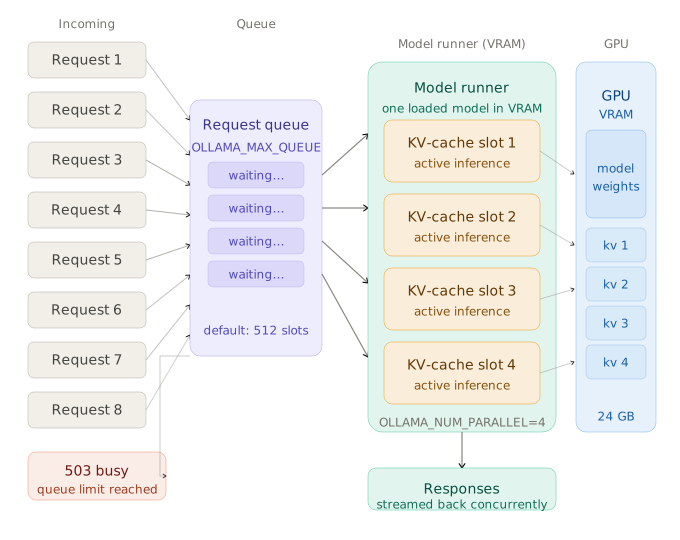 How Ollama routes concurrent requests: the queue feeds into parallel KV-cache slots on the GPU runner
The Three Variables That Control Ollama Parallelism
Before touching config, understand what each variable does:
| Variable | Default | Controls |
|---|---|---|
OLLAMA_NUM_PARALLEL | 1 | Max simultaneous inference sequences per loaded model |
OLLAMA_MAX_QUEUE | 512 | Max requests waiting in queue before Ollama returns 503 |
OLLAMA_MAX_LOADED_MODELS | 1 (GPU) / 3 (CPU) | How many models stay resident in VRAM at once |
OLLAMA_NUM_PARALLEL is the primary lever. Raising it lets multiple prompts share a single model load, interleaved on the GPU. Raising OLLAMA_MAX_LOADED_MODELS lets different models coexist in VRAM — useful for multi-model routing but not for same-model concurrency.
Solution
Step 1: Check Your Available VRAM
Parallel inference multiplies KV-cache usage. Before setting OLLAMA_NUM_PARALLEL, confirm you have headroom.
# NVIDIA — check free VRAM in MiB
nvidia-smi --query-gpu=memory.free,memory.total --format=csv,noheader

# Apple Silicon — unified memory, check with
sudo powermetrics --samplers gpu_power -n 1 2>/dev/null | grep "GPU"
Rule of thumb: Each additional parallel slot adds roughly 15–25% of base model VRAM for a 7B model at Q4_K_M quantization. On a 24 GB RTX 4090 running llama3.2:latest (≈5 GB), you have comfortable room for OLLAMA_NUM_PARALLEL=4.
| GPU VRAM | Model size | Safe OLLAMA_NUM_PARALLEL |
|---|---|---|
| 8 GB (RTX 3070) | 7B Q4 | 2 |
| 16 GB (RTX 4080) | 7B Q4 | 4 |
| 24 GB (RTX 4090) | 7B Q4 | 6–8 |
| 24 GB (RTX 4090) | 13B Q4 | 3–4 |
| 64 GB (M3 Max) | 32B Q4 | 4 |
Expected output: Free VRAM ≥ 2× model base size before you proceed.
Step 2: Set Environment Variables (Bare-Metal systemd)
On Linux with systemd, Ollama runs as a service. Override env vars via a drop-in file — never edit the base unit directly.
# Create the override directory
sudo mkdir -p /etc/systemd/system/ollama.service.d

# Write the override — WHY: drop-in survives package upgrades; base unit gets replaced on ollama update
sudo tee /etc/systemd/system/ollama.service.d/parallel.conf > /dev/null <<EOF
[Service]
Environment="OLLAMA_NUM_PARALLEL=4"
Environment="OLLAMA_MAX_QUEUE=256"
EOF

# Reload systemd and restart Ollama
sudo systemctl daemon-reload
sudo systemctl restart ollama
Expected output: sudo systemctl status ollama shows active (running) with no errors.
If it fails:
Permission denied→ Run withsudoFailed to restart ollama.service: Unit not found→ Ollama isn't installed as a service; use the Docker path below
Step 3: Set Environment Variables (Docker)
# docker-compose.yml
# WHY: OLLAMA_NUM_PARALLEL=4 gives 4 concurrent KV-cache slots;
# OLLAMA_MAX_QUEUE=256 caps the wait list to prevent memory exhaustion under burst
services:
  ollama:
    image: ollama/ollama:latest
    runtime: nvidia          # remove if CPU-only
    environment:
      - OLLAMA_NUM_PARALLEL=4
      - OLLAMA_MAX_QUEUE=256
      - OLLAMA_MAX_LOADED_MODELS=1
    volumes:
      - ollama_data:/root/.ollama
    ports:
      - "11434:11434"
    deploy:
      resources:
        reservations:
          devices:
            - driver: nvidia
              count: 1
              capabilities: [gpu]

volumes:
  ollama_data:
docker compose up -d
Expected output: docker compose logs ollama shows Listening on 127.0.0.1:11434.
Step 4: Pull and Warm the Model
After restart, the model must be loaded into VRAM before the first request — cold-start latency can skew your initial concurrency test.
# Pull if not already downloaded
ollama pull llama3.2:latest

# Warm the model — WHY: sends a dummy request so the runner is hot before load testing
curl -s http://localhost:11434/api/generate \
  -d '{"model":"llama3.2:latest","prompt":"hi","stream":false}' | jq .done
Expected output: true
Step 5: Verify Parallel Inference with a Live Load Test
Send 8 concurrent requests and confirm they're processed in parallel, not serially.
# Install hey — a lightweight HTTP load testing tool (~$0, open source)
# On Ubuntu/Debian:
sudo apt install hey 2>/dev/null || go install github.com/rakyll/hey@latest

# Send 8 concurrent requests, 8 total — WHY: 8 requests with concurrency 8
# means all hit the server simultaneously; serial processing would show
# total time ≈ 8 × single-request time; parallel should be ≈ 1–2×
hey -n 8 -c 8 -m POST \
  -H "Content-Type: application/json" \
  -d '{"model":"llama3.2:latest","prompt":"Count to 5","stream":false}' \
  http://localhost:11434/api/generate
Expected output (parallel):
Summary:
  Total:        4.2 secs    ← ~1× single request time = parallel working
  Requests/sec: 1.90
  ...
Status code distribution:
  [200] 8 responses
If total time ≈ 8× single request time → parallelism is not working. Check:
OLLAMA_NUM_PARALLELwas actually applied:sudo systemctl show ollama | grep NUM_PARALLEL- Model is fully loaded in VRAM, not partially offloaded to CPU (check
nvidia-smiduring the test)
Step 6: Tune for Your Workload Type
Different workloads need different settings:
Multi-user chat API (FastAPI / Node backend, 10–50 concurrent users):
OLLAMA_NUM_PARALLEL=4
OLLAMA_MAX_QUEUE=128   # WHY: short queue fails fast — better UX than long waits
Agent loop (LangGraph, CrewAI — many short tool-call prompts):
OLLAMA_NUM_PARALLEL=6
OLLAMA_MAX_QUEUE=512   # WHY: agents retry; a longer queue absorbs bursts
Batch processing (offline inference, no latency SLA):
OLLAMA_NUM_PARALLEL=8   # WHY: maximize throughput; latency per request doesn't matter
OLLAMA_MAX_QUEUE=1024
Verification
# Watch GPU utilization during a concurrent load test — should stay above 80%
watch -n 1 nvidia-smi --query-gpu=utilization.gpu,memory.used --format=csv,noheader

# In a second terminal, fire the load test
hey -n 20 -c 8 -m POST \
  -H "Content-Type: application/json" \
  -d '{"model":"llama3.2:latest","prompt":"Explain REST in one sentence","stream":false}' \
  http://localhost:11434/api/generate
You should see: GPU utilization ≥ 75% sustained during the test, and total hey runtime ≈ 2–4× a single request (not 20×).
What You Learned
OLLAMA_NUM_PARALLELcontrols KV-cache slots per model — it's the only variable that enables true simultaneous inference- Each parallel slot consumes extra VRAM proportional to context length; always verify headroom first
OLLAMA_MAX_QUEUEcontrols back-pressure — keep it low for latency-sensitive APIs, high for batch or agent workloads- Parallelism is per loaded model — if you need concurrent inference across multiple models, combine
OLLAMA_NUM_PARALLELwithOLLAMA_MAX_LOADED_MODELS - For serious multi-user throughput at scale, vLLM with continuous batching outperforms Ollama — but Ollama wins on simplicity and developer experience for teams under ~50 concurrent users
Tested on Ollama v0.6.1, CUDA 12.4, RTX 4090 (24 GB), Ubuntu 24.04 and macOS 15.3 (M3 Max)
FAQ
Q: Does OLLAMA_NUM_PARALLEL work on Apple Silicon?
A: Yes. On Apple Silicon, unified memory is shared between CPU and GPU. The same VRAM math applies — each additional slot uses more unified memory. On a 64 GB M3 Max, OLLAMA_NUM_PARALLEL=4 with a 32B Q4_K_M model (≈20 GB) is safe.
Q: What is the difference between OLLAMA_NUM_PARALLEL and OLLAMA_MAX_LOADED_MODELS?
A: OLLAMA_NUM_PARALLEL enables concurrent sequences within one model — multiple users querying llama3.2 at the same time. OLLAMA_MAX_LOADED_MODELS keeps multiple different models resident in VRAM simultaneously. You can combine both: 2 models loaded, each with 4 parallel slots = 8 concurrent sequences total.
Q: Will raising OLLAMA_NUM_PARALLEL increase per-request latency?
A: Slightly, yes. Parallel sequences compete for GPU compute. At OLLAMA_NUM_PARALLEL=4 under full load, expect 20–40% latency increase per individual request compared to serial mode — but total throughput increases 3–4×. For latency-critical single-user apps, keep the default of 1.
Q: Can I set OLLAMA_NUM_PARALLEL per model instead of globally?
A: Not directly via env vars — the setting is global per Ollama instance. If you need different parallelism per model, run separate Ollama instances on different ports with different env configs behind a reverse proxy like Caddy or nginx.
Q: What happens when the queue fills (OLLAMA_MAX_QUEUE is hit)?
A: Ollama returns HTTP 503 with {"error":"server busy, please try again"}. Your client should handle 503 with exponential backoff. Default OLLAMA_MAX_QUEUE=512 is generous — lower it to 64–128 for APIs where you'd rather fail fast than queue for minutes.