Remember the good old days when deploying AI models meant copying files to a server and crossing your fingers? Those days are as dead as dial-up internet. Welcome to the era of Ollama CI/CD pipelines, where your models deploy themselves while you sip your coffee.
Manual model deployment creates bottlenecks, introduces errors, and makes scaling impossible. This tutorial shows you how to build an automated Ollama CI/CD pipeline that handles model deployment, versioning, and scaling without breaking a sweat.
You'll learn to create production-ready pipelines using Docker containers, GitHub Actions, and automated testing. By the end, your Ollama models will deploy faster than you can say "continuous integration."
What Is an Ollama CI/CD Pipeline?
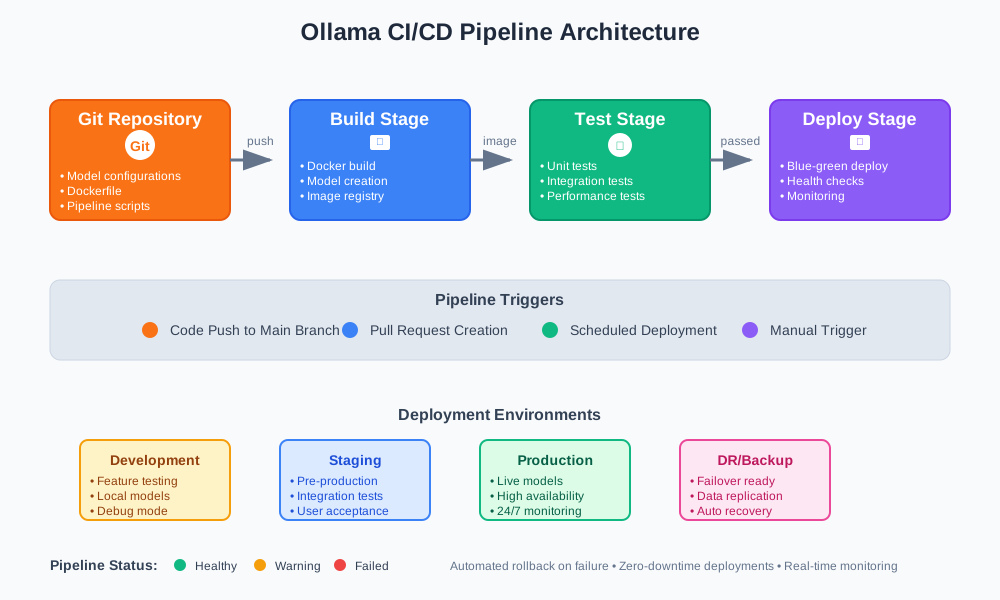
An Ollama CI/CD pipeline automates the entire lifecycle of your AI models. Instead of manual deployment, your pipeline handles building, testing, and deploying Ollama models automatically.
Traditional deployment involves these pain points:
- Manual file transfers prone to human error
- Inconsistent environments between development and production
- No rollback mechanism for failed deployments
- Time-consuming model updates
Automated deployment solves these issues through:
- Continuous Integration: Automatic testing of model changes
- Continuous Deployment: Seamless production releases
- Version Control: Track model iterations and rollbacks
- Environment Consistency: Identical setups across all stages
Prerequisites for Automated Model Deployment
Before building your Ollama CI/CD pipeline, ensure you have:
Required Tools
- Docker Desktop: Container platform for consistent environments
- Git: Version control for your model configurations
- GitHub Account: Repository hosting and Actions runner
- Ollama: Local installation for testing
System Requirements
- 8GB RAM minimum (16GB recommended)
- 50GB free disk space for model storage
- Docker-compatible operating system
Knowledge Prerequisites
- Basic Docker commands and Dockerfile syntax
- Git workflow understanding
- YAML configuration basics
- Command line familiarity
Setting Up Your Ollama Development Environment
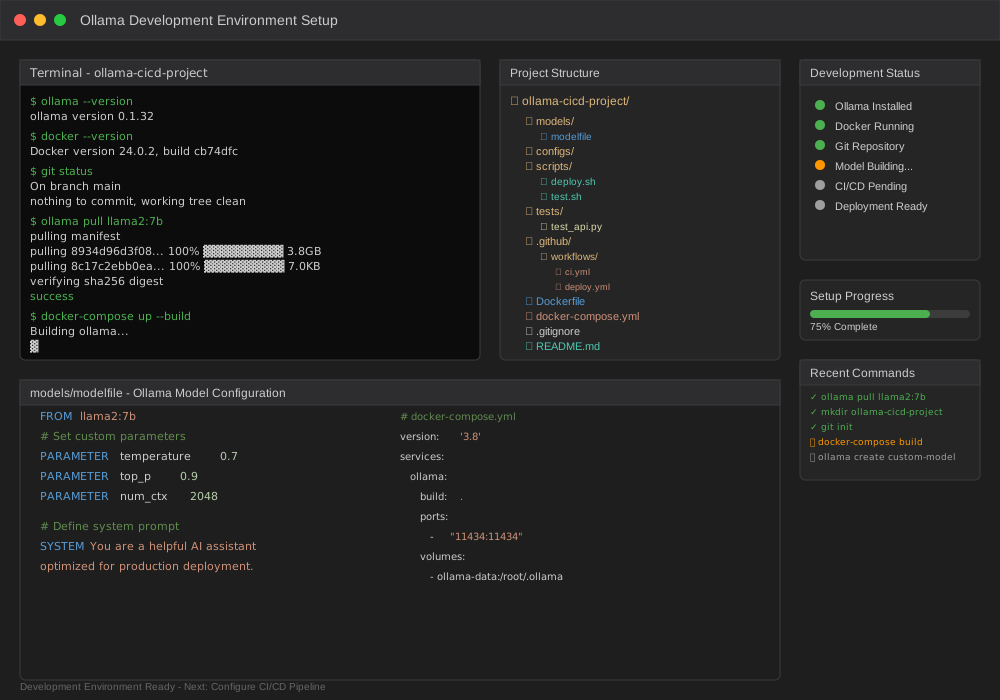
Your development environment forms the foundation of reliable automated deployment. Start with a consistent local setup that mirrors production.
Install Ollama Locally
# Linux/macOS installation
curl -fsSL https://ollama.ai/install.sh | sh

# Windows (PowerShell)
winget install Ollama.Ollama

# Verify installation
ollama --version
Create Project Structure
# Create project directory
mkdir ollama-cicd-project
cd ollama-cicd-project

# Initialize Git repository
git init

# Create directory structure
mkdir -p {models,configs,scripts,tests}
touch {Dockerfile,docker-compose.yml,.gitignore}
Configure Model Repository
# models/modelfile
FROM llama2:7b

# Set custom parameters
PARAMETER temperature 0.7
PARAMETER top_p 0.9

# Define system prompt
SYSTEM You are a helpful AI assistant optimized for production deployment.
Your project structure should look like:
ollama-cicd-project/
├── models/
│   └── modelfile
├── configs/
├── scripts/
├── tests/
├── Dockerfile
├── docker-compose.yml
└── .gitignore
Creating Docker Containers for Ollama
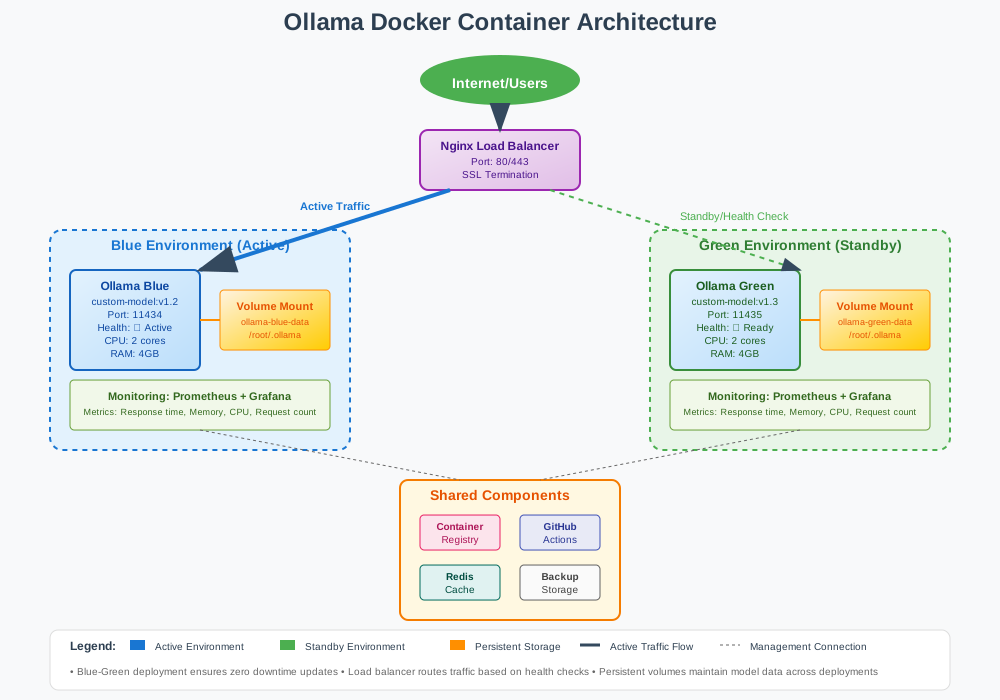
Docker containers ensure your Ollama models run consistently across all environments. This eliminates the "works on my machine" problem.
Base Dockerfile Configuration
# Dockerfile
FROM ollama/ollama:latest

# Set working directory
WORKDIR /app

# Copy model configurations
COPY models/ /app/models/
COPY scripts/ /app/scripts/

# Install model dependencies
RUN ollama pull llama2:7b

# Create custom model from modelfile
RUN ollama create custom-model -f /app/models/modelfile

# Expose Ollama port
EXPOSE 11434

# Health check endpoint
HEALTHCHECK --interval=30s --timeout=10s --start-period=60s \
  CMD curl -f http://localhost:11434/api/tags || exit 1

# Start Ollama service
CMD ["ollama", "serve"]
Multi-Stage Build Optimization
# Multi-stage Dockerfile for production
FROM ollama/ollama:latest AS builder

# Build stage - prepare models
WORKDIR /build
COPY models/ ./models/
RUN ollama pull llama2:7b
RUN ollama create custom-model -f ./models/modelfile

# Production stage - minimal image
FROM ollama/ollama:latest AS production

# Copy only built models
COPY --from=builder /root/.ollama /root/.ollama

# Add non-root user for security
RUN adduser --disabled-password --gecos '' ollama-user
USER ollama-user

EXPOSE 11434
CMD ["ollama", "serve"]
Docker Compose for Development
# docker-compose.yml
version: '3.8'

services:
  ollama:
    build: .
    ports:
      - "11434:11434"
    volumes:
      - ollama-data:/root/.ollama
    environment:
      - OLLAMA_HOST=0.0.0.0
    healthcheck:
      test: ["CMD", "curl", "-f", "http://localhost:11434/api/tags"]
      interval: 30s
      timeout: 10s
      retries: 3

  nginx:
    image: nginx:alpine
    ports:
      - "80:80"
    volumes:
      - ./nginx.conf:/etc/nginx/nginx.conf
    depends_on:
      - ollama

volumes:
  ollama-data:
Test your containerized setup:
# Build and run containers
docker-compose up --build

# Test API endpoint
curl http://localhost:11434/api/tags

# Expected output: List of available models
Building GitHub Actions Workflows
GitHub Actions automates your Ollama CI/CD pipeline with powerful workflow capabilities. Create workflows that trigger on code changes and deploy automatically.
Basic CI Workflow
# .github/workflows/ci.yml
name: Ollama CI Pipeline

on:
  push:
    branches: [ main, develop ]
  pull_request:
    branches: [ main ]

env:
  REGISTRY: ghcr.io
  IMAGE_NAME: ${{ github.repository }}/ollama-model

jobs:
  test:
    runs-on: ubuntu-latest
    steps:
      - name: Checkout code
        uses: actions/checkout@v4

      - name: Set up Docker Buildx
        uses: docker/setup-buildx-action@v3

      - name: Build test image
        run: |
          docker build -t ollama-test .

      - name: Run model tests
        run: |
          docker run --rm -d --name ollama-test -p 11434:11434 ollama-test
          sleep 30  # Wait for service startup

          # Test API availability
          curl -f http://localhost:11434/api/tags

          # Test model inference
          curl -X POST http://localhost:11434/api/generate \
            -H "Content-Type: application/json" \
            -d '{"model": "custom-model", "prompt": "Hello, world!"}'

      - name: Cleanup
        run: docker stop ollama-test
Advanced Deployment Workflow
# .github/workflows/deploy.yml
name: Ollama CD Pipeline

on:
  workflow_run:
    workflows: ["Ollama CI Pipeline"]
    types:
      - completed
    branches: [ main ]

jobs:
  deploy:
    if: ${{ github.event.workflow_run.conclusion == 'success' }}
    runs-on: ubuntu-latest

    steps:
      - name: Checkout code
        uses: actions/checkout@v4

      - name: Log in to Container Registry
        uses: docker/login-action@v3
        with:
          registry: ${{ env.REGISTRY }}
          username: ${{ github.actor }}
          password: ${{ secrets.GITHUB_TOKEN }}

      - name: Extract metadata
        id: meta
        uses: docker/metadata-action@v5
        with:
          images: ${{ env.REGISTRY }}/${{ env.IMAGE_NAME }}
          tags: |
            type=ref,event=branch
            type=sha,prefix={{branch}}-
            type=raw,value=latest,enable={{is_default_branch}}

      - name: Build and push image
        uses: docker/build-push-action@v5
        with:
          context: .
          push: true
          tags: ${{ steps.meta.outputs.tags }}
          labels: ${{ steps.meta.outputs.labels }}
          cache-from: type=gha
          cache-to: type=gha,mode=max

      - name: Deploy to production
        env:
          DEPLOY_HOST: ${{ secrets.DEPLOY_HOST }}
          DEPLOY_USER: ${{ secrets.DEPLOY_USER }}
          DEPLOY_KEY: ${{ secrets.DEPLOY_KEY }}
        run: |
          # SSH deployment script
          echo "$DEPLOY_KEY" > deploy_key
          chmod 600 deploy_key

          ssh -i deploy_key -o StrictHostKeyChecking=no \
            $DEPLOY_USER@$DEPLOY_HOST \
            "docker pull ${{ env.REGISTRY }}/${{ env.IMAGE_NAME }}:latest && \
             docker stop ollama-prod || true && \
             docker run -d --name ollama-prod --restart unless-stopped \
             -p 11434:11434 ${{ env.REGISTRY }}/${{ env.IMAGE_NAME }}:latest"
Environment-Specific Deployments
# .github/workflows/multi-env.yml
name: Multi-Environment Deployment

on:
  push:
    branches: [ main, staging, develop ]

jobs:
  deploy:
    runs-on: ubuntu-latest
    strategy:
      matrix:
        environment:
          - name: development
            branch: develop
            url: https://dev.ollama.example.com
          - name: staging
            branch: staging
            url: https://staging.ollama.example.com
          - name: production
            branch: main
            url: https://ollama.example.com

    environment:
      name: ${{ matrix.environment.name }}
      url: ${{ matrix.environment.url }}

    if: github.ref == format('refs/heads/{0}', matrix.environment.branch)

    steps:
      - name: Deploy to ${{ matrix.environment.name }}
        run: |
          echo "Deploying to ${{ matrix.environment.name }}"
          # Environment-specific deployment logic

Automated Testing for Model Validation
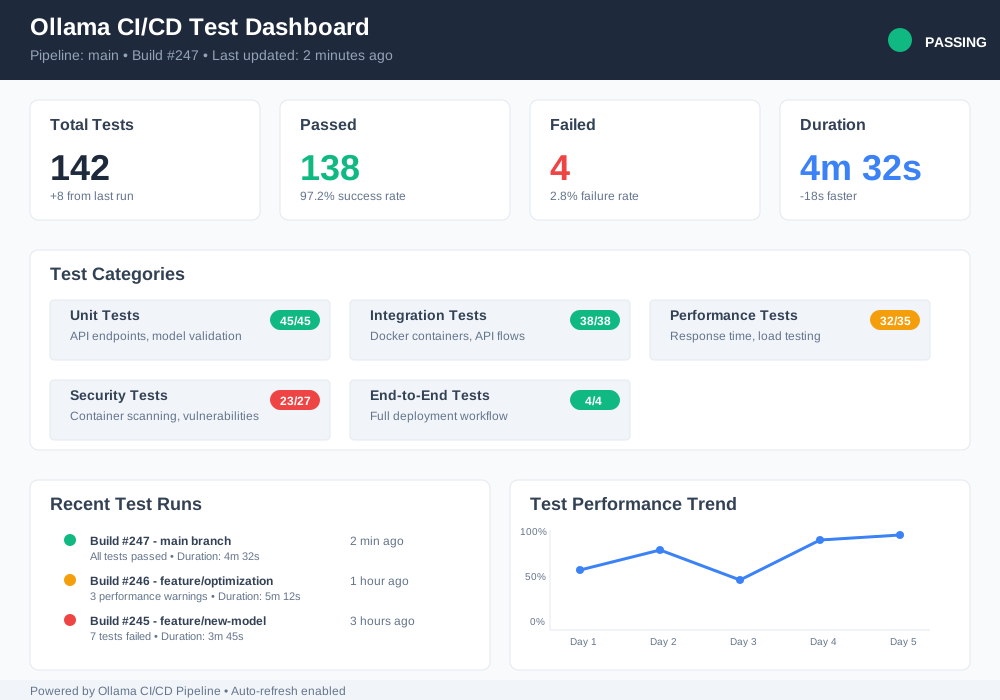
Automated testing ensures your Ollama models work correctly before production deployment. Create comprehensive test suites that validate model performance and API functionality.
Unit Tests for Model APIs
# tests/test_ollama_api.py
import requests
import pytest
import time
from typing import Dict, Any

class TestOllamaAPI:
    BASE_URL = "http://localhost:11434"

    @pytest.fixture(scope="class", autouse=True)
    def setup_ollama(self):
        """Wait for Ollama service to be ready"""
        max_retries = 30
        for _ in range(max_retries):
            try:
                response = requests.get(f"{self.BASE_URL}/api/tags")
                if response.status_code == 200:
                    break
            except requests.exceptions.ConnectionError:
                time.sleep(2)
        else:
            pytest.fail("Ollama service not available")

    def test_api_health(self):
        """Test API health endpoint"""
        response = requests.get(f"{self.BASE_URL}/api/tags")
        assert response.status_code == 200

        data = response.json()
        assert "models" in data
        assert len(data["models"]) > 0

    def test_model_generation(self):
        """Test model text generation"""
        payload = {
            "model": "custom-model",
            "prompt": "What is machine learning?",
            "stream": False
        }

        response = requests.post(
            f"{self.BASE_URL}/api/generate",
            json=payload,
            timeout=30
        )

        assert response.status_code == 200
        data = response.json()
        assert "response" in data
        assert len(data["response"]) > 0

    def test_model_performance(self):
        """Test model response time"""
        start_time = time.time()

        payload = {
            "model": "custom-model",
            "prompt": "Hello",
            "stream": False
        }

        response = requests.post(
            f"{self.BASE_URL}/api/generate",
            json=payload
        )

        end_time = time.time()
        response_time = end_time - start_time

        assert response.status_code == 200
        assert response_time < 10  # Max 10 seconds
Integration Tests Script
#!/bin/bash
# scripts/integration_tests.sh

set -e

echo "Starting Ollama integration tests..."

# Start Ollama container
docker run -d --name ollama-test -p 11434:11434 ollama-test
sleep 30

# Run Python tests
python -m pytest tests/ -v --tb=short

# Performance benchmarks
echo "Running performance tests..."
for i in {1..5}; do
    time curl -X POST http://localhost:11434/api/generate \
        -H "Content-Type: application/json" \
        -d '{"model": "custom-model", "prompt": "Test prompt", "stream": false}' \
        > /dev/null 2>&1
done

# Load testing
echo "Running load tests..."
ab -n 100 -c 10 -T application/json \
   -p tests/load_test_payload.json \
   http://localhost:11434/api/generate

# Cleanup
docker stop ollama-test
docker rm ollama-test

echo "Integration tests completed successfully!"
Model Quality Validation
# tests/test_model_quality.py
import requests
import json
from dataclasses import dataclass
from typing import List, Tuple

@dataclass
class TestCase:
    prompt: str
    expected_keywords: List[str]
    max_response_time: float = 10.0

class ModelQualityTests:
    def __init__(self, base_url: str = "http://localhost:11434"):
        self.base_url = base_url

    def test_response_quality(self, test_cases: List[TestCase]) -> bool:
        """Test model response quality with predefined cases"""

        for i, test_case in enumerate(test_cases):
            print(f"Testing case {i+1}: {test_case.prompt[:50]}...")

            response = self._get_model_response(test_case.prompt)

            # Check response contains expected keywords
            response_text = response.lower()
            found_keywords = [
                kw for kw in test_case.expected_keywords
                if kw.lower() in response_text
            ]

            if len(found_keywords) < len(test_case.expected_keywords) * 0.5:
                print(f"❌ Test case {i+1} failed: Missing keywords")
                return False

            print(f"✅ Test case {i+1} passed")

        return True

    def _get_model_response(self, prompt: str) -> str:
        """Get response from Ollama model"""
        payload = {
            "model": "custom-model",
            "prompt": prompt,
            "stream": False
        }

        response = requests.post(
            f"{self.base_url}/api/generate",
            json=payload,
            timeout=30
        )

        return response.json()["response"]

# Define test cases
quality_tests = [
    TestCase(
        prompt="Explain machine learning in simple terms",
        expected_keywords=["algorithm", "data", "learn", "pattern"]
    ),
    TestCase(
        prompt="What are the benefits of CI/CD?",
        expected_keywords=["automation", "deployment", "testing", "integration"]
    )
]

# Run quality tests
if __name__ == "__main__":
    tester = ModelQualityTests()
    success = tester.test_response_quality(quality_tests)
    exit(0 if success else 1)
Deployment Strategies and Best Practices
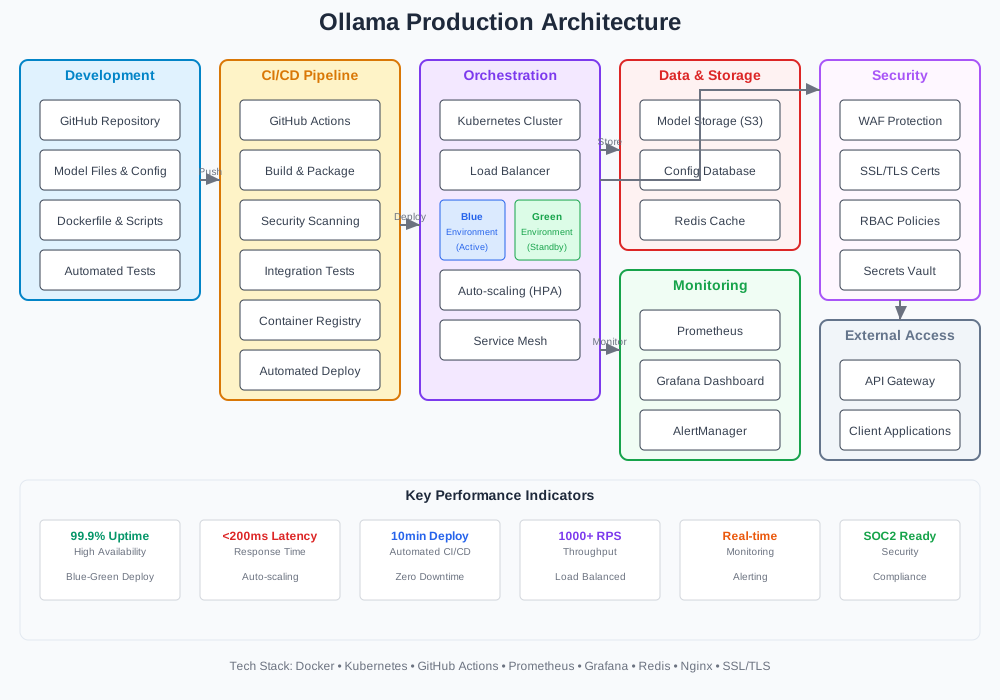
Production deployment requires careful planning and robust strategies. Implement blue-green deployments, canary releases, and rollback mechanisms for reliable model updates.
Blue-Green Deployment Setup
# docker-compose.prod.yml
version: '3.8'

services:
  ollama-blue:
    image: ${REGISTRY}/${IMAGE_NAME}:${BLUE_TAG}
    container_name: ollama-blue
    ports:
      - "11434:11434"
    volumes:
      - ollama-blue-data:/root/.ollama
    labels:
      - "traefik.enable=true"
      - "traefik.http.routers.ollama-blue.rule=Host(`ollama.example.com`) && PathPrefix(`/blue`)"

  ollama-green:
    image: ${REGISTRY}/${IMAGE_NAME}:${GREEN_TAG}
    container_name: ollama-green
    ports:
      - "11435:11434"
    volumes:
      - ollama-green-data:/root/.ollama
    labels:
      - "traefik.enable=true"
      - "traefik.http.routers.ollama-green.rule=Host(`ollama.example.com`) && PathPrefix(`/green`)"

  traefik:
    image: traefik:v2.10
    ports:
      - "80:80"
      - "8080:8080"
    volumes:
      - /var/run/docker.sock:/var/run/docker.sock
      - ./traefik.yml:/etc/traefik/traefik.yml

volumes:
  ollama-blue-data:
  ollama-green-data:
Deployment Script with Rollback
#!/bin/bash
# scripts/deploy.sh

set -e

CURRENT_ENV="blue"
NEW_ENV="green"
HEALTH_CHECK_URL="http://localhost:11434/api/tags"
ROLLBACK_IMAGE=""

# Function to check service health
check_health() {
    local url=$1
    local max_attempts=30
    local attempt=1

    while [ $attempt -le $max_attempts ]; do
        if curl -f "$url" > /dev/null 2>&1; then
            echo "✅ Service is healthy"
            return 0
        fi

        echo "⏳ Attempt $attempt/$max_attempts - waiting for service..."
        sleep 10
        ((attempt++))
    done

    echo "❌ Service health check failed"
    return 1
}

# Function to switch traffic
switch_traffic() {
    local target_env=$1
    echo "🔄 Switching traffic to $target_env environment"

    # Update load balancer configuration
    sed -i "s/ollama-$CURRENT_ENV/ollama-$target_env/g" nginx.conf
    docker exec nginx nginx -s reload
}

# Function to rollback deployment
rollback() {
    echo "🔙 Rolling back to previous version"

    if [ -n "$ROLLBACK_IMAGE" ]; then
        docker tag "$ROLLBACK_IMAGE" "ollama-$NEW_ENV:latest"
        docker-compose up -d "ollama-$NEW_ENV"

        if check_health "$HEALTH_CHECK_URL"; then
            switch_traffic "$NEW_ENV"
            echo "✅ Rollback completed successfully"
        else
            echo "❌ Rollback failed"
            exit 1
        fi
    else
        echo "❌ No rollback image available"
        exit 1
    fi
}

# Main deployment process
echo "🚀 Starting deployment process"

# Store current image for rollback
ROLLBACK_IMAGE=$(docker images --format "{{.Repository}}:{{.Tag}}" | grep "ollama-$CURRENT_ENV" | head -1)

# Deploy to new environment
echo "📦 Deploying to $NEW_ENV environment"
docker-compose up -d "ollama-$NEW_ENV"

# Health check new deployment
if check_health "http://localhost:11435/api/tags"; then
    # Switch traffic to new environment
    switch_traffic "$NEW_ENV"

    # Final health check
    sleep 30
    if check_health "$HEALTH_CHECK_URL"; then
        echo "✅ Deployment successful"

        # Cleanup old environment
        docker-compose stop "ollama-$CURRENT_ENV"

        # Swap environment variables for next deployment
        echo "NEW_ENV=$CURRENT_ENV" > .env
        echo "CURRENT_ENV=$NEW_ENV" >> .env
    else
        echo "❌ Final health check failed"
        rollback
    fi
else
    echo "❌ New deployment health check failed"
    rollback
fi
Monitoring and Alerting
# monitoring/docker-compose.monitoring.yml
version: '3.8'

services:
  prometheus:
    image: prom/prometheus:latest
    ports:
      - "9090:9090"
    volumes:
      - ./prometheus.yml:/etc/prometheus/prometheus.yml
      - prometheus-data:/prometheus

  grafana:
    image: grafana/grafana:latest
    ports:
      - "3000:3000"
    volumes:
      - grafana-data:/var/lib/grafana
      - ./grafana/dashboards:/etc/grafana/provisioning/dashboards
      - ./grafana/datasources:/etc/grafana/provisioning/datasources
    environment:
      - GF_SECURITY_ADMIN_PASSWORD=admin

  alertmanager:
    image: prom/alertmanager:latest
    ports:
      - "9093:9093"
    volumes:
      - ./alertmanager.yml:/etc/alertmanager/alertmanager.yml

volumes:
  prometheus-data:
  grafana-data:
Production Configuration Checklist
Before deploying to production, verify these critical configurations:
Security Settings:
- ✅ Non-root container user configured
- ✅ Secrets managed through environment variables
- ✅ Network security groups configured
- ✅ SSL/TLS certificates installed
Performance Optimization:
- ✅ Resource limits set (CPU, memory)
- ✅ Model caching enabled
- ✅ Connection pooling configured
- ✅ Load balancing implemented
Monitoring and Logging:
- ✅ Health checks configured
- ✅ Metrics collection enabled
- ✅ Log aggregation setup
- ✅ Alert thresholds defined
Backup and Recovery:
- ✅ Model data backup strategy
- ✅ Configuration backup automated
- ✅ Disaster recovery plan documented
- ✅ Rollback procedures tested
Troubleshooting Common Pipeline Issues
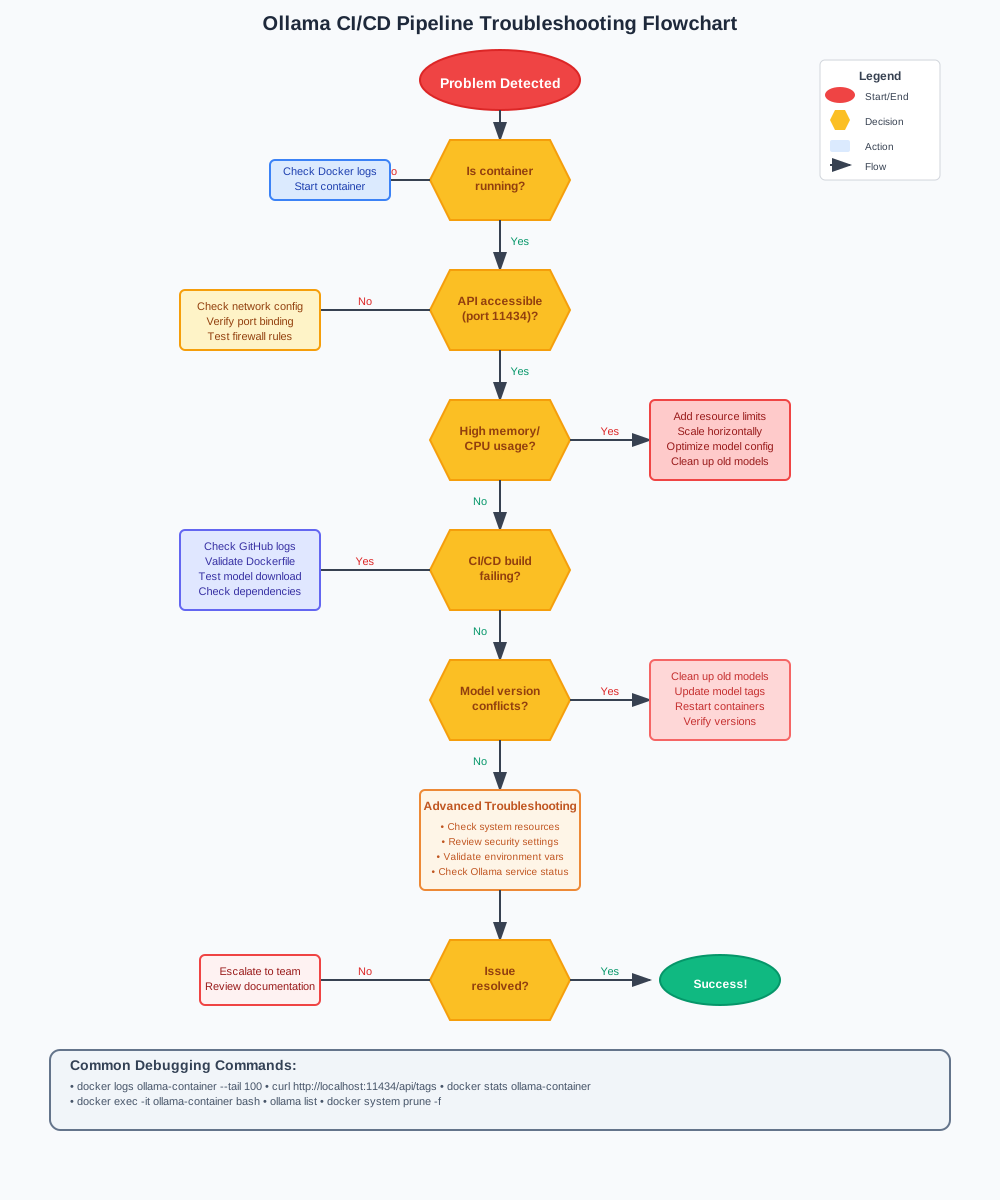
Even well-designed CI/CD pipelines encounter issues. Here are solutions for the most common Ollama deployment problems.
Container Build Failures
Problem: Docker build fails with "model not found" error
# Error message
Step 5/8 : RUN ollama create custom-model -f /app/models/modelfile
 ---> Running in 8a2f1b3c4d5e
Error: model 'llama2:7b' not found
Solution: Ensure base model exists before creating custom model
# Fixed Dockerfile
FROM ollama/ollama:latest

WORKDIR /app
COPY models/ /app/models/

# Pull base model first
RUN ollama serve & \
    sleep 10 && \
    ollama pull llama2:7b && \
    ollama create custom-model -f /app/models/modelfile && \
    pkill ollama

EXPOSE 11434
CMD ["ollama", "serve"]
Memory and Resource Issues
Problem: Container crashes with out-of-memory errors
# Solution: Add resource limits
version: '3.8'
services:
  ollama:
    image: ollama-model:latest
    deploy:
      resources:
        limits:
          memory: 8G
          cpus: '4'
        reservations:
          memory: 4G
          cpus: '2'
    environment:
      - OLLAMA_MAX_LOADED_MODELS=2
      - OLLAMA_NUM_PARALLEL=2
Network Connectivity Problems
Problem: API requests fail with connection refused
# Debug network issues
docker network ls
docker inspect ollama-container

# Check port binding
docker port ollama-container

# Test internal connectivity
docker exec ollama-container curl localhost:11434/api/tags
Solution: Fix network configuration
# docker-compose.yml with proper networking
version: '3.8'
services:
  ollama:
    build: .
    ports:
      - "11434:11434"
    networks:
      - ollama-network
    environment:
      - OLLAMA_HOST=0.0.0.0  # Bind to all interfaces

networks:
  ollama-network:
    driver: bridge
GitHub Actions Timeout Issues
Problem: Workflow times out during model download
# Solution: Optimize workflow with caching
name: Build and Test

jobs:
  build:
    runs-on: ubuntu-latest
    timeout-minutes: 60  # Increase timeout

    steps:
      - uses: actions/checkout@v4

      - name: Cache Docker layers
        uses: actions/cache@v3
        with:
          path: /tmp/.buildx-cache
          key: ${{ runner.os }}-buildx-${{ github.sha }}
          restore-keys: |
            ${{ runner.os }}-buildx-

      - name: Cache Ollama models
        uses: actions/cache@v3
        with:
          path: ~/.ollama
          key: ollama-models-${{ hashFiles('models/modelfile') }}

      - name: Build with cache
        uses: docker/build-push-action@v5
        with:
          context: .
          cache-from: type=local,src=/tmp/.buildx-cache
          cache-to: type=local,dest=/tmp/.buildx-cache-new
Model Version Conflicts
Problem: Multiple model versions cause conflicts
# scripts/cleanup_models.sh
#!/bin/bash

echo "🧹 Cleaning up old model versions"

# Remove unused models
docker exec ollama-container ollama rm old-model-v1
docker exec ollama-container ollama rm old-model-v2

# Cleanup Docker images
docker image prune -f

# Remove dangling volumes
docker volume prune -f

echo "✅ Cleanup completed"
Debugging Checklist
When troubleshooting deployment issues:
- Check logs:
docker logs ollama-container --tail 100 - Verify health:
curl http://localhost:11434/api/tags - Test model:
ollama run custom-model "test prompt" - Monitor resources:
docker stats ollama-container - Validate configuration: Review Dockerfile and compose files
Monitoring and Optimization
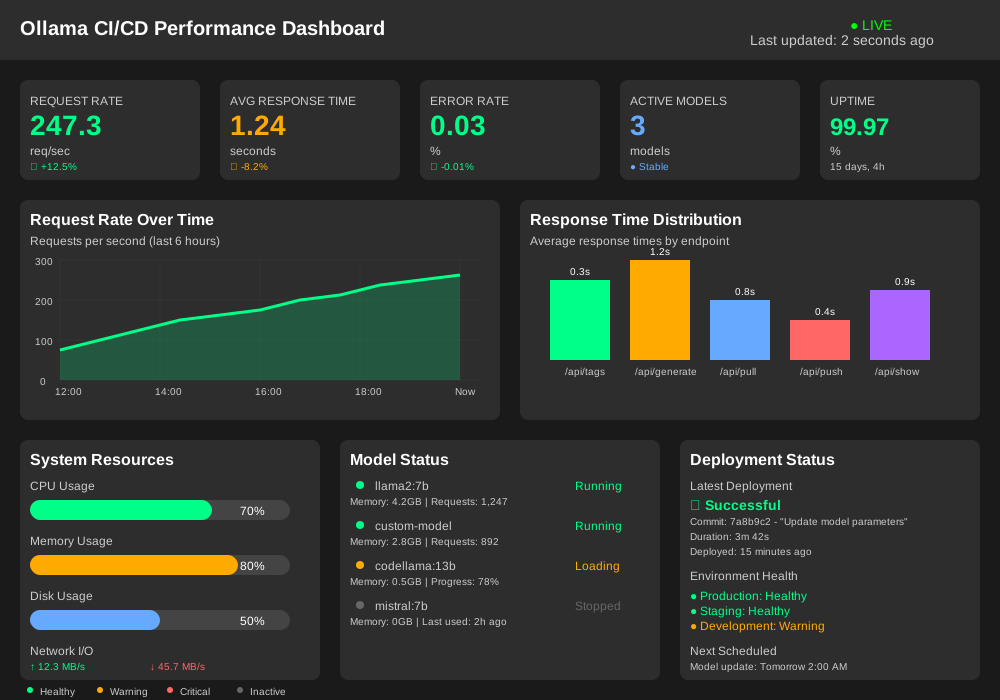
Continuous monitoring ensures your Ollama CI/CD pipeline performs optimally in production. Implement comprehensive monitoring, performance optimization, and automated scaling.
Performance Metrics Collection
# monitoring/metrics_collector.py
import time
import requests
import psutil
import logging
from dataclasses import dataclass
from typing import Dict, List
from prometheus_client import CollectorRegistry, Gauge, Counter, start_http_server

@dataclass
class ModelMetrics:
    request_count: int = 0
    response_time_avg: float = 0.0
    error_rate: float = 0.0
    memory_usage: float = 0.0
    cpu_usage: float = 0.0

class OllamaMetricsCollector:
    def __init__(self, ollama_url: str = "http://localhost:11434"):
        self.ollama_url = ollama_url
        self.registry = CollectorRegistry()

        # Define metrics
        self.request_counter = Counter(
            'ollama_requests_total',
            'Total number of requests',
            registry=self.registry
        )

        self.response_time_gauge = Gauge(
            'ollama_response_time_seconds',
            'Average response time in seconds',
            registry=self.registry
        )

        self.memory_gauge = Gauge(
            'ollama_memory_usage_bytes',
            'Memory usage in bytes',
            registry=self.registry
        )

        self.error_counter = Counter(
            'ollama_errors_total',
            'Total number of errors',
            registry=self.registry
        )

    def collect_metrics(self) -> ModelMetrics:
        """Collect comprehensive performance metrics"""

        # Test API response time
        start_time = time.time()
        try:
            response = requests.get(f"{self.ollama_url}/api/tags", timeout=5)
            response_time = time.time() - start_time

            if response.status_code == 200:
                self.request_counter.inc()
                self.response_time_gauge.set(response_time)
            else:
                self.error_counter.inc()

        except requests.exceptions.RequestException:
            self.error_counter.inc()
            response_time = float('inf')

        # Collect system metrics
        memory_info = psutil.virtual_memory()
        cpu_percent = psutil.cpu_percent(interval=1)

        self.memory_gauge.set(memory_info.used)

        return ModelMetrics(
            request_count=int(self.request_counter._value._value),
            response_time_avg=response_time,
            error_rate=0.0,  # Calculate from counters
            memory_usage=memory_info.percent,
            cpu_usage=cpu_percent
        )

    def start_metrics_server(self, port: int = 8000):
        """Start Prometheus metrics server"""
        start_http_server(port, registry=self.registry)
        logging.info(f"Metrics server started on port {port}")

# Usage
if __name__ == "__main__":
    collector = OllamaMetricsCollector()
    collector.start_metrics_server()

    while True:
        metrics = collector.collect_metrics()
        print(f"Response time: {metrics.response_time_avg:.2f}s")
        print(f"Memory usage: {metrics.memory_usage:.1f}%")
        print(f"CPU usage: {metrics.cpu_usage:.1f}%")
        time.sleep(30)
Automated Performance Optimization
#!/bin/bash
# scripts/optimize_performance.sh

echo "🚀 Starting performance optimization"

# Function to optimize model configuration
optimize_model_config() {
    local model_name=$1

    echo "🔧 Optimizing $model_name configuration"

    # Get current model info
    model_info=$(docker exec ollama-container ollama show $model_name)

    # Optimize parameters based on usage patterns
    docker exec ollama-container ollama create "${model_name}-optimized" << EOF
FROM $model_name

# Optimize for throughput
PARAMETER num_ctx 2048
PARAMETER num_batch 512
PARAMETER num_gqa 8

# Adjust temperature for consistency
PARAMETER temperature 0.7
PARAMETER top_p 0.9
PARAMETER repeat_penalty 1.1
EOF

    echo "✅ Model $model_name optimized"
}

# Function to optimize system resources
optimize_system() {
    echo "⚙️  Optimizing system configuration"

    # Increase file descriptor limits
    echo "fs.file-max = 65536" >> /etc/sysctl.conf
    sysctl -p

    # Optimize Docker daemon
    cat > /etc/docker/daemon.json << EOF
{
    "log-driver": "json-file",
    "log-opts": {
        "max-size": "10m",
        "max-file": "3"
    },
    "default-shm-size": "1g"
}
EOF

    systemctl restart docker
    echo "✅ System optimized"
}

# Function to implement caching strategy
setup_caching() {
    echo "💾 Setting up intelligent caching"

    # Redis for response caching
    docker run -d --name redis-cache \
        --restart unless-stopped \
        -p 6379:6379 \
        redis:alpine

    # Configure Nginx reverse proxy with caching
    cat > nginx-cache.conf << EOF
upstream ollama {
    server localhost:11434;
}

proxy_cache_path /var/cache/nginx levels=1:2 keys_zone=ollama_cache:10m max_size=1g inactive=60m;

server {
    listen 80;

    location /api/generate {
        proxy_pass http://ollama;
        proxy_cache ollama_cache;
        proxy_cache_key \$request_uri\$request_body;
        proxy_cache_valid 200 10m;
        proxy_cache_use_stale error timeout http_500 http_502 http_503 http_504;

        add_header X-Cache-Status \$upstream_cache_status;
    }

    location / {
        proxy_pass http://ollama;
    }
}
EOF

    echo "✅ Caching configured"
}

# Main optimization process
optimize_model_config "custom-model"
optimize_system
setup_caching

echo "🎉 Performance optimization completed"
Auto-Scaling Configuration
# kubernetes/ollama-deployment.yml
apiVersion: apps/v1
kind: Deployment
metadata:
  name: ollama-deployment
spec:
  replicas: 3
  selector:
    matchLabels:
      app: ollama
  template:
    metadata:
      labels:
        app: ollama
    spec:
      containers:
      - name: ollama
        image: ollama-model:latest
        resources:
          requests:
            memory: "4Gi"
            cpu: "2"
          limits:
            memory: "8Gi"
            cpu: "4"
        ports:
        - containerPort: 11434
        livenessProbe:
          httpGet:
            path: /api/tags
            port: 11434
          initialDelaySeconds: 60
          periodSeconds: 30
        readinessProbe:
          httpGet:
            path: /api/tags
            port: 11434
          initialDelaySeconds: 30
          periodSeconds: 10

---
apiVersion: autoscaling/v2
kind: HorizontalPodAutoscaler
metadata:
  name: ollama-hpa
spec:
  scaleTargetRef:
    apiVersion: apps/v1
    kind: Deployment
    name: ollama-deployment
  minReplicas: 2
  maxReplicas: 10
  metrics:
  - type: Resource
    resource:
      name: cpu
      target:
        type: Utilization
        averageUtilization: 70
  - type: Resource
    resource:
      name: memory
      target:
        type: Utilization
        averageUtilization: 80
Performance Dashboard
{
  "dashboard": {
    "title": "Ollama CI/CD Performance",
    "panels": [
      {
        "title": "Request Rate",
        "type": "graph",
        "targets": [
          {
            "expr": "rate(ollama_requests_total[5m])",
            "legend": "Requests/sec"
          }
        ]
      },
      {
        "title": "Response Time",
        "type": "graph",
        "targets": [
          {
            "expr": "ollama_response_time_seconds",
            "legend": "Avg Response Time"
          }
        ]
      },
      {
        "title": "Error Rate",
        "type": "singlestat",
        "targets": [
          {
            "expr": "rate(ollama_errors_total[5m]) / rate(ollama_requests_total[5m]) * 100",
            "legend": "Error %"
          }
        ]
      },
      {
        "title": "Resource Usage",
        "type": "graph",
        "targets": [
          {
            "expr": "ollama_memory_usage_bytes / 1024 / 1024 / 1024",
            "legend": "Memory (GB)"
          }
        ]
      }
    ]
  }
}
Security Best Practices
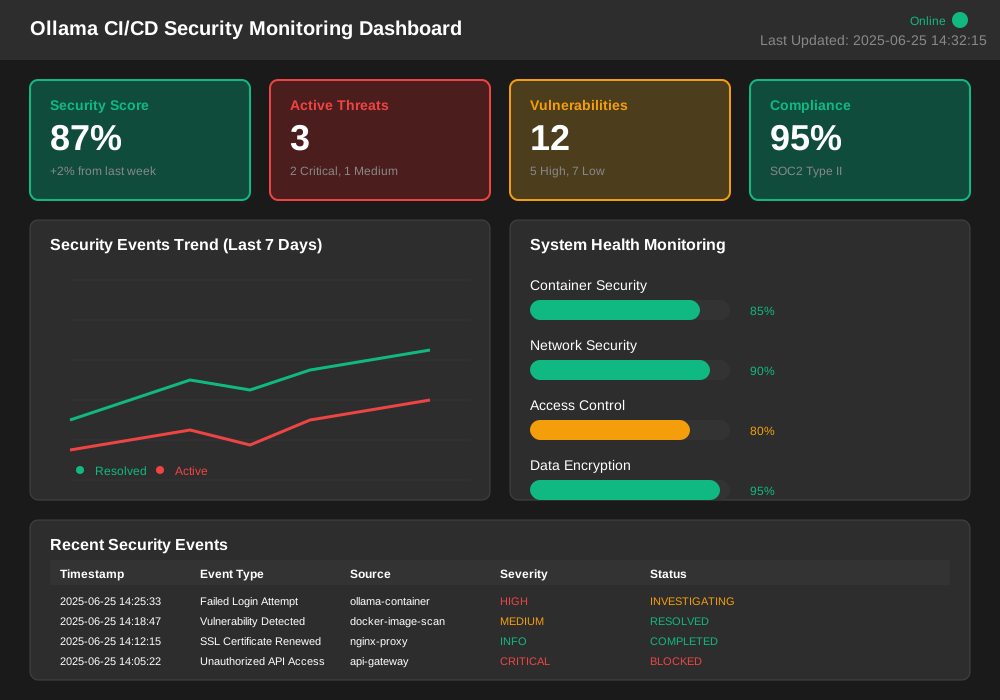
Security forms the foundation of production-ready Ollama CI/CD pipelines. Implement comprehensive security measures to protect your models, data, and infrastructure.
Container Security Hardening
# Dockerfile.secure
FROM ollama/ollama:latest AS base

# Create non-root user
RUN groupadd -r ollama && useradd -r -g ollama ollama

# Install security updates
RUN apt-get update && apt-get upgrade -y && \
    apt-get install -y --no-install-recommends \
    ca-certificates curl && \
    rm -rf /var/lib/apt/lists/*

FROM base AS builder
WORKDIR /build
COPY models/ ./models/

# Build models as root, then change ownership
RUN ollama serve & \
    sleep 10 && \
    ollama pull llama2:7b && \
    ollama create custom-model -f ./models/modelfile && \
    chown -R ollama:ollama /root/.ollama && \
    pkill ollama

FROM base AS production

# Copy models with correct ownership
COPY --from=builder --chown=ollama:ollama /root/.ollama /home/ollama/.ollama

# Switch to non-root user
USER ollama
WORKDIR /home/ollama

# Remove unnecessary packages
RUN apt-get purge -y curl wget && \
    apt-get autoremove -y

# Set secure environment
ENV OLLAMA_HOST=127.0.0.1
ENV OLLAMA_DATA_DIR=/home/ollama/.ollama

EXPOSE 11434
CMD ["ollama", "serve"]
Secrets Management
# docker-compose.secure.yml
version: '3.8'

services:
  ollama:
    build:
      context: .
      dockerfile: Dockerfile.secure
    ports:
      - "11434:11434"
    environment:
      # Use Docker secrets instead of environment variables
      - OLLAMA_API_KEY_FILE=/run/secrets/ollama_api_key
      - DATABASE_PASSWORD_FILE=/run/secrets/db_password
    secrets:
      - ollama_api_key
      - db_password
    networks:
      - ollama-internal
    security_opt:
      - no-new-privileges:true
    read_only: true
    tmpfs:
      - /tmp:noexec,nosuid,size=100m

secrets:
  ollama_api_key:
    external: true
  db_password:
    external: true

networks:
  ollama-internal:
    driver: bridge
    internal: true
GitHub Actions Security
# .github/workflows/secure-deploy.yml
name: Secure Deployment

on:
  push:
    branches: [ main ]

permissions:
  contents: read
  packages: write
  security-events: write

jobs:
  security-scan:
    runs-on: ubuntu-latest
    steps:
      - uses: actions/checkout@v4

      - name: Run Trivy vulnerability scanner
        uses: aquasecurity/trivy-action@master
        with:
          scan-type: 'fs'
          scan-ref: '.'
          format: 'sarif'
          output: 'trivy-results.sarif'

      - name: Upload Trivy scan results
        uses: github/codeql-action/upload-sarif@v2
        with:
          sarif_file: 'trivy-results.sarif'

  secure-build:
    needs: security-scan
    runs-on: ubuntu-latest
    steps:
      - uses: actions/checkout@v4

      - name: Set up Docker Buildx
        uses: docker/setup-buildx-action@v3

      - name: Build image
        uses: docker/build-push-action@v5
        with:
          context: .
          file: Dockerfile.secure
          push: false
          tags: ollama-secure:latest

      - name: Run container security scan
        run: |
          docker run --rm -v /var/run/docker.sock:/var/run/docker.sock \
            aquasec/trivy image ollama-secure:latest

      - name: Sign container image
        env:
          PRIVATE_KEY: ${{ secrets.COSIGN_PRIVATE_KEY }}
        run: |
          echo "$PRIVATE_KEY" > cosign.key
          cosign sign --key cosign.key ollama-secure:latest
Network Security Configuration
#!/bin/bash
# scripts/setup_security.sh

echo "🔒 Configuring security measures"

# Setup firewall rules
ufw --force reset
ufw default deny incoming
ufw default allow outgoing

# Allow SSH (adjust port as needed)
ufw allow 22/tcp

# Allow HTTPS only for external access
ufw allow 443/tcp

# Allow internal Docker communication
ufw allow from 172.16.0.0/12
ufw allow from 192.168.0.0/16

# Enable firewall
ufw --force enable

# Configure fail2ban for SSH protection
cat > /etc/fail2ban/jail.local << EOF
[sshd]
enabled = true
port = ssh
filter = sshd
logpath = /var/log/auth.log
maxretry = 3
bantime = 3600
EOF

systemctl restart fail2ban

# Setup SSL/TLS certificates
certbot --nginx -d ollama.example.com --non-interactive --agree-tos --email admin@example.com

# Configure Nginx with security headers
cat > /etc/nginx/conf.d/security.conf << EOF
# Security Headers
add_header X-Frame-Options DENY;
add_header X-Content-Type-Options nosniff;
add_header X-XSS-Protection "1; mode=block";
add_header Strict-Transport-Security "max-age=31536000; includeSubDomains";
add_header Content-Security-Policy "default-src 'self'";

# Hide Nginx version
server_tokens off;

# Rate limiting
limit_req_zone \$binary_remote_addr zone=api:10m rate=10r/s;
limit_req zone=api burst=20 nodelay;
EOF

nginx -t && systemctl reload nginx

echo "✅ Security configuration completed"
Audit and Compliance
# monitoring/security_audit.py
import os
import json
import logging
import subprocess
from datetime import datetime
from typing import Dict, List, Any

class SecurityAuditor:
    def __init__(self, log_file: str = "/var/log/ollama-security.log"):
        self.log_file = log_file
        self.setup_logging()

    def setup_logging(self):
        """Configure security audit logging"""
        logging.basicConfig(
            filename=self.log_file,
            level=logging.INFO,
            format='%(asctime)s - %(levelname)s - %(message)s'
        )

    def audit_container_security(self) -> Dict[str, Any]:
        """Audit Docker container security configuration"""

        audit_results = {
            "timestamp": datetime.now().isoformat(),
            "checks": []
        }

        # Check for non-root user
        try:
            result = subprocess.run(
                ["docker", "exec", "ollama-container", "whoami"],
                capture_output=True, text=True
            )

            user = result.stdout.strip()
            audit_results["checks"].append({
                "check": "non_root_user",
                "status": "PASS" if user != "root" else "FAIL",
                "details": f"Running as user: {user}"
            })

        except subprocess.CalledProcessError as e:
            audit_results["checks"].append({
                "check": "non_root_user",
                "status": "ERROR",
                "details": str(e)
            })

        # Check for read-only filesystem
        try:
            result = subprocess.run(
                ["docker", "inspect", "ollama-container", "--format", "{{.HostConfig.ReadonlyRootfs}}"],
                capture_output=True, text=True
            )

            readonly = result.stdout.strip()
            audit_results["checks"].append({
                "check": "readonly_filesystem",
                "status": "PASS" if readonly == "true" else "WARN",
                "details": f"Read-only filesystem: {readonly}"
            })

        except subprocess.CalledProcessError as e:
            audit_results["checks"].append({
                "check": "readonly_filesystem",
                "status": "ERROR",
                "details": str(e)
            })

        # Check for security options
        try:
            result = subprocess.run(
                ["docker", "inspect", "ollama-container", "--format", "{{.HostConfig.SecurityOpt}}"],
                capture_output=True, text=True
            )

            security_opts = result.stdout.strip()
            has_no_new_privs = "no-new-privileges:true" in security_opts

            audit_results["checks"].append({
                "check": "security_options",
                "status": "PASS" if has_no_new_privs else "WARN",
                "details": f"Security options: {security_opts}"
            })

        except subprocess.CalledProcessError as e:
            audit_results["checks"].append({
                "check": "security_options",
                "status": "ERROR",
                "details": str(e)
            })

        return audit_results

    def audit_network_security(self) -> Dict[str, Any]:
        """Audit network security configuration"""

        network_audit = {
            "timestamp": datetime.now().isoformat(),
            "network_checks": []
        }

        # Check exposed ports
        try:
            result = subprocess.run(
                ["docker", "port", "ollama-container"],
                capture_output=True, text=True
            )

            exposed_ports = result.stdout.strip().split('\n')

            # Should only expose necessary ports
            expected_ports = ["11434/tcp"]
            unnecessary_ports = [p for p in exposed_ports if not any(ep in p for ep in expected_ports)]

            network_audit["network_checks"].append({
                "check": "exposed_ports",
                "status": "PASS" if not unnecessary_ports else "WARN",
                "details": {
                    "exposed": exposed_ports,
                    "unnecessary": unnecessary_ports
                }
            })

        except subprocess.CalledProcessError as e:
            network_audit["network_checks"].append({
                "check": "exposed_ports",
                "status": "ERROR",
                "details": str(e)
            })

        return network_audit

    def generate_security_report(self) -> str:
        """Generate comprehensive security audit report"""

        container_audit = self.audit_container_security()
        network_audit = self.audit_network_security()

        report = {
            "security_audit_report": {
                "generated_at": datetime.now().isoformat(),
                "container_security": container_audit,
                "network_security": network_audit,
                "summary": {
                    "total_checks": len(container_audit["checks"]) + len(network_audit["network_checks"]),
                    "passed": 0,
                    "warnings": 0,
                    "failed": 0,
                    "errors": 0
                }
            }
        }

        # Calculate summary
        all_checks = container_audit["checks"] + network_audit["network_checks"]
        for check in all_checks:
            status = check["status"]
            if status == "PASS":
                report["security_audit_report"]["summary"]["passed"] += 1
            elif status == "WARN":
                report["security_audit_report"]["summary"]["warnings"] += 1
            elif status == "FAIL":
                report["security_audit_report"]["summary"]["failed"] += 1
            elif status == "ERROR":
                report["security_audit_report"]["summary"]["errors"] += 1

        # Log security audit
        logging.info(f"Security audit completed: {report['security_audit_report']['summary']}")

        return json.dumps(report, indent=2)

# Usage
if __name__ == "__main__":
    auditor = SecurityAuditor()
    report = auditor.generate_security_report()
    print(report)
Conclusion
Building an automated Ollama CI/CD pipeline transforms your AI model deployment from a manual bottleneck into a streamlined, reliable process. You've learned to create Docker containers, implement GitHub Actions workflows, automate testing, and deploy with confidence.
Your Ollama CI/CD pipeline now handles the heavy lifting of model deployment, freeing you to focus on what matters most: building better AI applications. With automated testing, monitoring, and security measures in place, your models deploy consistently and scale effortlessly.
The techniques covered in this tutorial—from blue-green deployments to performance optimization—ensure your Ollama models run reliably in production. Your CI/CD pipeline becomes a competitive advantage, enabling rapid iteration and bulletproof deployments.
Ready to take your automated model deployment to the next level? Start implementing these Ollama CI/CD practices today and watch your deployment confidence soar.