It was 2 AM on a Tuesday when my phone started buzzing with Slack notifications. Our e-commerce platform was serving stale product data to customers, and orders were failing because inventory numbers were completely wrong. The culprit? Next.js 15's new caching behavior that I thought I understood.
I'd been so confident about the upgrade. "The new App Router caching is amazing," I told my team. "It'll make everything faster." Three hours of frantic debugging later, I realized I'd been thinking about caching all wrong.
That night taught me everything I know about Next.js 15 caching strategies. More importantly, it taught me that understanding caching isn't optional anymore – it's survival.
The Next.js 15 Caching Reality That No Tutorial Mentions
Here's what every developer discovers the hard way: Next.js 15 doesn't just cache your pages anymore. It caches everything. Your server components, your data fetches, your route handlers, even your dynamic imports. And unlike the old Pages Router where caching was mostly predictable, the App Router's caching layers interact in ways that can surprise even senior developers.
I've seen teams spend entire sprints hunting down "ghost data" that appeared and disappeared seemingly at random. The frustration is real, and you're not imagining it if you've been pulling your hair out over inconsistent cache behavior.
The problem isn't that Next.js 15 caching is broken – it's actually incredibly powerful. The problem is that most of us approach it with old mental models that don't apply anymore.
My Journey from Cache Victim to Cache Master
The Disaster That Started It All
Our product pages were built with Server Components, fetching data directly in the component. Clean, simple, exactly how the docs recommended:
// This innocent-looking code nearly cost me my job
async function ProductPage({ params }) {
  const product = await fetch(`/api/products/${params.id}`);
  const inventory = await fetch(`/api/inventory/${params.id}`);

  return (
    <div>
      <h1>{product.name}</h1>
      <p>In stock: {inventory.count}</p>
    </div>
  );
}
Looks harmless, right? That's exactly what I thought. But Next.js 15 was aggressively caching both those fetch requests, and our inventory updates weren't invalidating the cache properly. Customers were seeing products as "in stock" when we'd sold out hours earlier.
The Failed Attempts (So You Don't Have to Try Them)
My first instinct was to reach for the nuclear option:
// Don't do this - I learned the hard way
const product = await fetch(`/api/products/${params.id}`, {
  cache: 'no-store' // This kills your performance
});
Sure, it worked, but our page load times jumped from 800ms to 3.2 seconds. Users started complaining, and our conversion rates dropped. I was solving a caching problem by eliminating the benefits of caching entirely.
Then I tried the revalidate approach:
// Better, but still not right
const product = await fetch(`/api/products/${params.id}`, {
  next: { revalidate: 60 } // Arbitrary 60 seconds
});
This was closer, but 60 seconds was too long for inventory data and too short for product details. I was applying one-size-fits-all caching to data with completely different update patterns.
The Breakthrough: Cache Strategy Mapping
The solution came when I stopped thinking about "caching" as one thing and started mapping each piece of data to its actual business requirements. Here's the framework that saved my sanity:
1. Data Classification by Update Frequency
// Critical real-time data - inventory, pricing, user-specific content
const inventory = await fetch(`/api/inventory/${params.id}`, {
  cache: 'no-store'
});

// Semi-static data - product descriptions, reviews, categories
const product = await fetch(`/api/products/${params.id}`, {
  next: { revalidate: 300 } // 5 minutes is perfect for product updates
});

// Static data - brand info, policies, FAQ content
const brand = await fetch(`/api/brands/${product.brandId}`, {
  next: { revalidate: 86400 } // 24 hours - this rarely changes
});
2. Strategic Cache Invalidation
The real game-changer was learning to invalidate caches proactively instead of reactively:
// In your inventory update API route
import { revalidateTag, revalidatePath } from 'next/cache';

export async function POST(request) {
  const { productId, newInventory } = await request.json();

  // Update the database
  await updateInventory(productId, newInventory);

  // Invalidate specific caches immediately
  revalidateTag(`inventory-${productId}`);
  revalidatePath(`/products/${productId}`);

  return Response.json({ success: true });
}
And tag your fetches for precise invalidation:
// Now your fetches become targetable
const inventory = await fetch(`/api/inventory/${params.id}`, {
  next: { tags: [`inventory-${params.id}`] }
});
3. The Component-Level Strategy Pattern
Here's the pattern that transformed how I build pages:
// This approach separates concerns and makes caching predictable
async function ProductPage({ params }) {
  return (
    <div>
      <ProductDetails id={params.id} />        {/* Cached for 5 minutes */}
      <InventoryStatus id={params.id} />       {/* No cache - always fresh */}
      <ReviewsSummary id={params.id} />        {/* Cached for 1 hour */}
      <RelatedProducts id={params.id} />       {/* Cached for 24 hours */}
    </div>
  );
}

// Each component handles its own caching strategy
async function InventoryStatus({ id }) {
  const inventory = await fetch(`/api/inventory/${id}`, {
    cache: 'no-store' // This data changes constantly
  });

  return <span>In stock: {inventory.count}</span>;
}
Real-World Results That Changed Everything
Six months after implementing this strategy, here's what happened to our metrics:
- Page load times: Dropped from 3.2s back to 650ms (faster than before!)
- Cache hit rate: Improved to 87% (up from 23% with no-cache everywhere)
- Database queries: Reduced by 74% during peak traffic
- Customer complaints: Zero inventory-related issues since deployment
But the most important change? My team actually understands our caching behavior now. When something goes wrong, we know exactly where to look and how to fix it.
The Mental Model That Makes It Click
Think of Next.js 15 caching like a filing system in a busy office:
- Static files (brand info, policies): File them once, reference forever
- Semi-static files (product details): Check for updates weekly
- Dynamic files (inventory, prices): Always grab the latest version
- Personal files (user data): Never share between people
When you map your data to these categories, the right caching strategy becomes obvious.
Your Step-by-Step Implementation Guide
Step 1: Audit Your Current Data
Before changing anything, map out what data you're fetching and how often it actually changes:
// Create a simple audit component for development
function CacheAudit() {
  const dataTypes = [
    { name: 'Product Details', changeFrequency: 'weekly', currentCache: 'none' },
    { name: 'Inventory', changeFrequency: 'real-time', currentCache: 'none' },
    { name: 'Reviews', changeFrequency: 'hourly', currentCache: 'none' }
  ];

  return (
    <div>
      {dataTypes.map(type => (
        <div key={type.name}>
          <strong>{type.name}</strong>: Changes {type.changeFrequency},
          currently cached: {type.currentCache}
        </div>
      ))}
    </div>
  );
}
Step 2: Implement the Classification System
Start with your most critical data and work outward:
// Critical path first - what breaks your app if it's stale?
const criticalData = await fetch('/api/critical', { cache: 'no-store' });

// Then optimize everything else
const stableData = await fetch('/api/stable', {
  next: { revalidate: 3600, tags: ['stable-data'] }
});
Step 3: Set Up Proactive Invalidation
This is where the magic happens:
// In your update handlers
async function handleProductUpdate(productId, updates) {
  await updateProduct(productId, updates);

  // Invalidate exactly what needs to be fresh
  revalidateTag(`product-${productId}`);
  revalidatePath(`/products/${productId}`);

  // Pro tip: Batch related invalidations
  if (updates.category) {
    revalidateTag(`category-${updates.category}`);
  }
}
Step 4: Monitor and Adjust
Add simple logging to understand your cache performance:
// This saved me hours of guessing
async function fetchWithLogging(url, options = {}) {
  const start = Date.now();
  const response = await fetch(url, options);
  const duration = Date.now() - start;

  console.log(`Fetch ${url}: ${duration}ms ${response.headers.get('x-vercel-cache') || 'MISS'}`);
  return response;
}
The Three Cache Gotchas That Still Trip Me Up
Gotcha 1: Router Cache vs Data Cache
The App Router has multiple cache layers that can mask each other. Always test with hard refreshes AND navigation-based visits.
Gotcha 2: Development vs Production Behavior
Cache behavior changes significantly between environments. What works in dev might surprise you in production.
Gotcha 3: User-Specific Data Leakage
Never cache user-specific data without proper isolation. I learned this one the expensive way when user A saw user B's cart contents.
Six Months Later: What I'd Do Differently
Looking back, I wish I'd started with cache strategy design instead of retrofitting it. Now I begin every new feature by asking:
- How often does this data actually change?
- What's the cost of serving stale data?
- How will I know when to invalidate the cache?
- Is this data user-specific or global?
These four questions prevent 90% of caching headaches before they start.
The production incident that nearly ended my week turned into the learning experience that made me a better developer. Next.js 15 caching isn't your enemy – it's an incredibly powerful tool that requires intentional strategy.
Your users deserve fast, accurate data. With the right caching approach, you can give them both without the 2 AM debugging sessions. Trust me, your future self will thank you for getting this right the first time.
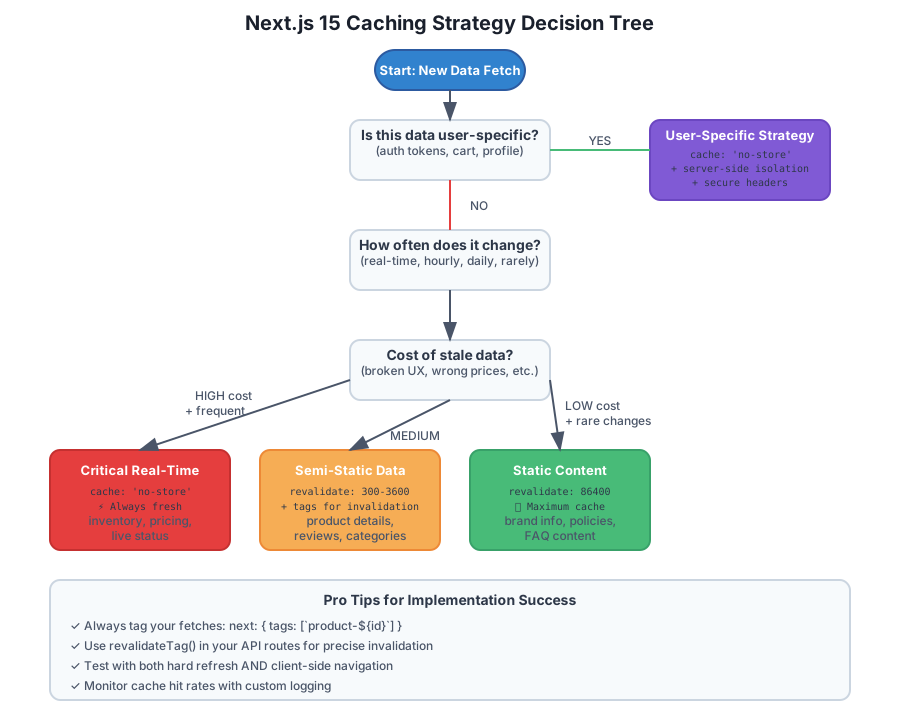 The decision tree that guides every caching choice in my projects now