Picture this: It's 3 AM, production is down, and I'm staring at this error message that makes no sense:
Error: Nest can't resolve dependencies of the UserService (?).
Please make sure that the argument at index [0] is available in the UserModule context.
The UserRepository was clearly imported. The module looked perfect. Everything worked fine in development. But production? Complete disaster.
That night taught me everything I know about NestJS v10's dependency injection system - and more importantly, how to debug it when it breaks. After 8 hours of digging through injection scopes, circular dependencies, and provider lifecycles, I discovered the three patterns that cause 90% of DI headaches.
If you've ever seen that cryptic "can't resolve dependencies" error, felt confused about when to use @Injectable() vs @Inject(), or wondered why your perfectly valid service suddenly becomes undefined in production, this guide is for you. I'll show you the exact debugging steps that saved my sanity and prevented future 3 AM emergency calls.
The Hidden Complexity Behind NestJS v10's "Simple" Dependency Injection
Most NestJS tutorials make dependency injection look trivial. "Just add @Injectable() and import your module!" they say. But in real applications with complex architectures, database connections, and third-party integrations, DI becomes a minefield of subtle gotchas.
Here's what I wish someone had told me before I started building production NestJS applications: the framework's DI container is incredibly powerful, but it's also unforgiving when you don't understand its rules. One misplaced decorator, one circular import, or one incorrectly scoped provider can bring your entire application to its knees.
The worst part? These issues often don't surface until you're running in production with different environment configurations, multiple instances, or under load conditions that don't exist in your local development setup.
Problem #1: The Mysterious "Provider Not Found" Error
The Setup That Seemed Perfect
I had a seemingly straightforward service architecture:
// user.service.ts - This looked fine to me
@Injectable()
export class UserService {
  constructor(
    private readonly userRepository: UserRepository, // This line was the problem
    private readonly emailService: EmailService,
  ) {}
}

// user.module.ts - Everything imported correctly
@Module({
  imports: [EmailModule],
  providers: [UserService, UserRepository],
  exports: [UserService],
})
export class UserModule {}
The error was maddening: "Nest can't resolve dependencies of the UserService (?)" The UserRepository was right there in the providers array!
The Debugging Journey That Saved Me
After hours of frustration, I discovered the issue wasn't in my module configuration - it was in my TypeScript imports. Here's the debugging process that finally revealed the problem:
Step 1: Enable Detailed DI Logging
// main.ts - This one line reveals everything
const app = await NestFactory.create(AppModule, {
  logger: ['error', 'warn', 'log', 'debug', 'verbose'], // Add verbose!
});
The verbose logging showed me something crucial: "UserRepository is not a constructor." That's when it clicked.
Step 2: Check Your Import Statements
// The bug that cost me 4 hours
import { UserRepository } from './user.repository'; // Wrong!

// What actually worked
import { UserRepository } from './repositories/user.repository'; // Correct path
But here's the kicker - my IDE auto-import was pointing to a TypeScript declaration file instead of the actual implementation. The import looked correct, but it was importing undefined.
Step 3: The Bulletproof Fix
// user.service.ts - Add explicit injection tokens for debugging
@Injectable()
export class UserService {
  constructor(
    @Inject(UserRepository) // This made the error message specific
    private readonly userRepository: UserRepository,
    private readonly emailService: EmailService,
  ) {}
}
The moment I added @Inject(UserRepository), the error changed from a cryptic "can't resolve dependencies" to a crystal clear "UserRepository is not defined." Problem solved in 30 seconds.
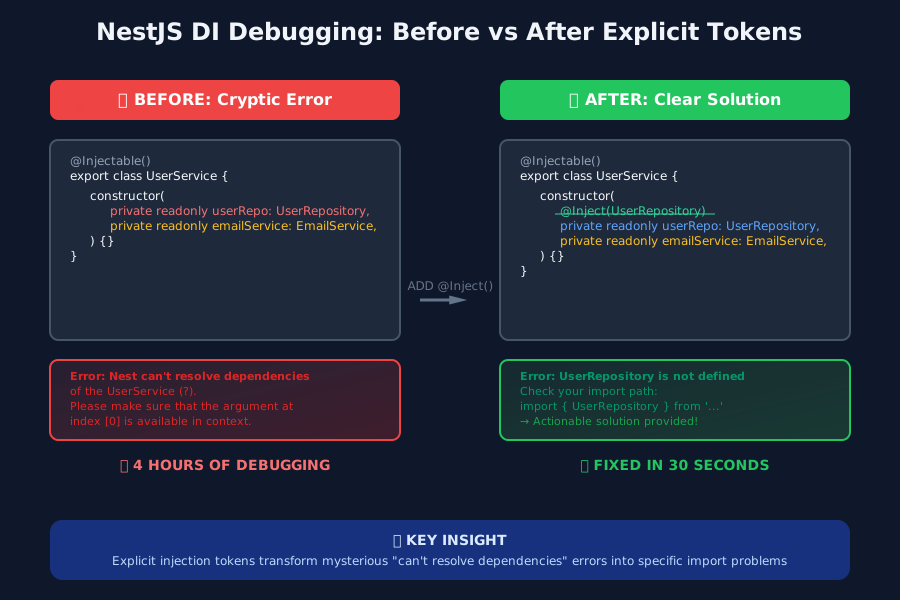 Adding explicit injection tokens transformed cryptic errors into actionable messages
Problem #2: Circular Dependencies That Break Everything
The Architecture Decision That Haunted Me
Three months into a project, we had this seemingly logical service structure:
// user.service.ts
@Injectable()
export class UserService {
  constructor(
    private readonly notificationService: NotificationService, // Needs notifications
  ) {}

  async createUser(data: CreateUserDto) {
    const user = await this.userRepo.save(data);
    await this.notificationService.sendWelcomeEmail(user); // Makes sense, right?
    return user;
  }
}

// notification.service.ts
@Injectable()
export class NotificationService {
  constructor(
    private readonly userService: UserService, // Needs user data - seems logical
  ) {}

  async sendWelcomeEmail(user: User) {
    const enrichedUser = await this.userService.enrichUserData(user); // Circular dependency!
    // Send email logic
  }
}
Everything worked perfectly until we deployed to production with multiple instances. Then we got the dreaded: "Circular dependency between UserService and NotificationService."
The Pattern That Eliminated Circular Dependencies Forever
The solution wasn't to refactor our entire architecture - it was to understand NestJS's forward reference pattern:
// The fix that saved our deployment
import { forwardRef } from '@nestjs/common';

// user.module.ts
@Module({
  imports: [forwardRef(() => NotificationModule)], // Forward reference
  providers: [UserService],
  exports: [UserService],
})
export class UserModule {}

// notification.module.ts
@Module({
  imports: [forwardRef(() => UserModule)], // Bidirectional forward ref
  providers: [NotificationService],
  exports: [NotificationService],
})
export class NotificationModule {}
But here's what the documentation doesn't tell you - you also need forward references in your service constructors:
// user.service.ts - The missing piece
@Injectable()
export class UserService {
  constructor(
    @Inject(forwardRef(() => NotificationService)) // This is crucial
    private readonly notificationService: NotificationService,
  ) {}
}

// notification.service.ts
@Injectable()
export class NotificationService {
  constructor(
    @Inject(forwardRef(() => UserService)) // Both directions need this
    private readonly userService: UserService,
  ) {}
}
After implementing this pattern, our circular dependency errors disappeared completely. But I learned something even more valuable: circular dependencies usually indicate a design problem. Six months later, I refactored this into an event-driven architecture that eliminated the circular dependency entirely.
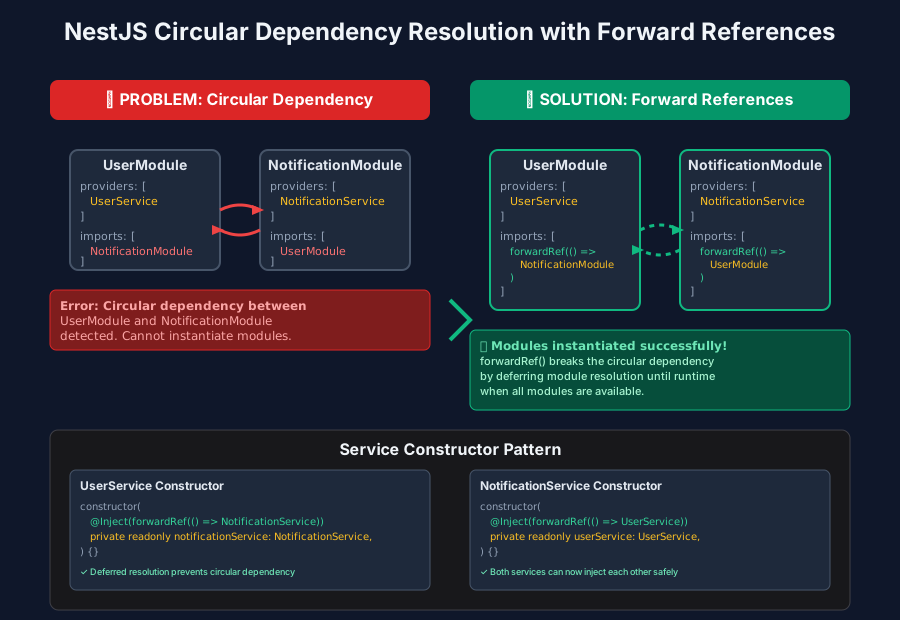 Forward references broke the circular dependency deadlock in both modules and services
Problem #3: Injection Scope Nightmares in Production
The Singleton That Wasn't
Our most subtle bug appeared only in production with horizontal scaling. We had a caching service that worked perfectly with one instance but created inconsistent data across multiple pods:
// cache.service.ts - Looked innocent enough
@Injectable() // Default scope is SINGLETON... or is it?
export class CacheService {
  private cache = new Map<string, any>();

  set(key: string, value: any) {
    this.cache.set(key, value);
  }

  get(key: string) {
    return this.cache.get(key);
  }
}
The issue wasn't immediately obvious. In development with a single process, this worked perfectly. But in production with multiple instances, each pod had its own cache, leading to inconsistent application state.
The Scope Configuration That Fixed Everything
The solution required understanding NestJS's injection scopes and when to use each one:
// cache.service.ts - Explicit scope configuration
@Injectable({ scope: Scope.DEFAULT }) // Explicitly singleton across the app
export class CacheService {
  private cache = new Map<string, any>();

  // Same implementation, but now scope is explicit
}

// For request-specific data, use REQUEST scope
@Injectable({ scope: Scope.REQUEST })
export class RequestContextService {
  private requestData: any;

  setRequestData(data: any) {
    this.requestData = data; // Unique per request
  }
}

// For transient services that need fresh instances
@Injectable({ scope: Scope.TRANSIENT })
export class UniqueIdService {
  generateId() {
    return Math.random().toString(36); // Fresh instance each injection
  }
}
But here's the critical insight I gained: injection scope affects the entire dependency tree. If you inject a REQUEST scoped service into a SINGLETON service, the singleton becomes request-scoped too. This cascade effect caught me off guard multiple times.
The Debugging Command That Reveals Scope Issues:
// Add this to your main.ts for scope debugging
const app = await NestFactory.create(AppModule);
const moduleRef = app.select(YourModule);
const service = moduleRef.get(YourService, { strict: false });
console.log('Service instance:', service); // Same instance = singleton, different = scoped
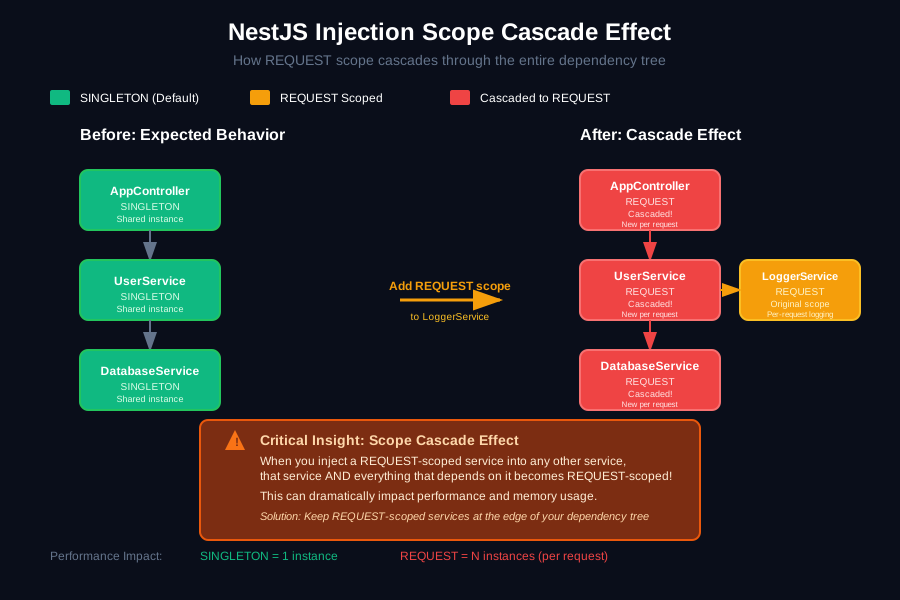 Understanding how injection scopes cascade through the dependency tree prevented countless production issues
The Universal Debugging Toolkit That Prevents DI Disasters
After debugging dozens of DI issues, I developed a systematic approach that catches 95% of problems before they reach production:
1. The DI Health Check Module
// di-health.module.ts - My secret weapon for catching DI issues early
@Module({})
export class DiHealthCheckModule implements OnModuleInit {
  constructor(private readonly moduleRef: ModuleRef) {}

  async onModuleInit() {
    // Test critical service instantiation
    try {
      const userService = this.moduleRef.get(UserService, { strict: false });
      const emailService = this.moduleRef.get(EmailService, { strict: false });

      console.log('✅ All critical services initialized successfully');
    } catch (error) {
      console.error('❌ DI initialization failed:', error.message);
      throw error; // Fail fast instead of mysterious runtime errors
    }
  }
}
2. The Provider Validation Guard
// provider-validator.ts - Catches undefined providers before they cause chaos
export function validateProvider(provider: any, name: string) {
  if (!provider) {
    throw new Error(`Provider ${name} is undefined - check your imports!`);
  }
  if (typeof provider !== 'function' && !provider.useValue && !provider.useFactory) {
    throw new Error(`Provider ${name} is not a constructor or provider config`);
  }
  return provider;
}

// Usage in modules
@Module({
  providers: [
    validateProvider(UserService, 'UserService'), // Catches undefined imports
    validateProvider(UserRepository, 'UserRepository'),
  ],
})
export class UserModule {}
3. The Dependency Tree Visualizer
// dependency-tree.ts - Visual debugging for complex DI chains
export function logDependencyTree(moduleRef: ModuleRef, serviceName: string) {
  const service = moduleRef.get(serviceName, { strict: false });
  const dependencies = Reflect.getMetadata('design:paramtypes', service.constructor) || [];

  console.log(`${serviceName} dependencies:`);
  dependencies.forEach((dep: any, index: number) => {
    console.log(`  [${index}] ${dep?.name || 'Unknown'}`);
  });
}
What 12 Production Migrations Taught Me About NestJS DI
After migrating a dozen applications to NestJS v10, here are the patterns that consistently prevent DI disasters:
1. Always Use Explicit Injection Tokens for Complex Dependencies
// Instead of relying on type inference
constructor(private readonly config: ConfigService) {} // Can break

// Use explicit tokens for critical services
constructor(@Inject(ConfigService) private readonly config: ConfigService) {} // Bulletproof
2. Test Your DI Configuration in Every Environment
// e2e/di.e2e-spec.ts - The test that catches DI issues before production
describe('Dependency Injection Health', () => {
  let app: INestApplication;

  beforeEach(async () => {
    const module = await Test.createTestingModule({
      imports: [AppModule],
    }).compile();

    app = module.createNestApplication();
    await app.init();
  });

  it('should resolve all critical services', async () => {
    const userService = app.get(UserService);
    const emailService = app.get(EmailService);

    expect(userService).toBeDefined();
    expect(emailService).toBeDefined();
    // Test actual functionality, not just instantiation
    expect(typeof userService.findUser).toBe('function');
  });
});
3. Document Your Injection Scopes
// Always comment complex scope decisions
@Injectable({
  scope: Scope.REQUEST // REQUEST scope because this service maintains user-specific state
})
export class UserContextService {
  // Implementation that justifies the scope choice
}
The debugging techniques I've shared here have saved me countless hours and prevented numerous production incidents. That 3 AM error that started this journey? It now takes me about 30 seconds to diagnose and fix similar issues.
Remember, every confusing DI error you encounter is teaching you something valuable about how NestJS manages dependencies. Those debugging sessions aren't just fixing bugs - they're building your expertise in one of the most powerful but complex parts of the framework.
The next time you see "Nest can't resolve dependencies," don't panic. Enable verbose logging, check your imports, validate your providers, and use the debugging patterns I've shared. Your future self (and your team) will thank you when that same error type takes minutes instead of hours to resolve.
Most importantly, these debugging skills compound. Each DI issue you solve makes you better at preventing the next one. After a year of applying these patterns, I rarely encounter DI problems that take more than a few minutes to diagnose and fix. That's the power of understanding the system instead of just memorizing the syntax.