Multimodal RAG with images lets your retrieval pipeline answer questions that plain text search can't — reading charts, diagrams, scanned PDFs, and product photos alongside prose. Here's what I built to solve it, and exactly how to replicate it.
Most RAG tutorials stop at text chunks. The moment you have a codebase with architecture diagrams, a product catalog with photos, or a technical manual with embedded figures, text-only retrieval misses half the signal. This tutorial closes that gap.
You'll learn:
- How to embed images as base64 and store them in ChromaDB alongside text
- How to use GPT-4o vision to summarize image content for retrieval
- How to wire
MultiVectorRetrieverso queries pull the right image chunks - How to stream the final answer with image + text context in one prompt
Time: 25 min | Difficulty: Intermediate
Why Text-Only RAG Fails on Image-Heavy Documents
Standard RAG pipelines extract text, chunk it, embed it, and retrieve similar chunks. That pipeline breaks in three common situations:
Symptoms:
- Query: "What does the system architecture look like?" → retriever returns surrounding text paragraphs, never the diagram
- Query: "Show me the error in screenshot 3" → no image stored, answer is fabricated
- Query: "Compare the Q3 and Q4 revenue charts" → numbers are present in text, but visual trend analysis is impossible
The root cause is that most embedding models (text-embedding-3-small, nomic-embed-text) are text-only. They can't ingest a raw PNG. The fix is a two-stage approach: first summarize the image into text using a vision LLM, then embed that summary while keeping the raw image as the retrieval payload.
Multimodal RAG Architecture
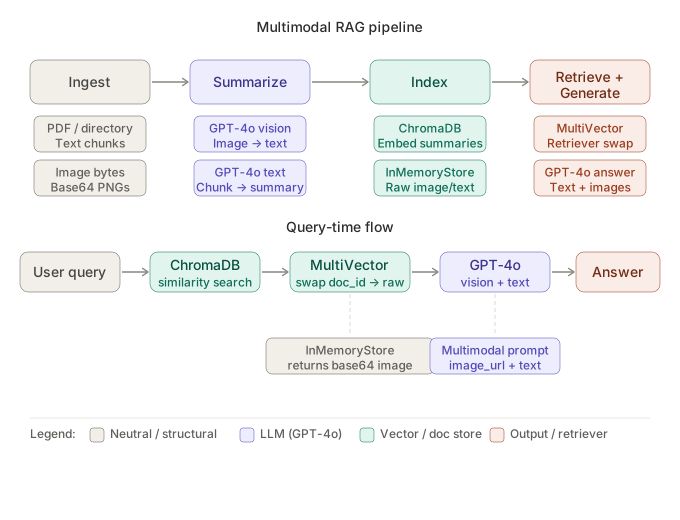 Pipeline: documents → image extraction → GPT-4o vision summary → ChromaDB embedding → MultiVectorRetriever → GPT-4o answer
The pipeline has four stages:
- Ingest — parse PDF or directory, extract text chunks and image bytes
- Summarize — pass each image to GPT-4o vision, get a text description
- Index — embed the text summary; store raw image as the
doc_idpayload in aInMemoryStore - Retrieve + Generate — query returns summaries,
MultiVectorRetrieverswaps in the raw image bytes, GPT-4o answers with full multimodal context
Solution
Step 1: Install Dependencies
Create a project directory and install with uv (faster than pip, ships with Python 3.12 lockfile support).
# Create project
mkdir multimodal-rag && cd multimodal-rag
uv init --python 3.12
uv add langchain langchain-openai langchain-chroma chromadb \
        unstructured[pdf] pillow python-dotenv openai
If you prefer pip:
pip install langchain langchain-openai langchain-chroma chromadb \
            "unstructured[pdf]" pillow python-dotenv openai --break-system-packages
Set your OpenAI key:
# .env
OPENAI_API_KEY=sk-...
Expected output: All packages installed successfully (uv) or no errors (pip).
Step 2: Extract Text and Images from a PDF
# ingest.py
import base64
import uuid
from pathlib import Path
from unstructured.partition.pdf import partition_pdf

def extract_elements(pdf_path: str) -> tuple[list, list]:
    """Return (text_chunks, image_b64_list) from a PDF."""
    raw = partition_pdf(
        filename=pdf_path,
        extract_images_in_pdf=True,          # unstructured extracts embedded images
        infer_table_structure=True,
        chunking_strategy="by_title",
        max_characters=4000,
        new_after_n_chars=3800,
        combine_text_under_n_chars=2000,
        image_output_dir_path="./figures",   # saves PNGs here
    )

    text_chunks = [str(el) for el in raw if el.category in ("NarrativeText", "Table")]
    images: list[str] = []

    for img_file in Path("./figures").glob("*.png"):
        with open(img_file, "rb") as f:
            images.append(base64.standard_b64encode(f.read()).decode("utf-8"))

    return text_chunks, images
partition_pdf with extract_images_in_pdf=True writes each embedded figure to ./figures/. We immediately encode them as base64 strings — that's the format GPT-4o vision expects, and it's what we'll store in the vector DB payload.
Step 3: Summarize Images with GPT-4o Vision
# summarize.py
from openai import OpenAI

client = OpenAI()

def summarize_image(image_b64: str) -> str:
    """Ask GPT-4o to describe an image for downstream retrieval."""
    response = client.chat.completions.create(
        model="gpt-4o",
        messages=[
            {
                "role": "user",
                "content": [
                    {
                        "type": "image_url",
                        "image_url": {"url": f"data:image/png;base64,{image_b64}"},
                    },
                    {
                        "type": "text",
                        "text": (
                            "Describe this image in detail for a retrieval system. "
                            "Include: what type of visual it is (diagram, chart, screenshot, photo), "
                            "all text labels visible, key data points or relationships shown, "
                            "and the main insight a reader would take away."
                        ),
                    },
                ],
            }
        ],
        max_tokens=500,
    )
    return response.choices[0].message.content


def summarize_text(text: str) -> str:
    """Summarize a text chunk to improve retrieval signal."""
    response = client.chat.completions.create(
        model="gpt-4o",
        messages=[
            {
                "role": "user",
                "content": f"Summarize this text for a retrieval index. Be concise and preserve key facts:\n\n{text}",
            }
        ],
        max_tokens=200,
    )
    return response.choices[0].message.content
The image summary prompt is deliberately verbose — it asks GPT-4o to name the visual type, transcribe labels, and extract the key insight. Richer summaries mean better cosine similarity matches at query time.
Step 4: Build the MultiVectorRetriever
This is the core of the pipeline. MultiVectorRetriever stores summaries in ChromaDB for semantic search, but returns the raw originals (full text or base64 image) from an InMemoryStore.
# retriever.py
import uuid
from langchain_chroma import Chroma
from langchain_openai import OpenAIEmbeddings
from langchain.retrievers.multi_vector import MultiVectorRetriever
from langchain.storage import InMemoryStore
from langchain_core.documents import Document

def build_retriever(
    text_chunks: list[str],
    text_summaries: list[str],
    image_b64s: list[str],
    image_summaries: list[str],
) -> MultiVectorRetriever:
    vectorstore = Chroma(
        collection_name="multimodal_rag",
        embedding_function=OpenAIEmbeddings(model="text-embedding-3-small"),
    )
    store = InMemoryStore()
    id_key = "doc_id"

    retriever = MultiVectorRetriever(
        vectorstore=vectorstore,
        docstore=store,
        id_key=id_key,
    )

    # --- index text chunks ---
    text_ids = [str(uuid.uuid4()) for _ in text_chunks]
    summary_docs = [
        Document(page_content=summary, metadata={id_key: doc_id})
        for summary, doc_id in zip(text_summaries, text_ids)
    ]
    retriever.vectorstore.add_documents(summary_docs)
    retriever.docstore.mset(list(zip(text_ids, text_chunks)))

    # --- index images ---
    image_ids = [str(uuid.uuid4()) for _ in image_b64s]
    image_summary_docs = [
        Document(page_content=summary, metadata={id_key: doc_id})
        for summary, doc_id in zip(image_summaries, image_ids)
    ]
    retriever.vectorstore.add_documents(image_summary_docs)
    # store raw base64 so the retriever can pass the image directly to GPT-4o
    retriever.docstore.mset(list(zip(image_ids, image_b64s)))

    return retriever
Key design decision: the docstore stores raw base64 for images. When the retriever fires, it pulls the summary's doc_id, looks up the docstore, and returns the original — which is either a text string or a base64 image.
Step 5: Query with a Multimodal Chain
# chain.py
from langchain_core.messages import HumanMessage
from langchain_openai import ChatOpenAI
from langchain_core.runnables import RunnableLambda, RunnablePassthrough
import base64

llm = ChatOpenAI(model="gpt-4o", max_tokens=1024)


def split_image_text_types(docs: list) -> dict:
    """Separate retrieved docs into images (base64) and text strings."""
    images, texts = [], []
    for doc in docs:
        # base64 strings are long and don't contain spaces
        if len(doc) > 200 and " " not in doc[:50]:
            images.append(doc)
        else:
            texts.append(doc)
    return {"images": images, "texts": texts}


def build_prompt(context: dict) -> list:
    """Build a multimodal HumanMessage combining text context and images."""
    content: list = []

    if context["context"]["texts"]:
        joined = "\n\n".join(context["context"]["texts"])
        content.append({"type": "text", "text": f"Text context:\n{joined}"})

    for img_b64 in context["context"]["images"]:
        content.append(
            {
                "type": "image_url",
                "image_url": {"url": f"data:image/png;base64,{img_b64}"},
            }
        )

    content.append({"type": "text", "text": context["question"]})
    return [HumanMessage(content=content)]


def build_chain(retriever):
    return (
        {
            "context": retriever | RunnableLambda(split_image_text_types),
            "question": RunnablePassthrough(),
        }
        | RunnableLambda(build_prompt)
        | llm
    )
split_image_text_types uses a heuristic: base64-encoded PNGs are long strings with no spaces in the first 50 characters. This separates retrieved images from text chunks before building the prompt.
Step 6: Wire Everything Together
# main.py
import os
from dotenv import load_dotenv
from ingest import extract_elements
from summarize import summarize_image, summarize_text
from retriever import build_retriever
from chain import build_chain

load_dotenv()

PDF_PATH = "your-document.pdf"

# 1. Extract
print("Extracting elements...")
text_chunks, image_b64s = extract_elements(PDF_PATH)
print(f"  {len(text_chunks)} text chunks, {len(image_b64s)} images")

# 2. Summarize
print("Summarizing with GPT-4o...")
text_summaries = [summarize_text(t) for t in text_chunks]
image_summaries = [summarize_image(img) for img in image_b64s]

# 3. Index
print("Building retriever...")
retriever = build_retriever(text_chunks, text_summaries, image_b64s, image_summaries)

# 4. Query
chain = build_chain(retriever)

question = "What does the system architecture diagram show?"
print(f"\nQ: {question}")
response = chain.invoke(question)
print(f"A: {response.content}")
Expected output:
Extracting elements...
  12 text chunks, 4 images
Summarizing with GPT-4o...
Building retriever...

Q: What does the system architecture diagram show?
A: The system architecture diagram shows a three-tier setup with a React frontend,
   a FastAPI backend, and a PostgreSQL database. Arrows indicate...
Verification
Run a quick smoke test against a known PDF:
uv run python main.py
To confirm images are actually being retrieved (not just text), add a debug line:
# After building the chain, inspect what the retriever returns
raw_docs = retriever.invoke("architecture diagram")
images_retrieved = [d for d in raw_docs if len(d) > 200 and " " not in d[:50]]
print(f"Images in context: {len(images_retrieved)}")  # should be > 0
You should see: Images in context: 1 or more for any query about a visual element in the document.
Retrieval Strategy Comparison
Different storage backends change cost and latency. Here's how to choose:
InMemoryStore | ChromaDB persistent | Pinecone (managed) | |
|---|---|---|---|
| Best for | Prototyping, < 1k docs | Self-hosted, unlimited | Production, scale |
| Image storage | Raw base64 in RAM | Metadata field (5 MB limit) | External URL reference |
| Pricing | Free | Free | Starts at $0.096/GB/month |
| Persistence | No (lost on restart) | Yes (local disk) | Yes (cloud) |
| Setup | Zero config | persist_directory="./" | API key + index name |
For production with images > 5 MB, store the raw bytes in S3 or GCS and save the URL in the docstore instead of the base64 string. Retrieval fetches the URL, your application layer fetches the bytes before passing to GPT-4o.
What You Learned
- Multimodal RAG separates what gets searched (the GPT-4o summary) from what gets returned (raw base64 or full text) using
MultiVectorRetriever'sdocstore - Image summaries are the quality bottleneck — a vague summary yields poor retrieval; include visual type, labels, and key insight in the prompt
- Base64 images passed directly to GPT-4o vision work without any extra file hosting — practical for documents under ~10 images
InMemoryStoreis fine for demos; swap to a persistent store (Redis, S3, Postgresbytea) before deploying to production
Tested on Python 3.12.3, LangChain 0.3.x, ChromaDB 0.5.x, GPT-4o (2025-11-20), macOS Sequoia & Ubuntu 24.04
FAQ
Q: Does this work with local vision models instead of GPT-4o?
A: Yes — swap ChatOpenAI(model="gpt-4o") for ChatOllama(model="llava") or ChatOllama(model="llama3.2-vision"). Local models are slower and less accurate on dense diagrams but work well for simple screenshots and cost $0.
Q: What is the difference between MultiVectorRetriever and a standard VectorStoreRetriever?
A: A standard retriever returns whatever document is embedded. MultiVectorRetriever lets you embed a representation (like a summary) but return a different payload (like raw bytes). That indirection is exactly what multimodal RAG needs.
Q: How many images can I index before hitting OpenAI rate limits? A: GPT-4o vision allows 500 RPM on Tier 1 ($5 spent). A 100-page PDF with 30 images takes roughly 30 summarization calls — well within limits. Batch overnight with a 1-second sleep between calls to stay safe.
Q: Can I use this with DOCX or PowerPoint files instead of PDFs?
A: Yes. Replace partition_pdf with partition_docx or partition_pptx from unstructured. PowerPoint is especially well-suited — each slide's embedded images are extracted cleanly, and slide titles make natural chunk boundaries.
Q: What's the minimum RAM needed to run this locally? A: 8 GB RAM is enough for the Python pipeline itself. The heavy lifting (GPT-4o) is remote. If you swap to a local vision model like LLaVA 7B via Ollama, budget 8 GB VRAM (GPU) or 16 GB RAM (CPU-only, slow).