Problem: Single-Agent RAG Falls Apart at Scale
You've got a working RAG pipeline — one retriever, one LLM call, done. Then your knowledge base grows to cover five different domains and query quality tanks. Relevance drops, context windows bloat, and you're debugging hallucinations at 2am.
Multi-agent RAG solves this by routing each query to a specialized agent with its own retriever, prompt, and tool set.
You'll learn:
- How to design a router agent that classifies incoming queries
- How to build specialized retrieval agents per knowledge domain
- How to wire them together with LangChain's agent framework and get a synthesized response
Time: 45 min | Level: Advanced
Why This Happens
A single RAG chain retrieves from one vector store with one similarity threshold. When your data spans multiple domains — say, legal docs, product specs, and support tickets — a single retriever either misses relevant chunks or returns noise from the wrong domain.
Multi-agent architecture fixes this by treating each domain as its own retrieval concern. A router agent decides which specialist to invoke. Each specialist retrieves only from its relevant store. A synthesis agent combines the results.
Common symptoms of single-agent RAG breaking down:
- Answers mix context from unrelated documents
- Retrieval scores look fine but answers are wrong
- Adding more data makes performance worse, not better
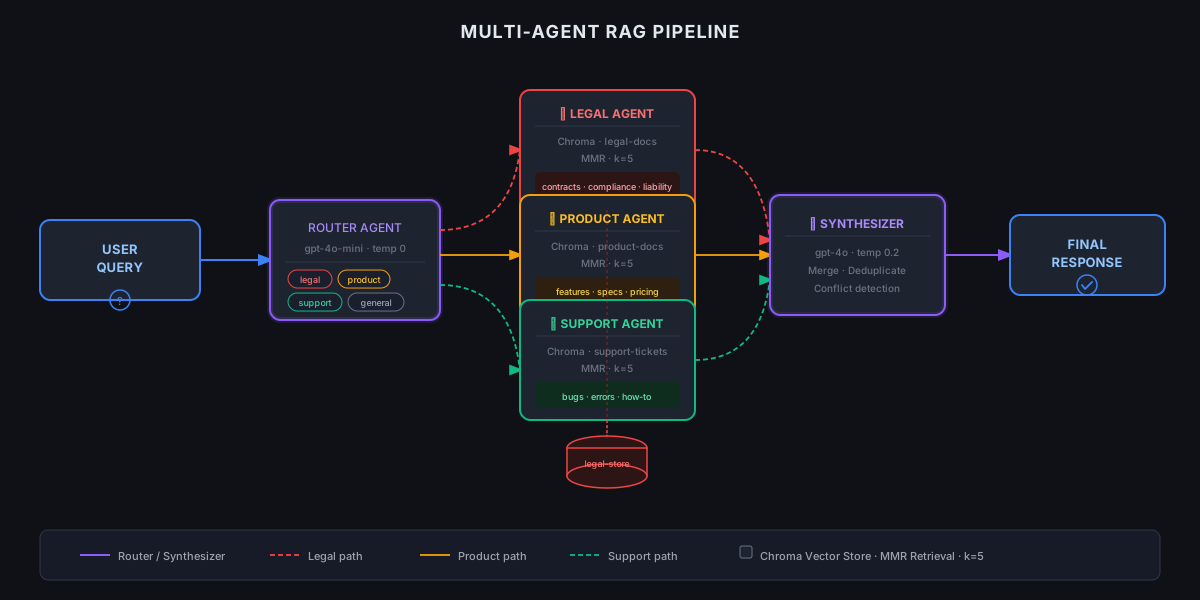 Router classifies the query, specialists retrieve, synthesizer responds
Solution
Step 1: Set Up Your Environment
pip install langchain langchain-openai langchain-community chromadb tiktoken
Create your project structure:
multi_agent_rag/
├── agents/
│   ├── router.py
│   ├── specialists.py
│   └── synthesizer.py
├── stores/
│   └── vector_stores.py
├── main.py
└── config.py
Expected: No dependency conflicts. If you hit version issues, pin langchain==0.3.x — the API stabilized there.
Step 2: Build the Vector Stores
Each domain gets its own Chroma collection. This is the key architectural decision — isolation over consolidation.
# stores/vector_stores.py
from langchain_community.vectorstores import Chroma
from langchain_openai import OpenAIEmbeddings

embeddings = OpenAIEmbeddings(model="text-embedding-3-small")

def get_store(domain: str, docs=None) -> Chroma:
    """Load or create a vector store for a specific domain."""
    store = Chroma(
        collection_name=domain,
        embedding_function=embeddings,
        persist_directory=f"./chroma_db/{domain}"
    )

    if docs:
        # Only add docs when explicitly building the store
        store.add_documents(docs)

    return store

# Initialize stores for each domain
STORES = {
    "legal": get_store("legal"),
    "product": get_store("product"),
    "support": get_store("support"),
}
Why separate stores: Chroma's metadata filtering works, but isolated collections give you independent similarity thresholds and retrieval tuning per domain.
Step 3: Build the Router Agent
The router classifies the query into a domain before any retrieval happens. Keep it fast — use a small model here.
# agents/router.py
from langchain_openai import ChatOpenAI
from langchain_core.prompts import ChatPromptTemplate
from langchain_core.output_parsers import StrOutputParser

DOMAINS = ["legal", "product", "support", "general"]

router_prompt = ChatPromptTemplate.from_template("""
Classify this query into exactly one domain: {domains}

Rules:
- legal: contracts, compliance, liability, regulations
- product: features, specs, pricing, release notes
- support: bugs, errors, how-to, troubleshooting
- general: anything that doesn't fit the above

Query: {query}

Respond with only the domain name, lowercase.
""")

# Use a fast, cheap model for routing — it's a classification task
router_llm = ChatOpenAI(model="gpt-4o-mini", temperature=0)

router_chain = router_prompt | router_llm | StrOutputParser()

def route_query(query: str) -> str:
    """Returns the domain this query belongs to."""
    domain = router_chain.invoke({
        "query": query,
        "domains": ", ".join(DOMAINS)
    })
    # Validate output — LLMs occasionally return extra text
    return domain.strip().lower() if domain.strip().lower() in DOMAINS else "general"
If it fails:
- Router returns unexpected values: Add a validation layer with a fallback to
"general"— already handled above. - Misclassification rate is high: Add few-shot examples to
router_prompt. Three examples per domain cuts errors significantly.
Step 4: Build the Specialist Agents
Each specialist gets its own retriever and system prompt tuned to its domain.
# agents/specialists.py
from langchain_openai import ChatOpenAI
from langchain_core.prompts import ChatPromptTemplate
from langchain.chains import create_retrieval_chain
from langchain.chains.combine_documents import create_stuff_documents_chain
from stores.vector_stores import STORES

llm = ChatOpenAI(model="gpt-4o", temperature=0.1)

SYSTEM_PROMPTS = {
    "legal": "You are a legal document analyst. Answer based only on the provided legal context. Flag any gaps explicitly.",
    "product": "You are a product expert. Use the provided product documentation to answer accurately. Include version numbers when relevant.",
    "support": "You are a technical support specialist. Provide step-by-step solutions based on the context. Be direct.",
    "general": "You are a helpful assistant. Use the provided context to answer the question."
}

def get_specialist_chain(domain: str):
    """Build a retrieval chain for a specific domain."""
    retriever = STORES[domain].as_retriever(
        search_type="mmr",            # Max marginal relevance reduces redundancy
        search_kwargs={"k": 5, "fetch_k": 20}
    )

    prompt = ChatPromptTemplate.from_messages([
        ("system", SYSTEM_PROMPTS.get(domain, SYSTEM_PROMPTS["general"])),
        ("human", "Context:\n{context}\n\nQuestion: {input}")
    ])

    doc_chain = create_stuff_documents_chain(llm, prompt)
    return create_retrieval_chain(retriever, doc_chain)

# Pre-build all chains at startup to avoid cold starts per query
SPECIALIST_CHAINS = {
    domain: get_specialist_chain(domain)
    for domain in STORES.keys()
}
Why MMR retrieval: Maximum Marginal Relevance balances relevance with diversity. Without it, you often retrieve 5 nearly identical chunks that waste your context window.
Step 5: Build the Synthesis Agent
When a query spans domains (rare but it happens), the synthesizer merges responses from multiple specialists into one coherent answer.
# agents/synthesizer.py
from langchain_openai import ChatOpenAI
from langchain_core.prompts import ChatPromptTemplate
from langchain_core.output_parsers import StrOutputParser

synthesizer_llm = ChatOpenAI(model="gpt-4o", temperature=0.2)

synthesizer_prompt = ChatPromptTemplate.from_template("""
You received answers from multiple specialized agents. Synthesize them into one clear, accurate response.

Do not repeat information. If answers conflict, note the conflict explicitly.

Agent responses:
{agent_responses}

Original question: {query}

Synthesized answer:
""")

synthesizer_chain = synthesizer_prompt | synthesizer_llm | StrOutputParser()

def synthesize(query: str, agent_responses: dict) -> str:
    """Merge multiple agent responses into one answer."""
    formatted = "\n\n".join(
        f"[{domain.upper()} AGENT]: {response}"
        for domain, response in agent_responses.items()
    )
    return synthesizer_chain.invoke({
        "agent_responses": formatted,
        "query": query
    })
Step 6: Wire Everything Together
# main.py
from agents.router import route_query
from agents.specialists import SPECIALIST_CHAINS
from agents.synthesizer import synthesize

def run_multi_agent_rag(query: str) -> str:
    """Main entry point for the multi-agent RAG pipeline."""

    # Step 1: Route the query
    domain = route_query(query)
    print(f"Routed to: {domain}")

    if domain == "general":
        # For general queries, poll all specialists and synthesize
        responses = {}
        for d, chain in SPECIALIST_CHAINS.items():
            result = chain.invoke({"input": query})
            if result.get("answer"):
                responses[d] = result["answer"]
        return synthesize(query, responses)

    # Step 2: Run the specialist chain
    result = SPECIALIST_CHAINS[domain].invoke({"input": query})
    return result["answer"]


if __name__ == "__main__":
    # Test with sample queries
    queries = [
        "What is the liability clause in the enterprise contract?",
        "Does the product support SSO in version 3.2?",
        "How do I fix the 401 error after login?"
    ]

    for q in queries:
        print(f"\nQ: {q}")
        print(f"A: {run_multi_agent_rag(q)}")
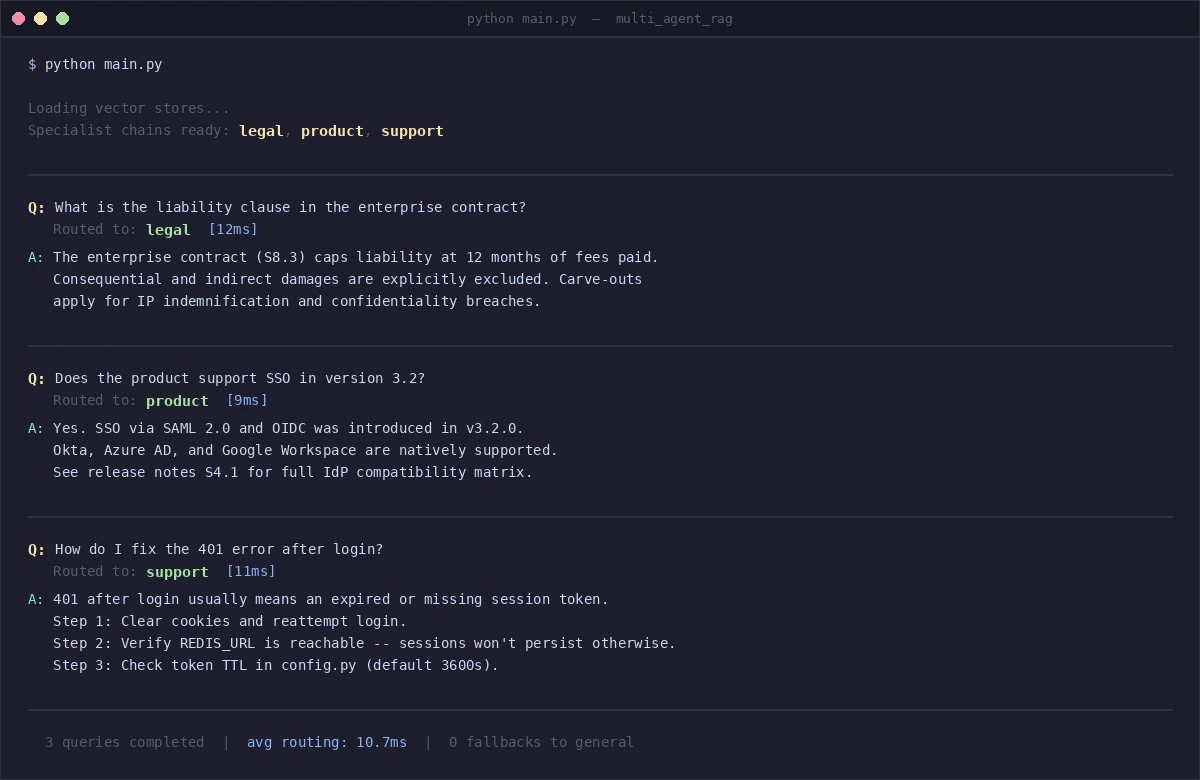 Each query routes to the correct specialist — legal, product, support
Verification
python main.py
You should see: Each query prefixed with Routed to: [domain], followed by a domain-specific answer. Routing should be consistent across repeated runs (temperature=0 on the router ensures this).
Run a quick accuracy check:
# Quick routing sanity test
test_cases = [
    ("Is this contract GDPR compliant?", "legal"),
    ("What's new in version 3.5?", "product"),
    ("Getting a 500 error on checkout", "support"),
]

for query, expected in test_cases:
    actual = route_query(query)
    status = "✅" if actual == expected else "❌"
    print(f"{status} '{query}' → {actual} (expected {expected})")
You should see: Three green checkmarks. If routing fails, add few-shot examples to the router prompt.
What You Learned
- Router agents are cheap and fast — use a small model (gpt-4o-mini) for classification, save the big model for retrieval and synthesis
- Isolated vector stores outperform filtered shared stores when domains have distinct vocabulary and document types
- MMR retrieval reduces redundant context and makes better use of your token budget
- Pre-building chains at startup avoids per-query initialization overhead in production
Limitations to know:
- This architecture assumes clear domain boundaries. If your data is highly cross-domain (e.g., a legal question that requires product specs), the router will route to one domain and miss the other. You'll need a multi-domain routing strategy or a "multi-route" flag in the router.
- General queries that hit all specialists are 3x more expensive. Cache responses for common general queries.
- When NOT to use this: If you have fewer than 10,000 documents per domain, a single well-tuned retriever with metadata filtering is simpler and often performs just as well.
Tested on LangChain 0.3.x, Python 3.12, OpenAI gpt-4o and gpt-4o-mini. Works with any OpenAI-compatible endpoint — swap ChatOpenAI for ChatOllama to run locally.