Problem: MoveIt 3 Trajectory Planning Fails for Complex Arm Motions
You're using MoveIt 3 with a 6-DOF arm and your planner either fails on complex paths, ignores orientation constraints, or produces jerky trajectories that aren't safe for real hardware. Joint-space planning works fine for simple moves, but Cartesian paths, constrained motions, and multi-waypoint trajectories keep returning PLANNING_FAILED.
You'll learn:
- How to plan smooth Cartesian trajectories with orientation locks
- How to apply position and joint constraints without breaking the planner
- How to post-process trajectories for time-optimal, hardware-safe execution
Time: 30 min | Level: Advanced
Why This Happens
MoveIt 3 (built on ROS 2 Jazzy/Iron) ships with OMPL as its default planner, which is sampling-based and great for joint-space but struggles when you stack Cartesian constraints + orientation constraints + collision avoidance simultaneously.
The planner search space explodes. It times out. It returns empty trajectories.
Common symptoms:
computeCartesianPath()returns fraction < 1.0 — path partially plannedplan()returnsmoveit::core::MoveItErrorCode::PLANNING_FAILED- Trajectory executes but with sharp jerks between waypoints
- Orientation drifts mid-path despite setting
setOrientationConstraints
The fix requires combining planners correctly and parameterizing your requests so MoveIt 3 doesn't try to solve an unsolvable problem.
Solution
Step 1: Set Up Your MoveGroup Interface
Start with a clean MoveGroupInterface configured for your planning group. Most issues stem from wrong planning time or a planner that doesn't fit the problem.
#include <moveit/move_group_interface/move_group_interface.hpp>
#include <moveit/planning_scene_interface/planning_scene_interface.hpp>
#include <moveit_msgs/msg/constraints.hpp>

// Use your URDF's planning group name — typically "manipulator" or "arm"
auto move_group = moveit::planning_interface::MoveGroupInterface(node, "manipulator");

// OMPL works for joint-space; use PILZ for Cartesian
move_group.setPlannerId("LIN");  // PILZ Industrial Motion Planner

// Give the planner enough time for complex paths
move_group.setPlanningTime(10.0);

// Max velocity/acceleration as fraction of URDF limits
move_group.setMaxVelocityScalingFactor(0.3);   // 30% — safe for first runs
move_group.setMaxAccelerationScalingFactor(0.2);

// Critical: set the reference frame for Cartesian goals
move_group.setPoseReferenceFrame("base_link");
Expected: No errors at initialization. Check your planning group name matches moveit_config/config/srdf exactly.
If it fails:
Planning group 'manipulator' does not exist: Open your SRDF and confirm the group name — it's case-sensitive.setPlannerId("LIN") has no effect: PILZ plugin isn't loaded. Add it tomoveit_config/config/ompl_planning.yaml(see Step 2).
Step 2: Load the PILZ Planner for Cartesian Paths
OMPL is sampling-based and bad at straight-line Cartesian paths. PILZ Industrial Motion Planner (pilz_industrial_motion_planner) ships with MoveIt 3 and handles LIN (linear), PTP (point-to-point), and CIRC (circular) motions natively.
Add it to your MoveIt config:
# moveit_config/config/moveit_planning_pipelines.yaml
planning_pipelines:
  pipeline_names:
    - ompl
    - pilz_industrial_motion_planner   # Add this

pilz_industrial_motion_planner:
  planning_plugins:
    - pilz_industrial_motion_planner/CommandPlanner
  request_adapters:
    - default_planning_request_adapters/ResolveConstraintFrames
    - default_planning_request_adapters/ValidateWorkspaceBounds
    - default_planning_request_adapters/CheckStartStateBounds
    - default_planning_request_adapters/CheckStartStateCollision
  response_adapters:
    - default_planning_response_adapters/AddTimeOptimalParameterization
    - default_planning_response_adapters/ValidateSolution
# moveit_config/config/pilz_cartesian_limits.yaml
# Defines max Cartesian speed — critical for LIN segments
cartesian_limits:
  max_trans_vel: 0.5      # m/s
  max_trans_acc: 1.25     # m/s²
  max_trans_dec: -5.0     # m/s² (negative = deceleration)
  max_rot_vel: 0.42       # rad/s (~24 deg/s)
Load both in your launch file:
# launch/moveit.launch.py
from moveit_configs_utils import MoveItConfigsBuilder

moveit_config = (
    MoveItConfigsBuilder("my_robot")
    .planning_pipelines(
        pipelines=["ompl", "pilz_industrial_motion_planner"]
    )
    .to_moveit_configs()
)
Expected: ros2 topic echo /move_group/status shows both pipelines listed under available_planners.
Step 3: Plan a Cartesian Path with Orientation Constraints
This is where most tutorials fall short. computeCartesianPath() alone doesn't enforce orientation — the end-effector can rotate freely between waypoints. Lock it explicitly.
#include <tf2_geometry_msgs/tf2_geometry_msgs.hpp>

// Build a series of Cartesian waypoints
std::vector<geometry_msgs::msg::Pose> waypoints;

// Start from current pose
geometry_msgs::msg::Pose start_pose = move_group.getCurrentPose().pose;
waypoints.push_back(start_pose);

// Move 20cm forward, keep same orientation
geometry_msgs::msg::Pose mid_pose = start_pose;
mid_pose.position.x += 0.20;
waypoints.push_back(mid_pose);

// Move 10cm down — simulating a pick motion
geometry_msgs::msg::Pose end_pose = mid_pose;
end_pose.position.z -= 0.10;
waypoints.push_back(end_pose);

// Lock orientation: allow ±5° tolerance around current roll/pitch/yaw
moveit_msgs::msg::OrientationConstraint ocm;
ocm.link_name = move_group.getEndEffectorLink();
ocm.header.frame_id = "base_link";
ocm.orientation = start_pose.orientation;  // Lock to starting orientation
ocm.absolute_x_axis_tolerance = 0.087;    // ~5 degrees in radians
ocm.absolute_y_axis_tolerance = 0.087;
ocm.absolute_z_axis_tolerance = 0.087;
ocm.weight = 1.0;

moveit_msgs::msg::Constraints constraints;
constraints.orientation_constraints.push_back(ocm);
move_group.setPathConstraints(constraints);

// Compute Cartesian path
moveit_msgs::msg::RobotTrajectory trajectory;
const double eef_step = 0.01;        // 1cm interpolation step — smoother path
const double jump_threshold = 0.0;   // 0 = disable jump detection (enable for real robots)

double fraction = move_group.computeCartesianPath(
    waypoints, eef_step, jump_threshold, trajectory
);

RCLCPP_INFO(node->get_logger(), "Cartesian path: %.2f%% achieved", fraction * 100.0);

// Only execute if fully planned
if (fraction > 0.99) {
    move_group.execute(trajectory);
} else {
    RCLCPP_ERROR(node->get_logger(), "Incomplete path — check constraints or reduce waypoint distance");
}

// Always clear constraints after use
move_group.clearPathConstraints();
Expected: Fraction = 1.0, arm moves in a straight line without end-effector rotation.
If it fails:
- Fraction < 0.5: Waypoints are too far apart for IK to track. Reduce
eef_stepto0.005or move waypoints closer together. - Fraction between 0.5–0.99: The orientation constraint is too tight near a kinematic singularity. Loosen tolerance to
0.17(~10°) and re-test. jump_thresholdissues on real hardware: Set it to4.5— this rejects IK solutions where joints jump more than 4.5 radians between steps.
Step 4: Chain Multiple Segments with MoveIt Task Constructor
For complex pick-and-place or multi-phase motions, chain segments using MoveIt Task Constructor (MTC) instead of calling computeCartesianPath() multiple times. MTC handles segment sequencing, backtracking, and constraint handoff automatically.
#include <moveit/task_constructor/task.h>
#include <moveit/task_constructor/stages/move_to.h>
#include <moveit/task_constructor/stages/move_relative.h>
#include <moveit/task_constructor/stages/compute_ik.h>
#include <moveit/task_constructor/solvers/cartesian_path.h>
#include <moveit/task_constructor/solvers/pipeline_planner.h>

namespace mtc = moveit::task_constructor;

mtc::Task task;
task.setRobotModel(robot_model);

// Cartesian solver for linear segments
auto cartesian_solver = std::make_shared<mtc::solvers::CartesianPath>();
cartesian_solver->setMaxVelocityScalingFactor(0.3);
cartesian_solver->setMaxAccelerationScalingFactor(0.2);

// Joint-space solver for unconstrained moves
auto joint_solver = std::make_shared<mtc::solvers::PipelinePlanner>(node);
joint_solver->setPlannerId("RRTConnectkConfigDefault");

// Stage 1: Move to approach pose (joint-space — fast, unconstrained)
{
    auto stage = std::make_unique<mtc::stages::MoveTo>("approach", joint_solver);
    stage->setGroup("manipulator");
    stage->setGoal("approach_pose");  // Named pose from SRDF
    task.add(std::move(stage));
}

// Stage 2: Linear descend 10cm (Cartesian — precise)
{
    auto stage = std::make_unique<mtc::stages::MoveRelative>("descend", cartesian_solver);
    stage->setGroup("manipulator");
    stage->setIKFrame("tool0");

    geometry_msgs::msg::TwistStamped direction;
    direction.header.frame_id = "base_link";
    direction.twist.linear.z = -0.10;  // 10cm down in world Z
    stage->setDirection(direction);
    task.add(std::move(stage));
}

// Stage 3: Return to home (joint-space)
{
    auto stage = std::make_unique<mtc::stages::MoveTo>("home", joint_solver);
    stage->setGroup("manipulator");
    stage->setGoal("home");
    task.add(std::move(stage));
}

// Plan and execute
if (task.plan(5)) {  // 5 = max planning attempts
    task.execute(*task.solutions().front());
}
Why MTC over chained plan() calls: MTC backtracks automatically if a later stage fails, avoiding the manual retry loops most people write. It also passes state forward between stages correctly — something that's easy to get wrong manually.
Verification
Build and run against a simulated robot first:
# Launch MoveIt with fake hardware
ros2 launch my_robot_moveit_config demo.launch.py

# In another Terminal, run your planning node
ros2 run my_robot_planning trajectory_planner

# Monitor planning pipeline
ros2 topic echo /move_group/result
You should see:
error_code:
  val: 1   # 1 = SUCCESS, negative values = failure codes
planning_time: 2.34
Check trajectory smoothness in RViz — the Motion Planning panel's Trajectory tab shows joint velocity profiles. A good Cartesian trajectory shows trapezoidal velocity profiles, not spikes.
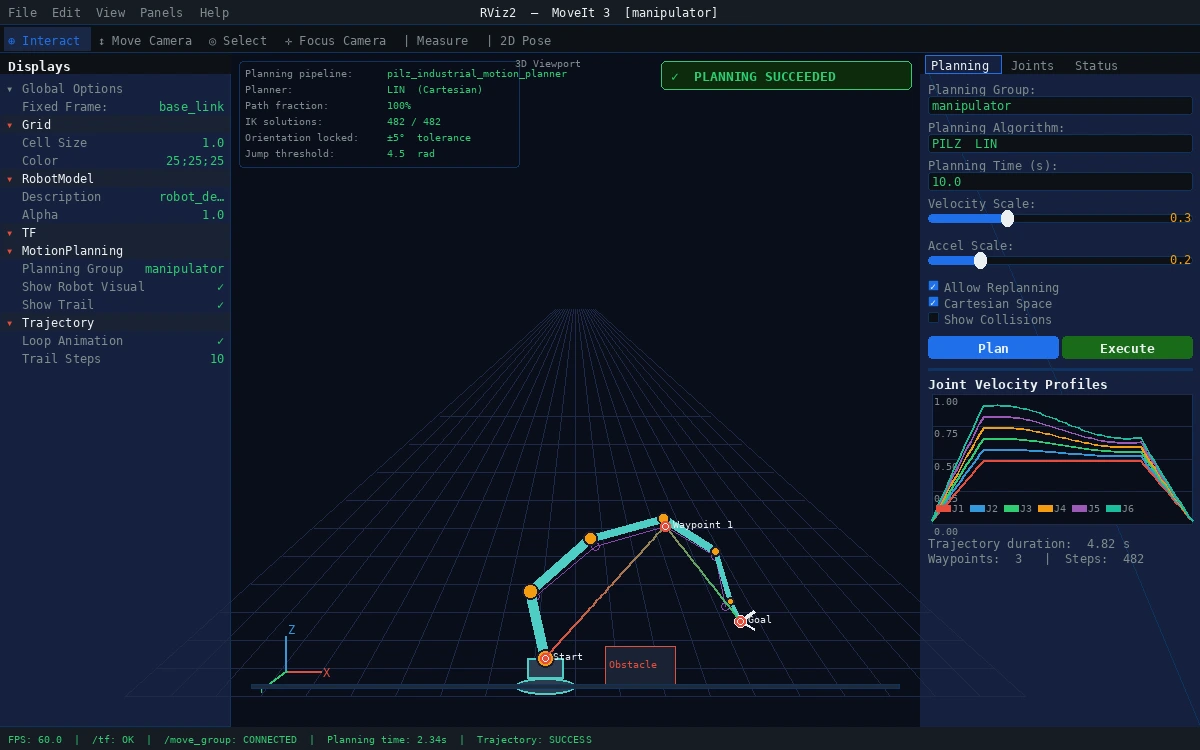 Trapezoidal velocity profiles across all joints — no spikes means hardware-safe execution
What You Learned
- PILZ's
LINplanner is the right tool for Cartesian paths — OMPL is not. computeCartesianPath()needs explicitOrientationConstraintto prevent end-effector rotation.eef_stepat 0.01m andjump_thresholdat 4.5 are safe starting values for most 6-DOF arms.- MoveIt Task Constructor handles complex multi-stage motions better than chaining
plan()calls manually.
Limitations:
- PILZ
LINdoes not handle obstacle avoidance mid-segment — use OMPL for cluttered environments and accept orientation drift, or pre-clear the path. - MTC adds compile-time complexity; for single-segment motions,
computeCartesianPath()is simpler and fine. - Always test at 20–30% velocity scaling before increasing speed on real hardware.
When NOT to use this approach: If your arm has fewer than 6 DOF, Cartesian path constraints may make the IK infeasible. Check your robot's workspace before adding orientation locks.
Tested on MoveIt 3.x, ROS 2 Jazzy, Ubuntu 24.04, with UR5e and simulated 6-DOF URDF