Problem: Your LLM Can Turn Toxic Without Warning
Your model returns fine 99% of the time. Then a user crafts a clever prompt and your app spits out hate speech, discriminatory content, or confidently biased output — live, in production, in front of real users.
Logging it after the fact isn't enough. You need to catch it as it streams.
You'll learn:
- How to add a real-time toxicity and bias detection layer between your LLM and your users
- How to use open-source classifiers without adding noticeable latency
- How to build a streaming guardrail that blocks, flags, or rewrites bad output
Time: 25 min | Level: Intermediate
Why This Happens
LLMs don't have a stable "safe mode." They're probability machines — given the right context, even well-tuned models will produce outputs that are toxic, biased toward certain demographics, or confidently wrong in harmful ways.
Common symptoms:
- Hate speech or slurs in edge-case completions
- Outputs that stereotype or demean based on race, gender, or religion
- Jailbreaks that bypass system prompt instructions
- Sentiment or advice that skews negatively toward certain user groups
Fine-tuning and RLHF reduce these — they don't eliminate them. You still need a runtime layer.
Solution
The architecture here uses a classifier running in parallel with your LLM stream. Output is buffered in sliding windows, scored, and either passed through, flagged, or blocked — all before the final token hits the client.
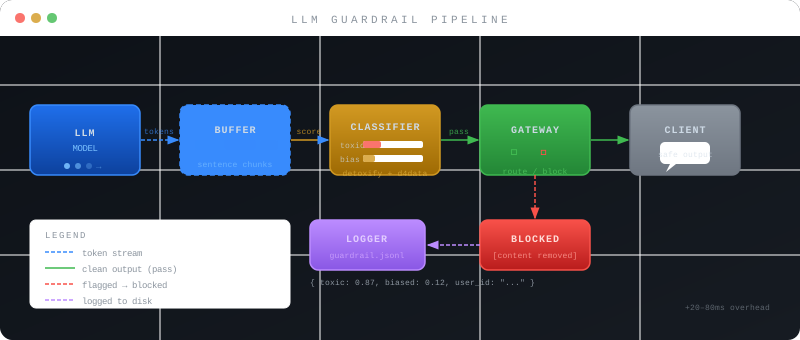 Token stream flows from LLM → buffer → classifier → gateway → client
Step 1: Install the Detection Stack
We'll use detoxify for toxicity scoring and transformers for bias classification. Both run locally — no external API calls on the hot path.
pip install detoxify transformers torch
pip install fastapi uvicorn httpx  # for the gateway
Verify GPU availability (optional but recommended for low latency):
python -c "import torch; print(torch.cuda.is_available())"
Expected: True if GPU is available, False if CPU-only. CPU works fine for < 50 req/min.
Step 2: Build the Scoring Module
# guardrail/scorer.py
from detoxify import Detoxify
from transformers import pipeline
import torch

class OutputScorer:
    def __init__(self):
        device = 0 if torch.cuda.is_available() else -1

        # Detoxify handles: toxic, severe_toxic, obscene, threat, insult, identity_hate
        self.toxicity_model = Detoxify('multilingual', device=device)

        # Bias classifier — catches demographic stereotyping
        self.bias_model = pipeline(
            "text-classification",
            model="d4data/bias-detection-model",
            device=device
        )

    def score(self, text: str) -> dict:
        if len(text.strip()) < 10:
            # Too short to classify reliably
            return {"toxic": 0.0, "biased": 0.0, "flagged": False}

        tox = self.toxicity_model.predict(text)
        bias = self.bias_model(text[:512])[0]  # Truncate to model max

        # Aggregate toxicity score — worst-case across categories
        max_toxic = max(
            tox["toxicity"],
            tox["identity_attack"],
            tox["insult"],
            tox["threat"]
        )

        bias_score = bias["score"] if bias["label"] == "Biased" else 0.0

        return {
            "toxic": round(max_toxic, 3),
            "biased": round(bias_score, 3),
            "flagged": max_toxic > 0.7 or bias_score > 0.75,
            "details": tox
        }
Why this works: Scoring each token is wasteful. Scoring complete sentences gives the models enough context to work with. The flagged threshold of 0.7 is deliberately conservative — tune it up if you're getting false positives.
Step 3: Add the Streaming Gateway
This wraps your existing LLM client. It buffers output into sentence chunks and scores each one before forwarding.
# guardrail/gateway.py
import asyncio
import re
from typing import AsyncGenerator
from .scorer import OutputScorer

scorer = OutputScorer()  # Load once at startup

SENTENCE_ENDINGS = re.compile(r'(?<=[.!?])\s+')

async def guarded_stream(
    llm_stream: AsyncGenerator[str, None],
    on_flag=None  # Optional callback: async fn(chunk, scores)
) -> AsyncGenerator[str, None]:

    buffer = ""

    async for token in llm_stream:
        buffer += token

        # Score when we have a complete sentence
        sentences = SENTENCE_ENDINGS.split(buffer)

        # Keep the last incomplete fragment in the buffer
        if len(sentences) > 1:
            to_score = " ".join(sentences[:-1])
            buffer = sentences[-1]

            scores = scorer.score(to_score)

            if scores["flagged"]:
                if on_flag:
                    await on_flag(to_score, scores)
                # Block the flagged chunk — yield nothing
                # You can also yield a placeholder: "[Content removed]"
                continue

            yield to_score + " "

    # Flush remaining buffer
    if buffer.strip():
        scores = scorer.score(buffer)
        if not scores["flagged"]:
            yield buffer
Expected: Flagged sentences are dropped silently. The rest of the stream continues uninterrupted.
If it fails:
- High false positive rate: Raise thresholds to
0.82+ or add a domain-specific allowlist - Latency spikes > 200ms: Run
scorer.pyon GPU, or switch todetoxify('original')(smaller model) - Stream breaks mid-word: Increase buffer before scoring — check for
\nin addition to sentence endings
Step 4: Wire Up Logging and Alerting
Silent blocking is a start, but you need visibility.
# guardrail/logger.py
import json
import time
from pathlib import Path

LOG_PATH = Path("logs/guardrail.jsonl")
LOG_PATH.parent.mkdir(exist_ok=True)

async def log_flag(chunk: str, scores: dict, user_id: str = "anonymous"):
    entry = {
        "ts": time.time(),
        "user_id": user_id,
        "chunk": chunk[:200],  # Truncate PII risk
        "toxic": scores["toxic"],
        "biased": scores["biased"],
        "details": scores.get("details", {})
    }
    with open(LOG_PATH, "a") as f:
        f.write(json.dumps(entry) + "\n")
Pipe guardrail.jsonl into your existing log aggregator (Datadog, Loki, CloudWatch). Set an alert if toxic > 0.9 events exceed 5 per hour — that's a signal someone is actively probing your system.
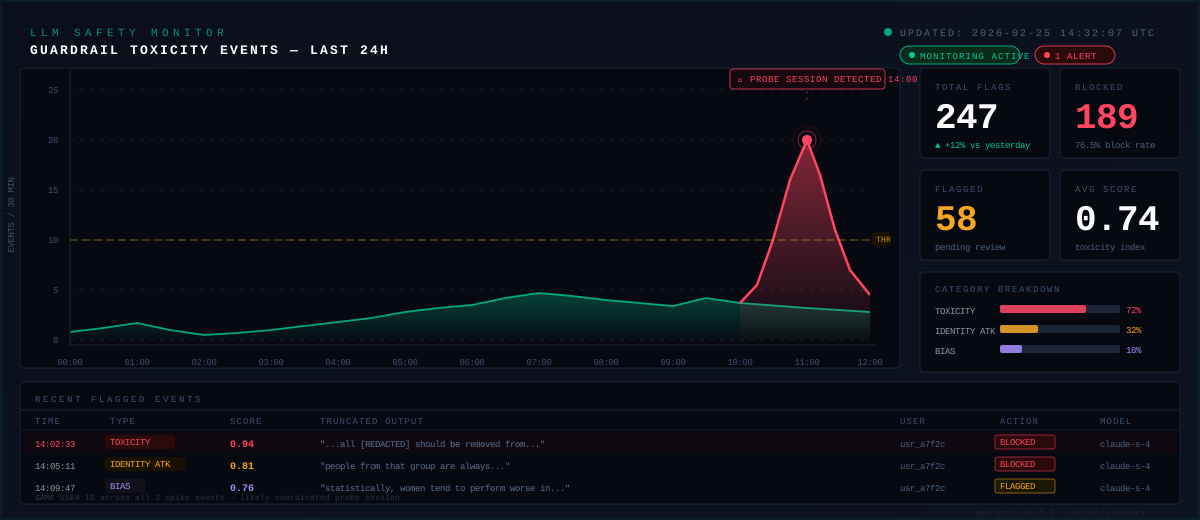 Flagged events over 24 hours — the spike at 14:00 shows an active probing session
Step 5: Add Demographic Bias Auditing (Offline)
Real-time scoring catches acute toxicity. Demographic bias is subtler — you need periodic offline analysis across your full output corpus.
# scripts/bias_audit.py
import json
from pathlib import Path
from guardrail.scorer import OutputScorer

scorer = OutputScorer()

def audit_logs(log_path: str, sample_size: int = 500):
    entries = []
    with open(log_path) as f:
        for line in f:
            entries.append(json.loads(line))

    # Sample recent non-flagged output for bias patterns
    sample = entries[-sample_size:]
    bias_scores = [scorer.score(e["chunk"])["biased"] for e in sample]

    avg_bias = sum(bias_scores) / len(bias_scores)
    high_bias = [s for s in bias_scores if s > 0.5]

    print(f"Avg bias score: {avg_bias:.3f}")
    print(f"High-bias outputs (>0.5): {len(high_bias)} / {len(sample)}")

    if avg_bias > 0.15:
        print("⚠️  Average bias elevated — review prompt templates and system instructions")

    return avg_bias, high_bias
Run this weekly via cron. If average bias trends up, your system prompt or few-shot examples may be the source — not just edge-case user inputs.
Verification
# Run a quick smoke test
python -c "
from guardrail.scorer import OutputScorer
s = OutputScorer()
print(s.score('I hate all people from that country'))
print(s.score('Here is how to bake a chocolate cake'))
"
You should see:
- First call:
flagged: True,toxic> 0.7 - Second call:
flagged: False, scores near 0.0
# Test the streaming gateway
python -m pytest tests/test_gateway.py -v
What You Learned
- A sentence-buffered streaming guardrail adds 20–80ms latency overhead — acceptable for most chat UIs
detoxifycovers acute toxicity well; demographic bias needs a second model liked4data/bias-detection-model- Thresholds matter more than model choice — start conservative, tune based on your domain
- Real-time blocking + offline auditing cover different threat surfaces — you need both
Limitation: These classifiers are English-first. Multilingual content needs detoxify('multilingual') and separate bias models per language. Coverage drops significantly for low-resource languages.
When NOT to use this: If you're running a medical, legal, or crisis support application, this layer is necessary but not sufficient. You'll also need human review queues and domain-specific classifiers.
Tested on Python 3.12, PyTorch 2.3, detoxify 0.5.2, transformers 4.40. Works with any async LLM client (OpenAI, Anthropic, local via Ollama).