Problem: Midjourney v7 Has an API — Here's How to Actually Use It
Midjourney v7 ships with an official REST API, but the async job model trips up most developers the first time. You submit a prompt, get a job ID back, and then have to poll for the result — nothing arrives in a single response.
You'll learn:
- How to submit image generation jobs to the Midjourney v7 API
- How to poll job status without hammering the endpoint
- How to display results cleanly in a React 19 component with proper loading states
Time: 25 min | Level: Intermediate
Why This Happens
Midjourney's image generation takes 10–60 seconds depending on resolution and queue load. A synchronous HTTP request would time out. Instead, the API uses a two-step pattern: submit a job, receive a job_id, then poll /jobs/{job_id} until status is "complete".
Most React tutorials skip the polling logic and leave you with a broken loading state or a maxed-out rate limit.
Common symptoms:
fetchresolves immediately with{ status: "pending" }— no image yet- Polling too aggressively and hitting 429 rate limit errors
- No way to cancel an in-flight job when the component unmounts
 A clean prompt input and image display — what we're building
Solution
Step 1: Set Up Your API Credentials
Midjourney v7 API keys live in your account dashboard. Never expose them client-side — proxy all requests through your own backend.
Create a minimal Express proxy (or a Next.js API route):
// api/imagine.ts (Next.js App Router)
import { NextRequest, NextResponse } from 'next/server';

const MJ_API_BASE = 'https://api.midjourney.com/v1';
const MJ_API_KEY = process.env.MIDJOURNEY_API_KEY!; // Server-side only

export async function POST(req: NextRequest) {
  const { prompt, aspect_ratio = '1:1' } = await req.json();

  const response = await fetch(`${MJ_API_BASE}/imagine`, {
    method: 'POST',
    headers: {
      'Authorization': `Bearer ${MJ_API_KEY}`,
      'Content-Type': 'application/json',
    },
    body: JSON.stringify({
      prompt,
      aspect_ratio,
      model: 'v7',           // Explicitly request v7
      quality: 'standard',   // "standard" | "high" — high costs 2x
    }),
  });

  const data = await response.json();
  return NextResponse.json(data);
}
Expected: Your route returns { job_id: "abc123", status: "pending" }.
If it fails:
- 401 Unauthorized: Check
MIDJOURNEY_API_KEYis set in.env.local, not.env - 422 Unprocessable: Your prompt hit a content filter — simplify it
Step 2: Build the Polling Hook
This is the critical part. Use setInterval inside a useEffect, and always clean up on unmount to avoid state updates on dead components.
// hooks/useMidjourneyJob.ts
import { useState, useEffect, useRef, useCallback } from 'react';

type JobStatus = 'idle' | 'pending' | 'processing' | 'complete' | 'failed';

interface JobState {
  status: JobStatus;
  imageUrl: string | null;
  error: string | null;
  jobId: string | null;
}

export function useMidjourneyJob() {
  const [state, setState] = useState<JobState>({
    status: 'idle',
    imageUrl: null,
    error: null,
    jobId: null,
  });

  // Ref holds the interval so cleanup always targets the right one
  const intervalRef = useRef<ReturnType<typeof setInterval> | null>(null);
  const isMountedRef = useRef(true);

  useEffect(() => {
    isMountedRef.current = true;
    return () => {
      // Clean up polling when component unmounts
      isMountedRef.current = false;
      if (intervalRef.current) clearInterval(intervalRef.current);
    };
  }, []);

  const pollJob = useCallback((jobId: string) => {
    // Poll every 3 seconds — respects rate limits
    intervalRef.current = setInterval(async () => {
      try {
        const res = await fetch(`/api/jobs/${jobId}`);
        const data = await res.json();

        if (!isMountedRef.current) return;

        if (data.status === 'complete') {
          clearInterval(intervalRef.current!);
          setState({ status: 'complete', imageUrl: data.image_url, error: null, jobId });
        } else if (data.status === 'failed') {
          clearInterval(intervalRef.current!);
          setState({ status: 'failed', imageUrl: null, error: data.error ?? 'Generation failed', jobId });
        }
        // 'pending' and 'processing' — keep polling
      } catch (err) {
        if (!isMountedRef.current) return;
        clearInterval(intervalRef.current!);
        setState(prev => ({ ...prev, status: 'failed', error: 'Network error while polling' }));
      }
    }, 3000); // 3s interval keeps you well under rate limits
  }, []);

  const generate = useCallback(async (prompt: string, aspect_ratio = '1:1') => {
    // Cancel any existing poll
    if (intervalRef.current) clearInterval(intervalRef.current);
    setState({ status: 'pending', imageUrl: null, error: null, jobId: null });

    try {
      const res = await fetch('/api/imagine', {
        method: 'POST',
        headers: { 'Content-Type': 'application/json' },
        body: JSON.stringify({ prompt, aspect_ratio }),
      });
      const data = await res.json();

      if (!isMountedRef.current) return;

      if (!data.job_id) throw new Error(data.message ?? 'No job ID returned');

      setState(prev => ({ ...prev, jobId: data.job_id, status: 'processing' }));
      pollJob(data.job_id);
    } catch (err: any) {
      if (!isMountedRef.current) return;
      setState({ status: 'failed', imageUrl: null, error: err.message, jobId: null });
    }
  }, [pollJob]);

  return { ...state, generate };
}
Why 3 seconds? Midjourney's rate limit is 60 requests/minute per key. At 3s intervals, you use at most 20 poll requests per job — plenty of headroom for multiple concurrent users.
Step 3: Wire Up the React Component
// components/ImageGenerator.tsx
'use client';

import { useState } from 'react';
import { useMidjourneyJob } from '@/hooks/useMidjourneyJob';

const ASPECT_OPTIONS = ['1:1', '16:9', '4:3', '9:16'] as const;
type AspectRatio = typeof ASPECT_OPTIONS[number];

export default function ImageGenerator() {
  const [prompt, setPrompt] = useState('');
  const [aspect, setAspect] = useState<AspectRatio>('1:1');
  const { status, imageUrl, error, generate } = useMidjourneyJob();

  const isLoading = status === 'pending' || status === 'processing';

  const handleSubmit = (e: React.FormEvent) => {
    e.preventDefault();
    if (!prompt.trim() || isLoading) return;
    generate(prompt.trim(), aspect);
  };

  return (
    <div className="max-w-2xl mx-auto p-6">
      <form onSubmit={handleSubmit} className="space-y-4">
        <textarea
          value={prompt}
          onChange={e => setPrompt(e.target.value)}
          placeholder="A photorealistic mountain landscape at golden hour..."
          className="w-full rounded-lg border p-3 text-sm resize-none h-24"
          disabled={isLoading}
        />

        <div className="flex gap-3 items-center">
          <select
            value={aspect}
            onChange={e => setAspect(e.target.value as AspectRatio)}
            className="rounded border px-3 py-2 text-sm"
            disabled={isLoading}
          >
            {ASPECT_OPTIONS.map(r => (
              <option key={r} value={r}>{r}</option>
            ))}
          </select>

          <button
            type="submit"
            disabled={isLoading || !prompt.trim()}
            className="flex-1 bg-indigo-600 text-white rounded-lg py-2 text-sm font-medium disabled:opacity-50"
          >
            {isLoading ? 'Generating…' : 'Generate'}
          </button>
        </div>
      </form>

      {/* Status indicator */}
      {isLoading && (
        <div className="mt-6 flex items-center gap-2 text-sm text-gray-500">
          <span className="animate-spin">⟳</span>
          {status === 'pending' ? 'Submitting job…' : 'Generating image (this takes ~20s)…'}
        </div>
      )}

      {/* Error state */}
      {status === 'failed' && error && (
        <div className="mt-6 rounded-lg bg-red-50 border border-red-200 p-4 text-sm text-red-700">
          {error}
        </div>
      )}

      {/* Result */}
      {status === 'complete' && imageUrl && (
        <div className="mt-6">
          <img
            src={imageUrl}
            alt={prompt}
            className="w-full rounded-xl shadow-lg"
            loading="lazy"
          />
          <p className="mt-2 text-xs text-gray-400 text-center">{prompt}</p>
        </div>
      )}
    </div>
  );
}
Expected: A textarea + aspect ratio selector. After submit, you see "Generating image…" for 15–40 seconds, then the image appears.
If it fails:
- Image never appears: Add
console.log(data)in your poll handler to see what status the API returns - 429 Too Many Requests: Increase poll interval to
5000ms
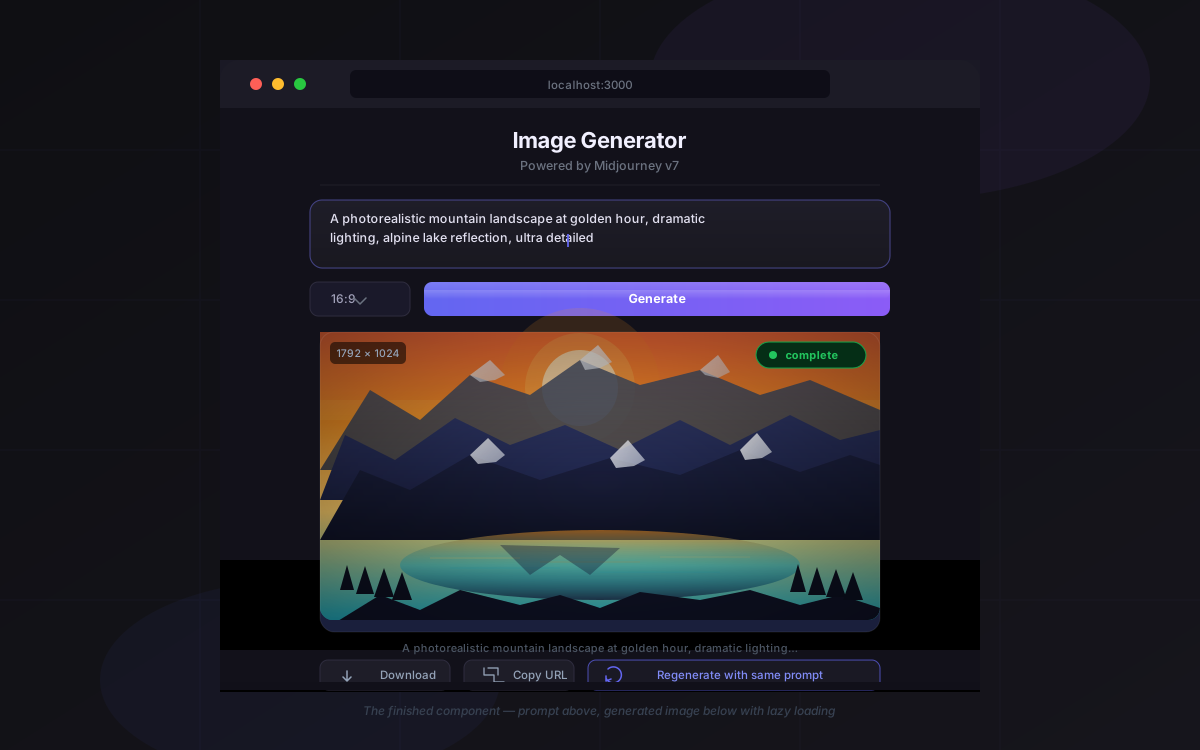 The finished component — prompt above, generated image below with lazy loading
Step 4: Add the Job Status Proxy Route
// api/jobs/[jobId]/route.ts
import { NextRequest, NextResponse } from 'next/server';

const MJ_API_BASE = 'https://api.midjourney.com/v1';
const MJ_API_KEY = process.env.MIDJOURNEY_API_KEY!;

export async function GET(
  _req: NextRequest,
  { params }: { params: { jobId: string } }
) {
  const res = await fetch(`${MJ_API_BASE}/jobs/${params.jobId}`, {
    headers: { 'Authorization': `Bearer ${MJ_API_KEY}` },
  });

  const data = await res.json();
  return NextResponse.json(data);
}
This keeps your API key server-side and gives you a clean internal endpoint at /api/jobs/:jobId.
Verification
npm run dev
Open http://localhost:3000, enter a prompt, and submit. Watch the network tab in DevTools — you should see /api/imagine return a job_id, followed by repeated calls to /api/jobs/{id} every 3 seconds until status: "complete" comes back.
You should see: The image render in your component 15–40 seconds after submit with no console errors.
 Network tab: one POST to /api/imagine, then repeated GETs to /api/jobs — clean and predictable
What You Learned
- Midjourney v7's API is async — always submit then poll, never expect a synchronous image response
- Always proxy your API key through a server route; never expose it client-side
- Clean up
setIntervalinuseEffectreturn to prevent memory leaks and state updates on unmounted components - 3-second polling intervals keep you comfortably under rate limits even with concurrent users
Limitation: This setup handles one job at a time per component instance. For a gallery with multiple concurrent generations, lift the job state up and manage a Map<jobId, JobState> at the page level.
When NOT to use this: If you're building a high-throughput production pipeline (thousands of jobs/hour), move polling to a backend queue (BullMQ, Upstash QStash) and use webhooks instead of client-side polling.
Tested on React 19.0, Next.js 15.2, TypeScript 5.7, Node.js 22.x