Problem: Your AI Agent Can't Touch Your Apps
You've built a capable AI agent. It can reason, plan, and write code — but it can't open a file, click a button, or interact with a running application. It's stuck inside the chat box.
You'll learn:
- What MCP is and why it matters for agent development
- How to expose desktop app actions as MCP tools
- How to wire up a working agent that controls a real app
Time: 25 min | Level: Intermediate
Why This Happens
LLMs are stateless text processors. They don't have hands. To interact with the world, they need a structured protocol for calling external functions — and a server that translates those calls into real actions.
That's exactly what the Model Context Protocol (MCP) is. Developed by Anthropic and released as an open standard in late 2024, MCP gives agents a consistent way to discover and invoke tools exposed by any MCP server.
Common symptoms of the problem it solves:
- Agents that can describe a workflow but can't execute it
- Custom tool glue code that breaks every time your LLM changes
- No standard way for apps to advertise what actions are available
Solution
Step 1: Understand the MCP Architecture
MCP uses a client-server model. Your agent (the MCP client) connects to one or more MCP servers. Each server exposes a list of tools — structured functions with typed inputs. The agent calls tools; the server executes them.
Agent (LLM) → MCP Client → MCP Server → Desktop App
Three transport modes exist: stdio (subprocess), SSE (HTTP/EventSource), and WebSocket. For local desktop control, stdio is the simplest.
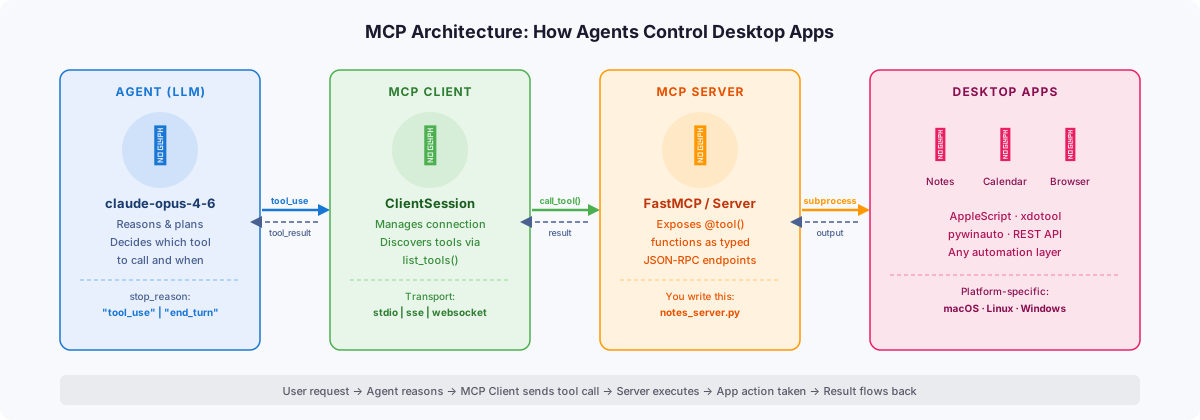 Agent, MCP server, and desktop app as distinct layers — the server is the bridge
Step 2: Install the MCP SDK
pip install mcp
The Python SDK gives you everything needed to build both MCP servers (expose tools) and clients (call them).
Expected: No errors, and mcp --version prints a version string.
Step 3: Build a Simple MCP Server
Here's a minimal server that exposes two tools to control a hypothetical notes app.
# notes_server.py
import subprocess
from mcp.server.fastmcp import FastMCP

mcp = FastMCP("Notes App Controller")

@mcp.tool()
def open_note(title: str) -> str:
    """Open a note by title in the Notes app."""
    # On macOS — swap for your platform's approach
    subprocess.run([
        "osascript", "-e",
        f'tell application "Notes" to show note "{title}"'
    ])
    return f"Opened note: {title}"

@mcp.tool()
def create_note(title: str, body: str) -> str:
    """Create a new note with the given title and body."""
    script = f'''
    tell application "Notes"
        make new note with properties {{name:"{title}", body:"{body}"}}
    end tell
    '''
    subprocess.run(["osascript", "-e", script])
    return f"Created note: {title}"

if __name__ == "__main__":
    # stdio transport — agent launches this as a subprocess
    mcp.run(transport="stdio")
Why FastMCP: It handles tool schema generation from your type hints automatically. No manual JSON schema writing.
Step 4: Connect an Agent to the Server
# agent.py
import asyncio
import anthropic
from mcp import ClientSession, StdioServerParameters
from mcp.client.stdio import stdio_client

async def run_agent(user_request: str):
    server_params = StdioServerParameters(
        command="python",
        args=["notes_server.py"]
    )

    async with stdio_client(server_params) as (read, write):
        async with ClientSession(read, write) as session:
            await session.initialize()

            # Fetch the tool list the server exposes
            tools_result = await session.list_tools()
            tools = [
                {
                    "name": t.name,
                    "description": t.description,
                    "input_schema": t.inputSchema
                }
                for t in tools_result.tools
            ]

            client = anthropic.Anthropic()
            messages = [{"role": "user", "content": user_request}]

            # Agentic loop — keep going until no more tool calls
            while True:
                response = client.messages.create(
                    model="claude-opus-4-6",
                    max_tokens=1024,
                    tools=tools,
                    messages=messages
                )

                if response.stop_reason == "end_turn":
                    # Agent is done — print final response
                    for block in response.content:
                        if hasattr(block, "text"):
                            print(block.text)
                    break

                # Process tool calls
                messages.append({"role": "assistant", "content": response.content})
                tool_results = []

                for block in response.content:
                    if block.type == "tool_use":
                        result = await session.call_tool(block.name, block.input)
                        tool_results.append({
                            "type": "tool_result",
                            "tool_use_id": block.id,
                            "content": result.content[0].text
                        })

                messages.append({"role": "user", "content": tool_results})

asyncio.run(run_agent("Create a note called 'Meeting Notes' with the body 'Discuss Q1 roadmap'"))
What the loop does: After each LLM response, it checks if there are tool calls. If yes, it executes them and feeds the results back. Repeat until stop_reason == "end_turn".
 Each iteration shows the tool called and the result — the agent sees this as context
Step 5: Run It
python agent.py
You should see:
Created note: Meeting Notes
Done! I've created the note "Meeting Notes" with the Q1 roadmap discussion body.
If it fails:
ModuleNotFoundError: mcp: Runpip install mcpagain, confirm your venv is activeFileNotFoundError: osascript: You're not on macOS — replace the subprocess call with your platform's automation API (xdotool on Linux, pywinauto on Windows)- Server hangs: Check that
notes_server.pyusestransport="stdio", not"sse"
Verification
# Run a quick sanity check — list what tools the server exposes
python - <<'EOF'
import asyncio
from mcp import ClientSession, StdioServerParameters
from mcp.client.stdio import stdio_client

async def check():
    params = StdioServerParameters(command="python", args=["notes_server.py"])
    async with stdio_client(params) as (r, w):
        async with ClientSession(r, w) as s:
            await s.initialize()
            tools = await s.list_tools()
            for t in tools.tools:
                print(f"Tool: {t.name} — {t.description}")

asyncio.run(check())
EOF
You should see:
Tool: open_note — Open a note by title in the Notes app.
Tool: create_note — Create a new note with the given title and body.
Going Further: Multi-App Agents
The real power of MCP is composability. Your agent can connect to multiple servers simultaneously — one for Notes, one for Calendar, one for a browser automation server.
# Connect to multiple servers in one session
servers = [
    StdioServerParameters(command="python", args=["notes_server.py"]),
    StdioServerParameters(command="python", args=["calendar_server.py"]),
]
The agent sees all tools from all servers in a single flat list and decides which to call based on the task.
What You Learned
- MCP is a standardized protocol — not a library-specific hack — so your tools work across any compatible agent framework
- The agentic loop is explicit: you control when tool calls happen and how results feed back
FastMCPremoves boilerplate, but the underlying protocol is just JSON-RPC over your chosen transport
Limitations to know:
stdiotransport only works for local processes — usesseor WebSocket for remote servers- Tool schemas are auto-generated from type hints, but complex nested types need manual adjustment
- MCP doesn't handle authentication — add that yourself at the server layer
When NOT to use this: If you just need one-off scripting, a direct subprocess call is simpler. MCP shines when you want multiple agents or apps to share the same tools without rewiring everything.
Tested on Python 3.12, mcp 1.x, claude-opus-4-6, macOS Sequoia 15 and Ubuntu 24.04