Problem: MAVLink Packets Are Flying by and You Can't Read Them
Your drone is sending telemetry over UDP, but the raw bytes look like gibberish. You need to decode GPS coordinates, flight attitude, and battery state in real-time — without waiting for a full ground station to load.
You'll learn:
- How MAVLink 2.0 packet structure works (and why it differs from v1)
- How to open a UDP connection and parse live packets with
pymavlink - How to filter and display specific message types as a live feed
Time: 25 min | Level: Intermediate
Why This Happens
MAVLink (Micro Air Vehicle Link) is a lightweight binary serialization protocol. Autopilots like ArduPilot and PX4 stream dozens of message types per second — GLOBAL_POSITION_INT, ATTITUDE, SYS_STATUS, and more — multiplexed into a single UDP stream.
Each packet has a fixed header, a variable-length payload, and a CRC. The problem is that most developers try to parse raw sockets manually, miss the framing logic, and end up with corrupt reads.
Common symptoms:
- Partial packets decoded as garbage data
- CRC mismatch errors that drop valid messages
- Missed messages because the read buffer is too small
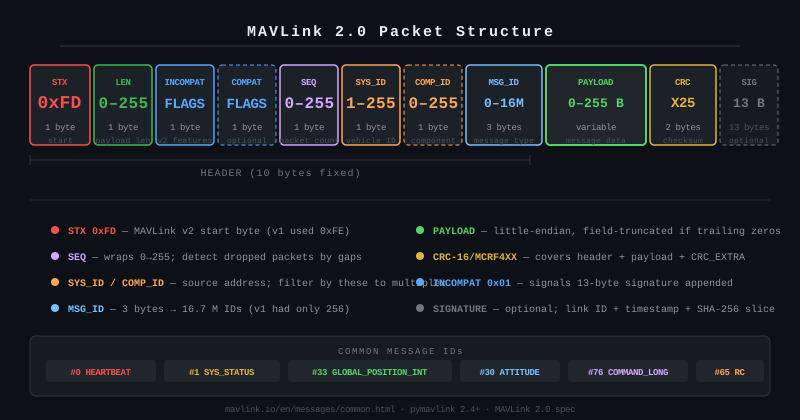 MAVLink 2.0 packet layout: STX (0xFD), length, flags, sequence, system ID, component ID, message ID (3 bytes), payload, checksum, and optional signature
Solution
Step 1: Install pymavlink
pip install pymavlink
Verify it installed correctly:
python -c "from pymavlink import mavutil; print(mavutil.mavlink.WIRE_PROTOCOL_VERSION)"
# Should print: 2.0
If it fails:
ModuleNotFoundError: Your environment may have multiple Pythons. Trypip3 install pymavlinkorpython -m pip install pymavlink.
Step 2: Open a MAVLink UDP Connection
from pymavlink import mavutil

# Connect to the drone's telemetry stream
# udpin = listen for incoming packets on this port
connection = mavutil.mavlink_connection(
    'udpin:0.0.0.0:14550',
    dialect='ardupilotmega'  # Use 'common' for PX4
)

# Wait for the first heartbeat - confirms the autopilot is talking
print("Waiting for heartbeat...")
connection.wait_heartbeat()
print(f"Connected — system {connection.target_system}, component {connection.target_component}")
Why udpin: The drone pushes telemetry to your ground station. udpin tells pymavlink to bind and listen rather than connect outward.
Expected:
Waiting for heartbeat...
Connected — system 1, component 1
If it hangs: Check that your firewall allows UDP 14550 inbound, and that the drone's SR0_* stream rate params are non-zero.
Step 3: Decode Messages in a Real-Time Loop
import time

# Message types we care about
TARGETS = {'GLOBAL_POSITION_INT', 'ATTITUDE', 'SYS_STATUS'}

print("Streaming telemetry (Ctrl+C to stop)...\n")

while True:
    msg = connection.recv_match(type=list(TARGETS), blocking=True, timeout=1)

    if msg is None:
        # Timeout hit — drone may have stopped streaming
        print("No message received in 1s")
        continue

    msg_type = msg.get_type()

    if msg_type == 'GLOBAL_POSITION_INT':
        # Lat/lon are in 1e-7 degrees — divide to get decimal degrees
        lat = msg.lat / 1e7
        lon = msg.lon / 1e7
        alt = msg.alt / 1000  # mm → meters (MSL)
        rel_alt = msg.relative_alt / 1000  # mm → meters (above home)
        print(f"[GPS]  lat={lat:.6f}  lon={lon:.6f}  alt={alt:.1f}m  rel={rel_alt:.1f}m")

    elif msg_type == 'ATTITUDE':
        import math
        # Attitude is in radians — convert to degrees for readability
        roll  = math.degrees(msg.roll)
        pitch = math.degrees(msg.pitch)
        yaw   = math.degrees(msg.yaw)
        print(f"[ATT]  roll={roll:+.1f}°  pitch={pitch:+.1f}°  yaw={yaw:.1f}°")

    elif msg_type == 'SYS_STATUS':
        # Voltage in millivolts, current in centiamperes
        voltage = msg.voltage_battery / 1000  # mV → V
        current = msg.current_battery / 100   # cA → A
        remaining = msg.battery_remaining      # % (-1 if unknown)
        print(f"[BAT]  {voltage:.2f}V  {current:.1f}A  {remaining}% remaining")

    time.sleep(0.01)  # Yield CPU — pymavlink buffers incoming packets
Why divide lat/lon by 1e7: MAVLink encodes degrees as integers multiplied by 10,000,000 to avoid floating-point in the wire format. This is documented in the MAVLink common message set.
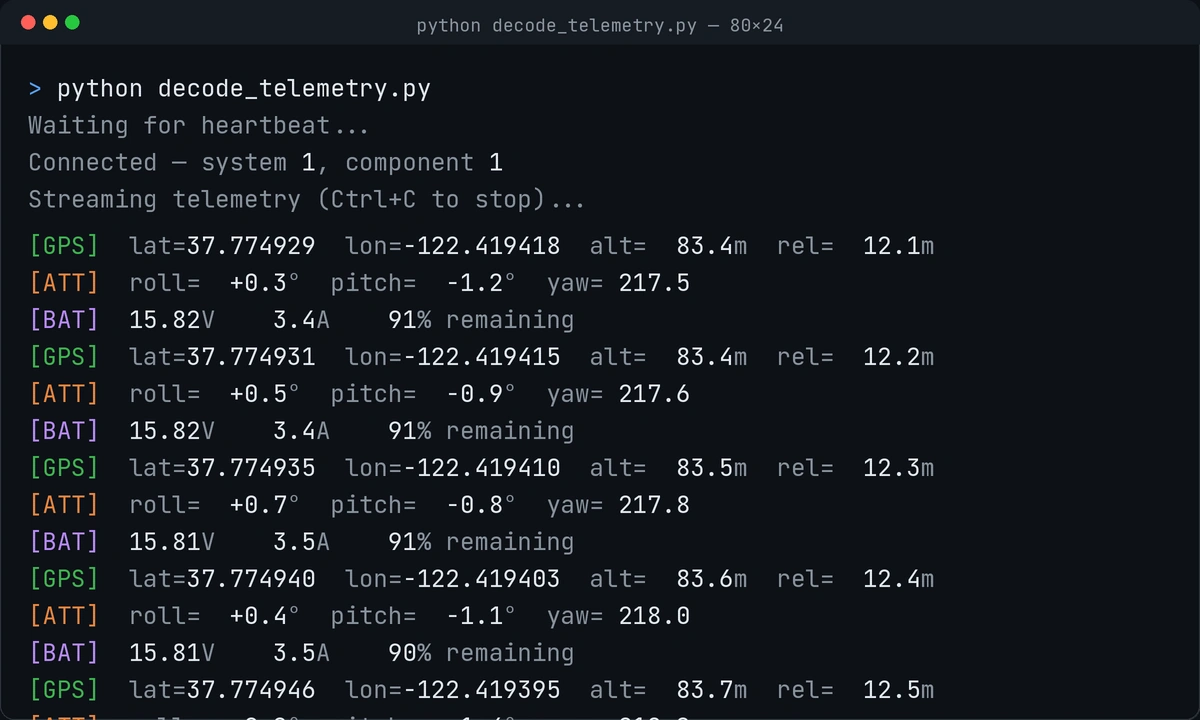 Live output: GPS, attitude, and battery messages interleaved as the drone streams them
Step 4: Log to CSV for Post-Flight Analysis
import csv, time, math
from pymavlink import mavutil

connection = mavutil.mavlink_connection('udpin:0.0.0.0:14550', dialect='ardupilotmega')
connection.wait_heartbeat()

TARGETS = ['GLOBAL_POSITION_INT', 'ATTITUDE', 'SYS_STATUS']
row = {'ts': None, 'lat': None, 'lon': None, 'alt': None,
       'roll': None, 'pitch': None, 'yaw': None,
       'voltage': None, 'current': None, 'batt_pct': None}

with open('flight_log.csv', 'w', newline='') as f:
    writer = csv.DictWriter(f, fieldnames=row.keys())
    writer.writeheader()

    while True:
        msg = connection.recv_match(type=TARGETS, blocking=True, timeout=2)
        if msg is None:
            break

        t = msg.get_type()
        row['ts'] = time.time()

        if t == 'GLOBAL_POSITION_INT':
            row['lat'] = msg.lat / 1e7
            row['lon'] = msg.lon / 1e7
            row['alt'] = msg.alt / 1000

        elif t == 'ATTITUDE':
            row['roll']  = round(math.degrees(msg.roll), 2)
            row['pitch'] = round(math.degrees(msg.pitch), 2)
            row['yaw']   = round(math.degrees(msg.yaw), 2)

        elif t == 'SYS_STATUS':
            row['voltage'] = msg.voltage_battery / 1000
            row['current'] = msg.current_battery / 100
            row['batt_pct'] = msg.battery_remaining
            writer.writerow(row)  # Write a complete row when battery data arrives
            f.flush()             # Force write to disk — important if power cuts out
Why flush after each row: If the drone's battery dies mid-flight and your script exits uncleanly, unflushed data is lost. flush() writes the buffer to disk immediately after each battery update.
Verification
Run the decoder while the drone's autopilot is live (or use a SITL simulator):
python decode_telemetry.py
You should see a stream of GPS, attitude, and battery lines updating several times per second. If only one message type appears, check that the autopilot's stream rates are configured — on ArduPilot, set SR0_POSITION, SR0_EXTRA1, and SR0_EXTRA2 to 4 (Hz) via MAVProxy or Mission Planner.
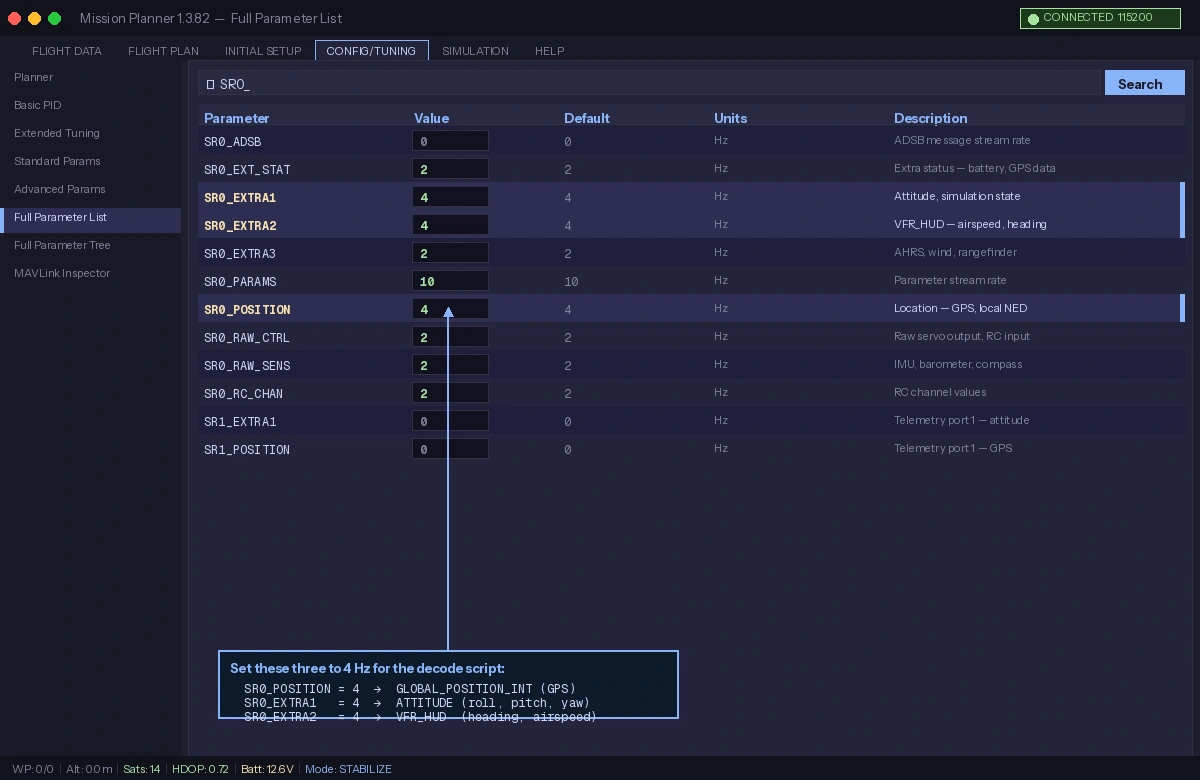 Set stream rates in Mission Planner's Full Parameter List — SR0_POSITION controls GPS frequency
What You Learned
- MAVLink 2.0 uses
0xFDas the start byte and supports 3-byte message IDs (up from 1-byte in v1), enabling 16 million possible message types pymavlinkhandles framing, CRC validation, and dialect loading — never parse raw bytes manually- Lat/lon fields are integer-encoded in units of 1e-7 degrees; always divide before using
Limitations to know: recv_match with blocking=True will block your thread. For production, run the MAVLink loop in a separate thread or use asyncio with non-blocking reads. Also, MAVLink has no built-in encryption — treat the telemetry stream as untrusted on public networks.
When NOT to use this approach: If you need to send commands (arm, takeoff, waypoints), use DroneKit-Python instead — it builds on pymavlink but adds a higher-level vehicle API that handles command acknowledgment and retries.
Tested on pymavlink 2.4.41, Python 3.12, ArduCopter 4.5 SITL and live hardware on Ubuntu 24.04