Problem: Your Game's Music Doesn't React to Gameplay
Static background tracks loop awkwardly and break immersion. Players notice when the calm exploration theme keeps playing during a boss fight.
You'll learn:
- How to set up the Lyria 3 API for real-time music generation
- How to trigger music changes based on game state
- How to crossfade between generated segments without audio glitches
Time: 25 min | Level: Intermediate
Why This Happens
Traditional game audio uses pre-recorded loops. They're easy to implement but can't respond to dynamic game states without complex branching logic and large audio budgets.
Lyria 3 (released late 2025) generates music segments on-the-fly from text prompts and audio continuations. This means you can describe "tense dungeon combat with fast drums" and get a unique, seamless segment every time.
Common symptoms this solves:
- Music loops feel repetitive after 2-3 minutes
- Jarring cuts when transitioning between game states
- High storage cost for a full adaptive soundtrack
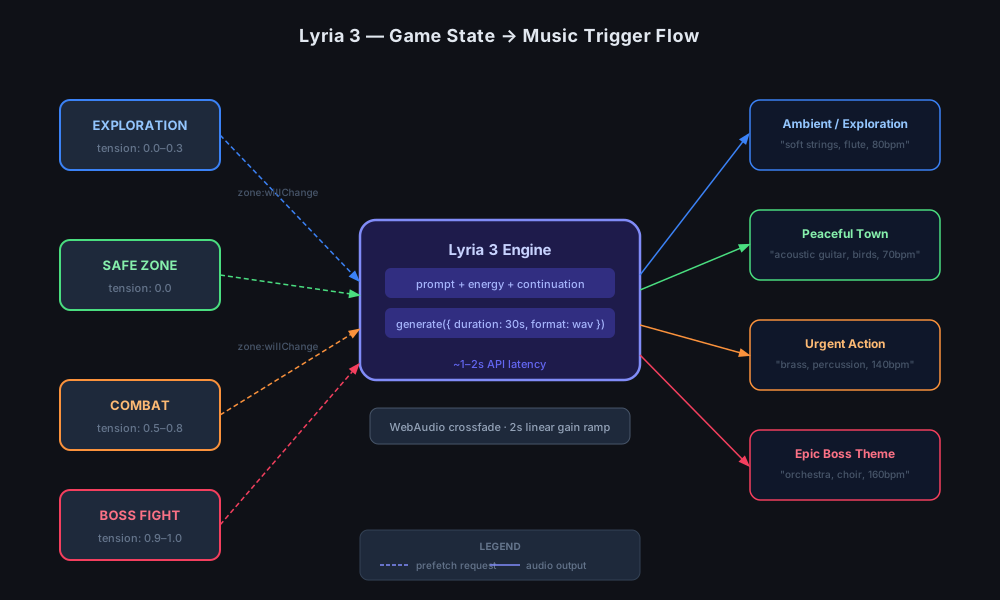 Game states map directly to Lyria 3 prompt parameters
Solution
Step 1: Install the Lyria 3 SDK
# Node.js 22+ required
npm install @google/lyria-client@^1.0.0 web-audio-api
Get your API key from Google AI Studio and add it to your environment:
echo "LYRIA_API_KEY=your_key_here" >> .env
Expected: node_modules/@google/lyria-client should exist after install.
If it fails:
- Error "engine unsupported": You need Node 22+. Run
node --versionto check. - 401 Unauthorized: Your API key isn't in scope — double-check your
.envloader.
Step 2: Create the Music Manager
This class handles generation and crossfading. The key insight is to pre-generate the next segment while the current one plays, so there's no gap.
// src/audio/MusicManager.ts
import { LyriaClient } from '@google/lyria-client';

interface GameState {
  zone: 'exploration' | 'combat' | 'boss' | 'safe';
  tension: number; // 0.0 - 1.0
}

const PROMPTS: Record<GameState['zone'], string> = {
  exploration: 'ambient fantasy exploration, soft strings, gentle flute, 80bpm',
  combat:      'urgent action music, driving percussion, brass, 140bpm',
  boss:        'epic boss battle, full orchestra, choir, intense, 160bpm',
  safe:        'peaceful town theme, acoustic guitar, birds, 70bpm',
};

export class MusicManager {
  private client: LyriaClient;
  private ctx: AudioContext;
  private currentSource: AudioBufferSourceNode | null = null;
  private nextBuffer: AudioBuffer | null = null;

  constructor(apiKey: string) {
    this.client = new LyriaClient({ apiKey });
    this.ctx = new AudioContext();
  }

  async prefetch(state: GameState): Promise<void> {
    // Build prompt dynamically — tension nudges the energy parameter
    const prompt = PROMPTS[state.zone];
    const response = await this.client.generate({
      prompt,
      duration_seconds: 30,
      energy: state.tension,          // Lyria maps 0-1 to low/high energy
      continuation: this.getSnapshot(), // Pass last 2s for seamless join
      format: 'wav',
    });

    this.nextBuffer = await this.ctx.decodeAudioData(await response.arrayBuffer());
  }

  transition(fadeDuration = 2.0): void {
    if (!this.nextBuffer) return;

    const gainOut = this.ctx.createGain();
    const gainIn  = this.ctx.createGain();
    const now     = this.ctx.currentTime;

    // Fade out current track
    if (this.currentSource) {
      gainOut.gain.setValueAtTime(1, now);
      gainOut.gain.linearRampToValueAtTime(0, now + fadeDuration);
      this.currentSource.connect(gainOut).connect(this.ctx.destination);
      setTimeout(() => this.currentSource?.stop(), fadeDuration * 1000);
    }

    // Fade in new track
    const source = this.ctx.createBufferSource();
    source.buffer = this.nextBuffer;
    source.loop   = true;
    gainIn.gain.setValueAtTime(0, now);
    gainIn.gain.linearRampToValueAtTime(1, now + fadeDuration);
    source.connect(gainIn).connect(this.ctx.destination);
    source.start(now);

    this.currentSource = source;
    this.nextBuffer    = null;
  }

  private getSnapshot(): ArrayBuffer | undefined {
    // Returns last 2 seconds of current audio for continuation
    // Implementation depends on your recording pipeline
    return undefined; // Omit on first call — Lyria handles cold start
  }
}
Why continuation matters: Passing the tail of the current buffer lets Lyria match tempo and key, so the crossfade sounds composed rather than stitched.
Step 3: Hook Into Your Game Loop
Call prefetch when a state change is imminent, not after it happens. Most game engines give you an event before the transition completes.
// src/game/GameController.ts
import { MusicManager } from '../audio/MusicManager';

const music = new MusicManager(process.env.LYRIA_API_KEY!);

// Example with a generic event system
gameEvents.on('zone:willChange', async (next: GameState) => {
  await music.prefetch(next);   // ~1-2s API latency, runs in background
});

gameEvents.on('zone:changed', () => {
  music.transition(2.0);        // Crossfade over 2 seconds
});
Expected: Music should begin fading to the new style within 2 seconds of a zone change, with no silence gap.
If it fails:
- Gap between tracks: Increase prefetch lead time or reduce
fadeDuration. - Music doesn't match new zone: Check that
zone:willChangefires beforezone:changed, not simultaneously.
Step 4: Tune Prompts for Your Game
Prompt quality directly affects output quality. A few patterns that work well:
// Add BPM to lock tempo to your game's feel
'tense stealth sequence, pizzicato strings, no drums, 90bpm'

// Describe instrumentation, not emotion — Lyria infers emotion from instruments
'medieval tavern, lute, recorder, crowd noise, upbeat, 110bpm'

// Use energy + prompt together for the same zone at different intensities
const prompt = `${PROMPTS[state.zone]}, energy:${state.tension.toFixed(1)}`;
 A clean crossfade — no silence, no click at the join point
Verification
npm run dev
Open your browser console and trigger a zone change manually:
gameEvents.emit('zone:willChange', { zone: 'combat', tension: 0.8 });
setTimeout(() => gameEvents.emit('zone:changed'), 1500);
You should see: Music fades from exploration to combat over 2 seconds. No silence. No audio click at the join.
What You Learned
- Lyria 3 generates 30-second WAV segments from text prompts in ~1-2 seconds
- The
continuationparameter is what makes seamless transitions possible — don't skip it - Prefetch on upcoming state, not current state, to hide API latency
energy(0–1) and BPM in the prompt are your primary levers for real-time variation
Limitations: Lyria 3 API has a rate limit of 10 requests/minute on the free tier — fine for zone changes, not for per-second adaptation. For beat-synced reactivity, consider generating longer buffers (60–120s) and using the Web Audio API's scheduling features to align loop points to downbeats.
When NOT to use this: Cutscenes with dialogue. Pre-composed, mastered tracks are still better when audio needs to hit specific emotional marks at specific timestamps.
Tested on Lyria 3 API v1.0, Node.js 22.14, Chrome 133, and Firefox 135.