Problem: Your LLM API Is Getting Hammered
LLM rate limiting is the difference between a $50/month API bill and a $5,000 one. Without it, a single runaway client, a botched retry loop, or a bad actor can burn through your OpenAI or Anthropic quota in minutes.
You'll learn:
- Three battle-tested rate limiting strategies — token bucket, sliding window, and fixed window
- A Redis-backed limiter that works across multiple FastAPI workers
- Per-user and per-IP enforcement with graceful
429responses - How to avoid false positives that block legitimate users
Time: 20 min | Difficulty: Intermediate
Why LLM APIs Need Rate Limiting Differently
Standard REST endpoints cost microseconds per call. An LLM inference call costs $0.002–$0.06 per request and can take 5–30 seconds. A single user spamming POST /chat at 10 req/s doesn't just hurt your bill — it starves every other user in the queue.
Symptoms of a missing rate limiter:
- OpenAI
429 — You exceeded your current quotaerrors in production - Monthly API spend spiking with no traffic growth
- One tenant consuming 80%+ of your LLM capacity
- Anthropic
overloaded_errorduring peak hours because your own upstream calls pile up
The fix is layered: enforce limits at the edge (per IP), at the application layer (per user/API key), and optionally at the model tier (per model slug).
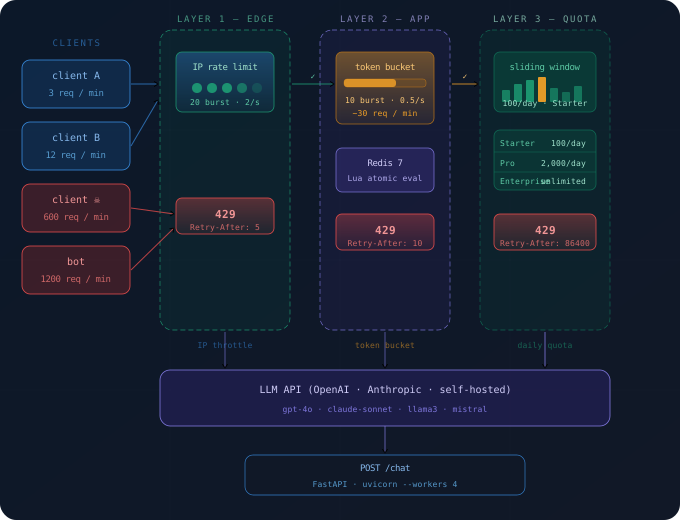 Three-layer defense: IP throttle at the edge, per-user token bucket in FastAPI, and upstream quota guard before hitting OpenAI/Anthropic.
Solution
Step 1: Install Dependencies
# Using uv (recommended) — installs in ~2s vs pip's 20s
uv pip install fastapi uvicorn slowapi redis hiredis openai anthropic

# Or pip
pip install fastapi uvicorn slowapi redis hiredis openai anthropic --break-system-packages
Verify Redis is running. Use Docker if you don't have a local instance:
docker run -d -p 6379:6379 --name redis-limiter redis:7-alpine
redis-cli ping   # → PONG
Expected output: PONG
If it fails:
Connection refused→ Redis isn't running. Start it with the Docker command above.command not found: redis-cli→ install withbrew install redis(macOS) orapt install redis-tools(Ubuntu).
Step 2: Choose Your Strategy
Three algorithms dominate LLM rate limiting in 2026. Pick the one that matches your traffic shape.
| Strategy | Best For | Burst Allowed | Memory |
|---|---|---|---|
| Token Bucket | Smooth steady traffic | ✅ Yes | Low |
| Sliding Window | Strict per-minute SLAs | ❌ No | Medium |
| Fixed Window | Simple billing-aligned limits | ✅ At boundary | Lowest |
For LLM APIs, token bucket is the default choice. Users can burst 5 requests quickly, but sustained abuse is capped. Fixed window is dangerous for LLMs — a user can double-burst at the window boundary.
Step 3: Implement the Redis Token Bucket
# rate_limiter.py
import time
import redis.asyncio as aioredis
from fastapi import HTTPException, Request

REDIS_URL = "redis://localhost:6379"

# One client shared across workers — hiredis parser makes this ~3x faster
_redis: aioredis.Redis | None = None

async def get_redis() -> aioredis.Redis:
    global _redis
    if _redis is None:
        _redis = aioredis.from_url(REDIS_URL, decode_responses=True)
    return _redis


async def token_bucket_check(
    key: str,
    capacity: int = 10,       # max tokens (burst ceiling)
    refill_rate: float = 1.0, # tokens added per second
    cost: int = 1,            # tokens consumed per LLM call
) -> bool:
    """
    Returns True if the request is allowed, False if rate-limited.
    Uses a Lua script for atomic read-modify-write — critical under concurrency.
    """
    r = await get_redis()
    now = time.time()

    lua_script = """
    local key = KEYS[1]
    local capacity = tonumber(ARGV[1])
    local refill_rate = tonumber(ARGV[2])
    local cost = tonumber(ARGV[3])
    local now = tonumber(ARGV[4])

    local data = redis.call('HMGET', key, 'tokens', 'last_refill')
    local tokens = tonumber(data[1]) or capacity
    local last_refill = tonumber(data[2]) or now

    -- Refill based on elapsed time
    local elapsed = now - last_refill
    tokens = math.min(capacity, tokens + elapsed * refill_rate)

    if tokens >= cost then
        tokens = tokens - cost
        redis.call('HMSET', key, 'tokens', tokens, 'last_refill', now)
        redis.call('EXPIRE', key, 3600)  -- TTL: 1 hour of inactivity
        return 1  -- allowed
    else
        redis.call('HMSET', key, 'tokens', tokens, 'last_refill', now)
        redis.call('EXPIRE', key, 3600)
        return 0  -- blocked
    end
    """
    result = await r.eval(lua_script, 1, key, capacity, refill_rate, cost, now)
    return bool(result)


async def require_rate_limit(request: Request, user_id: str) -> None:
    """
    Dependency for FastAPI routes. Raises 429 if rate-limited.
    Enforces both per-user and per-IP limits.
    """
    ip = request.client.host
    allowed_by_ip = await token_bucket_check(
        key=f"rl:ip:{ip}",
        capacity=20,       # 20-req burst per IP
        refill_rate=2.0,   # 2 req/s sustained per IP
    )
    if not allowed_by_ip:
        raise HTTPException(
            status_code=429,
            detail="Too many requests from this IP. Retry after a few seconds.",
            headers={"Retry-After": "5"},
        )

    allowed_by_user = await token_bucket_check(
        key=f"rl:user:{user_id}",
        capacity=10,       # 10-req burst per user
        refill_rate=0.5,   # 30 req/min sustained per user — sweet spot for chat UX
    )
    if not allowed_by_user:
        raise HTTPException(
            status_code=429,
            detail="Rate limit exceeded. You can send ~30 messages per minute.",
            headers={"Retry-After": "10"},
        )
Step 4: Wire It Into FastAPI
# main.py
from fastapi import FastAPI, Depends, Request
from pydantic import BaseModel
from openai import AsyncOpenAI
from rate_limiter import require_rate_limit

app = FastAPI()
openai_client = AsyncOpenAI()  # reads OPENAI_API_KEY from env


class ChatRequest(BaseModel):
    message: str
    user_id: str


@app.post("/chat")
async def chat(
    payload: ChatRequest,
    request: Request,
):
    # Rate limit check — runs before any LLM call touches the wire
    await require_rate_limit(request, user_id=payload.user_id)

    response = await openai_client.chat.completions.create(
        model="gpt-4o",
        messages=[{"role": "user", "content": payload.message}],
        max_tokens=1024,
    )
    return {"reply": response.choices[0].message.content}


@app.exception_handler(429)
async def rate_limit_handler(request: Request, exc):
    from fastapi.responses import JSONResponse
    return JSONResponse(
        status_code=429,
        content={"error": exc.detail, "code": "rate_limited"},
        headers=exc.headers or {},
    )
Start the server:
uvicorn main:app --host 0.0.0.0 --port 8000 --workers 4
Expected output:
INFO:     Started server process [12345]
INFO:     Uvicorn running on http://0.0.0.0:8000 (Press CTRL+C to quit)
If it fails:
ModuleNotFoundError: No module named 'slowapi'→ rerun the pip install command from Step 1.redis.exceptions.ConnectionError→ Redis isn't reachable. Checkredis-cli ping.
Step 5: Add the Sliding Window for Strict Quota Enforcement
Token bucket allows bursts. If you sell tiered plans (e.g., Starter: 100 calls/day, Pro: 2,000 calls/day), use a sliding window instead — it prevents any window boundary abuse.
# sliding_window.py
import time
import redis.asyncio as aioredis

async def sliding_window_check(
    key: str,
    limit: int,         # max calls in the window
    window_seconds: int = 86400,  # 86400 = 1 day
) -> tuple[bool, int]:
    """
    Returns (allowed: bool, remaining: int).
    Uses Redis sorted sets — each call is scored by Unix timestamp.
    """
    r = await get_redis()  # reuse client from rate_limiter.py
    now = time.time()
    window_start = now - window_seconds

    pipe = r.pipeline()
    # Remove expired entries
    pipe.zremrangebyscore(key, 0, window_start)
    # Count calls in window
    pipe.zcard(key)
    # Add this call
    pipe.zadd(key, {str(now): now})
    # Keep key alive for one window
    pipe.expire(key, window_seconds)
    results = await pipe.execute()

    current_count = results[1]  # count before adding this call
    if current_count >= limit:
        # Remove the call we just added — don't count refused calls
        await r.zrem(key, str(now))
        return False, 0

    remaining = limit - current_count - 1
    return True, remaining
Use it for daily quota checks per API key:
# In your route, after token bucket:
allowed, remaining = await sliding_window_check(
    key=f"quota:daily:{payload.user_id}",
    limit=100,            # Starter plan: 100 calls/day
    window_seconds=86400,
)
if not allowed:
    raise HTTPException(
        status_code=429,
        detail="Daily quota exceeded. Upgrade to Pro for 2,000 calls/day — starts at $29/month.",
        headers={"X-RateLimit-Remaining": "0", "Retry-After": "86400"},
    )
Verification
Run a quick load test with curl in a loop:
for i in $(seq 1 15); do
  curl -s -o /dev/null -w "%{http_code}\n" \
    -X POST http://localhost:8000/chat \
    -H "Content-Type: application/json" \
    -d '{"message": "hello", "user_id": "test-user-1"}'
done
You should see:
200
200
...
200   ← 10 allowed (burst capacity)
429
429
429
429
429   ← remaining calls blocked
Then wait 10 seconds and retry — tokens refill at 0.5/s, so you'll get ~5 new requests through.
sleep 10
curl -s -w "%{http_code}\n" -X POST http://localhost:8000/chat \
  -H "Content-Type: application/json" \
  -d '{"message": "hello", "user_id": "test-user-1"}'
# → 200
What You Learned
- Token bucket is the right default for LLM chat — it allows natural burst behavior while capping sustained abuse. Fixed window is dangerous at the boundary.
- Lua scripts are mandatory for Redis rate limiters under concurrency. Non-atomic check-then-set causes race conditions that let abusers slip through at scale.
- Layer your limits: IP limits stop bots, user limits enforce fair use, sliding windows enforce paid quotas. Don't rely on a single limit.
- Always return
Retry-Afterin 429 responses — well-behaved clients (and your own frontend) will back off automatically instead of hammering harder. - When NOT to use this: if you're on a managed API gateway (AWS API Gateway, Cloudflare Workers AI), use their built-in rate limiting. Rolling your own Redis solution on top adds latency for no gain.
Tested on Python 3.12, FastAPI 0.115, redis-py 5.x, Redis 7.2, Ubuntu 24.04 & macOS Sequoia
FAQ
Q: Does this work with Anthropic's API as well as OpenAI?
A: Yes — the limiter runs in your application layer before any upstream call. Swap openai_client.chat.completions.create for anthropic.Anthropic().messages.create and the limiting logic is identical.
Q: What's the difference between rate limiting and throttling?
A: Rate limiting rejects requests that exceed a threshold with a 429. Throttling queues them and slows delivery. For LLM APIs, rejection is almost always better — queuing causes memory buildup and unpredictable latency spikes.
Q: Can I run this without Redis, on a single-worker server?
A: Yes. Replace the Redis calls with an in-memory dict and asyncio.Lock. This works fine for single-process deployments but breaks across multiple Uvicorn workers — each worker has its own memory space.
Q: How much does Redis add to latency? A: A local Redis call takes ~0.1–0.3ms. Against an LLM call that takes 500–5000ms, this is noise. On Redis Cloud (AWS us-east-1), expect ~1–2ms round-trip — still negligible.
Q: What's the minimum plan for Redis Cloud to support this in production? A: The Free tier (30MB) is sufficient for up to ~50,000 active user keys. Paid plans start at $7/month for 250MB on AWS us-east-1 — more than enough for most early-stage LLM products.