Problem: LLM Bills Spike With No Warning
LLM cost tracking with per-request budget alerts is the fastest way to stop surprise $400 OpenAI invoices from hitting your credit card at the end of the month.
You shipped a feature. A user hit it 10,000 times overnight with long prompts. You had no idea until billing ran.
You'll learn:
- How to extract token usage from OpenAI, Anthropic, and Gemini responses
- How to calculate per-request USD cost using a live pricing table
- How to fire an alert (log, raise, Slack webhook) when a single call exceeds your threshold
Time: 20 min | Difficulty: Intermediate
Why This Happens
LLM APIs charge per token. A single GPT-4o call with a 10k-token context costs ~$0.025. That sounds small — until an unguarded loop runs it 50,000 times.
Symptoms:
- Monthly invoice is 10× higher than expected
- No per-endpoint visibility into which feature is expensive
- No alerting when a single request goes rogue (huge prompt, runaway agent loop)
The fix is a thin cost-tracking wrapper: intercept every API response, read usage.total_tokens, multiply by the model's per-token rate, and compare against your threshold.
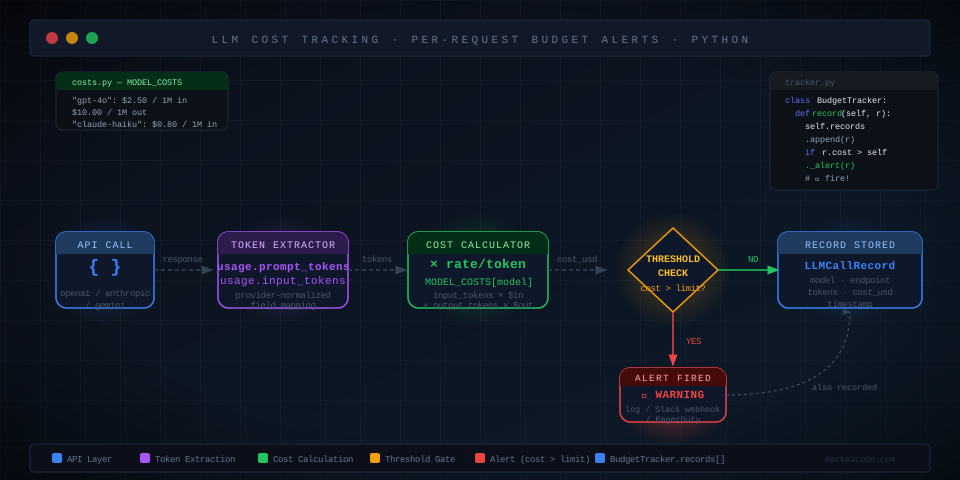 Flow: every LLM call → token extractor → cost calculator → threshold check → alert or pass-through
Solution
Step 1: Install Dependencies
This guide uses uv (Python 3.12). The only required library is the SDK for whichever provider you use. No LangChain needed.
uv init llm-cost-tracker
cd llm-cost-tracker

# Install provider SDKs you need — pick one or all
uv add openai anthropic google-generativeai

# Optional: httpx for Slack webhook alerts
uv add httpx
Expected output: Resolved X packages in Xs
Step 2: Build the Pricing Table
Hard-code the per-token rates for every model you call. Update this table when providers change pricing (check their pricing pages monthly).
Prices below are in USD as of March 2026. OpenAI GPT-4o is $2.50 per 1M input tokens / $10.00 per 1M output tokens.
# costs.py

# All prices in USD per token (not per 1M)
# Source: provider pricing pages, March 2026
MODEL_COSTS: dict[str, dict[str, float]] = {
    # OpenAI
    "gpt-4o": {
        "input": 2.50 / 1_000_000,   # $2.50 per 1M input tokens
        "output": 10.00 / 1_000_000,  # $10.00 per 1M output tokens
    },
    "gpt-4o-mini": {
        "input": 0.15 / 1_000_000,
        "output": 0.60 / 1_000_000,
    },
    "gpt-4.1": {
        "input": 2.00 / 1_000_000,
        "output": 8.00 / 1_000_000,
    },
    # Anthropic
    "claude-opus-4-5": {
        "input": 15.00 / 1_000_000,
        "output": 75.00 / 1_000_000,
    },
    "claude-sonnet-4-5": {
        "input": 3.00 / 1_000_000,
        "output": 15.00 / 1_000_000,
    },
    "claude-haiku-3-5": {
        "input": 0.80 / 1_000_000,
        "output": 4.00 / 1_000_000,
    },
    # Google
    "gemini-2.0-flash": {
        "input": 0.10 / 1_000_000,
        "output": 0.40 / 1_000_000,
    },
    "gemini-2.5-pro": {
        "input": 1.25 / 1_000_000,
        "output": 10.00 / 1_000_000,
    },
}


def calculate_cost(model: str, input_tokens: int, output_tokens: int) -> float:
    """Return USD cost for one LLM API call."""
    rates = MODEL_COSTS.get(model)
    if rates is None:
        # Unknown model — fail loudly rather than silently under-count
        raise ValueError(f"No pricing data for model '{model}'. Add it to MODEL_COSTS.")
    return (input_tokens * rates["input"]) + (output_tokens * rates["output"])
Step 3: Build the Budget Alert Layer
This is a dataclass that holds the result of every tracked call. The alert method is where you plug in your notification channel.
# tracker.py
from dataclasses import dataclass, field
from datetime import datetime, timezone
import logging

logger = logging.getLogger(__name__)


@dataclass
class LLMCallRecord:
    model: str
    input_tokens: int
    output_tokens: int
    cost_usd: float
    timestamp: datetime = field(default_factory=lambda: datetime.now(timezone.utc))
    endpoint: str = "unknown"  # tag with feature name for per-endpoint breakdown


class BudgetTracker:
    def __init__(self, alert_threshold_usd: float = 0.10):
        # Fire an alert if a single request costs more than this
        self.threshold = alert_threshold_usd
        self.records: list[LLMCallRecord] = []

    def record(self, record: LLMCallRecord) -> None:
        self.records.append(record)
        if record.cost_usd > self.threshold:
            self._alert(record)

    def _alert(self, record: LLMCallRecord) -> None:
        """Override this method to send Slack/PagerDuty/email alerts."""
        logger.warning(
            "BUDGET ALERT | endpoint=%s model=%s cost=$%.4f tokens_in=%d tokens_out=%d",
            record.endpoint,
            record.model,
            record.cost_usd,
            record.input_tokens,
            record.output_tokens,
        )

    def total_cost(self) -> float:
        return sum(r.cost_usd for r in self.records)

    def summary(self) -> dict:
        return {
            "total_requests": len(self.records),
            "total_cost_usd": round(self.total_cost(), 6),
            "alerts_fired": sum(1 for r in self.records if r.cost_usd > self.threshold),
        }
Step 4: Wrap OpenAI Calls
# openai_wrapper.py
from openai import OpenAI
from costs import calculate_cost
from tracker import BudgetTracker, LLMCallRecord

client = OpenAI()  # reads OPENAI_API_KEY from env


def chat(
    messages: list[dict],
    model: str = "gpt-4o-mini",
    tracker: BudgetTracker | None = None,
    endpoint: str = "unknown",
) -> str:
    response = client.chat.completions.create(model=model, messages=messages)

    if tracker is not None:
        usage = response.usage  # usage.prompt_tokens, usage.completion_tokens
        cost = calculate_cost(model, usage.prompt_tokens, usage.completion_tokens)
        tracker.record(
            LLMCallRecord(
                model=model,
                input_tokens=usage.prompt_tokens,
                output_tokens=usage.completion_tokens,
                cost_usd=cost,
                endpoint=endpoint,
            )
        )

    # Return the text content of the first choice
    return response.choices[0].message.content
Step 5: Wrap Anthropic Calls
Anthropic's response object uses usage.input_tokens and usage.output_tokens — different field names from OpenAI.
# anthropic_wrapper.py
import anthropic
from costs import calculate_cost
from tracker import BudgetTracker, LLMCallRecord

client = anthropic.Anthropic()  # reads ANTHROPIC_API_KEY from env


def chat(
    prompt: str,
    model: str = "claude-haiku-3-5",
    tracker: BudgetTracker | None = None,
    endpoint: str = "unknown",
) -> str:
    response = client.messages.create(
        model=model,
        max_tokens=1024,
        messages=[{"role": "user", "content": prompt}],
    )

    if tracker is not None:
        usage = response.usage  # usage.input_tokens, usage.output_tokens
        cost = calculate_cost(model, usage.input_tokens, usage.output_tokens)
        tracker.record(
            LLMCallRecord(
                model=model,
                input_tokens=usage.input_tokens,
                output_tokens=usage.output_tokens,
                cost_usd=cost,
                endpoint=endpoint,
            )
        )

    return response.content[0].text
Step 6: Add Slack Webhook Alerts (Optional)
Override _alert in BudgetTracker to post to Slack when a request exceeds your threshold.
# slack_tracker.py
import httpx
from tracker import BudgetTracker, LLMCallRecord


class SlackBudgetTracker(BudgetTracker):
    def __init__(self, alert_threshold_usd: float, webhook_url: str):
        super().__init__(alert_threshold_usd)
        self.webhook_url = webhook_url

    def _alert(self, record: LLMCallRecord) -> None:
        # Also call parent so the warning still appears in logs
        super()._alert(record)

        payload = {
            "text": (
                f":rotating_light: *LLM Budget Alert*\n"
                f"• Endpoint: `{record.endpoint}`\n"
                f"• Model: `{record.model}`\n"
                f"• Cost: `${record.cost_usd:.4f}` (threshold: `${self.threshold:.4f}`)\n"
                f"• Tokens: {record.input_tokens} in / {record.output_tokens} out"
            )
        }

        # Fire-and-forget — don't block the main request on Slack latency
        try:
            httpx.post(self.webhook_url, json=payload, timeout=3.0)
        except httpx.TimeoutException:
            pass  # Slack is down — don't crash the app over a missed alert
Step 7: Wire It Into Your App
# main.py
import logging
import os
from slack_tracker import SlackBudgetTracker
from openai_wrapper import chat as openai_chat
from anthropic_wrapper import chat as anthropic_chat

logging.basicConfig(level=logging.INFO)

tracker = SlackBudgetTracker(
    alert_threshold_usd=0.05,  # Alert on any single call over $0.05
    webhook_url=os.environ["SLACK_WEBHOOK_URL"],
)

# Simulate two feature endpoints
response_a = openai_chat(
    messages=[{"role": "user", "content": "Summarize the history of the Roman Empire in detail."}],
    model="gpt-4o",
    tracker=tracker,
    endpoint="summarize",
)

response_b = anthropic_chat(
    prompt="What is 2 + 2?",
    model="claude-haiku-3-5",
    tracker=tracker,
    endpoint="math-tutor",
)

print(tracker.summary())
# {'total_requests': 2, 'total_cost_usd': 0.00382, 'alerts_fired': 0}
Verification
Run the app and check for the summary dict and any budget warnings:
uv run python main.py
You should see:
INFO:tracker:Recording call: endpoint=summarize model=gpt-4o cost=$0.0031
INFO:tracker:Recording call: endpoint=math-tutor model=claude-haiku-3-5 cost=$0.0001
{'total_requests': 2, 'total_cost_usd': 0.003200, 'alerts_fired': 0}
To trigger a test alert, temporarily set alert_threshold_usd=0.000001 and run again. You should see a WARNING: BUDGET ALERT line (and a Slack message if the webhook is configured).
Comparison: DIY Tracking vs Observability Platforms
| This approach | LangSmith | Helicone | |
|---|---|---|---|
| Setup time | ~20 min | ~10 min | ~5 min |
| Per-request cost | $0 | Free tier, then $39+/mo | Free tier, then $20+/mo |
| Self-hosted | ✅ | ❌ | ❌ |
| Custom alert logic | ✅ Full control | ❌ Limited | ❌ Limited |
| Works without LangChain | ✅ | ⚠️ Better with it | ✅ |
| Stores prompt/response logs | ❌ (add your own) | ✅ | ✅ |
Choose this DIY approach if: you want zero vendor lock-in, need custom alert routing, or are running in an air-gapped environment (SOC 2 / HIPAA workloads on AWS us-east-1).
Choose LangSmith or Helicone if: you want prompt replay, dataset management, and a UI dashboard without building it yourself.
What You Learned
response.usageon OpenAI returnsprompt_tokens/completion_tokens; Anthropic returnsinput_tokens/output_tokens— they are not the same field names- A per-token pricing table plus a small dataclass gives you full cost visibility with no third-party dependency
- Subclassing
BudgetTracker._alertlets you swap notification channels (log → Slack → PagerDuty) without changing any call sites
Tested on Python 3.12, openai 1.75, anthropic 0.49, uv 0.6.x, macOS Sequoia & Ubuntu 24.04
FAQ
Q: Does this work with streaming responses?
A: Yes, but you must wait for the stream to finish before reading usage. With OpenAI streaming, pass stream_options={"include_usage": True} and read usage from the final chunk. With Anthropic streaming, usage is in the message_delta event at the end of the stream.
Q: What if a model isn't in my pricing table?
A: calculate_cost raises a ValueError immediately. This is intentional — silently returning $0 would make your cost reports wrong. Add the model's rates to MODEL_COSTS before calling it.
Q: Can I track costs across multiple workers or processes?
A: The BudgetTracker in this guide is in-process only. For multi-process apps, write records to a shared store — PostgreSQL, Redis, or a time-series DB like InfluxDB. Use a background thread or async task to flush records so you don't add latency to the request path.
Q: How do I get per-endpoint cost breakdowns?
A: Filter tracker.records by the endpoint field: [r for r in tracker.records if r.endpoint == "summarize"]. Sum their cost_usd values. For production, group by endpoint and write daily rollups to your DB.
Q: Does this handle cached tokens (OpenAI prompt caching)?
A: OpenAI's prompt caching returns a prompt_tokens_details.cached_tokens field. Cached tokens are billed at 50% of the normal input rate. Add this to calculate_cost to account for it: cached = usage.prompt_tokens_details.cached_tokens or 0 and price the cached portion at rates["input"] * 0.5.