LlamaIndex property graph RAG lets you extract structured entity-relationship data from documents and query it with graph traversal — not just cosine similarity. The result is more precise answers on multi-hop questions that vector search consistently fails.
This tutorial builds a full Knowledge Graph RAG pipeline: extract a property graph from raw text, store it in Neo4j, and query it with LlamaIndex's graph retrievers. Tested on Python 3.12, LlamaIndex 0.10.x, and Neo4j 5.x.
You'll learn:
- How
PropertyGraphIndexextracts entities and relations from documents - How to connect LlamaIndex to a Neo4j backend for persistent graph storage
- How to switch between keyword, vector, and Cypher graph retrievers
- When graph RAG outperforms — and when it doesn't
Time: 25 min | Difficulty: Intermediate
Why Vector RAG Misses Multi-Hop Questions
Standard RAG embeds document chunks and retrieves the top-k closest chunks at query time. That works well when the answer lives in a single passage. It breaks down when the answer requires connecting facts across multiple documents or entities.
Example failure case:
"Which research papers co-authored by the same lab as Alice Wang also cite the BERT architecture?"
A vector search returns chunks mentioning Alice Wang or BERT — not the chain of relationships that links them. A property graph stores (Alice Wang)-[:AFFILIATED_WITH]->(MIT CSAIL)-[:PUBLISHED]->(Paper X)-[:CITES]->(BERT) and can traverse it exactly.
Symptoms that signal you need graph RAG:
- Answers require connecting 3+ entities across documents
- Users ask "who else worked on X" or "what else is related to Y"
- Your vector RAG hallucinates relationship details it can't ground in a single chunk
Architecture: LlamaIndex Property Graph RAG
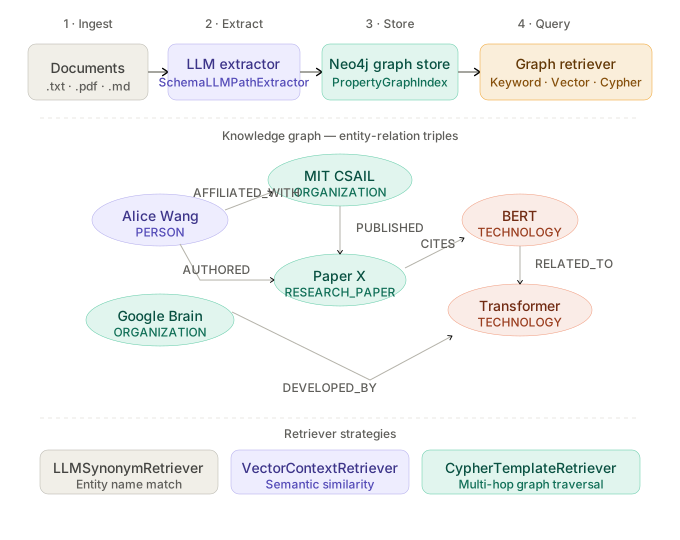 End-to-end flow: documents → LLM entity extractor → property graph → Neo4j → graph retriever → LLM answer
The pipeline has four stages:
- Ingestion — Load raw documents with
SimpleDirectoryReader - Extraction —
SchemaLLMPathExtractorcalls an LLM to pull(entity, relation, entity)triples - Storage —
Neo4jPropertyGraphStorepersists nodes and edges; embeddings stored alongside for hybrid retrieval - Query —
PropertyGraphIndex.as_retriever()traverses the graph, optionally mixing vector similarity and Cypher queries
Prerequisites
You need:
- Python 3.12
- A running Neo4j 5.x instance (Docker instructions below)
- An OpenAI API key (or swap in any LlamaIndex-compatible LLM)
uvfor dependency management (faster than pip)
Start Neo4j with Docker
# WHY --env NEO4J_AUTH: disables auth for local dev; set a password in production
docker run \
  --name neo4j-rag \
  -p 7474:7474 -p 7687:7687 \
  --env NEO4J_AUTH=none \
  --env NEO4J_PLUGINS='["apoc"]' \
  neo4j:5.18
Open http://localhost:7474 to confirm the Neo4j Browser loads.
Install Dependencies
uv init llamaindex-kg-rag
cd llamaindex-kg-rag

# WHY llama-index-graph-stores-neo4j: property graph Neo4j backend, not included in core
uv add llama-index-core \
       llama-index-llms-openai \
       llama-index-embeddings-openai \
       llama-index-graph-stores-neo4j
Step 1: Load Documents
# ingest.py
from llama_index.core import SimpleDirectoryReader

# WHY show_progress=True: extraction is slow (LLM per chunk); track it
documents = SimpleDirectoryReader(
    input_dir="./data",
    required_exts=[".txt", ".pdf", ".md"],
).load_data(show_progress=True)

print(f"Loaded {len(documents)} documents")
Drop any .txt, .pdf, or .md files into ./data/. For this walkthrough, use 10–20 Wikipedia article exports or research paper abstracts — small enough to extract in under 5 minutes with GPT-4o-mini.
Expected output: Loaded 14 documents
Step 2: Configure the LLM and Embedding Model
# settings.py
import os
from llama_index.core import Settings
from llama_index.llms.openai import OpenAI
from llama_index.embeddings.openai import OpenAIEmbedding

os.environ["OPENAI_API_KEY"] = "sk-..."  # or load from .env

# WHY gpt-4o-mini for extraction: cheaper than gpt-4o; accurate enough for triple extraction
Settings.llm = OpenAI(model="gpt-4o-mini", temperature=0)

# WHY text-embedding-3-small: 1536-dim vectors at $0.02/1M tokens vs $0.13 for large
Settings.embed_model = OpenAIEmbedding(model="text-embedding-3-small")
If you want a fully local setup, swap in llama-index-llms-ollama with llama3.3:70b and llama-index-embeddings-ollama with nomic-embed-text. Extraction will be slower but costs $0.
Step 3: Define the Graph Schema
# schema.py
from llama_index.core.indices.property_graph import SchemaLLMPathExtractor
from typing import Literal

# WHY explicit entity types: constrains the LLM; prevents "Organization" and "Org" as duplicates
EntityType = Literal[
    "PERSON", "ORGANIZATION", "LOCATION",
    "RESEARCH_PAPER", "CONCEPT", "TECHNOLOGY"
]

# WHY explicit relation types: forces consistent edge labels in the graph
RelationType = Literal[
    "AUTHORED_BY", "AFFILIATED_WITH", "CITES",
    "DEVELOPED_BY", "LOCATED_IN", "RELATED_TO"
]

kg_extractor = SchemaLLMPathExtractor(
    llm=Settings.llm,
    possible_entities=EntityType,
    possible_relations=RelationType,
    # WHY num_workers=4: parallel chunk extraction; cap at 4 to avoid rate limits
    num_workers=4,
    max_triplets_per_chunk=10,
)
Defining possible_entities and possible_relations is the most impactful tuning step. Vague schemas produce noisy graphs. Tight schemas produce clean, traversable ones.
Step 4: Connect Neo4j Storage
# storage.py
from llama_index.graph_stores.neo4j import Neo4jPropertyGraphStore

graph_store = Neo4jPropertyGraphStore(
    username="neo4j",
    password="",         # empty string = auth disabled
    url="bolt://localhost:7687",
    database="neo4j",
    # WHY refresh_schema=True: re-reads Neo4j schema on init; needed after schema changes
    refresh_schema=True,
)
If connection fails:
ServiceUnavailable: Failed to establish connection→ Neo4j container isn't running; checkdocker psAuthError→ You setNEO4J_AUTH=nonebut passed a password; setpassword=""
Step 5: Build the PropertyGraphIndex
# build_index.py
from llama_index.core import PropertyGraphIndex
from ingest import documents
from schema import kg_extractor
from storage import graph_store
from settings import Settings  # noqa: F401 — applies global settings

index = PropertyGraphIndex.from_documents(
    documents,
    kg_extractors=[kg_extractor],
    property_graph_store=graph_store,
    # WHY show_progress=True: extraction takes 1–3 sec per chunk
    show_progress=True,
)

# Persist index metadata (node IDs, chunk map) separately from Neo4j
index.storage_context.persist(persist_dir="./storage")
print("Index built and persisted.")
Expected output:
Extracting paths from text: 100%|████████| 14/14 [02:41<00:00, 11.5s/it]
Index built and persisted.
Open Neo4j Browser at http://localhost:7474 and run MATCH (n) RETURN n LIMIT 50 to see your entity nodes and relationship edges rendered as a graph.
Step 6: Query the Property Graph
LlamaIndex ships three retriever strategies for property graphs. Each fits a different query type.
6a: Keyword-Based Graph Retrieval (Fast, No LLM Cost)
# query_keyword.py
from llama_index.core import PropertyGraphIndex, StorageContext, load_index_from_storage
from llama_index.graph_stores.neo4j import Neo4jPropertyGraphStore
from llama_index.core.indices.property_graph import LLMSynonymRetriever

graph_store = Neo4jPropertyGraphStore(url="bolt://localhost:7687", username="neo4j", password="")
storage_context = StorageContext.from_defaults(persist_dir="./storage", property_graph_store=graph_store)
index = load_index_from_storage(storage_context)

# WHY LLMSynonymRetriever: expands query terms to synonyms, then matches entity names in graph
retriever = index.as_retriever(
    sub_retrievers=[
        LLMSynonymRetriever(
            index.property_graph_store,
            llm=Settings.llm,
            # WHY include_text=True: returns source chunk alongside graph triples
            include_text=True,
        )
    ]
)

nodes = retriever.retrieve("What organizations did Alice Wang collaborate with?")
for node in nodes:
    print(node.text)
6b: Vector Graph Retrieval (Semantic Match)
from llama_index.core.indices.property_graph import VectorContextRetriever

# WHY VectorContextRetriever: embeds query, finds nearest entity nodes by vector similarity
retriever = index.as_retriever(
    sub_retrievers=[
        VectorContextRetriever(
            index.property_graph_store,
            embed_model=Settings.embed_model,
            # WHY include_text=True: augments graph triples with surrounding chunk text
            include_text=True,
        )
    ]
)
6c: Cypher Query Retrieval (Multi-Hop, Most Powerful)
from llama_index.core.indices.property_graph import CypherTemplateRetriever
import re

# WHY CypherTemplateRetriever: translates natural language to Cypher; handles 3+ hop queries
cypher_retriever = CypherTemplateRetriever(
    index.property_graph_store,
    cypher_query_corrector=None,
)

nodes = cypher_retriever.retrieve(
    "Which papers cite the same technology as papers co-authored by Alice Wang?"
)
for node in nodes:
    print(node.text)
6d: Full Query Engine with Answer Synthesis
# query_engine.py
query_engine = index.as_query_engine(include_text=True)

response = query_engine.query(
    "What research organizations are connected to transformer architecture development?"
)
print(response)
Expected output:
Based on the knowledge graph, transformer architecture development is connected to
Google Brain (via the 'Attention Is All You Need' paper), University of Toronto
(Hinton affiliation), and OpenAI (GPT series). Google Brain and OpenAI share...
Step 7: Load Existing Index Without Re-Extracting
Re-extraction costs money and time. Always reload from storage after the first build.
# reload.py
from llama_index.core import StorageContext, load_index_from_storage
from llama_index.graph_stores.neo4j import Neo4jPropertyGraphStore

graph_store = Neo4jPropertyGraphStore(
    url="bolt://localhost:7687",
    username="neo4j",
    password="",
)

storage_context = StorageContext.from_defaults(
    persist_dir="./storage",
    property_graph_store=graph_store,
)

# WHY load_index_from_storage: reads metadata from disk, graph data from Neo4j — no re-extraction
index = load_index_from_storage(storage_context)
query_engine = index.as_query_engine(include_text=True)
Retriever Comparison
| Retriever | Speed | LLM Calls | Best For |
|---|---|---|---|
LLMSynonymRetriever | Fast | 1 (synonyms only) | Named entity lookups |
VectorContextRetriever | Medium | 0 (embedding only) | Semantic/conceptual queries |
CypherTemplateRetriever | Medium | 1–2 (Cypher gen) | Multi-hop relational queries |
| Combined (all three) | Slower | 2–3 | Production; maximum recall |
For production, combine all three as sub-retrievers. LlamaIndex deduplicates overlapping node results automatically.
# WHY combining all three: captures entity name matches, semantic neighbors, and graph paths
retriever = index.as_retriever(
    sub_retrievers=[
        LLMSynonymRetriever(index.property_graph_store, llm=Settings.llm, include_text=True),
        VectorContextRetriever(index.property_graph_store, embed_model=Settings.embed_model, include_text=True),
        CypherTemplateRetriever(index.property_graph_store),
    ]
)
Verification
Run this Cypher in Neo4j Browser to confirm your graph has populated correctly:
// Count all nodes and relationships
MATCH (n) RETURN labels(n) AS type, count(n) AS count
UNION
MATCH ()-[r]->() RETURN [type(r)] AS type, count(r) AS count
ORDER BY count DESC
You should see: Multiple node types (PERSON, ORGANIZATION, TECHNOLOGY, etc.) with relationship counts above 0. If all counts are 0, extraction failed silently — check that kg_extractors was passed to PropertyGraphIndex.from_documents.
Query the engine:
response = query_engine.query("List all technologies mentioned alongside neural networks.")
assert len(str(response)) > 50, "Empty response — check Neo4j connection and index reload"
print("✅ Graph RAG pipeline working")
What You Learned
PropertyGraphIndexextracts(entity, relation, entity)triples using an LLM and stores them in Neo4j as a traversable property graph- Defining tight
possible_entitiesandpossible_relationsschemas is the highest-leverage tuning step — loose schemas produce duplicate, inconsistent nodes LLMSynonymRetriever,VectorContextRetriever, andCypherTemplateRetrievereach cover different query shapes; combine all three for production workloads- Graph RAG excels at multi-hop relational questions; it adds overhead for simple factual lookups that vector RAG handles well
- Always persist with
storage_context.persist()after first build — re-extraction on 100 documents costs ~$0.30 and 3 minutes each run
When NOT to use property graph RAG:
- Documents are unstructured prose with no clear entities (product reviews, logs)
- All queries are single-document lookups — vector RAG is cheaper and faster
- Your team can't maintain a Neo4j instance — use
SimplePropertyGraphStore(in-memory) for prototyping
Tested on LlamaIndex 0.10.68, Neo4j 5.18, Python 3.12, gpt-4o-mini, text-embedding-3-small · macOS Sequoia & Ubuntu 24.04
FAQ
Q: Can I use a local LLM instead of OpenAI for entity extraction?
A: Yes. Set Settings.llm = Ollama(model="llama3.3:70b") and Settings.embed_model = OllamaEmbedding(model_name="nomic-embed-text"). Extraction is slower (~30s/chunk on an RTX 3090) but costs nothing after hardware.
Q: What is SimplePropertyGraphStore and when should I use it?
A: It's LlamaIndex's in-memory graph store — no external DB required. Use it for prototyping and testing. It does not persist across runs; switch to Neo4jPropertyGraphStore for production.
Q: How many triplets per chunk is optimal?
A: max_triplets_per_chunk=10 is the right starting point. Set it lower (5–7) for dense technical text where precision matters more than recall. Going above 15 introduces noise.
Q: Does CypherTemplateRetriever work with graph stores other than Neo4j?
A: Cypher is Neo4j's query language. For other backends like Nebula Graph or Amazon Neptune, you need the matching retriever adapter. LLMSynonymRetriever and VectorContextRetriever work with any PropertyGraphStore implementation.
Q: How do I add new documents to an existing graph without rebuilding from scratch?
A: Call index.insert(new_document) for individual documents or index.refresh_ref_docs(updated_docs) for a batch update. LlamaIndex only processes new or changed chunks, leaving existing graph nodes intact.