llama.cpp server turns any GGUF model into an OpenAI-compatible REST API you can drop into any existing codebase without changing a single endpoint.
No Python runtime. No daemon management. No GPU cloud bill. You point llama-server at a .gguf file, and your /v1/chat/completions endpoint is live in under 30 seconds.
You'll learn:
- Build or install
llama-serverwith CUDA support on Ubuntu - Serve a quantized model with correct chat template and context length
- Call the API with the OpenAI Python SDK — zero code changes
- Tune
--n-gpu-layersand--parallelfor throughput on consumer GPUs
Time: 20 min | Difficulty: Intermediate
Why Use llama.cpp Server Instead of a Full Framework
Most local LLM serving stacks — vLLM, TGI, Ollama — add hundreds of megabytes of Python dependencies and their own model formats. llama.cpp server is a single statically-linked binary compiled from C++. On a fresh Ubuntu 24 VM with CUDA 12.4, it starts serving requests in under 5 seconds.
The /v1/chat/completions and /v1/completions endpoints are wire-compatible with the OpenAI API. Any library that accepts a base_url parameter — the OpenAI Python SDK, LangChain, LlamaIndex, LiteLLM — works without modification.
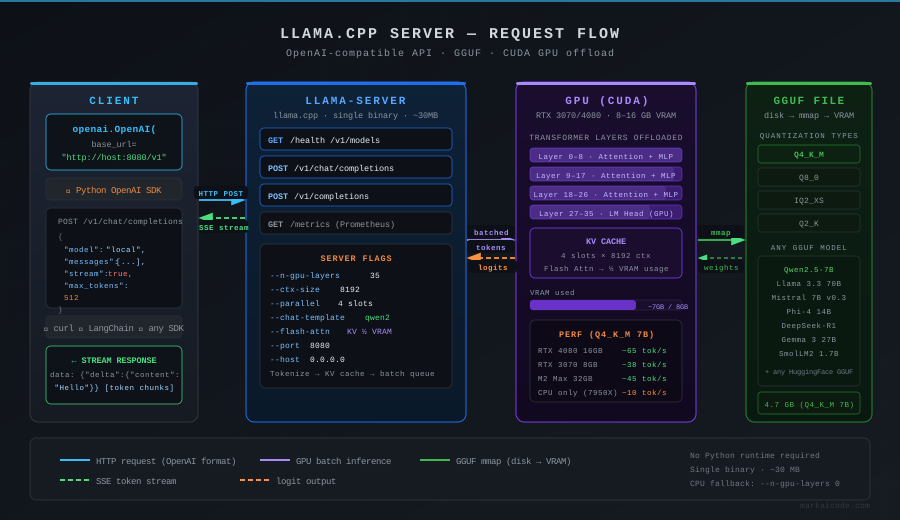 Request flow: client sends OpenAI-format JSON → llama-server tokenizes → GGUF layers run on GPU → streamed completion returns
Common reasons to pick llama.cpp server over Ollama:
- You need raw control over quantization type (IQ2_XS vs Q4_K_M) without a model library abstraction
- You're deploying to a container with no internet access — single binary, no model pull step
- You need a
/metricsendpoint and per-slot stats for Prometheus - You want to load multiple LoRA adapters at runtime without rebuilding
Step 1: Install llama-server with CUDA Support
Two paths: pre-built binary from GitHub Releases, or build from source.
Option A — Pre-built binary (fastest)
# Download the latest CUDA 12 release for Linux x86_64
# Check https://github.com/ggml-org/llama.cpp/releases for the latest tag
RELEASE="b5082"
wget "https://github.com/ggml-org/llama.cpp/releases/download/${RELEASE}/llama-${RELEASE}-bin-ubuntu-x64.zip"
unzip "llama-${RELEASE}-bin-ubuntu-x64.zip" -d llama-cpp
cd llama-cpp
chmod +x llama-server
Expected output: llama-server binary in the current directory, ~30 MB.
Option B — Build from source (recommended for CUDA tuning)
# Prerequisites: CUDA 12.4, cmake ≥ 3.21, gcc ≥ 12
sudo apt install -y cmake build-essential libcurl4-openssl-dev

git clone https://github.com/ggml-org/llama.cpp
cd llama.cpp

# GGML_CUDA=ON enables GPU offloading
# GGML_CUDA_F16=ON improves throughput on RTX 30xx/40xx
cmake -B build \
  -DGGML_CUDA=ON \
  -DGGML_CUDA_F16=ON \
  -DCMAKE_BUILD_TYPE=Release

cmake --build build --config Release -j$(nproc)
Expected output: build/bin/llama-server binary, build time ~4 min on 8 cores.
If it fails:
nvcc: command not found→ Runsudo apt install nvidia-cuda-toolkitor setPATHto include/usr/local/cuda/binCMake Error: CUDA not found→ SetDCMAKE_CUDA_COMPILER=/usr/local/cuda/bin/nvccexplicitly
Step 2: Download a GGUF Model
For this guide, use Qwen2.5-7B-Instruct Q4_K_M — 4.7 GB, fits in 8 GB VRAM with headroom.
# Install huggingface-hub CLI
pip install huggingface-hub --break-system-packages

# Download directly — no account required for public models
huggingface-cli download \
  Qwen/Qwen2.5-7B-Instruct-GGUF \
  qwen2.5-7b-instruct-q4_k_m.gguf \
  --local-dir ./models
Expected output: ./models/qwen2.5-7b-instruct-q4_k_m.gguf (4.7 GB).
Any GGUF model from Hugging Face works — Llama 3.3, Mistral, Phi-4, DeepSeek-R1 distills. The steps below are identical.
Step 3: Start the Server
./llama-server \
  --model ./models/qwen2.5-7b-instruct-q4_k_m.gguf \
  --host 0.0.0.0 \
  --port 8080 \
  --n-gpu-layers 35 \
  --ctx-size 8192 \
  --parallel 4 \
  --chat-template qwen2 \
  --log-disable
Flag breakdown:
| Flag | Value | Why |
|---|---|---|
--n-gpu-layers | 35 | Offload 35 transformer layers to GPU; adjust down if OOM |
--ctx-size | 8192 | KV cache size per slot; 8192 × 4 slots = 32k total context |
--parallel | 4 | Concurrent request slots; each slot reserves its own KV cache |
--chat-template | qwen2 | Applies correct <|im_start|> template; wrong template = garbled output |
--log-disable | — | Silences per-token stderr noise in production |
Expected output:
llama server listening at http://0.0.0.0:8080
If it fails:
CUDA out of memory→ Reduce--n-gpu-layersby 5 at a time until it startsmodel file does not exist→ Verify the path; llama-server does not search subdirectories- Wrong template → Check the model card on Hugging Face for the correct
--chat-templatevalue (llama3,chatml,gemma,phi3,qwen2)
Step 4: Call the API with the OpenAI SDK
Install the OpenAI Python SDK — the only change from a standard GPT-4o call is base_url.
from openai import OpenAI

client = OpenAI(
    base_url="http://localhost:8080/v1",
    api_key="not-needed",  # llama-server ignores this; required by SDK schema
)

response = client.chat.completions.create(
    model="qwen2.5-7b-instruct-q4_k_m",  # any string; llama-server ignores model field
    messages=[
        {"role": "system", "content": "You are a helpful assistant."},
        {"role": "user", "content": "Explain KV cache quantization in 3 sentences."},
    ],
    temperature=0.7,
    max_tokens=512,
    stream=False,
)

print(response.choices[0].message.content)
Expected output: A coherent 3-sentence explanation of KV cache quantization.
Streaming response
stream = client.chat.completions.create(
    model="local",
    messages=[{"role": "user", "content": "Write a haiku about GGUF."}],
    stream=True,
)

for chunk in stream:
    delta = chunk.choices[0].delta.content
    if delta:
        print(delta, end="", flush=True)
Using curl (no SDK required)
curl http://localhost:8080/v1/chat/completions \
  -H "Content-Type: application/json" \
  -d '{
    "model": "local",
    "messages": [{"role": "user", "content": "Hello"}],
    "max_tokens": 64
  }'
Step 5: Tune for Throughput
Find the right --n-gpu-layers value
# Start server with full GPU offload, watch VRAM
nvidia-smi dmon -s mu -d 1

# In another terminal, send a request and watch VRAM spike
curl -s http://localhost:8080/v1/chat/completions \
  -H "Content-Type: application/json" \
  -d '{"model":"x","messages":[{"role":"user","content":"hi"}],"max_tokens":10}'
Rule of thumb for Q4_K_M models:
| VRAM | Max --n-gpu-layers (7B) | Max --n-gpu-layers (13B) |
|---|---|---|
| 6 GB (RTX 3060) | 28 | 14 |
| 8 GB (RTX 3070/4060) | 35 | 20 |
| 12 GB (RTX 3080/4070) | 35 (full) | 34 |
| 24 GB (RTX 3090/4090) | 35 (full) | 40 (full) |
--parallel and KV cache math
Each parallel slot reserves ctx-size × 2 × n_layers × head_dim bytes of VRAM for KV cache. At --ctx-size 8192 with a 7B model, each slot costs ~500 MB.
# 4 parallel slots at 8k context on 8GB VRAM — tight but workable
--parallel 4 --ctx-size 8192 --n-gpu-layers 30

# 2 parallel slots at 16k context — better for long documents
--parallel 2 --ctx-size 16384 --n-gpu-layers 32
Enable Flash Attention (RTX 30xx/40xx only)
# Cuts KV cache VRAM by ~50% on supported hardware
./llama-server \
  --model ./models/qwen2.5-7b-instruct-q4_k_m.gguf \
  --n-gpu-layers 35 \
  --ctx-size 16384 \
  --parallel 4 \
  --flash-attn \
  --chat-template qwen2 \
  --port 8080
Step 6: Run as a Systemd Service (Production)
# /etc/systemd/system/llama-server.service
sudo tee /etc/systemd/system/llama-server.service > /dev/null <<EOF
[Unit]
Description=llama.cpp OpenAI-compatible server
After=network.target

[Service]
Type=simple
User=ubuntu
ExecStart=/opt/llama-cpp/llama-server \
  --model /opt/models/qwen2.5-7b-instruct-q4_k_m.gguf \
  --host 0.0.0.0 \
  --port 8080 \
  --n-gpu-layers 35 \
  --ctx-size 8192 \
  --parallel 4 \
  --flash-attn \
  --chat-template qwen2 \
  --log-disable
Restart=on-failure
RestartSec=5

[Install]
WantedBy=multi-user.target
EOF

sudo systemctl daemon-reload
sudo systemctl enable --now llama-server
sudo systemctl status llama-server
Expected output: Active: active (running) with the PID shown.
Verification
# Health check — returns 200 OK when server is ready
curl -s http://localhost:8080/health | python3 -m json.tool

# Model info — confirms loaded model name and context size
curl -s http://localhost:8080/v1/models | python3 -m json.tool

# Metrics — Prometheus-compatible endpoint
curl -s http://localhost:8080/metrics | grep llama
You should see:
{ "status": "ok" }
And a /v1/models response listing your GGUF filename as the model ID.
llama.cpp Server vs Alternatives
| llama.cpp server | Ollama | vLLM | |
|---|---|---|---|
| Binary size | ~30 MB | ~200 MB + daemon | Python + torch (~8 GB) |
| GPU required | No (CPU fallback) | No | Yes (A10G+ recommended) |
| OpenAI-compatible | ✅ | ✅ | ✅ |
| Multi-model | ❌ (one at a time) | ✅ | ✅ |
| KV cache quant | ✅ Q8, Q4 | ❌ | ✅ fp8 |
| LoRA at runtime | ✅ --lora flag | ❌ | ✅ |
| Pricing (self-hosted, AWS g4dn.xlarge) | ~$0.526/hr | ~$0.526/hr | ~$0.526/hr |
| Overhead above bare metal | < 1% | ~5% | ~10% |
Choose llama.cpp server if: you want a single binary with no runtime dependencies, direct GGUF control, or LoRA hot-swapping.
Choose Ollama if: you want model library management, automatic updates, and a simple ollama pull workflow.
Choose vLLM if: you're running throughput benchmarks at scale on A100/H100 hardware with PagedAttention.
What You Learned
llama-serverexposes/v1/chat/completionsand/v1/completions— drop-in replacement for OpenAI endpoints--n-gpu-layerscontrols GPU offload; start high and reduce by 5 if you hit OOM--chat-templatemust match the model family — wrong template produces incoherent output--parallel×--ctx-sizedetermines VRAM cost; use Flash Attention (--flash-attn) to halve KV cache memory
Tested on llama.cpp b5082, CUDA 12.4, Ubuntu 24.04, RTX 4080 16GB and M2 Max 32GB.
FAQ
Q: Does llama.cpp server work on CPU only, without a GPU?
A: Yes. Remove --n-gpu-layers entirely (or set it to 0) and the server runs on CPU using AVX2/AVX-512. Throughput on a Ryzen 9 7950X is roughly 8–12 tokens/sec for a Q4_K_M 7B model.
Q: What is the difference between --ctx-size and max_tokens in the API request?
A: --ctx-size sets the maximum KV cache allocated at startup — it's a hard ceiling. max_tokens in the request is a per-call limit within that ceiling. You can't request more tokens than ctx-size allows.
Q: Can llama.cpp server load multiple models at the same time?
A: No — one model per server process. Run multiple llama-server instances on different ports and use a reverse proxy like Caddy or nginx to route by path if you need multi-model serving.
Q: What --chat-template value should I use for Llama 3.3 or Llama 3.1?
A: Use --chat-template llama3. For Mistral models use mistral. For Phi-4 use phi3. When in doubt, check the model's tokenizer_config.json on Hugging Face for the chat_template field.
Q: Does the OpenAI function calling / tool use API work with llama.cpp server?
A: Partially. The /v1/chat/completions endpoint accepts a tools array, but tool call quality depends entirely on whether the GGUF model was fine-tuned for tool use. Qwen2.5-7B-Instruct and Llama 3.3 Instruct both handle basic function calling reliably.