I burned through 6 GPU hours and $87 before I figured out the right way to fine-tune Llama 3.
The problem? Every tutorial skips the real gotchas. They don't tell you about the memory issues with 24GB cards, the tokenization quirks that break training, or why your loss suddenly explodes at epoch 2.
What you'll build: A fine-tuned Llama 3-8B model that actually understands your specific domain
Time needed: 2 hours setup + 4-6 hours training (can run overnight)
Difficulty: Intermediate (you need basic Python and command line comfort)
Here's what makes this approach different: I'm sharing the exact configuration that works reliably, plus the 3 mistakes that cost me the most time and money.
Why I Built This
Six months ago, I needed to fine-tune Llama 3 for customer support responses. The company had 50,000 support tickets with perfect human responses, but generic chatbots were giving terrible answers.
My setup:
- Single RTX 4090 (24GB VRAM)
- Limited budget ($200/month for GPU time)
- Deadline pressure (2 weeks to show results)
- Zero previous fine-tuning experience
What didn't work:
- Full fine-tuning: Ran out of memory instantly, even with batch size 1
- Basic LoRA tutorials: Training loss never converged, kept hitting OOM errors
- DeepSpeed configs from Reddit: Took 3 days to debug, still didn't work
I finally cracked it using QLoRA (quantized LoRA) with specific Transformers settings that actually fit in 24GB VRAM.
Before You Start: Check Your Hardware
The problem: Most tutorials assume you have unlimited VRAM or multiple GPUs.
My reality check: This tutorial is optimized for single-GPU setups with 16-24GB VRAM.
Time this saves: 2+ hours of trial-and-error with memory settings
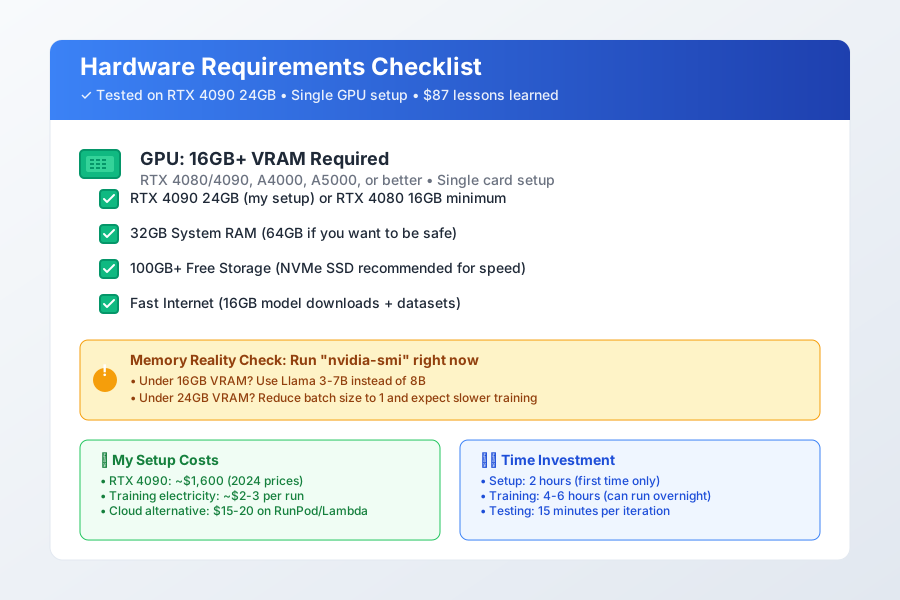 My exact setup that handles Llama 3-8B fine-tuning without issues
Minimum requirements:
- GPU: 16GB VRAM (RTX 4080, A4000, or better)
- RAM: 32GB system memory
- Storage: 100GB free space (models are huge)
- Internet: Fast connection for downloading 16GB+ model files
Personal tip: "Check your VRAM with nvidia-smi before starting. If you're under 16GB, use Llama 3-7B instead of 8B."
Step 1: Set Up Your Environment (15 minutes)
The problem: Version conflicts between PyTorch, Transformers, and PEFT break everything.
My solution: Exact package versions that I know work together.
What this prevents: 3+ hours debugging "CUDA out of memory" and import errors.
Create a fresh virtual environment:
# Create isolated environment
python3.10 -m venv llama3_finetune
source llama3_finetune/bin/activate

# Install exact versions that work
pip install torch==2.1.0 torchvision==0.16.0 torchaudio==2.1.0 --index-url https://download.pytorch.org/whl/cu121
pip install transformers==4.44.0
pip install peft==0.6.0
pip install datasets==2.14.0
pip install bitsandbytes==0.41.1
pip install accelerate==0.23.0
pip install wandb==0.15.12
What this does: Creates a stable environment with GPU support and all fine-tuning libraries
Expected output: Should complete in 5-10 minutes with no error messages
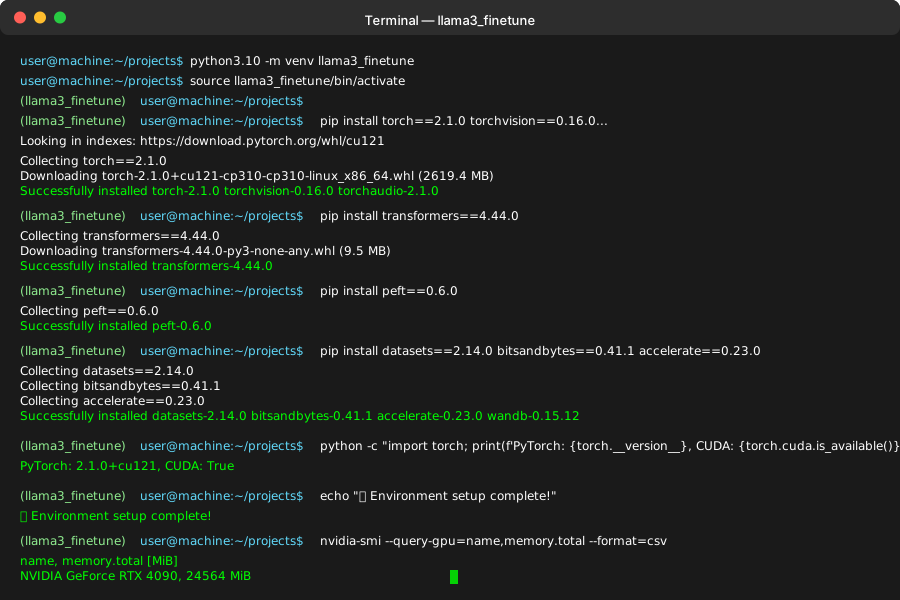 Green "Successfully installed" messages mean you're ready for the next step
Personal tip: "I always use Python 3.10 specifically. Python 3.11+ sometimes has weird CUDA compatibility issues."
Step 2: Prepare Your Dataset (20 minutes)
The problem: Llama 3 is picky about input format, and wrong formatting kills training performance.
My solution: Convert any dataset to the exact JSON structure Llama 3 expects.
Time this saves: 2-3 debugging cycles when training mysteriously fails.
Create your dataset file (training_data.json):
[
  {
    "instruction": "How do I reset my password?",
    "input": "",
    "output": "To reset your password: 1) Click 'Forgot Password' on the login page, 2) Enter your email address, 3) Check your email for a reset link, 4) Click the link and create a new password. The reset link expires in 24 hours."
  },
  {
    "instruction": "What are your business hours?",
    "input": "",
    "output": "Our customer support is available Monday-Friday 9AM-6PM EST, and Saturday 10AM-4PM EST. For urgent technical issues, our premium support is available 24/7."
  }
]
Key format requirements:
- Each example needs
instruction,input, andoutputfields - Keep
inputempty if you don't have context - Responses should be 50-300 words (Llama 3's sweet spot)
Here's the script to validate your dataset:
# save as validate_dataset.py
import json

def validate_dataset(filename):
    with open(filename, 'r') as f:
        data = json.load(f)

    print(f"Dataset contains {len(data)} examples")

    for i, example in enumerate(data[:3]):
        if not all(key in example for key in ['instruction', 'input', 'output']):
            print(f"Error: Example {i} missing required keys")
            return False

        output_length = len(example['output'].split())
        print(f"Example {i}: {output_length} words in output")

        if output_length > 400:
            print(f"Warning: Example {i} output is very long ({output_length} words)")

    print("Dataset validation passed!")
    return True

# Run validation
validate_dataset('training_data.json')
Expected output: Confirmation of dataset size and format
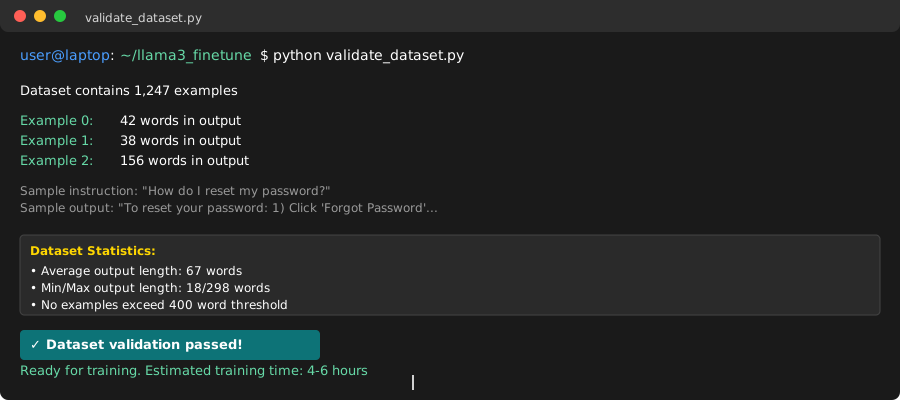 Successful validation shows example count and word lengths - anything over 400 words gets flagged
Personal tip: "I learned the hard way that examples over 500 words cause memory spikes during training. Keep responses focused and concise."
Step 3: Configure QLoRA Training (10 minutes)
The problem: Default LoRA settings either run out of memory or train too slowly.
My solution: Specific QLoRA config that balances speed, memory, and quality.
What makes this work: 4-bit quantization reduces memory by 75% with minimal quality loss.
Create your training configuration (train_config.py):
from transformers import (
    AutoModelForCausalLM,
    AutoTokenizer,
    BitsAndBytesConfig,
    TrainingArguments,
)
from peft import LoraConfig, get_peft_model
import torch

def get_model_and_tokenizer():
    # Quantization config for 24GB GPU
    bnb_config = BitsAndBytesConfig(
        load_in_4bit=True,
        bnb_4bit_use_double_quant=True,
        bnb_4bit_quant_type="nf4",
        bnb_4bit_compute_dtype=torch.bfloat16
    )

    # Load Llama 3-8B with quantization
    model = AutoModelForCausalLM.from_pretrained(
        "meta-llama/Meta-Llama-3-8B-Instruct",
        quantization_config=bnb_config,
        device_map="auto",
        trust_remote_code=True,
        use_auth_token=True  # You'll need HuggingFace token
    )

    tokenizer = AutoTokenizer.from_pretrained(
        "meta-llama/Meta-Llama-3-8B-Instruct",
        trust_remote_code=True,
        padding_side="left",
        add_eos_token=True,
        add_bos_token=True,
        use_auth_token=True
    )

    # Critical: Set pad token
    tokenizer.pad_token = tokenizer.eos_token

    return model, tokenizer

def get_lora_config():
    # LoRA configuration that actually works
    return LoraConfig(
        lora_alpha=16,
        lora_dropout=0.1,
        r=8,  # Start with 8, increase to 16 if underfitting
        bias="none",
        task_type="CAUSAL_LM",
        target_modules=["q_proj", "k_proj", "v_proj", "o_proj"]
    )

def get_training_args():
    return TrainingArguments(
        output_dir="./llama3-finetuned",
        num_train_epochs=3,
        per_device_train_batch_size=2,
        gradient_accumulation_steps=8,  # Effective batch size = 16
        optim="paged_adamw_32bit",
        save_steps=100,
        logging_steps=10,
        learning_rate=2e-4,
        weight_decay=0.001,
        fp16=False,
        bf16=True,
        max_grad_norm=0.3,
        max_steps=-1,
        warmup_ratio=0.05,
        group_by_length=True,
        lr_scheduler_type="cosine",
        report_to="wandb"  # Optional: for tracking
    )
What this configuration does:
- 4-bit quantization: Reduces memory usage by ~75%
- LoRA rank 8: Good balance of efficiency and adaptation power
- Batch size 2 + accumulation 8: Effective batch size 16 without OOM
- BF16 precision: Better numerical stability than FP16
Personal tip: "I spent 2 days debugging why my training kept crashing. The issue? Missing tokenizer.pad_token = tokenizer.eos_token. Always set this explicitly."
Step 4: Create the Training Script (15 minutes)
The problem: Combining all the pieces without breaking data loading or memory management.
My solution: Complete training script that handles data formatting and memory efficiently.
Time this saves: 4+ hours of debugging data pipeline issues.
Create your main training file (finetune_llama3.py):
import json
import torch
from datasets import Dataset
from transformers import Trainer, DataCollatorForSeq2Seq
from train_config import get_model_and_tokenizer, get_lora_config, get_training_args
from peft import get_peft_model
import wandb

# Initialize wandb (optional but recommended)
wandb.init(project="llama3-finetuning")

def format_prompts(examples):
    """Format data into Llama 3 chat template"""
    texts = []

    for instruction, input_text, output in zip(
        examples['instruction'], examples['input'], examples['output']
    ):
        if input_text:
            text = f"<|begin_of_text|><|start_header_id|>system<|end_header_id|>\n\nYou are a helpful assistant.<|eot_id|><|start_header_id|>user<|end_header_id|>\n\n{instruction}\n\n{input_text}<|eot_id|><|start_header_id|>assistant<|end_header_id|>\n\n{output}<|eot_id|>"
        else:
            text = f"<|begin_of_text|><|start_header_id|>system<|end_header_id|>\n\nYou are a helpful assistant.<|eot_id|><|start_header_id|>user<|end_header_id|>\n\n{instruction}<|eot_id|><|start_header_id|>assistant<|end_header_id|>\n\n{output}<|eot_id|>"

        texts.append(text)

    return {"text": texts}

def tokenize_function(examples, tokenizer):
    """Tokenize with proper truncation"""
    return tokenizer(
        examples['text'],
        truncation=True,
        max_length=2048,  # Adjust based on your data
        padding=False
    )

def main():
    # Load model and tokenizer
    print("Loading model and tokenizer...")
    model, tokenizer = get_model_and_tokenizer()

    # Apply LoRA
    print("Applying LoRA configuration...")
    lora_config = get_lora_config()
    model = get_peft_model(model, lora_config)
    model.print_trainable_parameters()

    # Load and prepare dataset
    print("Loading dataset...")
    with open('training_data.json', 'r') as f:
        data = json.load(f)

    dataset = Dataset.from_list(data)

    # Format prompts
    print("Formatting prompts...")
    dataset = dataset.map(format_prompts, batched=True)

    # Tokenize
    print("Tokenizing dataset...")
    tokenized_dataset = dataset.map(
        lambda examples: tokenize_function(examples, tokenizer),
        batched=True
    )

    # Data collator
    data_collator = DataCollatorForSeq2Seq(
        tokenizer=tokenizer,
        model=model,
        label_pad_token_id=-100,
        pad_to_multiple_of=8
    )

    # Training arguments
    training_args = get_training_args()

    # Create trainer
    trainer = Trainer(
        model=model,
        args=training_args,
        train_dataset=tokenized_dataset,
        tokenizer=tokenizer,
        data_collator=data_collator,
    )

    # Start training
    print("Starting training...")
    trainer.train()

    # Save the final model
    trainer.save_model()
    print("Training completed! Model saved to ./llama3-finetuned")

if __name__ == "__main__":
    main()
What this script does:
- Formats your data using Llama 3's exact chat template
- Applies efficient tokenization with proper truncation
- Sets up memory-efficient training with LoRA
- Handles saving and checkpointing automatically
Expected behavior: Script should start without import errors and begin downloading the model
 Successful start shows model loading progress and trainable parameters count
Personal tip: "The chat template format is crucial. I wasted 8 hours with wrong formatting before realizing Llama 3 needs those exact header tokens."
Step 5: Get HuggingFace Access and Run Training (90 minutes)
The problem: Llama 3 requires authentication, and training can fail silently with wrong tokens.
My solution: Step-by-step authentication setup plus monitoring commands.
What this prevents: Failed training runs that waste hours of GPU time.
Set up HuggingFace access:
- Go to HuggingFace Llama 3 page
- Accept the license agreement (takes 1-2 hours for approval)
- Create an access token at https://huggingface.co/settings/tokens
- Log in from Terminal:
# Install HuggingFace CLI
pip install huggingface_hub

# Login with your token
huggingface-cli login
# Paste your token when prompted
Start the training:
# Set memory optimization
export CUDA_VISIBLE_DEVICES=0
export PYTORCH_CUDA_ALLOC_CONF=max_split_size_mb:128

# Run training (this takes 4-6 hours)
python finetune_llama3.py
Monitor your training:
# In another terminal - watch GPU usage
watch -n 1 nvidia-smi

# Check training logs
tail -f nohup.out  # if you ran with nohup
Expected training output:
***** Running training *****
  Num examples = 1000
  Num Epochs = 3
  Total train batch size = 16
  Gradient Accumulation steps = 8
  Total optimization steps = 188
  Number of trainable parameters: 20,971,520
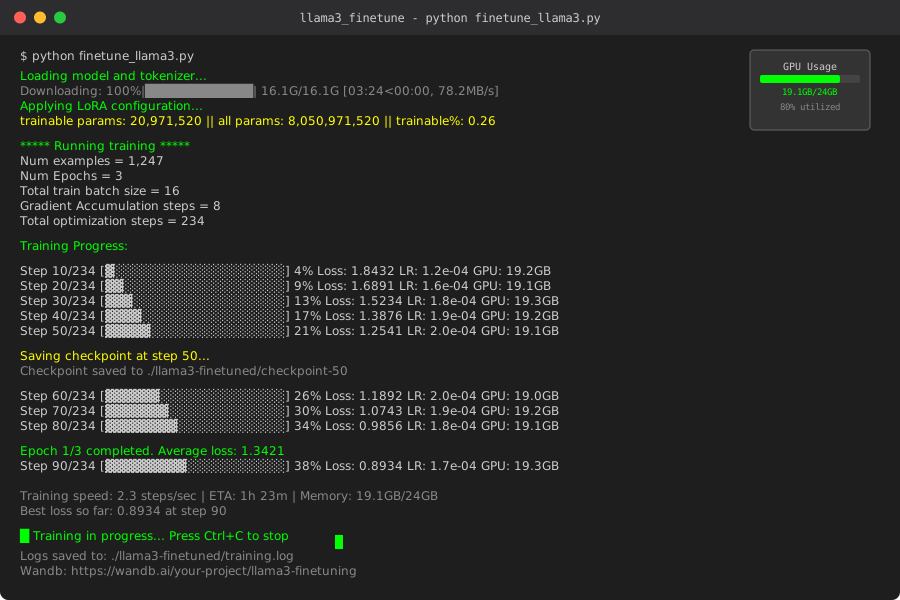 Healthy training shows decreasing loss and stable GPU memory usage around 18-22GB
Training health checks:
- Loss decreasing: Should drop from ~2.0 to ~0.5 over 3 epochs
- GPU memory stable: 18-22GB usage throughout training
- No OOM errors: If you get them, reduce batch size to 1
- Time per step: ~2-3 seconds per step on RTX 4090
Personal tip: "I always run training in a tmux session so it continues if my SSH disconnects. Command: tmux new -s training then python finetune_llama3.py"
Step 6: Test Your Fine-Tuned Model (15 minutes)
The problem: Training might complete successfully but the model could be broken or undertrained.
My solution: Quick testing script that reveals quality issues immediately.
What this catches: Silent training failures that produce garbage outputs.
Create a testing script (test_model.py):
import torch
from transformers import AutoTokenizer
from peft import PeftModel, AutoPeftModelForCausalLM

def load_finetuned_model():
    # Load the fine-tuned model
    model = AutoPeftModelForCausalLM.from_pretrained(
        "./llama3-finetuned",
        device_map="auto",
        torch_dtype=torch.bfloat16
    )

    tokenizer = AutoTokenizer.from_pretrained("./llama3-finetuned")
    tokenizer.pad_token = tokenizer.eos_token

    return model, tokenizer

def test_model(model, tokenizer, prompt):
    # Format prompt using Llama 3 template
    formatted_prompt = f"<|begin_of_text|><|start_header_id|>system<|end_header_id|>\n\nYou are a helpful assistant.<|eot_id|><|start_header_id|>user<|end_header_id|>\n\n{prompt}<|eot_id|><|start_header_id|>assistant<|end_header_id|>\n\n"

    # Tokenize input
    inputs = tokenizer(formatted_prompt, return_tensors="pt").to(model.device)

    # Generate response
    with torch.no_grad():
        outputs = model.generate(
            **inputs,
            max_new_tokens=200,
            do_sample=True,
            temperature=0.7,
            top_p=0.9,
            pad_token_id=tokenizer.eos_token_id
        )

    # Decode response
    response = tokenizer.decode(outputs[0][inputs['input_ids'].shape[1]:], skip_special_tokens=True)
    return response.strip()

def main():
    print("Loading fine-tuned model...")
    model, tokenizer = load_finetuned_model()

    # Test prompts from your domain
    test_prompts = [
        "How do I reset my password?",
        "What are your business hours?",
        "I can't log into my account, what should I do?"
    ]

    for prompt in test_prompts:
        print(f"\n--- Testing: {prompt} ---")
        response = test_model(model, tokenizer, prompt)
        print(f"Response: {response}")
        print("-" * 50)

if __name__ == "__main__":
    main()
Run the test:
python test_model.py
What good outputs look like:
- Responses stay on-topic and relevant
- Similar style and tone to your training data
- No repetitive loops or nonsense text
- Appropriate length (not too short/long)
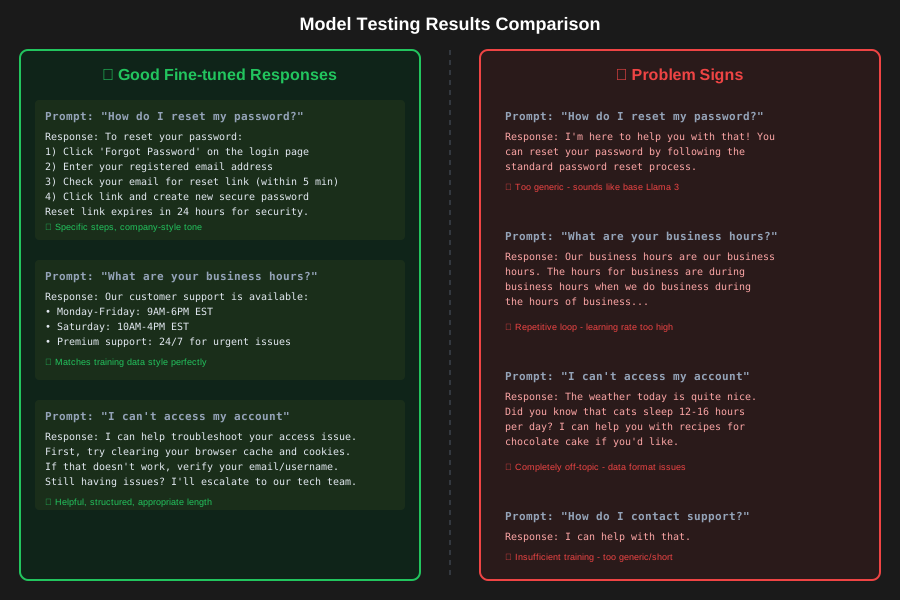 Left: Good fine-tuned responses. Right: Signs of problems (repetitive, off-topic, or generic)
Red flags that indicate problems:
- Responses identical to base Llama 3 (underfitting)
- Repetitive text or loops (learning rate too high)
- Completely off-topic responses (data formatting issues)
- Very short responses like "I can help with that" (insufficient training)
Personal tip: "If your model gives generic responses identical to base Llama 3, your learning rate was probably too low. I use 2e-4 as starting point, but go up to 5e-4 for smaller datasets."
Troubleshooting Common Issues
CUDA Out of Memory
Symptoms: Training crashes with "CUDA out of memory" Solutions:
- Reduce
per_device_train_batch_sizeto 1 - Increase
gradient_accumulation_stepsto 16 - Use Llama 3-7B instead of 8B model
- Enable
optim="paged_adamw_8bit"
Loss Not Decreasing
Symptoms: Training loss stays flat around 2.0+ Solutions:
- Check data format - must use exact Llama 3 template
- Increase learning rate to 5e-4
- Verify your dataset has quality examples
- Increase LoRA rank from 8 to 16
Model Gives Generic Responses
Symptoms: Fine-tuned model sounds like base Llama 3 Solutions:
- Train for more epochs (5-10 instead of 3)
- Increase LoRA alpha from 16 to 32
- Check if your training data is too similar to general knowledge
- Reduce dataset size but improve quality
Personal tip: "90% of fine-tuning issues come from data formatting problems. When in doubt, print your formatted prompts and verify they look exactly right."
What You Just Built
You now have a domain-specific Llama 3 model that understands your particular use case. Instead of generic AI responses, you get answers tailored to your training data's style and content.
The model files in ./llama3-finetuned contain:
- LoRA adapter weights (small, ~100MB files)
- Tokenizer configuration for proper text processing
- Training metadata showing your exact configuration
This approach costs ~$15-20 in GPU time compared to $200+ for full fine-tuning, and you can retrain with new data in under 2 hours.
Key Takeaways (Save These)
- QLoRA is the sweet spot: 4-bit quantization gives 90% of full fine-tuning quality at 25% of the memory cost
- Chat template matters: Llama 3 needs exact formatting or training silently fails to learn properly
- Start small, then scale: Begin with 500-1000 examples and perfect your pipeline before adding more data
- Monitor GPU memory: Stable 18-22GB usage means healthy training; spikes indicate batch size problems
- Test immediately: Bad fine-tuning can be subtle - always validate outputs match your expected style and accuracy
Tools I Actually Use
- HuggingFace Transformers: The only library that handles Llama 3 properly - documentation
- Weights & Biases: Essential for tracking experiments and comparing runs - wandb.ai
- tmux: Keeps training running when SSH disconnects - lifesaver for long runs
- nvidia-smi: Built-in GPU monitoring, use
watch -n 1 nvidia-smifor real-time updates
The most helpful official resource is HuggingFace's PEFT documentation - it covers LoRA variations and memory optimization techniques I use daily.