Problem: Your Customer Service Bot Has No Face
Text chatbots resolve tickets. But video-based AI avatars reduce customer churn by making interactions feel human — without hiring agents. The challenge: most tutorials stop at "upload a photo." This one gets you to a live, talking avatar integrated into a real support flow.
You'll learn:
- How lip-sync AI pipelines work end-to-end
- How to generate avatar video responses via API (HeyGen or D-ID)
- How to wire it into a customer service backend with streaming playback
Time: 45 min | Level: Intermediate
Why This Happens
Modern lip-sync avatars work by driving a base facial mesh (photo or 3D model) from an audio waveform. The audio is generated by a TTS engine, then a lip-sync model maps phonemes to mouth shapes frame-by-frame.
The stack has three layers:
- TTS — converts agent text response to audio (ElevenLabs, Azure TTS, etc.)
- Lip-sync engine — drives the avatar's face from audio (Wav2Lip, SadTalker, HeyGen API)
- Video delivery — streams or serves the rendered clip to the browser
Common symptoms when this goes wrong:
- Mouth movement looks mechanical or misaligned with syllables
- Latency too high for real-time conversation (>3s is noticeable)
- Avatar persona looks uncanny or inconsistent between clips
Solution
Step 1: Choose Your Pipeline
Three viable options in 2026, each with different latency/quality tradeoffs:
| Approach | Latency | Quality | Cost |
|---|---|---|---|
| HeyGen Streaming API | ~1.5s | High | $0.05/min |
| D-ID Agents API | ~2s | High | $0.04/min |
| Local Wav2Lip + SadTalker | ~4-8s | Medium | GPU cost only |
For production customer service, use HeyGen Streaming or D-ID Agents. For internal tools or privacy-sensitive deployments, use local inference.
This guide covers HeyGen Streaming API first, then the local fallback.
Step 2: Set Up HeyGen Streaming Session
Install the SDK and initialize a streaming session:
npm install @heygen/streaming-avatar
import StreamingAvatar, { AvatarQuality, StreamingEvents } from "@heygen/streaming-avatar";

const avatar = new StreamingAvatar({
  token: process.env.HEYGEN_API_KEY,
});

// Start a session — this reserves compute on HeyGen's end
const sessionData = await avatar.createStartAvatar({
  quality: AvatarQuality.High,
  avatarName: "Anna_public_3_20240108",  // Use HeyGen's public avatars to start
  voice: {
    voiceId: "en-US-AriaNeural",         // Azure voice ID passed through
    rate: 1.0,
    emotion: "Friendly",
  },
  language: "en",
  disableIdleTimeout: false,
});

console.log("Session ID:", sessionData.session_id);
Expected: You'll get a session_id and an ICE server config for WebRTC.
If it fails:
- 401 Unauthorized: Check your API key is from the Streaming tab in HeyGen dashboard, not the regular API key
- 429 Rate limit: Free tier allows 3 concurrent sessions; upgrade or queue requests
Step 3: Connect WebRTC Stream to Browser
The avatar video arrives as a WebRTC stream. Connect it to a <video> element:
// frontend/AvatarPlayer.tsx
import { useEffect, useRef } from "react";

export function AvatarPlayer({ sessionData }: { sessionData: SessionData }) {
  const videoRef = useRef<HTMLVideoElement>(null);

  useEffect(() => {
    const peerConnection = new RTCPeerConnection({
      iceServers: sessionData.ice_servers,  // From HeyGen session response
    });

    // Attach incoming video track to the <video> element
    peerConnection.ontrack = (event) => {
      if (videoRef.current && event.streams[0]) {
        videoRef.current.srcObject = event.streams[0];
      }
    };

    // Set remote description from HeyGen's SDP offer
    peerConnection.setRemoteDescription(
      new RTCSessionDescription(sessionData.sdp)
    );

    // Generate and send answer back to HeyGen
    peerConnection.createAnswer().then((answer) => {
      peerConnection.setLocalDescription(answer);
      // Send answer to your backend → HeyGen
      sendAnswerToBackend(answer);
    });

    return () => peerConnection.close();
  }, [sessionData]);

  return (
    <video
      ref={videoRef}
      autoPlay
      playsInline
      className="rounded-xl w-full max-w-md"
    />
  );
}
Expected: Avatar appears in idle state, blinking and breathing naturally while waiting for speech input.
Step 4: Send Customer Service Responses to the Avatar
When your LLM generates a support response, pipe it to the avatar:
// backend/avatarController.ts
import { OpenAI } from "openai";

const openai = new OpenAI();

export async function handleCustomerMessage(
  sessionId: string,
  customerMessage: string,
  avatarClient: StreamingAvatar
) {
  // Generate support response
  const completion = await openai.chat.completions.create({
    model: "gpt-4o",
    messages: [
      { role: "system", content: CUSTOMER_SERVICE_PROMPT },
      { role: "user", content: customerMessage },
    ],
    max_tokens: 150,  // Keep responses short — long clips add latency
  });

  const agentResponse = completion.choices[0].message.content;

  // Send text to avatar — HeyGen handles TTS + lip sync internally
  await avatarClient.speak({
    text: agentResponse,
    taskType: "repeat",   // "repeat" = speak exactly this text
    taskMode: "sync",     // Wait for speech to finish before resolving
  });

  return agentResponse;
}
Why max_tokens: 150: Responses over ~30 seconds feel unnatural in a support context. Keep the avatar speaking in 10-20 second bursts. Chain multiple turns instead.
Step 5: Add Interruption Handling
Real conversations need the avatar to stop speaking when the customer talks:
// Detect customer speech and interrupt avatar
const recognition = new webkitSpeechRecognition();
recognition.continuous = true;

recognition.onstart = async () => {
  // Stop avatar mid-sentence when customer starts talking
  await avatarClient.interrupt();
};

recognition.onresult = async (event) => {
  const transcript = event.results[event.results.length - 1][0].transcript;
  if (event.results[event.results.length - 1].isFinal) {
    await handleCustomerMessage(sessionId, transcript, avatarClient);
  }
};

recognition.start();
Expected: Avatar stops within ~200ms of detecting speech. The session stays open; no new session needed.
Step 6: Local Fallback with Wav2Lip (Optional)
For privacy-sensitive deployments, run lip sync locally:
# Install dependencies (GPU required for real-time)
pip install wav2lip-hq torch torchaudio

# Download pretrained model
wget https://github.com/Rudrabha/Wav2Lip/releases/download/v1.0/wav2lip_gan.pth
# local_avatar.py
import subprocess
import tempfile
from pathlib import Path

def generate_avatar_clip(text: str, base_image: str) -> str:
    """
    Generates a lip-synced video from text + static avatar image.
    Returns path to output MP4.
    """
    # Step 1: Generate audio from text
    audio_path = text_to_speech(text)  # Use your TTS of choice

    # Step 2: Run Wav2Lip inference
    output_path = tempfile.mktemp(suffix=".mp4")
    subprocess.run([
        "python", "inference.py",
        "--checkpoint_path", "wav2lip_gan.pth",
        "--face", base_image,           # Your avatar photo or video loop
        "--audio", audio_path,
        "--outfile", output_path,
        "--resize_factor", "1",
        "--nosmooth",                   # Sharper but faster
    ], check=True)

    return output_path
Latency note: On an RTX 4090, expect ~4 seconds for a 15-second clip. Not suitable for real-time; pre-render common responses (greetings, hold messages, FAQs) and cache them.
Verification
# Test HeyGen session creation
curl -X POST https://api.heygen.com/v1/streaming.new \
  -H "x-api-key: $HEYGEN_API_KEY" \
  -H "Content-Type: application/json" \
  -d '{"quality": "high", "avatar_name": "Anna_public_3_20240108"}'
You should see: A JSON response with session_id, url, and ice_servers array.
For the WebRTC connection, open your browser console and confirm:
RTCPeerConnection state: connected
Video track active: true
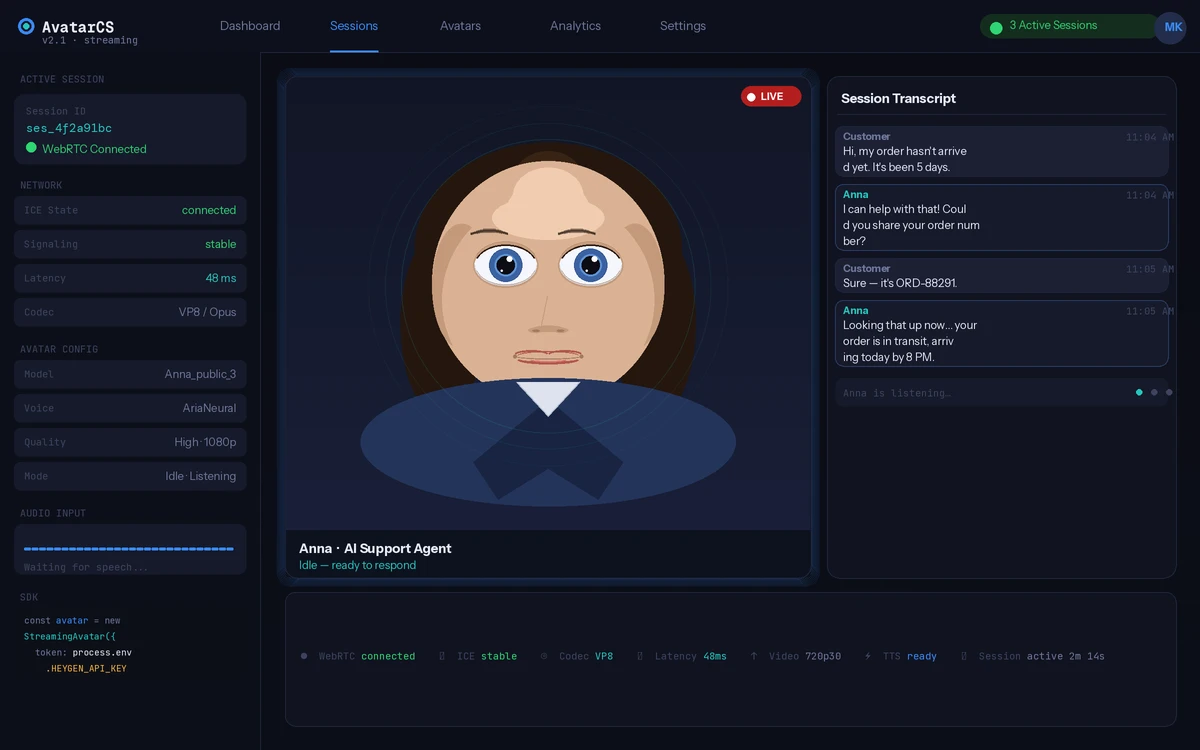 Avatar idle state — connected and ready to receive speech input
What You Learned
- HeyGen Streaming uses WebRTC for sub-2s end-to-end latency — avoid REST-based clip generation for live conversations
- Keep LLM responses under 150 tokens; chain turns for longer explanations
- Implement interruption handling from day one — it's what separates a demo from a production system
- Local Wav2Lip is viable for pre-rendered clips but not real-time interaction
Limitations:
- HeyGen public avatars can't be customized; paid plans unlock custom avatar training from a 2-minute video sample
- WebRTC requires HTTPS in production — localhost dev is fine, but deploy behind a proper TLS terminator
webkitSpeechRecognitionis Chrome-only; use Deepgram or AssemblyAI for cross-browser voice capture
When NOT to use this:
- Simple FAQ bots — the added latency and cost aren't worth it if customers are fine with text
- High-volume async support (tickets, email) — avatars only make sense for synchronous, live interactions
Tested on HeyGen Streaming API v2.1, Node.js 22.x, React 19, Chrome 122+