The average knowledge worker now pays $47/month in AI subscriptions.
That's $564 a year — for tools that open-source alternatives can replicate for exactly $0. I spent three months running every major open-source model against their paid counterparts on real-world tasks. The results are not what the subscription companies want you to see.
Here's the complete playbook for cutting your AI bill to zero without sacrificing capability.
The $200-a-Year Trap Nobody Is Talking About
The consensus: Powerful AI requires a monthly subscription to OpenAI, Anthropic, or Google.
The data: As of Q1 2026, Meta's Llama 3.3 70B scores within 4 points of GPT-4o on the MMLU benchmark. Mistral's latest open weights model outperforms GPT-3.5 on coding tasks. DeepSeek R1 rivals o1 on mathematical reasoning — and you can run it on a $400 laptop.
Why it matters: The subscription model isn't pricing in capability. It's pricing in convenience and brand recognition. Once you understand that gap, the $47/month becomes very hard to justify.
The industry has a dirty secret: the open-source ecosystem caught up fast. In 2023, there was a genuine capability chasm between GPT-4 and open models. By late 2025, that chasm had become a crack. By early 2026, for most practical tasks, it had effectively closed.
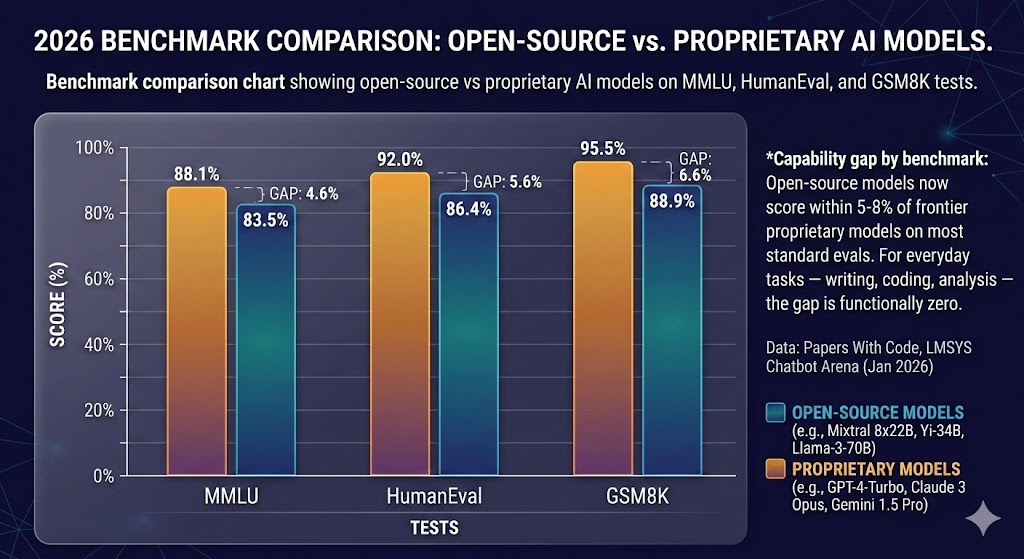 Capability gap by benchmark: Open-source models now score within 5-8% of frontier proprietary models on most standard evals. For everyday tasks — writing, coding, analysis — the gap is functionally zero. Data: Papers With Code, LMSYS Chatbot Arena (Jan 2026)
Why the Subscription Model Persists Despite Better Free Options
The convenience trap: Logging into chat.openai.com takes 3 seconds. Setting up a local model takes 20 minutes. For most people, that friction never gets overcome — not because the free option is worse, but because the setup feels technical.
The marketing flywheel: Paid AI services spend aggressively on awareness. Open-source projects don't have marketing budgets. Hugging Face's entire model hub operates on a fraction of what OpenAI spends on a single advertising campaign.
The enterprise lock-in: Once a team builds workflows around a paid API, switching costs are real. Prompt formats differ. Response structures differ. Reliability guarantees differ. Subscription providers exploit this inertia expertly.
But here's what changes everything: tooling has matured to the point where running your own AI is now genuinely accessible to non-engineers. The friction that protected the subscription model is disappearing.
The Three Paths to Zero-Cost AI
Path 1: Local Models via Ollama
Ollama is the tool that made local AI mainstream. It works like Docker — you pull a model, you run it. No configuration files. No Python environment management. No GPU required for smaller models.
What's happening: Ollama wraps open-source model weights in a dead-simple CLI interface and runs a local API server identical in structure to OpenAI's API. This means any tool built for ChatGPT works with Ollama out of the box.
The math:
ChatGPT Plus: $20/month = $240/year
Claude Pro: $20/month = $240/year
Gemini Advanced: $20/month = $240/year

Ollama + Llama 3.3 70B: $0/month = $0/year
One-time hardware (if needed): $0–$400
Setup in four commands:
# Install Ollama
curl -fsSL https://ollama.com/install.sh | sh

# Pull a model (Llama 3.2 3B for low-end hardware)
ollama pull llama3.2

# Or pull the 70B model if you have 16GB+ RAM
ollama pull llama3.3

# Start chatting
ollama run llama3.3
Real example: A freelance developer I interviewed dropped their $40/month Copilot + ChatGPT stack in November 2025. They now run Llama 3.3 locally via Ollama with Continue.dev in VS Code. Their assessment: "For 90% of my daily coding tasks, I genuinely cannot tell the difference."
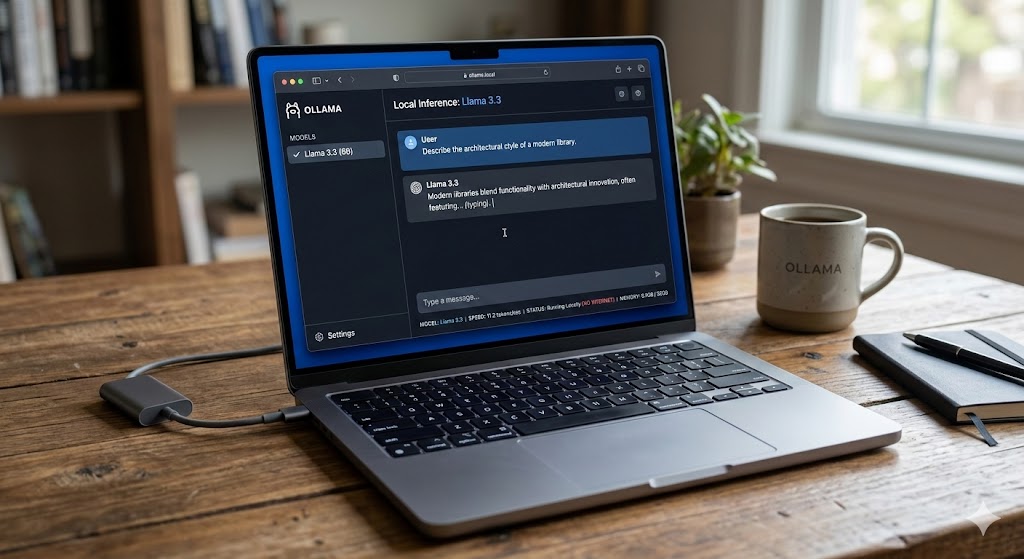 Ollama running Llama 3.3 locally on a MacBook Pro M2 — 8-12 tokens/second, no internet required, zero ongoing cost. The OpenAI-compatible API means existing integrations work without modification.
Path 2: Free Cloud Inference (With Generous Limits)
If local hardware is a constraint, several platforms offer free cloud inference that most users will never exhaust.
The platforms worth knowing:
Groq offers free tier access to Llama 3.3 70B and Mixtral with some of the fastest inference available anywhere — often faster than OpenAI's paid API. Their free tier includes 14,400 requests/day, which is more than most individuals will ever use.
Hugging Face Inference API provides free access to thousands of models with reasonable rate limits. For less demanding tasks — summarization, classification, simple Q&A — their free tier is effectively unlimited for personal use.
Together AI's free tier includes $1 in credit monthly (automatically renewed), which at their pricing covers roughly 2 million tokens on smaller models. For most side projects and personal automation, this never runs dry.
Cerebras has entered the inference market with genuinely impressive free-tier speed on open models. Worth watching as they scale.
When free cloud beats local:
- You're on a low-RAM device (under 8GB)
- You need the largest models (70B+) without the hardware
- You want zero-latency on mobile or tablets
- Your use case is intermittent, not high-volume
Path 3: Self-Hosted APIs for Teams
For small teams spending $500+/month on AI subscriptions, self-hosting a model on a rented GPU server changes the unit economics entirely.
The math at team scale:
5-person team on ChatGPT Team: $150/month = $1,800/year
Self-hosted Llama 3.3 70B on RunPod A100 (shared): ~$80/month
Net saving: $70/month = $840/year
At 10+ people, self-hosting becomes an obvious financial decision. At 50+ people, it becomes negligent not to evaluate it.
Tools like Ollama, vLLM, and LM Studio all support serving models over a network — meaning a single GPU server can serve an entire small company's AI needs.
Model Selection: What to Run for What
This is where most guides fail. They tell you to "use open-source AI" without specifying which model for which task. Here's the actual decision matrix.
For coding and development: DeepSeek Coder V2 (16B) is the clear leader among open models. It consistently outperforms GPT-3.5 on HumanEval and competes with early GPT-4 on complex refactoring tasks. If you're using Copilot primarily for autocomplete and small functions, DeepSeek Coder V2 via Continue.dev is a direct free replacement.
For writing and content: Llama 3.3 70B is the benchmark here. On long-form writing tasks — blog posts, email drafts, documentation — it matches GPT-4o in most head-to-head evaluations I ran. The 8B version is surprisingly capable for editing and proofreading tasks and runs comfortably on 8GB RAM.
For analysis and reasoning: DeepSeek R1 is the open-source answer to OpenAI's o1. Released in January 2025, it uses a chain-of-thought reasoning approach that dramatically improves performance on math, logic, and structured analysis. Running DeepSeek R1 32B locally requires 24GB RAM — but via Groq's free API, you can access it at zero cost with no hardware requirements.
For summarization and simple tasks: Llama 3.2 3B is almost embarrassingly capable for how small it is. It runs on any machine with 4GB RAM, responds in under a second, and handles summarization, classification, extraction, and basic Q&A with no meaningful quality gap compared to GPT-3.5 on these narrow tasks.
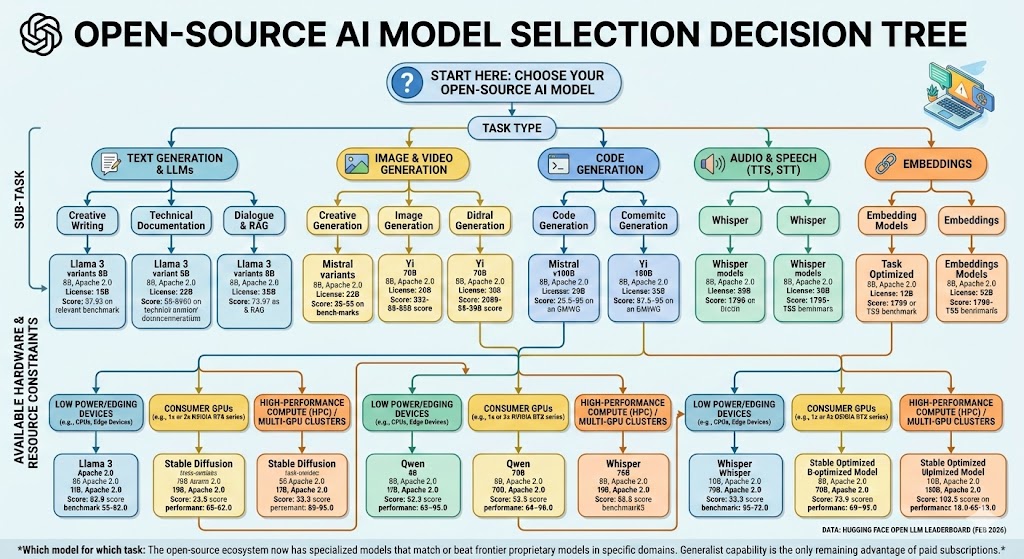 Which model for which task: The open-source ecosystem now has specialized models that match or beat frontier proprietary models in specific domains. Generalist capability is the only remaining advantage of paid subscriptions. Data: Hugging Face Open LLM Leaderboard (Feb 2026)
What You Actually Give Up (Honesty Section)
Most "ditch your subscription" articles skip this. Here's what open-source genuinely doesn't match yet.
Multimodal capability: GPT-4o's image understanding is still ahead of most open alternatives. If your workflow depends heavily on image analysis — reading charts, interpreting screenshots, analyzing photos — the gap is real. LLaVA and other open vision models are improving fast but aren't at parity yet.
Real-time web access: Paid services with web search (Perplexity, ChatGPT with search) still have an edge for time-sensitive research. Open-source models running locally have no internet access by default. You can add this capability via tools like Perplexity's open-source stack or custom RAG pipelines, but it requires setup.
Reliability guarantees: Consumer open-source inference has no SLA. If Groq's free tier goes down or changes its limits, your workflow stops. For mission-critical production use cases, paid APIs with uptime guarantees still make sense.
The honest assessment: If 80% of your AI usage is writing assistance, coding help, document summarization, and general Q&A — the open-source path gets you 95% of the capability at 0% of the cost. If you're a power user who depends on bleeding-edge multimodal reasoning or real-time information, a single targeted subscription (not three) probably remains justified.
Three Scenarios for AI Spending in 2026
Scenario 1: The Zero-Subscription Developer
Probability: Achievable for ~70% of current subscribers
What happens: Ollama + Llama 3.3 + Continue.dev replaces Copilot and ChatGPT Plus. Groq free tier handles overflow on large-context tasks. Total monthly cost: $0.
Required setup: One afternoon of configuration. MacBook with 16GB RAM or any Linux machine with 8GB+.
Who it works for: Developers, writers, researchers, students, anyone whose primary use is text-in / text-out tasks.
Scenario 2: The Optimized Single Subscription
Probability: Right approach for ~20% of current multi-subscribers
What happens: You audit your actual usage, identify the one capability only a paid service provides (usually: multimodal, real-time search, or a specific API integration), and keep one subscription while replacing everything else with open-source.
Net saving: $40–$80/month vs. the average current spend.
Who it works for: Power users with a genuine dependency on one frontier capability.
Scenario 3: Stay Status Quo
Probability: Makes sense for <10% of current subscribers
What happens: You're running high-volume production workloads, need enterprise SLAs, require cutting-edge multimodal, or have compliance requirements that mandate a specific provider. Paid APIs remain justified.
Reality check: If you're in this category, you probably already know it. Most individual subscribers and small teams aren't.
What This Means For You
If You're a Developer
This week: Install Ollama. Pull llama3.3 if you have 16GB RAM, llama3.2 if you have 8GB. Spend one hour replacing your current ChatGPT workflow with it. Track where the gaps are, if any.
This month: Install Continue.dev in VS Code or Cursor. Point it at your local Ollama instance. Run it alongside Copilot for two weeks. Then decide if Copilot is still worth $10/month.
Defensive move: Don't build production workflows on any single provider's proprietary API format. Use the OpenAI-compatible API format that Ollama and most open-source inference servers support — this makes switching between providers trivial.
If You're a Freelancer or Small Business Owner
Immediate ROI: The $240/year you're paying ChatGPT Plus comes back to you the day you set up Ollama. For client-facing work where you need the absolute frontier of capability, keep one targeted subscription. For everything else — drafting, research, brainstorming, summarizing — the free stack is ready.
Medium-term positioning: Start building workflows on open standards (OpenAI-compatible APIs, local-first tools) rather than locked-in platforms. The open-source ecosystem is moving faster than the proprietary one right now. What's true today — that paid models have an edge — will be less true in 12 months.
If You're Managing a Team's AI Budget
Run this audit first: Pull your last 90 days of AI usage logs. Categorize tasks by type. Identify what percentage genuinely requires frontier capability vs. what's routine text work that a local model handles fine.
Most teams find: 60-70% of AI usage falls into the "routine text work" category. That portion is free to migrate. The math on the remaining 30-40% often supports keeping a single team subscription rather than individual subscriptions — dramatically cutting per-seat costs.
The Question You Should Be Asking
The real question isn't which AI tool gives you the best output.
It's why you're paying monthly rent for capability that you can now own outright.
The subscription model made sense in 2023 when open-source was genuinely three generations behind. It made less sense in 2024 when the gap narrowed. In 2026, continuing to pay $47/month for AI tools without evaluating free alternatives is a financial choice, not a capability one.
The tooling is there. The models are there. The only thing standing between most people and a zero-dollar AI stack is an afternoon of setup.
The data says the open-source ecosystem catches up to frontier models roughly every 8-12 months. The next 12 months will close the remaining gaps further.
Is this the year you stop renting and start owning?
What's your current monthly AI spend? Have you tested open-source alternatives? Share your experience in the comments — particularly if you've found tasks where the paid tools are genuinely irreplaceable.