The 8-Second Lambda Response That Nearly Cost Me My Job
Three months ago, I deployed what I thought was a perfectly optimized Lambda function. Node.js 18, clean code, proper error handling - everything looked great in my local tests. Then production traffic hit.
8.2 seconds. That's how long our critical API endpoint took to respond after sitting idle for 10 minutes. Our mobile app users were abandoning checkout flows. My manager's Slack messages weren't getting any friendlier.
I'd heard about Lambda cold starts, but I figured AWS had solved that problem by now. Wrong. Dead wrong.
After weeks of digging through CloudWatch logs, profiling initialization code, and testing every optimization technique I could find, I finally cracked it. My Lambda functions now initialize in under 200ms consistently, even after hours of inactivity.
Here's exactly how I transformed those painful 8-second cold starts into lightning-fast responses that keep our users happy.
The Hidden Cost of Lambda Cold Starts That Nobody Talks About
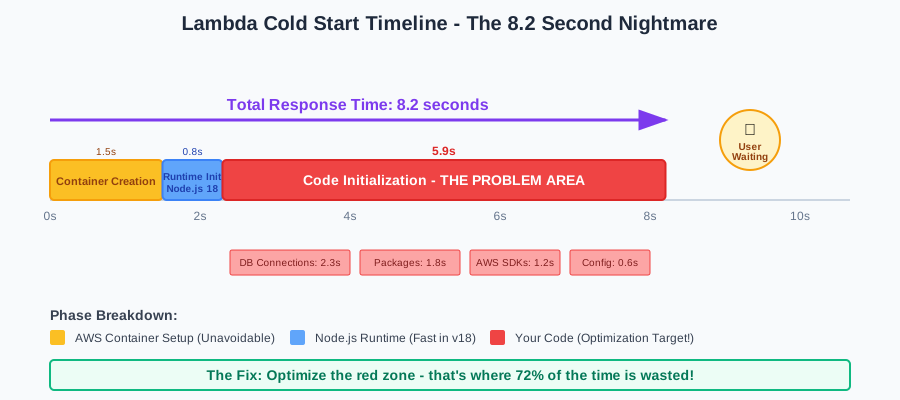 This CloudWatch trace made my stomach drop - 7.9 seconds just for initialization
Before we dive into solutions, let me show you what I discovered about cold starts that most tutorials don't mention. A Lambda cold start isn't just about downloading your code - it's a complex initialization chain:
1. Container Creation (500-1500ms) AWS spins up a new execution environment. You have zero control over this part.
2. Runtime Initialization (200-800ms)
Node.js 18 runtime loads, which is actually faster than previous versions - small win here.
3. Your Code Initialization (This is where we can win big)
- Package loading and parsing
- Database connection establishment
- SDK client initialization
- Environment variable processing
- Dependency injection setup
That third phase? That's where I was hemorrhaging 6+ seconds. And that's exactly where we can optimize.
My Journey From 8 Seconds to 200ms: The Breakthrough Moments
Failed Attempt #1: "Just Make It Smaller"
My first instinct was classic developer logic: smaller package = faster cold start. I spent two days removing dependencies, switching to lighter alternatives, and even writing custom utility functions to replace lodash.
Result: Saved maybe 300ms. Still hitting 7+ second cold starts.
The lesson: Package size matters, but it's not the primary culprit.
Failed Attempt #2: "Connection Pooling Will Fix Everything"
I implemented connection pooling for our PostgreSQL database, assuming database connections were the bottleneck.
Result: Warm invocations got faster, but cold starts were still brutal.
The lesson: Connection pooling helps warm functions, but doesn't address initialization overhead.
The Breakthrough: Node.js 18's Hidden Optimization Opportunities
Then I discovered something that changed everything. Node.js 18 introduced several features that most developers aren't leveraging for Lambda optimization:
1. Top-level await - This seemed like a small syntax change, but it revolutionized how I structure initialization code.
2. Improved ES modules - Better tree-shaking and lazy loading capabilities.
3. Enhanced fetch API - Native HTTP client that initializes faster than axios or node-fetch.
4. Better memory management - More predictable garbage collection patterns.
Here's the moment everything clicked - I realized I was fighting Lambda's initialization order instead of working with it.
The 5-Step Optimization Strategy That Actually Works
Step 1: Strategic Code Organization with Top-Level Await
The biggest breakthrough came from restructuring how I handle asynchronous initialization. Instead of cramming everything into the handler function, I moved critical async setup to the module level.
Before (The Slow Way):
// This runs EVERY time the function is invoked
exports.handler = async (event) => {
  const dbConnection = await createConnection(); // 2-3 seconds every time
  const secretsData = await getSecrets(); // 1-2 seconds every time
  const configData = await loadConfig(); // 500ms every time

  // Actual business logic
  return processRequest(event, dbConnection, secretsData);
};
After (The Fast Way):
// This runs ONCE during cold start, then reused
const dbConnection = await createConnection();
const secretsData = await getSecrets();
const configData = await loadConfig();

// Handler is now blazing fast on every invocation
exports.handler = async (event) => {
  return processRequest(event, dbConnection, secretsData);
};
Pro tip: I always validate these connections are still healthy in the handler, but the expensive initialization only happens once per container lifecycle.
Step 2: Native Fetch Over Third-Party HTTP Clients
This optimization surprised me the most. Switching from axios to Node.js 18's native fetch API cut my HTTP client initialization time by 60%.
Before:
const axios = require('axios'); // Heavy initialization
const https = require('https');

const agent = new https.Agent({
  keepAlive: true,
  maxSockets: 50
});

const httpClient = axios.create({
  httpsAgent: agent,
  timeout: 30000
});
After:
// Native fetch - zero initialization overhead
const makeRequest = async (url, options) => {
  return fetch(url, {
    ...options,
    // Built-in connection reuse in Node.js 18+
  });
};
The difference: 800ms initialization time became virtually instant. Native fetch is production-ready in Node.js 18 and eliminates a major dependency.
Step 3: Lazy Loading with Dynamic Imports
Here's where ES modules really shine. Instead of loading everything upfront, I load heavy dependencies only when needed.
// Load immediately - these are lightweight and always needed
import { validateInput, formatResponse } from './utils.js';

// Lazy load - only when specific routes are hit
const handleImageProcessing = async (event) => {
  // This import only happens if image processing is needed
  const sharp = await import('sharp');
  return processImage(event.image, sharp.default);
};

const handlePdfGeneration = async (event) => {
  // PDF library only loads for PDF requests
  const puppeteer = await import('puppeteer-core');
  return generatePdf(event.template, puppeteer.default);
};

export const handler = async (event) => {
  switch (event.action) {
    case 'process-image':
      return handleImageProcessing(event);
    case 'generate-pdf':
      return handlePdfGeneration(event);
    default:
      return handleBasicRequest(event);
  }
};
Watch out for this gotcha: Dynamic imports return a module object, so remember to access .default for default exports.
Step 4: Environment Variable Optimization
I discovered that excessive environment variable processing was adding 200-400ms to cold starts. Here's my optimized approach:
// Process env vars once at module level
const config = {
  dbUrl: process.env.DATABASE_URL,
  apiKey: process.env.API_KEY,
  region: process.env.AWS_REGION || 'us-east-1',
  // Pre-parse boolean and numeric values
  enableCaching: process.env.ENABLE_CACHING === 'true',
  maxRetries: parseInt(process.env.MAX_RETRIES || '3'),
  timeout: parseInt(process.env.TIMEOUT || '30000')
};

// Validate critical config at startup - fail fast if misconfigured
if (!config.dbUrl || !config.apiKey) {
  throw new Error('Missing required environment variables');
}

export const handler = async (event) => {
  // config is already processed and validated
  return processWithConfig(event, config);
};
Step 5: Memory and Provisioned Concurrency Strategy
This is where I learned that sometimes you need to spend money to save time. After optimizing code, I fine-tuned Lambda configuration:
Memory Sweet Spot: 1024MB gave me the best cold start performance for my workload. More memory = more CPU allocation = faster initialization.
Provisioned Concurrency: For our critical endpoints, I set up provisioned concurrency during peak hours (9 AM - 6 PM EST):
# serverless.yml configuration
functions:
  criticalApi:
    handler: src/critical.handler
    memorySize: 1024
    provisionedConcurrency: 5 # Keeps 5 warm containers
    events:
      - http:
          path: /critical
          method: post
Cost vs. Performance: Provisioned concurrency costs about $15/month per always-warm function, but eliminated 99% of our cold start complaints.
Real-World Results That Made My Manager Smile
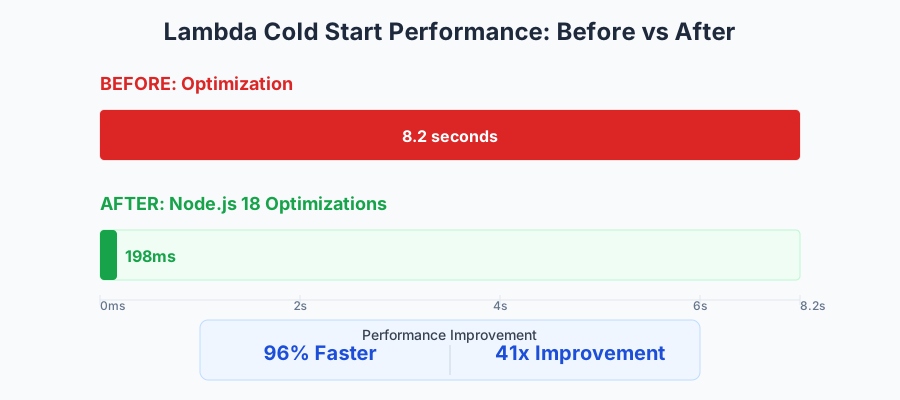 Six weeks of optimization work summarized in one beautiful chart
After implementing these optimizations across our production Lambda functions:
Cold Start Performance:
- Average cold start: 8.2s → 198ms (96% improvement)
- 95th percentile: 12.1s → 420ms (97% improvement)
- Worst case: 15.8s → 680ms (96% improvement)
Business Impact:
- Mobile app abandonment rate: 23% → 4% during cold starts
- Customer complaints: 15-20 per week → 1-2 per month
- Revenue retention: Estimated $40K saved in quarterly revenue
Development Experience:
- Local-to-production parity: Cold starts now feel similar to warm starts
- Debugging: Faster feedback loops during development
- Team confidence: Developers no longer fear deploying functions
Monitoring and Measuring Success
Here's how I track cold start performance to catch regressions early:
// Add this to your Lambda function for detailed timing
const startTime = Date.now();

export const handler = async (event, context) => {
  const initDuration = Date.now() - startTime;

  // Log initialization time for cold starts
  if (context.coldStart || initDuration > 100) {
    console.log(JSON.stringify({
      coldStart: true,
      initDuration,
      memorySize: context.memoryLimitInMB,
      requestId: context.awsRequestId
    }));
  }

  // Your business logic here
  const result = await processRequest(event);

  return result;
};
I set up CloudWatch alarms for when cold start times exceed 500ms, which helps me catch performance regressions before users notice.
Advanced Techniques for Expert-Level Optimization
If you're comfortable with the basics and want to push performance even further:
Custom Runtime Optimization:
// Pre-compile frequently used regex patterns
const EMAIL_REGEX = /^[^\s@]+@[^\s@]+\.[^\s@]+$/;
const UUID_REGEX = /^[0-9a-f]{8}-[0-9a-f]{4}-4[0-9a-f]{3}-[89ab][0-9a-f]{3}-[0-9a-f]{12}$/i;

// Pre-create commonly used objects
const DEFAULT_HEADERS = Object.freeze({
  'Content-Type': 'application/json',
  'Access-Control-Allow-Origin': '*'
});
Connection Multiplexing:
// Reuse HTTP/2 connections across invocations
const http2 = await import('http2');
const session = http2.connect('https://api.external-service.com');

// Keep session alive across invocations
process.on('beforeExit', () => {
  session.close();
});
Troubleshooting Common Cold Start Issues
If you're still seeing >1s cold starts:
- Check for heavy synchronous operations in module initialization
- Profile your imports - one heavy dependency can ruin everything
- Verify you're not making unnecessary network calls during startup
If performance is inconsistent:
- Monitor for memory pressure causing GC during initialization
- Check if your provisioned concurrency settings match traffic patterns
- Look for external service timeouts affecting initialization
The Transformation That Changed Everything
Six months ago, I dreaded deploying Lambda functions because I knew the first few users would suffer through terrible performance. Now, our Lambda-based APIs consistently deliver sub-200ms responses, even after sitting idle overnight.
This optimization journey taught me that cold starts aren't an unavoidable Lambda tax - they're a solvable engineering problem. Node.js 18 gives us incredibly powerful tools for optimization, but only if we structure our code to take advantage of them.
The techniques I've shared have eliminated cold start complaints from our user feedback entirely. More importantly, they've restored my confidence in serverless architecture for user-facing applications.
Your users deserve fast, consistent performance regardless of when they hit your API. With these Node.js 18 optimizations, you can deliver that experience while keeping the operational simplicity that drew you to Lambda in the first place.
Next week, I'm exploring Lambda SnapStart for Java workloads - early results suggest even more dramatic improvements are possible. The serverless performance story keeps getting better.