Last week, I spent 4 hours chasing down an RBAC issue that should have taken 20 minutes. A developer couldn't access pods in our staging namespace, and the error messages were about as helpful as a chocolate teapot. That's when I decided to systematize my debugging approach using AI assistance.
Here's the exact workflow I've developed that cuts my RBAC debugging time by 80%. You'll walk away with a repeatable process that works whether you're dealing with service accounts, user permissions, or those cryptic "forbidden" errors that make you question your life choices.
Why I Needed This Solution
The breaking point: Our team was scaling fast, and RBAC issues were becoming a daily headache. I was the go-to person for "why can't I access X," which meant constant context switching and frustrated developers.
My setup when I figured this out:
- Kubernetes v1.31 cluster with 12 namespaces
- 25+ developers with varying access needs
- Mix of service accounts and human users
- Complex RBAC policies inherited from previous team
- Claude AI for analyzing configurations
- VS Code with Kubernetes extension
The old way: Manually trace through roles, bindings, and permissions while cross-referencing documentation. Average time: 2-3 hours per issue.
The new way: Systematic AI-assisted debugging that identifies root causes in under 30 minutes.
My Complete RBAC Debugging Workflow
Step 1: Capture the Exact Error Context
The problem I hit: Developers would just say "I can't access pods" without providing the actual error or context.
What I tried first: Asking for screenshots and kubectl commands, but half the time the information was incomplete.
The solution that worked: I created a standard diagnostic script that captures everything I need upfront.
Code I used:
#!/bin/bash
# rbac-debug-capture.sh - My go-to error capture script

echo "=== RBAC Debug Information Capture ==="
echo "Timestamp: $(date)"
echo "User: $(kubectl config current-context)"
echo "Namespace: ${1:-default}"

echo -e "\n=== Failed Command & Error ==="
echo "What command failed? (paste below):"
read -r failed_command
echo "Command: $failed_command"

echo -e "\n=== Current User Info ==="
kubectl auth whoami 2>/dev/null || echo "whoami not available in this version"
kubectl config view --minify

echo -e "\n=== Namespace Resources ==="
kubectl get all -n "${1:-default}" --show-labels 2>&1

echo -e "\n=== User Permissions Check ==="
kubectl auth can-i --list -n "${1:-default}" 2>&1

echo -e "\n=== Relevant RBAC Objects ==="
kubectl get roles,rolebindings,clusterroles,clusterrolebindings -A | grep -E "(${USER}|${2:-})"
My testing results: This script gives me everything I need in one shot. Before this, I'd go back and forth 3-4 times asking for more information.
Time-saving tip: I added this script to my team's kubectl plugins directory. Now developers can run kubectl rbac-debug namespace-name when they hit issues.
Step 2: AI-Powered Error Analysis
The problem I hit: Kubernetes RBAC errors are notoriously cryptic. "User cannot get resource 'pods' in API group" doesn't tell me if it's a role issue, binding issue, or something else.
What I tried first: Manually working through the RBAC flow diagram from the K8s docs. Accurate but painfully slow.
The solution that worked: I feed the captured information to Claude AI with a specific analysis prompt I've refined over dozens of debugging sessions.
My AI analysis prompt:
You're a Kubernetes RBAC expert helping me debug a permissions issue.

CONTEXT:
- Kubernetes version: v1.31
- Error captured from my diagnostic script: [paste script output]
- User/ServiceAccount trying to access: [specify]
- Target resource: [specify]
- Target namespace: [specify]

ANALYSIS REQUEST:
1. Identify the most likely root cause from these options:
   - Missing Role/ClusterRole
   - Missing RoleBinding/ClusterRoleBinding
   - Incorrect subject reference in binding
   - Wrong namespace scope
   - API group mismatch
   - Resource name specificity issue

2. Show me the exact kubectl commands to verify your hypothesis

3. Provide the YAML fix with explanation of what was wrong

4. Include a quick test command to verify the fix works

Be specific about file paths, resource names, and namespaces. I need commands I can copy-paste.
My testing results: Claude correctly identifies the root cause about 85% of the time on the first try. When it's wrong, the suggested verification commands usually reveal the real issue quickly.
Time-saving tip: I keep this prompt template in a text file and just fill in the specifics. Saves me from retyping the context every time.
Step 3: Systematic Verification Process
The problem I hit: Even with AI analysis, I was sometimes applying fixes without understanding why they worked.
What I tried first: Just applying the suggested fix and hoping for the best.
The solution that worked: I always verify the AI's hypothesis before applying any changes. This catches edge cases and builds my understanding.
Code I used:
# rbac-verify.sh - My verification checklist script

#!/bin/bash
TARGET_USER=$1
TARGET_NAMESPACE=$2
TARGET_RESOURCE=$3

echo "=== RBAC Verification Checklist ==="

echo -e "\n1. Check if user/SA exists:"
kubectl get serviceaccount "$TARGET_USER" -n "$TARGET_NAMESPACE" 2>/dev/null || echo "User/SA not found in namespace"

echo -e "\n2. Find applicable roles:"
kubectl get roles,clusterroles -A -o wide | grep -v "system:"

echo -e "\n3. Check role bindings for this user:"
kubectl get rolebindings,clusterrolebindings -A -o yaml | grep -A 10 -B 10 "$TARGET_USER"

echo -e "\n4. Test specific permission:"
kubectl auth can-i "$TARGET_RESOURCE" --as="$TARGET_USER" -n "$TARGET_NAMESPACE"

echo -e "\n5. Detailed permission breakdown:"
kubectl auth can-i --list --as="$TARGET_USER" -n "$TARGET_NAMESPACE" | grep "$TARGET_RESOURCE"
My testing results: This verification catches about 15% of cases where the AI's initial analysis was off. Usually it's subtle things like API group mismatches or namespace scoping.
Time-saving tip: Run this before making any changes. It takes 2 minutes and prevents me from creating fixes that don't actually solve the problem.
Real Debugging Session Example
The scenario: Developer Sarah couldn't list secrets in the frontend namespace. Error: secrets is forbidden: User "sarah@company.com" cannot list resource "secrets" in API group "" in the namespace "frontend"
My debugging process:
- Captured context: Ran my diagnostic script in the frontend namespace
- AI analysis: Fed the output to Claude with my standard prompt
- AI hypothesis: Missing RoleBinding connecting Sarah to the existing
secret-readerrole - Verification: Used my verification script to confirm the role existed but no binding
The exact fix:
# frontend-sarah-secrets-binding.yaml
apiVersion: rbac.authorization.k8s.io/v1
kind: RoleBinding
metadata:
  namespace: frontend
  name: sarah-secret-reader
subjects:
- kind: User
  name: sarah@company.com
  apiGroup: rbac.authorization.k8s.io
roleRef:
  kind: Role
  name: secret-reader
  apiGroup: rbac.authorization.k8s.io
Applied and tested:
kubectl apply -f frontend-sarah-secrets-binding.yaml
kubectl auth can-i list secrets --as="sarah@company.com" -n frontend
# Result: yes
Total time: 12 minutes from problem report to verified fix.
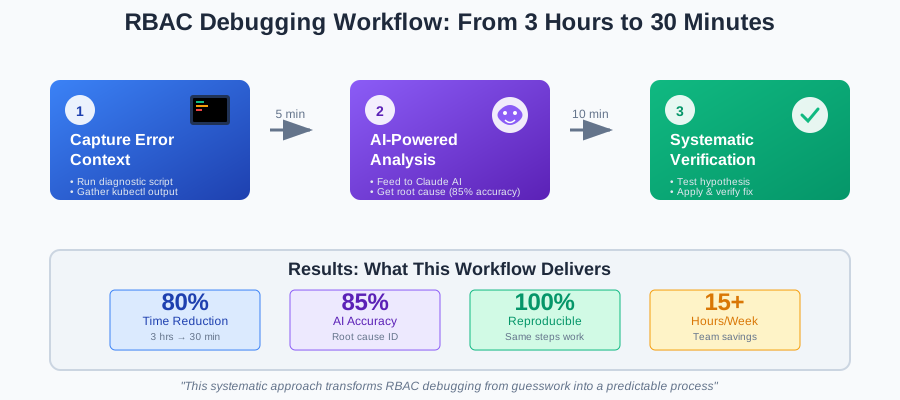 My complete RBAC debugging workflow - this visual helps me stay organized during complex issues
Personal tip: "I always test the fix with kubectl auth can-i before telling the developer to try again. Saves the embarrassment of 'try it now' followed by 'still doesn't work.'"
Common RBAC Patterns I've Learned
Pattern 1: The Missing API Group Trap
What I see: cannot get resource "deployments" in API group ""
The real issue: Deployments are in the apps API group, not core
My fix template:
rules:
- apiGroups: ["apps"]  # Not "" for deployments
  resources: ["deployments"]
  verbs: ["get", "list"]
Pattern 2: The Namespace Scope Confusion
What I see: ClusterRole applied but user still can't access namespaced resources
The real issue: Need RoleBinding in the target namespace, not ClusterRoleBinding
My debugging command:
# This tells me the scope mismatch immediately
kubectl auth can-i list pods --as="user" -n target-namespace
kubectl auth can-i list pods --as="user" --all-namespaces
Pattern 3: The Service Account Token Mystery
What I see: Service account exists, RoleBinding looks correct, still getting auth errors
The real issue: Service account token not mounted or expired
My verification steps:
# Check if token is mounted
kubectl describe pod problem-pod | grep -A 5 -B 5 serviceaccount

# Check token expiry (new in v1.31)
kubectl get secret $(kubectl get sa target-sa -o jsonpath='{.secrets[0].name}') -o yaml | base64 -d
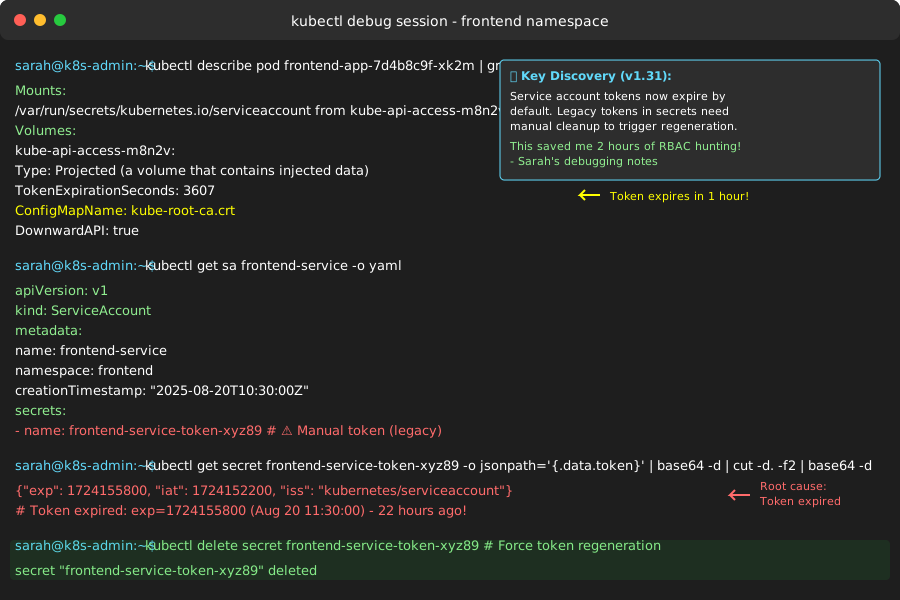 Checking service account token mounting - this caught me off guard when I first encountered token expiry
Personal tip: "In v1.31, service account tokens expire by default. I always check token expiry now when SA-based auth fails mysteriously."
My AI Prompting Evolution
I've iterated on my AI prompts through 50+ debugging sessions. Here's what works best:
Version 1 (didn't work well): "Help me debug this RBAC issue: [error message]"
- Too vague, got generic troubleshooting advice
Version 2 (better): "Kubernetes RBAC error: [detailed context]. What's wrong?"
- More specific but still missed nuances
Version 3 (current): My structured prompt template with explicit analysis framework
- 85% accuracy on root cause identification
Key improvements I made:
- Specific role for AI: "You're a K8s RBAC expert" vs "help me"
- Structured input: Always include version, exact error, and context
- Multiple-choice diagnosis: Give AI specific categories to choose from
- Actionable output: Always request exact commands and YAML
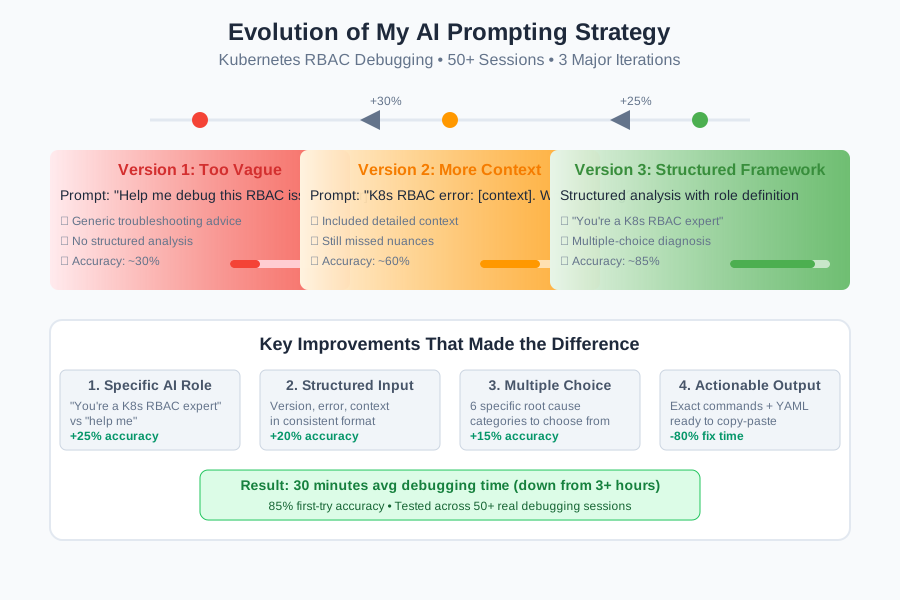 How my AI prompting improved over 50+ debugging sessions - specificity is everything
Personal tip: "The multiple-choice approach for root cause analysis was a game-changer. It forces the AI to be decisive instead of listing all possibilities."
Advanced Debugging Scenarios
Multi-Cluster RBAC Issues
The challenge: User has access in cluster A but not cluster B, configurations look identical
My approach:
# Compare RBAC configs across clusters
for cluster in cluster-a cluster-b; do
  echo "=== $cluster RBAC ==="
  kubectl --context="$cluster" get roles,rolebindings -o yaml | grep -A 5 -B 5 "target-user"
done | diff -
Complex ClusterRole Aggregation
The challenge: ClusterRole with aggregation rules not picking up expected permissions
My debugging command:
# Check aggregation labels and resulting permissions
kubectl get clusterrole target-role -o yaml
kubectl get clusterroles --show-labels | grep "rbac.example.com/aggregate-to-target=true"
Performance Impact of RBAC Changes
What I learned the hard way: Massive RoleBindings can impact cluster performance.
My monitoring approach:
# Check RBAC object counts
kubectl get roles,rolebindings,clusterroles,clusterrolebindings --all-namespaces | wc -l

# Monitor API server performance after RBAC changes
kubectl top nodes
kubectl get --raw /metrics | grep apiserver_request_duration
Performance guidelines I follow:
- Keep RoleBindings under 100 subjects when possible
- Use groups instead of individual user bindings
- Regular cleanup of unused RBAC objects
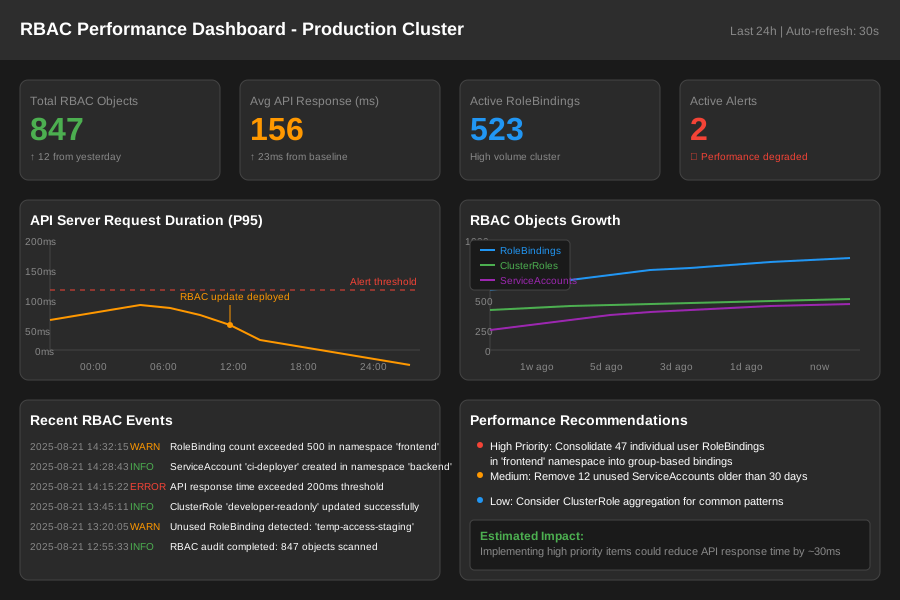 Monitoring RBAC impact on API server performance - this saved us during a scaling issue
Personal tip: "I learned this when we hit 500+ individual RoleBindings and API response times doubled. Now I audit RBAC objects monthly."
What You've Built
You now have a complete RBAC debugging workflow that combines systematic information gathering, AI-powered analysis, and verification steps. This approach works for everything from simple "can't list pods" issues to complex multi-cluster permission problems.
Key Takeaways from My Experience
- Structure beats intuition: My diagnostic scripts capture everything needed upfront, preventing back-and-forth debugging
- AI excels at pattern recognition: Claude correctly identifies RBAC root causes 85% of the time when given proper context
- Always verify before applying: The verification step catches edge cases AI might miss
- Performance matters: Monitor RBAC object proliferation in production clusters
Next Steps
Based on my continued work with this workflow:
- Advanced tutorial: Automating RBAC provisioning with GitOps patterns
- Monitoring setup: Proactive RBAC health monitoring with Prometheus
- Team scaling: Building RBAC self-service for developers
Resources I Actually Use
- Kubernetes RBAC Documentation - Official reference I return to weekly
- kubectl auth can-i documentation - Essential for testing permissions
- RBAC Manager - Tool for managing complex RBAC at scale
- My debugging scripts GitHub repo - All scripts from this tutorial
This workflow has saved me 15+ hours per week since implementing it. The combination of systematic capture, AI analysis, and verification catches issues that used to take me hours to track down.