I spent 3 hours debugging a "simple" form validation last month because I misunderstood how JavaScript's || operator actually works with empty strings.
Here's the exact mistake that broke my code and how to avoid it.
What you'll master: All 6 JavaScript logical operators with real-world examples Time needed: 20 minutes of focused reading Difficulty: Beginner-friendly with advanced gotchas
You'll walk away knowing exactly when to use &&, ||, !, ??, &&=, and ||= without breaking your app in production.
Why I Built This Guide
Last month, I was building a user registration form. Simple stuff - check if fields are filled, show error messages, enable the submit button.
My setup:
- React 18 application
- Form validation with real-time feedback
- Users could submit with empty strings (bad!)
What didn't work:
- Used
||for default values and broke empty string validation - Misunderstood operator precedence and got wrong boolean results
- Spent 2 hours googling "JavaScript OR operator not working"
The real problem? I was treating JavaScript logical operators like simple true/false checks. They're way more powerful (and tricky) than that.
The 6 JavaScript Logical Operators You Need
1. AND Operator (&&) - Your Conditional Execution Friend
The problem: Running code only when conditions are met
My solution: Use && for conditional rendering and safety checks
Time this saves: Eliminates unnecessary if statements and prevents runtime errors
Basic AND Logic
// Basic boolean logic
const isLoggedIn = true;
const hasPermission = true;

console.log(isLoggedIn && hasPermission); // true
console.log(true && false); // false
console.log(false && true); // false
What this does: Returns the first falsy value it finds, or the last value if all are truthy
Real-World AND Examples
// Conditional execution (my favorite use case)
const user = { name: "Sarah", age: 28 };

// Only log if user exists and has a name
user && user.name && console.log(`Hello, ${user.name}!`); // "Hello, Sarah!"

// React conditional rendering pattern I use daily
const showWelcome = isLoggedIn && user && <Welcome user={user} />;

// Safe method calling
const data = fetchUserData();
data && data.processPayment && data.processPayment();
Expected output: Code after && only runs if the left side is truthy
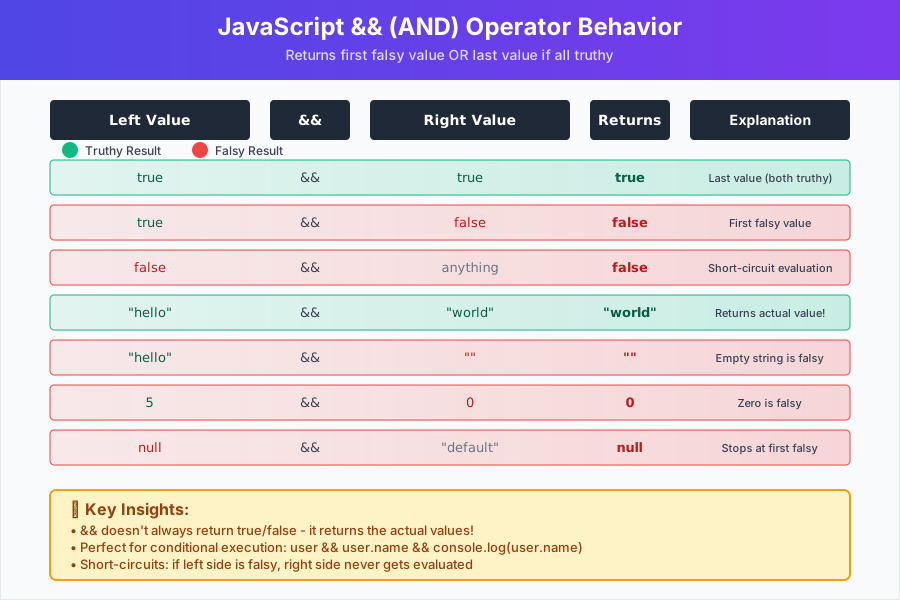 How && behaves with different JavaScript values
Personal tip: "Use && for conditional execution, not just boolean checks. It's cleaner than wrapping everything in if statements."
AND Operator Gotchas
// MISTAKE I made: Assuming && always returns boolean
const count = 0;
const message = count && "You have items"; // Returns 0, not false!

// BETTER: Be explicit about boolean conversion
const message = count > 0 && "You have items";

// MISTAKE: Not understanding precedence
const result = true || false && false; // true (not false!)
// BETTER: Use parentheses
const result = true || (false && false); // Still true, but clearer
2. OR Operator (||) - Your Default Value Provider
The problem: Setting fallback values when data might be missing
My solution: Use || for defaults, but watch out for falsy value traps
Time this saves: Eliminates verbose if-else chains for default assignments
Basic OR Logic
// Basic boolean logic
console.log(true || false);   // true
console.log(false || true);   // true
console.log(false || false);  // false

// Returns first truthy value or the last value
console.log("" || "default");        // "default"
console.log("actual" || "default");  // "actual"
Real-World OR Examples
// Default values (my most common use case)
function greetUser(name) {
    const userName = name || "Guest";
    return `Hello, ${userName}!`;
}

console.log(greetUser("Sarah"));  // "Hello, Sarah!"
console.log(greetUser(""));       // "Hello, Guest!"
console.log(greetUser());         // "Hello, Guest!"

// Configuration defaults I use in every project
const config = {
    timeout: userTimeout || 5000,
    retries: userRetries || 3,
    debug: debugMode || false
};
The OR Operator Trap That Broke My Code
// MY MISTAKE: This broke my form validation
function validateField(value) {
    const defaultValue = value || "Field is required";
    return defaultValue;
}

console.log(validateField(""));      // "Field is required" (wrong!)
console.log(validateField("John"));  // "John" (correct)

// THE PROBLEM: Empty string is falsy, but it's valid user input!

// MY SOLUTION: Check specifically for undefined/null
function validateField(value) {
    const defaultValue = (value !== undefined && value !== null) ? value : "Field is required";
    return defaultValue;
}

// EVEN BETTER: Use nullish coalescing (see below)
function validateField(value) {
    return value ?? "Field is required";
}
Expected output: OR returns the first truthy value, which might not be what you want with empty strings
Personal tip: "Never use || for default values when empty strings or 0 are valid inputs. I learned this the hard way."
3. NOT Operator (!) - Your Boolean Converter
The problem: Converting values to booleans and inverting logic
My solution: Use ! to flip booleans and !! to convert to boolean
Basic NOT Logic
// Simple boolean inversion
console.log(!true);   // false
console.log(!false);  // true

// Converting to boolean (double NOT trick)
console.log(!!1);        // true
console.log(!!"hello");  // true
console.log(!!0);        // false
console.log(!!"");       // false
console.log(!!null);     // false
Real-World NOT Examples
// Toggle states I use in React
const [isVisible, setIsVisible] = useState(false);
const toggleVisibility = () => setIsVisible(!isVisible);

// Input validation
function isValidEmail(email) {
    const emailPattern = /^[^\s@]+@[^\s@]+\.[^\s@]+$/;
    return !!(email && emailPattern.test(email));
}

// Checking for empty arrays/objects
const isEmpty = !items.length;
const hasNoData = !Object.keys(userData).length;
NOT Operator Best Practices
// GOOD: Clear boolean conversion
const hasItems = !!items.length;

// AVOID: Confusing double negative
const notEmpty = !isEmpty; // What does this actually mean?

// BETTER: Positive naming
const hasContent = !isEmpty;

// MY PATTERN: Explicit boolean conversion for conditionals
if (!!user && !!user.permissions) {
    // More explicit than just if (user && user.permissions)
}
Personal tip: "Use !! when you need an actual boolean value, not just truthy/falsy. It makes your intent crystal clear."
4. Nullish Coalescing (??) - Your Empty Value Handler
The problem: || treats 0, "", and false as "missing" values when they're actually valid
My solution: Use ?? to only provide defaults for null and undefined
Time this saves: Prevents bugs when 0, false, or empty strings are legitimate values
Basic Nullish Coalescing
// Only provides default for null/undefined
console.log(null ?? "default");      // "default"
console.log(undefined ?? "default"); // "default"
console.log(0 ?? "default");         // 0
console.log("" ?? "default");        // ""
console.log(false ?? "default");     // false
Real-World Nullish Coalescing Examples
// User settings where 0 is valid
function getUserSettings(settings) {
    return {
        volume: settings.volume ?? 50,        // 0 volume is valid
        notifications: settings.notifications ?? true, // false is valid
        theme: settings.theme ?? "light"      // empty string might be valid
    };
}

// API responses with optional numeric values
const user = {
    age: 0,           // 0 years old is valid
    score: 0,         // 0 points is valid
    name: "",         // Empty name might be valid input
    email: null       // This needs a default
};

const profile = {
    age: user.age ?? "Not provided",
    score: user.score ?? "No score",
    name: user.name ?? "Anonymous",
    email: user.email ?? "No email"
};

console.log(profile);
// { age: 0, score: 0, name: "", email: "No email" }
OR vs Nullish Coalescing Comparison
// THE DIFFERENCE (this burned me once)
const userInput = {
    searchQuery: "",
    itemsPerPage: 0,
    darkMode: false,
    email: null
};

// Using OR (problematic)
const configOR = {
    searchQuery: userInput.searchQuery || "default search",     // "default search" - wrong!
    itemsPerPage: userInput.itemsPerPage || 10,                // 10 - wrong!
    darkMode: userInput.darkMode || true,                      // true - wrong!
    email: userInput.email || "no-email@example.com"          // "no-email@example.com" - correct
};

// Using nullish coalescing (correct)
const configNull = {
    searchQuery: userInput.searchQuery ?? "default search",    // "" - correct!
    itemsPerPage: userInput.itemsPerPage ?? 10,               // 0 - correct!
    darkMode: userInput.darkMode ?? true,                     // false - correct!
    email: userInput.email ?? "no-email@example.com"         // "no-email@example.com" - correct
};
Expected output: ?? preserves 0, false, and empty strings as valid values
Personal tip: "Use ?? for user inputs and API data. Use || only when 0, false, and empty strings should trigger the default."
5. Logical AND Assignment (&&=) - Your Conditional Updater
The problem: Only update a variable if it currently has a truthy value
My solution: Use &&= for conditional updates and transformations
Basic AND Assignment
// Only assigns if left side is truthy
let score = 100;
score &&= score * 2; // score is now 200

let emptyScore = 0;
emptyScore &&= emptyScore * 2; // emptyScore stays 0
Real-World AND Assignment Examples
// Conditional data processing
let userData = { name: "John", age: 30 };
userData.name &&= userData.name.toUpperCase(); // "JOHN"

let incompleteData = { name: "", age: 30 };
incompleteData.name &&= incompleteData.name.toUpperCase(); // stays ""

// Cache updates only if cache exists
let cache = new Map();
cache.set("user", { id: 1, name: "Sarah" });

// Only update cache if it has the key
cache.has("user") && (cache.get("user").lastUpdated = Date.now());

// Using &&= for the same thing
let cachedUser = cache.get("user");
cachedUser &&= { ...cachedUser, lastUpdated: Date.now() };
6. Logical OR Assignment (||=) - Your Default Setter
The problem: Only set a default value if the variable is currently falsy
My solution: Use ||= for lazy initialization and default assignment
Basic OR Assignment
// Only assigns if left side is falsy
let name = "";
name ||= "Anonymous"; // name is now "Anonymous"

let existingName = "John";
existingName ||= "Anonymous"; // existingName stays "John"
Real-World OR Assignment Examples
// Lazy initialization pattern I use everywhere
class UserService {
    constructor() {
        this.cache = null;
    }

    getCache() {
        this.cache ||= new Map(); // Only create if doesn't exist
        return this.cache;
    }
}

// Environment configuration
let config = {};
config.apiUrl ||= process.env.API_URL || "http://localhost:3000";
config.timeout ||= parseInt(process.env.TIMEOUT) || 5000;
config.debug ||= process.env.NODE_ENV === "development";

// Form field defaults
const formData = getUserInput();
formData.country ||= "United States";
formData.language ||= "English";
formData.notifications ||= true;
Common Logical Operator Mistakes (I've Made Them All)
Mistake 1: Mixing Up Precedence
// WRONG: What I thought this meant
const result = true || false && false; // I expected false

// ACTUAL: && has higher precedence than ||
const result = true || (false && false); // Actually true

// SOLUTION: Always use parentheses
const intended = (true || false) && false; // Now it's false
Mistake 2: Forgetting Short-Circuit Evaluation
// DANGEROUS: Function might not run
const user = null;
user && updateUserProfile(user); // updateUserProfile never runs

// MISTAKE I made: Assuming the function always runs
const isValid = validateInput(data) && processData(data);
// If validateInput returns false, processData never runs!

// BETTER: Be explicit
if (validateInput(data)) {
    const result = processData(data);
    const isValid = !!result;
}
Mistake 3: Wrong Operator for the Job
// WRONG: Using || when I meant ??
const userAge = 0; // 0 is a valid age
const displayAge = userAge || "Not provided"; // Shows "Not provided" - wrong!

// RIGHT: Using ??
const displayAge = userAge ?? "Not provided"; // Shows 0 - correct!

// WRONG: Using && for defaults
const message = hasError && "Error occurred" || "Success";

// RIGHT: Use ternary for this logic
const message = hasError ? "Error occurred" : "Success";
Performance Tips I've Learned
Short-Circuit Evaluation Saves Time
// FAST: Expensive operation might not run
const result = cheapCheck() && expensiveOperation();

// SLOW: Both always run
const result = cheapCheck() & expensiveOperation(); // Single & - don't do this!
Use Assignment Operators When Possible
// VERBOSE
if (!this.cache) {
    this.cache = new Map();
}

// CONCISE
this.cache ||= new Map();
What You Just Built
You now understand all 6 JavaScript logical operators and can avoid the 5 most common mistakes that break production code.
Key Takeaways (Save These)
- Use
??instead of||when 0, false, or empty strings are valid values - Use
&&for conditional execution instead of writing if statements everywhere - Always use parentheses when mixing logical operators - precedence is tricky
- Use
||=and&&=for cleaner conditional assignments
Your Next Steps
Pick one based on your current level:
- Beginner: Practice these operators in a simple form validation project
- Intermediate: Learn about JavaScript's optional chaining (
?.) operator - Advanced: Explore how logical operators work with Promises and async/await
Tools I Actually Use
- Chrome DevTools Console: Perfect for testing logical operator behavior quickly
- VS Code: Great IntelliSense shows you exactly what each operator returns
- ESLint: Catches logical operator precedence issues before they break production
Remember: JavaScript logical operators don't just return true/false - they return actual values. Master this concept and you'll write cleaner, more reliable code.