Problem: Running an AI Software Engineer Locally
You've heard about autonomous AI coding agents like Devin, but $500/month is hard to justify. OpenHands — the open-source project formerly known as OpenDevin — gives you the same plan → code → test → fix loop for free, using your own LLM API key.
You'll learn:
- How to get OpenHands running locally with Docker in under 15 minutes
- How to connect it to Claude, GPT-4, or any other LLM
- What OpenHands can and can't do reliably
Time: 15 min | Level: Intermediate
Why This Happens
OpenDevin rebranded to OpenHands in late 2024 under the All-Hands-AI organization. If you searched for "OpenDevin install" and found conflicting Docker images and repo URLs — that's why. The new canonical repo is github.com/OpenHands/OpenHands and the images are hosted at docker.openhands.dev.
Common symptoms of confusion:
- Old Docker image URLs like
docker.all-hands.dev/all-hands-ai/openhands(still work but outdated) - GitHub forks of the old
OpenDevinrepo with stale install instructions - References to
~/.openhands-stateinstead of the newer~/.openhandsstate directory
Solution
Step 1: Verify Prerequisites
You need Docker running and at least 4GB RAM available.
# Confirm Docker is running
docker --version
docker info | grep "Total Memory"
Expected: Docker version 25+ and 4GB+ available.
On macOS: Open Docker Desktop → Settings → Advanced → ensure "Allow the default Docker socket to be used" is enabled.
On Windows: You must use WSL 2. Run all Docker commands from your Ubuntu WSL Terminal, not PowerShell.
# Windows only: confirm WSL 2
wsl --version   # Default Version should be 2
Step 2: Run OpenHands
One command pulls and starts everything.
docker run -it --rm --pull=always \
  -e AGENT_SERVER_IMAGE_REPOSITORY=ghcr.io/openhands/agent-server \
  -e LOG_ALL_EVENTS=true \
  -v /var/run/docker.sock:/var/run/docker.sock \
  -v ~/.openhands:/.openhands \
  -p 3000:3000 \
  --add-host host.docker.internal:host-gateway \
  --name openhands-app \
  docker.openhands.dev/openhands/openhands:latest
What this does: Mounts the Docker socket (so OpenHands can spin up sandbox containers), persists your settings to ~/.openhands, and exposes the UI on port 3000.
Expected: You'll see log output ending with something like Server started on port 3000.
If it fails:
permission denied /var/run/docker.sock: Runsudo chmod 666 /var/run/docker.sock(Linux only)- Port 3000 already in use: Change
-p 3000:3000to-p 3001:3000and openhttp://localhost:3001 - Image pull timeout: Your network may block
docker.openhands.dev— try adding--dns 8.8.8.8to the command
Step 3: Connect Your LLM
Open http://localhost:3000 in your browser. On first launch, a settings dialog appears.
Set your provider and model. The community recommends Claude Sonnet or GPT-4o as a minimum — smaller models lack the context window and reasoning needed for multi-step tasks.
Provider: Anthropic
Model:    claude-sonnet-4-6
API Key:  sk-ant-...
 Paste your API key here — it's stored locally in ~/.openhands
Save settings, then give it your first task in the chat input.
Step 4: Test With a Real Task
Start small. Something scoped and verifiable works best.
Task: Create a Python script that reads a CSV file and outputs the top 5 rows sorted by a column named "revenue". Save it as revenue_top5.py and run it against sample data to confirm it works.
Watch the agent panel on the left — you'll see OpenHands break the task into steps, write code, execute it in a sandboxed Docker container, check output, and iterate if needed.
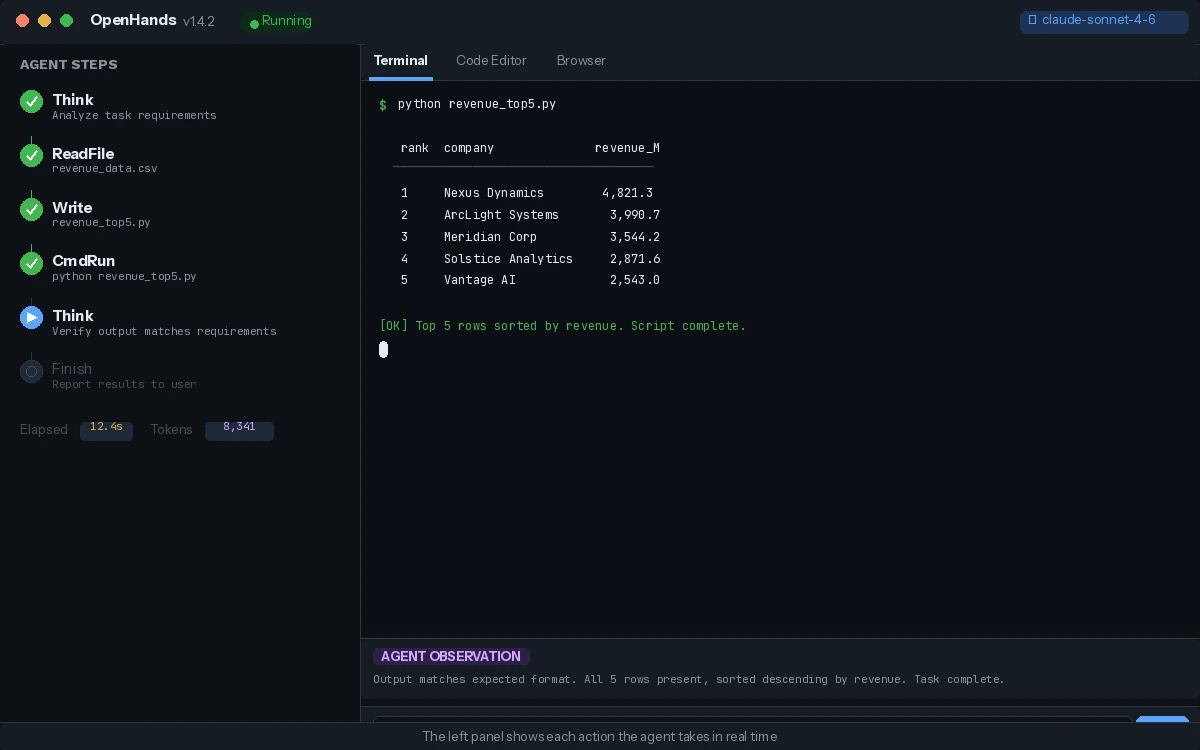 The left panel shows each action the agent takes in real time
Verification
Check that the agent completed a full loop:
# After the task, verify the file was created in your workspace
ls -la ~/openhands-workspace/
cat ~/openhands-workspace/revenue_top5.py
You should see: A working Python script created autonomously, with the agent having run and verified it.
What You Learned
- OpenDevin is now OpenHands — use
docker.openhands.devfor images - The Docker socket mount is required; without it the sandbox containers can't spin up
- OpenHands works best with GPT-4o or Claude Sonnet-class models — smaller models stall on multi-step tasks
- Treat it like a supervised junior dev: give it a scoped ticket, watch the plan, redirect if it loops on errors
Limitation: OpenHands doesn't maintain memory between sessions. Each new conversation starts fresh, so complex multi-session projects need you to re-provide context.
When NOT to use this: Production deployments without human review — the agent can and will make unintended file changes if given broad permissions.
Tested on OpenHands 1.4, Docker 27.x, macOS Sequoia & Ubuntu 24.04, February 2026