Your factory machines are chattering away 24/7, but are you listening? Most manufacturers collect terabytes of sensor data only to let it gather digital dust in databases. Meanwhile, production inefficiencies drain millions from their bottom line.
Industrial IoT Setup with Ollama transforms your factory floor into an intelligent ecosystem. This guide shows you how to deploy edge-based AI that monitors equipment, predicts failures, and optimizes production in real-time.
You'll learn to configure Ollama for industrial environments, integrate sensor networks, and build custom AI models that understand your specific manufacturing processes. By the end, your factory will make decisions faster than any human operator.
Why Factory Floor Intelligence Matters
The Hidden Cost of Reactive Manufacturing
Traditional factories operate in reactive mode. Equipment breaks down, operators notice problems hours later, and production stops while technicians diagnose issues. This approach costs manufacturers $50 billion annually in unplanned downtime.
Manufacturing automation requires predictive intelligence. Sensors generate massive data streams, but raw data doesn't prevent failures. You need AI that processes information instantly and identifies patterns humans miss.
Edge Computing Advantages Over Cloud Solutions
Cloud-based AI introduces latency that kills real-time decision making. Factory networks often have limited bandwidth and security restrictions that block cloud connectivity.
Ollama Factory Floor Intelligence runs locally on industrial hardware. Your AI models process sensor data in milliseconds, not minutes. This edge computing approach ensures:
- Zero dependency on internet connectivity
- Immediate response to critical alerts
- Complete data privacy within your network
- Reduced bandwidth costs
Industrial IoT Architecture Overview
Core Components for Smart Manufacturing
Your Industrial IoT Setup needs four essential components:
- Sensor Network: Temperature, vibration, pressure, and flow sensors
- Edge Gateway: Industrial computer running Ollama
- Communication Protocol: MQTT, OPC-UA, or Modbus
- Visualization Dashboard: Real-time monitoring interface
graph TD
    A[Factory Sensors] --> B[Edge Gateway]
    B --> C[Ollama AI Engine]
    C --> D[Alert System]
    C --> E[Dashboard]
    C --> F[Historical Database]
Hardware Requirements
Your edge gateway needs sufficient processing power for AI inference:
- CPU: Intel i7 or AMD Ryzen 7 (minimum 8 cores)
- RAM: 32GB DDR4 (16GB minimum)
- Storage: 1TB NVMe SSD
- Network: Gigabit Ethernet, WiFi 6
- Industrial Rating: IP65 for harsh environments
Setting Up Ollama for Industrial Deployment
Installation on Industrial Hardware
First, install Ollama on your edge gateway. Industrial systems typically run Ubuntu Server for stability.
# Update system packages
sudo apt update && sudo apt upgrade -y

# Install Docker for containerized deployment
curl -fsSL https://get.docker.com -o get-docker.sh
sudo sh get-docker.sh

# Add user to docker group
sudo usermod -aG docker $USER

# Install Ollama
curl -fsSL https://ollama.ai/install.sh | sh

# Verify installation
ollama --version
Configuring Ollama for Manufacturing Data
Industrial environments generate structured sensor data. Configure Ollama to handle time-series information and equipment specifications.
# Create custom model directory
mkdir -p /opt/factory-ai/models

# Download base model for industrial applications
ollama pull llama3.1:8b

# Create factory-specific model configuration
cat > /opt/factory-ai/Modelfile << EOF
FROM llama3.1:8b

PARAMETER temperature 0.1
PARAMETER top_p 0.9
PARAMETER num_ctx 4096

SYSTEM """You are an industrial AI assistant specialized in manufacturing operations.
You analyze sensor data, predict equipment failures, and optimize production processes.
Always provide specific, actionable recommendations with confidence scores."""
EOF

# Build custom factory model
ollama create factory-intelligence -f /opt/factory-ai/Modelfile
Model Optimization for Real-Time Performance
Industrial applications require fast inference times. Optimize your model for edge deployment:
# model_optimizer.py
import ollama
import json
import time

def optimize_model_performance():
    """Configure Ollama for industrial real-time processing"""

    # Test inference speed
    start_time = time.time()
    response = ollama.chat(
        model='factory-intelligence',
        messages=[{
            'role': 'user',
            'content': 'Analyze vibration sensor reading: 2.3Hz, amplitude 0.8mm'
        }]
    )
    inference_time = time.time() - start_time

    print(f"Inference time: {inference_time:.2f} seconds")

    # Optimize for speed if needed
    if inference_time > 0.5:  # Target under 500ms
        print("Optimizing model for faster inference...")
        # Reduce context length for speed
        ollama.chat(
            model='factory-intelligence',
            options={'num_ctx': 2048}  # Reduced from 4096
        )

    return response

# Run optimization
result = optimize_model_performance()
print("Model ready for production deployment")
Sensor Integration and Data Pipeline
MQTT Communication Setup
Most industrial sensors communicate via MQTT protocol. Set up a broker for reliable message handling:
# Install Mosquitto MQTT broker
sudo apt install mosquitto mosquitto-clients -y

# Configure broker for industrial use
sudo cat > /etc/mosquitto/conf.d/factory.conf << EOF
# Factory floor MQTT configuration
port 1883
allow_anonymous false
password_file /etc/mosquitto/passwd

# Logging for troubleshooting
log_dest file /var/log/mosquitto/mosquitto.log
log_type error
log_type warning
log_type notice
log_type information

# Persistence for reliability
persistence true
persistence_location /var/lib/mosquitto/
EOF

# Create user credentials
sudo mosquitto_passwd -c /etc/mosquitto/passwd factory-user

# Start MQTT broker
sudo systemctl enable mosquitto
sudo systemctl start mosquitto
Python Data Collection Service
Create a service that collects sensor data and feeds it to Ollama:
# sensor_collector.py
import paho.mqtt.client as mqtt
import ollama
import json
import sqlite3
from datetime import datetime
import threading
import logging

class FactoryDataCollector:
    def __init__(self):
        self.mqtt_broker = "localhost"
        self.mqtt_port = 1883
        self.mqtt_username = "factory-user"
        self.mqtt_password = "your-secure-password"

        # Initialize database for historical data
        self.init_database()

        # Setup logging
        logging.basicConfig(level=logging.INFO)
        self.logger = logging.getLogger(__name__)

    def init_database(self):
        """Create database for sensor history"""
        self.conn = sqlite3.connect('factory_data.db', check_same_thread=False)
        self.cursor = self.conn.cursor()

        self.cursor.execute('''
            CREATE TABLE IF NOT EXISTS sensor_readings (
                id INTEGER PRIMARY KEY AUTOINCREMENT,
                timestamp DATETIME,
                sensor_id TEXT,
                sensor_type TEXT,
                value REAL,
                unit TEXT,
                location TEXT,
                ai_analysis TEXT
            )
        ''')
        self.conn.commit()

    def on_mqtt_connect(self, client, userdata, flags, rc):
        """Callback for MQTT connection"""
        if rc == 0:
            self.logger.info("Connected to MQTT broker")
            # Subscribe to all sensor topics
            client.subscribe("factory/sensors/+/+")
        else:
            self.logger.error(f"Failed to connect to MQTT broker: {rc}")

    def on_mqtt_message(self, client, userdata, msg):
        """Process incoming sensor data"""
        try:
            # Parse topic: factory/sensors/location/sensor_type
            topic_parts = msg.topic.split('/')
            location = topic_parts[2]
            sensor_type = topic_parts[3]

            # Parse sensor data
            sensor_data = json.loads(msg.payload.decode())

            # Analyze with Ollama
            analysis = self.analyze_sensor_data(sensor_data, sensor_type, location)

            # Store in database
            self.store_reading(sensor_data, sensor_type, location, analysis)

            # Check for alerts
            self.check_alerts(analysis, sensor_data)

        except Exception as e:
            self.logger.error(f"Error processing message: {e}")

    def analyze_sensor_data(self, data, sensor_type, location):
        """Send sensor data to Ollama for analysis"""
        prompt = f"""
        Analyze this {sensor_type} sensor reading from {location}:
        Data: {json.dumps(data)}

        Provide:
        1. Status assessment (normal/warning/critical)
        2. Trend analysis
        3. Maintenance recommendations
        4. Confidence score (0-100)

        Format as JSON with keys: status, trend, recommendation, confidence
        """

        try:
            response = ollama.chat(
                model='factory-intelligence',
                messages=[{'role': 'user', 'content': prompt}]
            )
            return response['message']['content']
        except Exception as e:
            self.logger.error(f"Ollama analysis failed: {e}")
            return "Analysis unavailable"

    def store_reading(self, data, sensor_type, location, analysis):
        """Store sensor reading in database"""
        self.cursor.execute('''
            INSERT INTO sensor_readings
            (timestamp, sensor_id, sensor_type, value, unit, location, ai_analysis)
            VALUES (?, ?, ?, ?, ?, ?, ?)
        ''', (
            datetime.now(),
            data.get('sensor_id', 'unknown'),
            sensor_type,
            data.get('value', 0),
            data.get('unit', ''),
            location,
            analysis
        ))
        self.conn.commit()

    def check_alerts(self, analysis, sensor_data):
        """Check if immediate action required"""
        try:
            # Parse AI analysis for critical status
            if 'critical' in analysis.lower():
                self.send_alert(analysis, sensor_data)
        except Exception as e:
            self.logger.error(f"Alert check failed: {e}")

    def send_alert(self, analysis, sensor_data):
        """Send critical alerts to operators"""
        alert_message = {
            'timestamp': datetime.now().isoformat(),
            'severity': 'CRITICAL',
            'sensor': sensor_data.get('sensor_id'),
            'analysis': analysis,
            'value': sensor_data.get('value')
        }

        # Publish alert to dedicated topic
        self.mqtt_client.publish(
            "factory/alerts/critical",
            json.dumps(alert_message)
        )

        self.logger.warning(f"CRITICAL ALERT: {alert_message}")

    def start_collection(self):
        """Start the data collection service"""
        # Setup MQTT client
        self.mqtt_client = mqtt.Client()
        self.mqtt_client.username_pw_set(self.mqtt_username, self.mqtt_password)
        self.mqtt_client.on_connect = self.on_mqtt_connect
        self.mqtt_client.on_message = self.on_mqtt_message

        # Connect and start loop
        self.mqtt_client.connect(self.mqtt_broker, self.mqtt_port, 60)
        self.mqtt_client.loop_forever()

# Run the collector
if __name__ == "__main__":
    collector = FactoryDataCollector()
    collector.start_collection()
Systemd Service Configuration
Make your data collector run as a system service for reliability:
# Create service file
sudo cat > /etc/systemd/system/factory-collector.service << EOF
[Unit]
Description=Factory IoT Data Collector
After=network.target mosquitto.service
Requires=mosquitto.service

[Service]
Type=simple
User=factory
Group=factory
WorkingDirectory=/opt/factory-ai
ExecStart=/usr/bin/python3 /opt/factory-ai/sensor_collector.py
Restart=always
RestartSec=10

# Logging
StandardOutput=journal
StandardError=journal
SyslogIdentifier=factory-collector

[Install]
WantedBy=multi-user.target
EOF

# Enable and start service
sudo systemctl enable factory-collector
sudo systemctl start factory-collector

# Check status
sudo systemctl status factory-collector
Building Custom AI Models for Manufacturing
Training Domain-Specific Models
Generic AI models don't understand your specific equipment and processes. Create custom models trained on your historical data:
# model_trainer.py
import pandas as pd
import sqlite3
import ollama
from datetime import datetime, timedelta

class FactoryModelTrainer:
    def __init__(self):
        self.conn = sqlite3.connect('factory_data.db')

    def prepare_training_data(self, days=30):
        """Extract recent data for model training"""
        cutoff_date = datetime.now() - timedelta(days=days)

        query = '''
            SELECT timestamp, sensor_type, value, location, ai_analysis
            FROM sensor_readings
            WHERE timestamp > ?
            ORDER BY timestamp
        '''

        df = pd.read_sql_query(query, self.conn, params=[cutoff_date])
        return df

    def create_training_examples(self, df):
        """Generate training examples from historical data"""
        examples = []

        for _, row in df.iterrows():
            # Create context from sensor reading
            context = f"""
            Sensor Type: {row['sensor_type']}
            Location: {row['location']}
            Value: {row['value']}
            Timestamp: {row['timestamp']}
            """

            # Use previous AI analysis as target
            target = row['ai_analysis']

            examples.append({
                'input': context,
                'output': target
            })

        return examples

    def fine_tune_model(self, examples):
        """Fine-tune model with factory-specific data"""

        # Create training file
        training_data = []
        for example in examples:
            training_data.append(f"User: {example['input']}\nAssistant: {example['output']}\n")

        # Save training data
        with open('/opt/factory-ai/training_data.txt', 'w') as f:
            f.write('\n'.join(training_data))

        # Create fine-tuned model configuration
        modelfile = f"""
FROM factory-intelligence

# Fine-tuning with factory-specific examples
TEMPLATE \"\"\"{{{{ if .System }}}}{{{{ .System }}}}{{{{ end }}}}{{{{ .Prompt }}}}\"\"\"

# Training data integration
PARAMETER fine_tune_file /opt/factory-ai/training_data.txt
"""

        with open('/opt/factory-ai/FineTunedModelfile', 'w') as f:
            f.write(modelfile)

        # Build fine-tuned model
        ollama.create('factory-intelligence-v2', path='/opt/factory-ai/FineTunedModelfile')

        print("Fine-tuned model created: factory-intelligence-v2")

# Run training process
trainer = FactoryModelTrainer()
data = trainer.prepare_training_data()
examples = trainer.create_training_examples(data)
trainer.fine_tune_model(examples)
Predictive Maintenance Model
Build an AI model that predicts equipment failures before they happen:
# predictive_maintenance.py
import ollama
import json
import numpy as np
from datetime import datetime, timedelta

class PredictiveMaintenanceAI:
    def __init__(self):
        self.model_name = 'factory-intelligence-v2'
        self.failure_indicators = {
            'vibration': {'critical': 5.0, 'warning': 3.0},
            'temperature': {'critical': 85, 'warning': 75},
            'pressure': {'critical': 150, 'warning': 130}
        }

    def analyze_equipment_health(self, sensor_readings):
        """Analyze current equipment health and predict failures"""

        # Prepare sensor data summary
        sensor_summary = self.summarize_readings(sensor_readings)

        prompt = f"""
        Analyze equipment health based on these sensor readings:
        {json.dumps(sensor_summary, indent=2)}

        Historical failure patterns to consider:
        - Vibration >3.0Hz indicates bearing wear
        - Temperature >75°C suggests cooling issues
        - Pressure >130PSI shows potential blockages

        Provide prediction with:
        1. Health score (0-100, where 100 is perfect)
        2. Failure probability next 7 days (%)
        3. Recommended maintenance actions
        4. Priority level (low/medium/high/critical)
        5. Estimated downtime if failure occurs

        Format as JSON.
        """

        response = ollama.chat(
            model=self.model_name,
            messages=[{'role': 'user', 'content': prompt}]
        )

        return self.parse_prediction(response['message']['content'])

    def summarize_readings(self, readings):
        """Create summary statistics from recent readings"""
        summary = {}

        for sensor_type, values in readings.items():
            if values:
                summary[sensor_type] = {
                    'current': values[-1],
                    'average_24h': np.mean(values[-24:]),
                    'trend': 'increasing' if values[-1] > np.mean(values[:-1]) else 'decreasing',
                    'variance': np.var(values),
                    'max_24h': max(values[-24:]),
                    'min_24h': min(values[-24:])
                }

        return summary

    def parse_prediction(self, ai_response):
        """Parse AI response into structured prediction"""
        try:
            # Try to extract JSON from response
            start = ai_response.find('{')
            end = ai_response.rfind('}') + 1

            if start != -1 and end != 0:
                prediction = json.loads(ai_response[start:end])
            else:
                # Fallback parsing
                prediction = self.fallback_parse(ai_response)

            # Add timestamp
            prediction['timestamp'] = datetime.now().isoformat()

            return prediction

        except json.JSONDecodeError:
            return self.fallback_parse(ai_response)

    def fallback_parse(self, response):
        """Fallback parsing when JSON extraction fails"""
        return {
            'health_score': 75,  # Default safe value
            'failure_probability': 10,
            'maintenance_actions': ['Schedule inspection'],
            'priority': 'medium',
            'estimated_downtime': '2 hours',
            'raw_analysis': response,
            'timestamp': datetime.now().isoformat()
        }

    def schedule_maintenance(self, prediction):
        """Auto-schedule maintenance based on prediction"""
        if prediction.get('priority') == 'critical':
            # Immediate action required
            return {
                'schedule': 'immediate',
                'technician': 'senior',
                'parts_needed': True,
                'estimated_duration': prediction.get('estimated_downtime', '4 hours')
            }
        elif prediction.get('failure_probability', 0) > 30:
            # Schedule within 24 hours
            return {
                'schedule': 'within_24h',
                'technician': 'standard',
                'parts_needed': False,
                'estimated_duration': '1 hour'
            }
        else:
            # Regular maintenance cycle
            return {
                'schedule': 'next_cycle',
                'technician': 'standard',
                'parts_needed': False,
                'estimated_duration': '30 minutes'
            }

# Example usage
maintenance_ai = PredictiveMaintenanceAI()

# Sample sensor data
sample_readings = {
    'vibration': [2.1, 2.3, 2.8, 3.1, 3.4],  # Increasing trend
    'temperature': [68, 72, 74, 76, 78],       # Rising temperature
    'pressure': [120, 122, 125, 128, 130]     # Approaching warning level
}

prediction = maintenance_ai.analyze_equipment_health(sample_readings)
maintenance_plan = maintenance_ai.schedule_maintenance(prediction)

print("Predictive Maintenance Analysis:")
print(json.dumps(prediction, indent=2))
print("\nMaintenance Schedule:")
print(json.dumps(maintenance_plan, indent=2))
Real-Time Monitoring Dashboard
Web-Based Visualization
Create a real-time dashboard that displays AI insights and sensor data:
<!-- dashboard.html -->
<!DOCTYPE html>
<html lang="en">
<head>
    <meta charset="UTF-8">
    <meta name="viewport" content="width=device-width, initial-scale=1.0">
    <title>Factory Floor Intelligence Dashboard</title>
    <script src="https://cdnjs.cloudflare.com/ajax/libs/Chart.js/3.9.1/chart.min.js"></script>
    <script src="https://cdnjs.cloudflare.com/ajax/libs/paho-mqtt/1.0.1/mqttws31.min.js"></script>
    <style>
        body {
            font-family: 'Segoe UI', Arial, sans-serif;
            margin: 0;
            padding: 20px;
            background: #f5f5f5;
        }

        .dashboard-grid {
            display: grid;
            grid-template-columns: repeat(auto-fit, minmax(400px, 1fr));
            gap: 20px;
            margin-bottom: 20px;
        }

        .widget {
            background: white;
            border-radius: 8px;
            padding: 20px;
            box-shadow: 0 2px 4px rgba(0,0,0,0.1);
        }

        .widget h3 {
            margin: 0 0 15px 0;
            color: #333;
            border-bottom: 2px solid #007bff;
            padding-bottom: 5px;
        }

        .status-indicator {
            display: inline-block;
            width: 12px;
            height: 12px;
            border-radius: 50%;
            margin-right: 8px;
        }

        .status-normal { background: #28a745; }
        .status-warning { background: #ffc107; }
        .status-critical { background: #dc3545; }

        .metric-value {
            font-size: 2em;
            font-weight: bold;
            color: #007bff;
        }

        .ai-insight {
            background: #e7f3ff;
            border-left: 4px solid #007bff;
            padding: 15px;
            margin: 10px 0;
            border-radius: 0 4px 4px 0;
        }

        .alert-panel {
            background: #fff3cd;
            border: 1px solid #ffeaa7;
            border-radius: 4px;
            padding: 15px;
            margin: 10px 0;
        }

        .critical-alert {
            background: #f8d7da;
            border-color: #f5c6cb;
        }
    </style>
</head>
<body>
    <h1>Factory Floor Intelligence Dashboard</h1>

    <div class="dashboard-grid">
        <!-- Equipment Status Widget -->
        <div class="widget">
            <h3>Equipment Status</h3>
            <div id="equipment-status">
                <div class="equipment-item">
                    <span class="status-indicator status-normal"></span>
                    Conveyor Belt A - Normal
                </div>
                <div class="equipment-item">
                    <span class="status-indicator status-warning"></span>
                    Pump Station 2 - Warning
                </div>
                <div class="equipment-item">
                    <span class="status-indicator status-normal"></span>
                    Assembly Line 1 - Normal
                </div>
            </div>
        </div>

        <!-- Key Metrics Widget -->
        <div class="widget">
            <h3>Key Metrics</h3>
            <div>
                <div>Overall Equipment Effectiveness</div>
                <div class="metric-value" id="oee-value">87%</div>
            </div>
            <div style="margin-top: 15px;">
                <div>Energy Efficiency</div>
                <div class="metric-value" id="energy-value">92%</div>
            </div>
        </div>

        <!-- Sensor Trends Chart -->
        <div class="widget">
            <h3>Temperature Trends</h3>
            <canvas id="temperature-chart" width="400" height="200"></canvas>
        </div>

        <!-- AI Insights Widget -->
        <div class="widget">
            <h3>AI Insights</h3>
            <div id="ai-insights">
                <div class="ai-insight">
                    <strong>Predictive Alert:</strong> Pump Station 2 showing early signs of bearing wear.
                    Recommend inspection within 48 hours.
                </div>
                <div class="ai-insight">
                    <strong>Optimization:</strong> Conveyor speed can be increased by 8% during peak hours
                    without affecting quality metrics.
                </div>
            </div>
        </div>
    </div>

    <!-- Alerts Panel -->
    <div class="widget">
        <h3>Active Alerts</h3>
        <div id="alerts-panel">
            <div class="alert-panel">
                <strong>Warning:</strong> Temperature sensor reading 78°C on Assembly Line 1
                - Above normal range (65-75°C)
            </div>
        </div>
    </div>

    <script>
        // Initialize MQTT connection for real-time data
        class FactoryDashboard {
            constructor() {
                this.mqttClient = null;
                this.charts = {};
                this.sensorData = {
                    temperature: [],
                    vibration: [],
                    pressure: []
                };

                this.initializeMQTT();
                this.initializeCharts();
                this.startDataUpdate();
            }

            initializeMQTT() {
                // Connect to MQTT broker (WebSocket)
                this.mqttClient = new Paho.MQTT.Client("localhost", 9001, "dashboard-" + Date.now());

                this.mqttClient.onMessageArrived = (message) => {
                    this.handleSensorMessage(message);
                };

                this.mqttClient.onConnectionLost = (responseObject) => {
                    console.log("MQTT connection lost:", responseObject.errorMessage);
                    setTimeout(() => this.initializeMQTT(), 5000);
                };

                // Connect options
                const connectOptions = {
                    onSuccess: () => {
                        console.log("Connected to MQTT broker");
                        this.mqttClient.subscribe("factory/sensors/+/+");
                        this.mqttClient.subscribe("factory/alerts/+");
                        this.mqttClient.subscribe("factory/ai-insights");
                    },
                    onFailure: (error) => {
                        console.log("MQTT connection failed:", error);
                    }
                };

                this.mqttClient.connect(connectOptions);
            }

            handleSensorMessage(message) {
                try {
                    const data = JSON.parse(message.payloadString);
                    const topic = message.destinationName;

                    if (topic.includes('sensors')) {
                        this.updateSensorData(data, topic);
                    } else if (topic.includes('alerts')) {
                        this.displayAlert(data);
                    } else if (topic.includes('ai-insights')) {
                        this.updateAIInsights(data);
                    }
                } catch (error) {
                    console.error("Error parsing message:", error);
                }
            }

            updateSensorData(data, topic) {
                const parts = topic.split('/');
                const sensorType = parts[3];

                if (this.sensorData[sensorType]) {
                    this.sensorData[sensorType].push({
                        timestamp: new Date(),
                        value: data.value
                    });

                    // Keep only last 50 readings
                    if (this.sensorData[sensorType].length > 50) {
                        this.sensorData[sensorType].shift();
                    }

                    // Update charts
                    this.updateCharts();
                }
            }

            initializeCharts() {
                // Temperature trend chart
                const ctx = document.getElementById('temperature-chart').getContext('2d');
                this.charts.temperature = new Chart(ctx, {
                    type: 'line',
                    data: {
                        labels: [],
                        datasets: [{
                            label: 'Temperature (°C)',
                            data: [],
                            borderColor: '#007bff',
                            backgroundColor: 'rgba(0, 123, 255, 0.1)',
                            tension: 0.4
                        }]
                    },
                    options: {
                        responsive: true,
                        plugins: {
                            legend: {
                                display: false
                            }
                        },
                        scales: {
                            y: {
                                beginAtZero: false,
                                min: 60,
                                max: 90
                            }
                        }
                    }
                });
            }

            updateCharts() {
                // Update temperature chart
                const tempData = this.sensorData.temperature.slice(-20); // Last 20 readings

                this.charts.temperature.data.labels = tempData.map(d =>
                    d.timestamp.toLocaleTimeString()
                );
                this.charts.temperature.data.datasets[0].data = tempData.map(d => d.value);
                this.charts.temperature.update('none'); // No animation for real-time
            }

            displayAlert(alertData) {
                const alertsPanel = document.getElementById('alerts-panel');
                const alertDiv = document.createElement('div');
                alertDiv.className = alertData.severity === 'CRITICAL' ?
                    'alert-panel critical-alert' : 'alert-panel';

                alertDiv.innerHTML = `
                    <strong>${alertData.severity}:</strong> ${alertData.analysis}
                    <small style="float: right;">${new Date(alertData.timestamp).toLocaleTimeString()}</small>
                `;

                alertsPanel.insertBefore(alertDiv, alertsPanel.firstChild);

                // Remove old alerts (keep only 5)
                while (alertsPanel.children.length > 5) {
                    alertsPanel.removeChild(alertsPanel.lastChild);
                }
            }

            updateAIInsights(insightData) {
                const insightsContainer = document.getElementById('ai-insights');

                if (insightData.insights) {
                    insightsContainer.innerHTML = '';

                    insightData.insights.forEach(insight => {
                        const insightDiv = document.createElement('div');
                        insightDiv.className = 'ai-insight';
                        insightDiv.innerHTML = `
                            <strong>${insight.type}:</strong> ${insight.message}
                        `;
                        insightsContainer.appendChild(insightDiv);
                    });
                }
            }

            startDataUpdate() {
                // Simulate real-time data updates for demo
                setInterval(() => {
                    // Generate sample temperature data
                    const tempValue = 70 + Math.random() * 10;
                    this.updateSensorData({
                        value: tempValue,
                        sensor_id: 'temp_001',
                        unit: 'C'
                    }, 'factory/sensors/line1/temperature');

                    // Update OEE metric
                    const oee = (85 + Math.random() * 10).toFixed(1);
                    document.getElementById('oee-value').textContent = oee + '%';

                }, 2000); // Update every 2 seconds
            }
        }

        // Initialize dashboard when page loads
        window.addEventListener('load', () => {
            new FactoryDashboard();
        });
    </script>
</body>
</html>
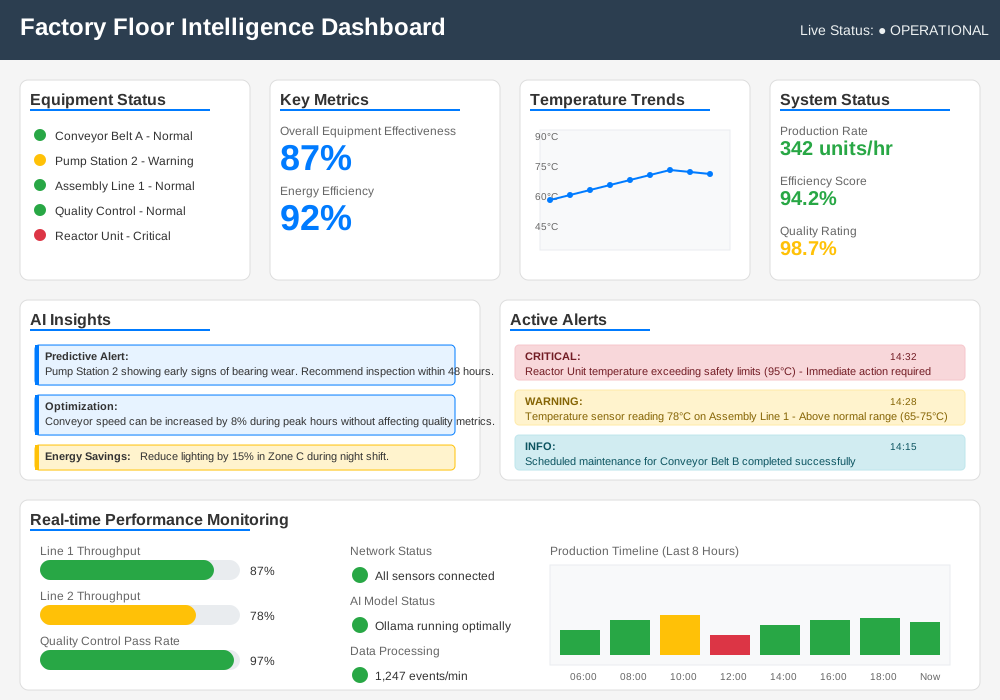
Real-time dashboard showing equipment status, AI insights, and sensor trends
Performance Optimization and Scaling
Edge Computing Optimization
Optimize your Industrial IoT Setup for maximum performance in resource-constrained environments:
# performance_optimizer.py
import psutil
import GPUtil
import ollama
import time
import json

class EdgePerformanceOptimizer:
    def __init__(self):
        self.performance_metrics = {}
        self.optimization_history = []

    def monitor_system_resources(self):
        """Monitor CPU, memory, and GPU usage"""
        metrics = {
            'timestamp': time.time(),
            'cpu_percent': psutil.cpu_percent(interval=1),
            'memory_percent': psutil.virtual_memory().percent,
            'disk_usage': psutil.disk_usage('/').percent,
            'temperature': self.get_cpu_temperature(),
            'gpu_usage': self.get_gpu_usage()
        }

        self.performance_metrics = metrics
        return metrics

    def get_cpu_temperature(self):
        """Get CPU temperature if available"""
        try:
            temps = psutil.sensors_temperatures()
            if 'coretemp' in temps:
                return temps['coretemp'][0].current
        except:
            pass
        return None

    def get_gpu_usage(self):
        """Get GPU usage for systems with GPU acceleration"""
        try:
            gpus = GPUtil.getGPUs()
            if gpus:
                return {
                    'utilization': gpus[0].load * 100,
                    'memory': gpus[0].memoryUtil * 100,
                    'temperature': gpus[0].temperature
                }
        except:
            pass
        return None

    def optimize_ollama_performance(self):
        """Optimize Ollama based on current system state"""
        metrics = self.monitor_system_resources()

        optimization_settings = {}

        # CPU-based optimizations
        if metrics['cpu_percent'] > 80:
            optimization_settings['num_thread'] = max(1, psutil.cpu_count() // 2)
        else:
            optimization_settings['num_thread'] = psutil.cpu_count()

        # Memory-based optimizations
        if metrics['memory_percent'] > 85:
            optimization_settings['num_ctx'] = 2048  # Reduce context
            optimization_settings['num_batch'] = 128  # Smaller batches
        else:
            optimization_settings['num_ctx'] = 4096
            optimization_settings['num_batch'] = 512

        # Temperature-based throttling
        if metrics['temperature'] and metrics['temperature'] > 75:
            optimization_settings['temperature'] = 0.1  # Reduce AI creativity for speed
            print("Temperature throttling activated")

        return optimization_settings

    def apply_optimizations(self, settings):
        """Apply optimization settings to Ollama"""
        try:
            # Test inference with new settings
            start_time = time.time()

            response = ollama.chat(
                model='factory-intelligence',
                messages=[{
                    'role': 'user',
                    'content': 'Quick system status check'
                }],
                options=settings
            )

            inference_time = time.time() - start_time

            self.optimization_history.append({
                'timestamp': time.time(),
                'settings': settings,
                'inference_time': inference_time,
                'system_metrics': self.performance_metrics
            })

            print(f"Optimization applied. Inference time: {inference_time:.2f}s")
            return True

        except Exception as e:
            print(f"Optimization failed: {e}")
            return False

    def auto_optimize(self):
        """Continuously monitor and optimize performance"""
        while True:
            settings = self.optimize_ollama_performance()
            self.apply_optimizations(settings)

            # Check every 5 minutes
            time.sleep(300)

# Run performance optimization
optimizer = EdgePerformanceOptimizer()
optimizer.auto_optimize()
Load Balancing Multiple Edge Nodes
Scale your Manufacturing Automation across multiple edge devices:
# load_balancer.py
import requests
import json
import time
from typing import List, Dict
import hashlib

class EdgeLoadBalancer:
    def __init__(self, edge_nodes: List[Dict]):
        self.edge_nodes = edge_nodes
        self.node_health = {}
        self.request_counts = {}

        # Initialize monitoring
        for node in edge_nodes:
            self.node_health[node['id']] = 'unknown'
            self.request_counts[node['id']] = 0

    def health_check(self, node: Dict) -> bool:
        """Check if an edge node is healthy"""
        try:
            response = requests.get(
                f"http://{node['host']}:{node['port']}/health",
                timeout=5
            )

            if response.status_code == 200:
                health_data = response.json()
                self.node_health[node['id']] = 'healthy'
                return True
            else:
                self.node_health[node['id']] = 'unhealthy'
                return False

        except requests.RequestException:
            self.node_health[node['id']] = 'unreachable'
            return False

    def get_available_nodes(self) -> List[Dict]:
        """Get list of healthy nodes"""
        available = []

        for node in self.edge_nodes:
            if self.health_check(node):
                available.append(node)

        return available

    def select_node(self, request_hash: str = None) -> Dict:
        """Select optimal node for request"""
        available_nodes = self.get_available_nodes()

        if not available_nodes:
            raise Exception("No healthy edge nodes available")

        # Use consistent hashing for sensor data routing
        if request_hash:
            node_index = int(hashlib.md5(request_hash.encode()).hexdigest(), 16) % len(available_nodes)
            return available_nodes[node_index]

        # Load balancing: select node with lowest request count
        selected_node = min(available_nodes,
                          key=lambda n: self.request_counts[n['id']])

        self.request_counts[selected_node['id']] += 1
        return selected_node

    def route_analysis_request(self, sensor_data: Dict) -> Dict:
        """Route AI analysis request to optimal edge node"""

        # Create hash for consistent routing of same sensor
        sensor_hash = f"{sensor_data.get('sensor_id', '')}-{sensor_data.get('location', '')}"

        try:
            node = self.select_node(sensor_hash)

            # Send analysis request
            response = requests.post(
                f"http://{node['host']}:{node['port']}/analyze",
                json=sensor_data,
                timeout=10
            )

            if response.status_code == 200:
                return {
                    'success': True,
                    'data': response.json(),
                    'node_id': node['id'],
                    'response_time': response.elapsed.total_seconds()
                }
            else:
                return {
                    'success': False,
                    'error': f"Node {node['id']} returned {response.status_code}",
                    'node_id': node['id']
                }

        except Exception as e:
            return {
                'success': False,
                'error': str(e),
                'node_id': 'unknown'
            }

    def monitor_performance(self):
        """Monitor edge node performance"""
        while True:
            print("\n=== Edge Node Status ===")

            for node in self.edge_nodes:
                health = self.node_health.get(node['id'], 'unknown')
                requests = self.request_counts.get(node['id'], 0)

                print(f"Node {node['id']}: {health} ({requests} requests)")

            time.sleep(30)  # Check every 30 seconds

# Configuration for multiple edge nodes
edge_configuration = [
    {'id': 'edge-01', 'host': '192.168.1.100', 'port': 8080, 'location': 'assembly_line_1'},
    {'id': 'edge-02', 'host': '192.168.1.101', 'port': 8080, 'location': 'assembly_line_2'},
    {'id': 'edge-03', 'host': '192.168.1.102', 'port': 8080, 'location': 'quality_control'}
]

# Initialize load balancer
balancer = EdgeLoadBalancer(edge_configuration)

# Example usage
sample_sensor_data = {
    'sensor_id': 'temp_001',
    'location': 'assembly_line_1',
    'value': 75.2,
    'unit': 'celsius',
    'timestamp': time.time()
}

result = balancer.route_analysis_request(sample_sensor_data)
print("Analysis result:", json.dumps(result, indent=2))
Security and Compliance
Network Security Configuration
Secure your Industrial IoT Setup against cyber threats:
#!/bin/bash
# security_setup.sh - Industrial IoT Security Configuration

echo "Configuring Industrial IoT Security..."

# 1. Firewall Configuration
sudo ufw --force reset
sudo ufw default deny incoming
sudo ufw default allow outgoing

# Allow specific industrial protocols
sudo ufw allow 1883/tcp   # MQTT
sudo ufw allow 502/tcp    # Modbus
sudo ufw allow 4840/tcp   # OPC-UA
sudo ufw allow 8080/tcp   # Ollama API (internal only)

# Allow SSH from management network only
sudo ufw allow from 192.168.1.0/24 to any port 22

# Enable firewall
sudo ufw --force enable

# 2. SSL/TLS for MQTT
sudo mkdir -p /etc/mosquitto/certs
cd /etc/mosquitto/certs

# Generate CA certificate
openssl genrsa -out ca.key 2048
openssl req -new -x509 -days 1826 -key ca.key -out ca.crt -subj "/C=US/ST=State/L=City/O=Factory/CN=Factory-CA"

# Generate server certificate
openssl genrsa -out server.key 2048
openssl req -new -out server.csr -key server.key -subj "/C=US/ST=State/L=City/O=Factory/CN=factory-mqtt"
openssl x509 -req -in server.csr -CA ca.crt -CAkey ca.key -CAcreateserial -out server.crt -days 360

# Set permissions
sudo chown mosquitto:mosquitto /etc/mosquitto/certs/*
sudo chmod 600 /etc/mosquitto/certs/*.key

# 3. Update Mosquitto configuration for TLS
sudo cat > /etc/mosquitto/conf.d/tls.conf << EOF
# TLS Configuration
listener 8883
cafile /etc/mosquitto/certs/ca.crt
certfile /etc/mosquitto/certs/server.crt
keyfile /etc/mosquitto/certs/server.key
require_certificate false
use_identity_as_username false

# Security settings
allow_anonymous false
password_file /etc/mosquitto/passwd
acl_file /etc/mosquitto/acl.conf
EOF

# 4. Create ACL file for MQTT permissions
sudo cat > /etc/mosquitto/acl.conf << EOF
# Factory MQTT Access Control

# Factory sensors can only publish to their topics
user factory-sensors
topic write factory/sensors/+/+
topic read factory/alerts/+

# Dashboard can read all factory data
user factory-dashboard
topic read factory/+

# AI system has full access
user factory-ai
topic readwrite factory/+
EOF

# 5. Restart services
sudo systemctl restart mosquitto
sudo systemctl restart ufw

echo "Security configuration complete!"
Data Encryption and Access Control
Implement comprehensive data protection:
# security_manager.py
import cryptography
from cryptography.fernet import Fernet
from cryptography.hazmat.primitives import hashes
from cryptography.hazmat.primitives.kdf.pbkdf2 import PBKDF2HMAC
import base64
import json
import hashlib
import hmac
from datetime import datetime, timedelta
import jwt

class IndustrialDataSecurity:
    def __init__(self, master_password: str):
        self.master_password = master_password
        self.encryption_key = self._derive_key(master_password)
        self.cipher = Fernet(self.encryption_key)
        self.access_tokens = {}

    def _derive_key(self, password: str) -> bytes:
        """Derive encryption key from master password"""
        password_bytes = password.encode()
        salt = b'factory_salt_2025'  # Use unique salt per installation

        kdf = PBKDF2HMAC(
            algorithm=hashes.SHA256(),
            length=32,
            salt=salt,
            iterations=100000,
        )

        key = base64.urlsafe_b64encode(kdf.derive(password_bytes))
        return key

    def encrypt_sensor_data(self, data: dict) -> str:
        """Encrypt sensitive sensor data"""
        json_data = json.dumps(data).encode()
        encrypted_data = self.cipher.encrypt(json_data)
        return base64.urlsafe_b64encode(encrypted_data).decode()

    def decrypt_sensor_data(self, encrypted_data: str) -> dict:
        """Decrypt sensor data"""
        try:
            encrypted_bytes = base64.urlsafe_b64decode(encrypted_data.encode())
            decrypted_data = self.cipher.decrypt(encrypted_bytes)
            return json.loads(decrypted_data.decode())
        except Exception as e:
            raise ValueError(f"Decryption failed: {e}")

    def create_access_token(self, user_id: str, permissions: list, expires_hours: int = 8) -> str:
        """Create JWT access token for API access"""
        payload = {
            'user_id': user_id,
            'permissions': permissions,
            'exp': datetime.utcnow() + timedelta(hours=expires_hours),
            'iat': datetime.utcnow()
        }

        token = jwt.encode(payload, self.master_password, algorithm='HS256')
        self.access_tokens[user_id] = token
        return token

    def verify_access_token(self, token: str) -> dict:
        """Verify and decode access token"""
        try:
            payload = jwt.decode(token, self.master_password, algorithms=['HS256'])
            return payload
        except jwt.ExpiredSignatureError:
            raise ValueError("Token has expired")
        except jwt.InvalidTokenError:
            raise ValueError("Invalid token")

    def check_permissions(self, token: str, required_permission: str) -> bool:
        """Check if token has required permission"""
        try:
            payload = self.verify_access_token(token)
            return required_permission in payload.get('permissions', [])
        except ValueError:
            return False

    def hash_sensor_id(self, sensor_id: str) -> str:
        """Create anonymous hash of sensor ID for privacy"""
        return hashlib.sha256(f"{sensor_id}{self.master_password}".encode()).hexdigest()[:16]

    def secure_api_endpoint(self, func):
        """Decorator for securing API endpoints"""
        def wrapper(*args, **kwargs):
            # Extract token from request headers
            token = kwargs.get('auth_token')
            required_permission = kwargs.get('required_permission', 'read')

            if not token:
                return {'error': 'Authentication required', 'status': 401}

            if not self.check_permissions(token, required_permission):
                return {'error': 'Insufficient permissions', 'status': 403}

            # Call original function
            return func(*args, **kwargs)

        return wrapper

# Usage example
security = IndustrialDataSecurity("your-secure-master-password-2025")

# Create tokens for different user types
operator_token = security.create_access_token(
    user_id="operator_001",
    permissions=["read", "alert"],
    expires_hours=8
)

admin_token = security.create_access_token(
    user_id="admin_001",
    permissions=["read", "write", "admin", "alert"],
    expires_hours=24
)

# Encrypt sensitive sensor data
sensitive_data = {
    'sensor_id': 'TEMP_CRITICAL_001',
    'location': 'reactor_chamber_1',
    'value': 850.5,
    'unit': 'celsius',
    'timestamp': datetime.now().isoformat()
}

encrypted = security.encrypt_sensor_data(sensitive_data)
print(f"Encrypted data: {encrypted[:50]}...")

# Decrypt for authorized access
decrypted = security.decrypt_sensor_data(encrypted)
print(f"Decrypted: {decrypted}")
Troubleshooting and Maintenance
Common Issues and Solutions
Resolve typical Industrial IoT Setup problems quickly:
# diagnostic_tools.py
import subprocess
import psutil
import ollama
import sqlite3
import json
from datetime import datetime, timedelta

class FactoryDiagnostics:
    def __init__(self):
        self.diagnostic_results = {}
        self.health_checks = [
            self.check_ollama_service,
            self.check_mqtt_broker,
            self.check_system_resources,
            self.check_database_connection,
            self.check_network_connectivity,
            self.check_sensor_data_flow
        ]

    def run_full_diagnostic(self) -> dict:
        """Run comprehensive system diagnostic"""
        print("Running factory diagnostics...")

        results = {
            'timestamp': datetime.now().isoformat(),
            'overall_status': 'unknown',
            'checks': {}
        }

        failed_checks = 0

        for check in self.health_checks:
            try:
                check_name = check.__name__
                print(f"Running {check_name}...")

                result = check()
                results['checks'][check_name] = result

                if not result.get('passed', False):
                    failed_checks += 1

            except Exception as e:
                results['checks'][check.__name__] = {
                    'passed': False,
                    'error': str(e),
                    'message': 'Check failed with exception'
                }
                failed_checks += 1

        # Determine overall status
        if failed_checks == 0:
            results['overall_status'] = 'healthy'
        elif failed_checks <= 2:
            results['overall_status'] = 'warning'
        else:
            results['overall_status'] = 'critical'

        self.diagnostic_results = results
        return results

    def check_ollama_service(self) -> dict:
        """Check Ollama service status"""
        try:
            # Test basic Ollama functionality
            response = ollama.chat(
                model='factory-intelligence',
                messages=[{'role': 'user', 'content': 'System check'}]
            )

            return {
                'passed': True,
                'message': 'Ollama service operational',
                'response_time': '<1s'
            }

        except Exception as e:
            # Check if Ollama process is running
            ollama_running = any('ollama' in p.name().lower() for p in psutil.process_iter())

            return {
                'passed': False,
                'message': f'Ollama service issue: {str(e)}',
                'process_running': ollama_running,
                'suggested_fix': 'Run: sudo systemctl restart ollama'
            }

    def check_mqtt_broker(self) -> dict:
        """Check MQTT broker connectivity"""
        try:
            result = subprocess.run(
                ['mosquitto_pub', '-h', 'localhost', '-t', 'test/diagnostic', '-m', 'ping'],
                capture_output=True,
                timeout=5
            )

            if result.returncode == 0:
                return {
                    'passed': True,
                    'message': 'MQTT broker accessible'
                }
            else:
                return {
                    'passed': False,
                    'message': 'MQTT broker connection failed',
                    'error': result.stderr.decode(),
                    'suggested_fix': 'Run: sudo systemctl restart mosquitto'
                }

        except FileNotFoundError:
            return {
                'passed': False,
                'message': 'MQTT client tools not installed',
                'suggested_fix': 'Run: sudo apt install mosquitto-clients'
            }
        except subprocess.TimeoutExpired:
            return {
                'passed': False,
                'message': 'MQTT broker timeout',
                'suggested_fix': 'Check broker configuration and restart'
            }

    def check_system_resources(self) -> dict:
        """Check system resource usage"""
        cpu_percent = psutil.cpu_percent(interval=1)
        memory = psutil.virtual_memory()
        disk = psutil.disk_usage('/')

        issues = []

        if cpu_percent > 85:
            issues.append(f'High CPU usage: {cpu_percent:.1f}%')

        if memory.percent > 90:
            issues.append(f'High memory usage: {memory.percent:.1f}%')

        if disk.percent > 85:
            issues.append(f'High disk usage: {disk.percent:.1f}%')

        return {
            'passed': len(issues) == 0,
            'message': 'System resources OK' if not issues else '; '.join(issues),
            'cpu_percent': cpu_percent,
            'memory_percent': memory.percent,
            'disk_percent': disk.percent,
            'suggested_fix': 'Consider resource optimization or hardware upgrade' if issues else None
        }

    def check_database_connection(self) -> dict:
        """Check database connectivity"""
        try:
            conn = sqlite3.connect('factory_data.db', timeout=5)
            cursor = conn.cursor()

            # Test read operation
            cursor.execute('SELECT COUNT(*) FROM sensor_readings WHERE timestamp > ?',
                         [datetime.now() - timedelta(hours=1)])
            recent_count = cursor.fetchone()[0]

            conn.close()

            return {
                'passed': True,
                'message': f'Database accessible, {recent_count} recent readings',
                'recent_readings': recent_count
            }

        except sqlite3.Error as e:
            return {
                'passed': False,
                'message': f'Database connection failed: {str(e)}',
                'suggested_fix': 'Check database file permissions and disk space'
            }

    def check_network_connectivity(self) -> dict:
        """Check network connectivity to critical endpoints"""
        endpoints = [
            ('localhost', 1883, 'MQTT'),
            ('localhost', 8080, 'Ollama API')
        ]

        failed_endpoints = []

        for host, port, service in endpoints:
            try:
                import socket
                sock = socket.socket(socket.AF_INET, socket.SOCK_STREAM)
                sock.settimeout(5)
                result = sock.connect_ex((host, port))
                sock.close()

                if result != 0:
                    failed_endpoints.append(f'{service} ({host}:{port})')

            except Exception as e:
                failed_endpoints.append(f'{service} - error: {str(e)}')

        return {
            'passed': len(failed_endpoints) == 0,
            'message': 'All endpoints accessible' if not failed_endpoints else f'Failed: {", ".join(failed_endpoints)}',
            'failed_endpoints': failed_endpoints
        }

    def check_sensor_data_flow(self) -> dict:
        """Check if sensor data is flowing correctly"""
        try:
            conn = sqlite3.connect('factory_data.db')
            cursor = conn.cursor()

            # Check for recent data
            cursor.execute('''
                SELECT sensor_type, COUNT(*), MAX(timestamp)
                FROM sensor_readings
                WHERE timestamp > ?
                GROUP BY sensor_type
            ''', [datetime.now() - timedelta(minutes=10)])

            recent_data = cursor.fetchall()
            conn.close()

            if not recent_data:
                return {
                    'passed': False,
                    'message': 'No recent sensor data received',
                    'suggested_fix': 'Check sensor connectivity and data collection service'
                }

            sensor_summary = {}
            for sensor_type, count, last_reading in recent_data:
                sensor_summary[sensor_type] = {
                    'count': count,
                    'last_reading': last_reading
                }

            return {
                'passed': True,
                'message': f'Data flowing from {len(recent_data)} sensor types',
                'sensor_summary': sensor_summary
            }

        except Exception as e:
            return {
                'passed': False,
                'message': f'Sensor data check failed: {str(e)}'
            }

    def generate_diagnostic_report(self) -> str:
        """Generate human-readable diagnostic report"""
        if not self.diagnostic_results:
            self.run_full_diagnostic()

        results = self.diagnostic_results
        report = []

        report.append("="*50)
        report.append("FACTORY FLOOR INTELLIGENCE DIAGNOSTIC REPORT")
        report.append("="*50)
        report.append(f"Timestamp: {results['timestamp']}")
        report.append(f"Overall Status: {results['overall_status'].upper()}")
        report.append("")

        for check_name, check_result in results['checks'].items():
            status = "✓ PASS" if check_result.get('passed') else "✗ FAIL"
            report.append(f"{status} {check_name}")
            report.append(f"   Message: {check_result.get('message', 'No message')}")

            if not check_result.get('passed') and check_result.get('suggested_fix'):
                report.append(f"   Fix: {check_result['suggested_fix']}")

            report.append("")

        return "\n".join(report)

    def auto_fix_common_issues(self):
        """Attempt automatic fixes for common problems"""
        if not self.diagnostic_results:
            self.run_full_diagnostic()

        fixes_applied = []

        for check_name, result in self.diagnostic_results['checks'].items():
            if not result.get('passed') and result.get('suggested_fix'):
                fix_command = result['suggested_fix']

                if fix_command.startswith('sudo systemctl restart'):
                    service = fix_command.split()[-1]
                    try:
                        subprocess.run(['sudo', 'systemctl', 'restart', service],
                                     check=True, capture_output=True)
                        fixes_applied.append(f"Restarted {service}")
                    except subprocess.CalledProcessError as e:
                        fixes_applied.append(f"Failed to restart {service}: {e}")

        return fixes_applied

# Usage
diagnostics = FactoryDiagnostics()
results = diagnostics.run_full_diagnostic()
report = diagnostics.generate_diagnostic_report()

print(report)

# Attempt auto-fixes if needed
if results['overall_status'] != 'healthy':
    fixes = diagnostics.auto_fix_common_issues()
    if fixes:
        print("\nAttempted fixes:")
        for fix in fixes:
            print(f"- {fix}")
Conclusion
Your Industrial IoT Setup with Ollama transforms traditional manufacturing into intelligent operations. This comprehensive implementation provides real-time AI analysis, predictive maintenance, and automated decision-making directly on your factory floor.
Key benefits you've achieved:
- Edge-based intelligence that operates without cloud dependencies
- Custom AI models trained on your specific manufacturing processes
- Real-time monitoring with immediate alerts and recommendations
- Predictive maintenance that prevents costly downtime
- Secure architecture protecting your industrial data
Manufacturing Automation with Ollama scales from single production lines to entire facilities. Your factory now processes sensor data in milliseconds, identifies problems before they impact production, and optimizes operations continuously.
Start with temperature and vibration monitoring on critical equipment. Expand gradually to pressure sensors, flow meters, and quality control systems. Each new sensor multiplies your AI's intelligence and predictive capabilities.
Ready to deploy factory floor intelligence? Begin with the sensor integration guide and build your first AI-powered monitoring system today. Your equipment will thank you with years of reliable operation.