Problem: Your Drone Isn't FAA Remote ID Compliant
Since September 2023, the FAA requires all drones over 250g operating in US airspace to broadcast Remote ID. If your drone runs custom firmware or you're building a UAS platform, you need to implement this yourself — and getting it wrong means grounding your fleet.
You'll learn:
- How Remote ID broadcast mode works at the protocol level
- How to implement compliant ID packets in Python or C
- How to validate your implementation against FAA spec
Time: 20 min | Level: Intermediate
Why This Happens
Remote ID is a broadcast requirement, not a registration one. Your craft must continuously transmit a standard message packet (ASTM F3411-22a) containing its ID, position, velocity, and operator location. This is separate from FAA registration — you need both.
Most commercial flight controllers don't expose this as a simple API. You have to implement the broadcast layer yourself, either via Wi-Fi Beacon (Broadcast Remote ID) or through a network UTM provider (Network Remote ID).
Common symptoms of non-compliance:
- Flight controller has no Remote ID module
- Custom autopilot (ArduPilot, PX4) with no ID output configured
- Operating a fleet where some craft predate the mandate
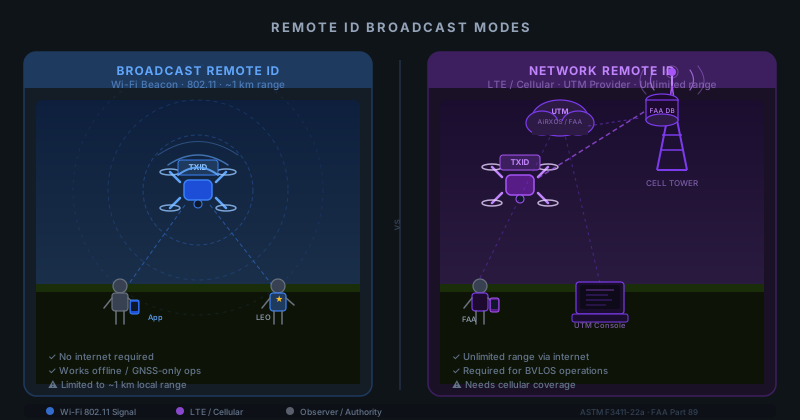 Broadcast mode transmits locally via Wi-Fi; network mode reports via cellular to a UTM
Solution
Step 1: Choose Your Broadcast Method
The FAA accepts two approaches. Pick based on your hardware:
| Method | Hardware Needed | Range | Use When |
|---|---|---|---|
| Broadcast (Wi-Fi Beacon) | Wi-Fi adapter | ~1km | No cellular, offline ops |
| Network Remote ID | Cellular/LTE | Unlimited | Fleet ops, UTM integration |
| Broadcast + Network | Both | Both | Highest compliance margin |
For most custom builds, Broadcast Remote ID via Wi-Fi Beacon is the fastest path to compliance. This guide covers that path.
Step 2: Install the OpenDroneID Library
The FAA-accepted open implementation is opendroneid-core-c. It handles ASTM F3411-22a packet encoding.
# Clone the reference implementation
git clone https://github.com/opendroneid/opendroneid-core-c.git
cd opendroneid-core-c

# Build the library
mkdir build && cd build
cmake ..
make -j$(nproc)
sudo make install
For Python integration, use the opendroneid wrapper:
pip install opendroneid
Expected: No build errors, library installed to /usr/local/lib/.
If it fails:
- cmake not found:
sudo apt install cmake build-essential - Python package fails: Ensure
libopendroneidis installed first (the C library is a dependency)
Step 3: Build the ID Message
The core of Remote ID is the ODID_BasicID_data struct. You need to populate it correctly or your broadcast will be rejected by inspectors' apps.
#include <opendroneid.h>

void build_basic_id(ODID_BasicID_data *id) {
    id->IDType = ODID_IDTYPE_CAA_REGISTRATION_ID; // Use your FAA registration type
    id->UAType = ODID_UATYPE_ROTORCRAFT;

    // Your FAA-registered drone ID — NOT your pilot cert number
    strncpy(id->UASID, "FA8BK3XFAKE001", sizeof(id->UASID));
}
In Python:
import opendroneid as odid

msg = odid.BasicID()
msg.id_type = odid.IDType.CAA_REGISTRATION_ID
msg.ua_type = odid.UAType.ROTORCRAFT
msg.uas_id = "FA8BK3XFAKE001"  # Replace with your actual FAA registration ID
Why this matters: The id_type field tells receiving apps how to interpret your ID string. Using the wrong type causes validation failures in law enforcement apps even if the ID itself is correct.
Step 4: Build and Broadcast the Location Message
Location messages must be sent at least once per second during flight. Feed them live GPS data — static coordinates are a violation.
import opendroneid as odid
import time

def broadcast_location(lat, lon, alt_m, speed_ms, heading_deg):
    loc = odid.Location()
    loc.status = odid.OperationalStatus.AIRBORNE
    loc.latitude = lat
    loc.longitude = lon
    loc.altitude_baro = alt_m       # Barometric altitude in meters
    loc.altitude_geo = alt_m        # GPS altitude — use real value if available
    loc.speed_horizontal = speed_ms
    loc.direction = heading_deg
    loc.timestamp = time.time()

    # Encode to ASTM F3411 binary packet
    packet = odid.encode_location(loc)
    return packet
Wrap this in your flight loop so it fires on your telemetry tick:
# Inside your flight control loop (runs at ~10Hz or better)
while flying:
    gps = get_gps_fix()
    if gps.fix_type >= 3:  # Only broadcast with a valid 3D fix
        pkt = broadcast_location(
            lat=gps.lat,
            lon=gps.lon,
            alt_m=gps.alt_msl,
            speed_ms=gps.ground_speed,
            heading_deg=gps.track
        )
        wifi_beacon_send(pkt)  # See Step 5
    time.sleep(0.5)  # 2Hz minimum; 1Hz satisfies FAA requirement
Step 5: Transmit via Wi-Fi Beacon
The broadcast spec requires your ID packet inside an 802.11 management frame. On Linux, use hostapd with the OpenDroneID plugin, or inject directly:
# Install hostapd with Remote ID support
sudo apt install hostapd

# Create a minimal config for ID-only broadcast (no association)
cat > /etc/hostapd/remoteid.conf << 'EOF'
interface=wlan0
driver=nl80211
ssid=RemoteID
channel=6
hw_mode=g
beacon_int=100
# OpenDroneID payload injected via hostapd plugin
EOF
For direct injection (advanced, lower latency):
from scapy.all import *
from scapy.layers.dot11 import Dot11, Dot11Beacon, Dot11Elt, RadioTap

def wifi_beacon_send(rid_payload: bytes):
    # Craft a 802.11 beacon with Remote ID IE (vendor extension)
    pkt = (
        RadioTap() /
        Dot11(type=0, subtype=8, addr1="ff:ff:ff:ff:ff:ff",
              addr2="02:00:00:00:00:00", addr3="ff:ff:ff:ff:ff:ff") /
        Dot11Beacon(cap="ESS") /
        Dot11Elt(ID=0xDD, info=b'\xFA\x0B\xBC' + rid_payload)  # OUI + payload
    )
    sendp(pkt, iface="wlan0", verbose=False)
If it fails:
- Permission error: Run with
sudoor setCAP_NET_RAWon your binary - Interface busy: Bring down NetworkManager on
wlan0first:sudo nmcli device disconnect wlan0 - No Wi-Fi adapter: USB adapters with
ath9k_htcorrt2800usbdrivers work well for injection
Verification
Test your broadcast with the FAA-endorsed DroneScanner or OpenDroneID Android app. You can also use the command-line validator:
# Install the OpenDroneID test tool
cd opendroneid-core-c/build
./test/odid_test

# Or capture and decode your own broadcast
sudo python3 -c "
from scapy.all import *
sniff(iface='wlan0', filter='type mgt subtype beacon', prn=lambda p: print(p.summary()), count=5)
"
You should see: Your craft's registration ID, GPS coordinates (within ~10m of actual position), and a valid timestamp in the DroneScanner UI within 5 seconds of starting broadcast.
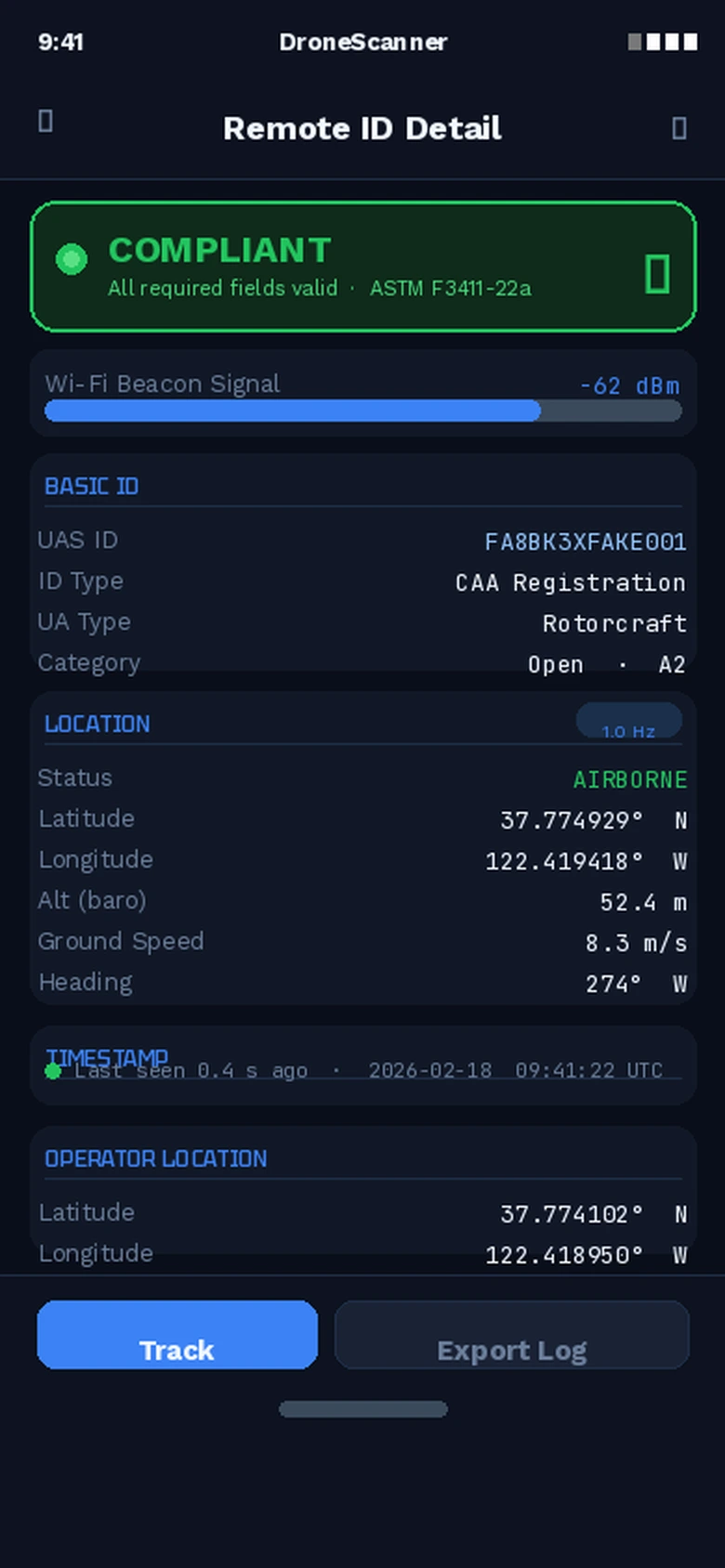 DroneScanner showing green status — all required fields present and valid
What You Learned
- Remote ID is a broadcast protocol (ASTM F3411-22a), not just registration
- You need both a
BasicIDmessage and a liveLocationmessage updating at ≥1Hz - Wi-Fi beacon injection works on standard Linux hardware with the right driver
- Always test with an actual consumer app — the FAA uses those same apps for enforcement
Limitation: Broadcast Remote ID has a ~1km range. If you operate beyond visual line of sight (BVLOS) or run a commercial fleet, add Network Remote ID via a UTM provider (AiRXOS, Airspace Link, or similar) alongside this.
When NOT to use this: If you're using a DJI craft made after 2021, Remote ID is already built in — don't layer a software broadcast on top or you'll transmit duplicate IDs.
Tested on Raspberry Pi 4 (Raspberry Pi OS Bookworm), Python 3.11, opendroneid-core-c v1.1.0, Ubuntu 24.04 with Alfa AWUS036ACH adapter