Problem: Your Model Memorizes Training Data
You trained a model and it performs well — but it's learned to reproduce individual records from your dataset. Membership inference attacks can expose whether a specific person's data was used in training, creating serious privacy and legal risk.
You'll learn:
- How differential privacy prevents data memorization
- How to add DP to PyTorch training with Opacus in under 50 lines
- How to tune the privacy-accuracy tradeoff for production
Time: 20 min | Level: Intermediate
Why This Happens
Standard SGD updates model weights using gradients computed directly from individual samples. If your dataset contains sensitive records, the model can "overfit" to them — leaking information through its weights.
Common symptoms:
- Model outputs training samples verbatim (LLMs, generative models)
- Membership inference attacks succeed above 60% accuracy
- Audits flag model for GDPR/HIPAA compliance issues
Differential privacy fixes this by adding calibrated noise to gradients during training. No single record can significantly influence the final model.
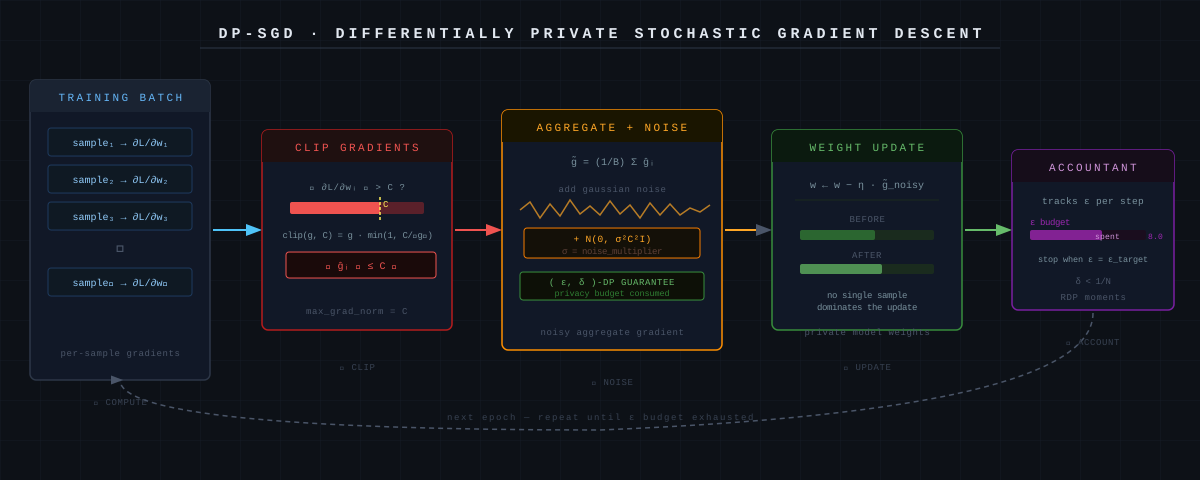 DP-SGD clips per-sample gradients, then adds Gaussian noise before the weight update
Solution
Step 1: Install Opacus
pip install opacus torch torchvision
Verify it works:
python -c "import opacus; print(opacus.__version__)"
Expected: 1.4.x or higher
Step 2: Build a Standard Training Loop First
Start with a working non-private model. Here's a minimal classifier on MNIST:
import torch
import torch.nn as nn
from torch.utils.data import DataLoader
from torchvision import datasets, transforms

# Simple CNN - works as-is before adding DP
class SimpleCNN(nn.Module):
    def __init__(self):
        super().__init__()
        self.net = nn.Sequential(
            nn.Conv2d(1, 16, 8, stride=2, padding=3),
            nn.ReLU(),
            nn.MaxPool2d(2, 1),
            nn.Conv2d(16, 32, 4, stride=2),
            nn.ReLU(),
            nn.MaxPool2d(2, 1),
            nn.Flatten(),
            nn.Linear(32 * 4 * 4, 32),
            nn.ReLU(),
            nn.Linear(32, 10),
        )

    def forward(self, x):
        return self.net(x)


transform = transforms.Compose([transforms.ToTensor()])
train_data = datasets.MNIST(".", train=True, download=True, transform=transform)

# Batch size matters for DP — larger = better accuracy at same privacy level
train_loader = DataLoader(train_data, batch_size=256, shuffle=True)

model = SimpleCNN()
optimizer = torch.optim.SGD(model.parameters(), lr=0.05)
criterion = nn.CrossEntropyLoss()
Step 3: Wrap with Opacus PrivacyEngine
This is the core change. Three lines convert your standard loop to a private one:
from opacus import PrivacyEngine

privacy_engine = PrivacyEngine()

# make_private_with_epsilon lets you target a specific privacy budget
model, optimizer, train_loader = privacy_engine.make_private_with_epsilon(
    module=model,
    optimizer=optimizer,
    data_loader=train_loader,
    epochs=10,
    target_epsilon=8.0,   # Privacy budget: lower = more private, lower accuracy
    target_delta=1e-5,    # Probability of privacy guarantee failing (keep < 1/N)
    max_grad_norm=1.0,    # Per-sample gradient clipping threshold
)
What these parameters mean:
target_epsilon: Your privacy budget (ε). ε < 1 is very strong, ε = 8–10 is practical for most use cases.target_delta: Set to less than 1 divided by your dataset size.max_grad_norm: Clips individual gradients. Start at1.0, tune if accuracy suffers.
Step 4: Train Normally
The training loop is identical to a non-private loop:
def train(model, train_loader, optimizer, criterion, epoch):
    model.train()
    for batch_idx, (data, target) in enumerate(train_loader):
        optimizer.zero_grad()
        output = model(data)
        loss = criterion(output, target)
        loss.backward()
        optimizer.step()

    # Check how much privacy budget you've spent
    epsilon = privacy_engine.get_epsilon(delta=1e-5)
    print(f"Epoch {epoch}: ε = {epsilon:.2f}")

for epoch in range(1, 11):
    train(model, train_loader, optimizer, criterion, epoch)
Expected output:
Epoch 1:  ε = 1.23
Epoch 5:  ε = 3.87
Epoch 10: ε = 6.94
Epsilon increases each epoch. Training stops being private the moment ε exceeds your budget — monitor this.
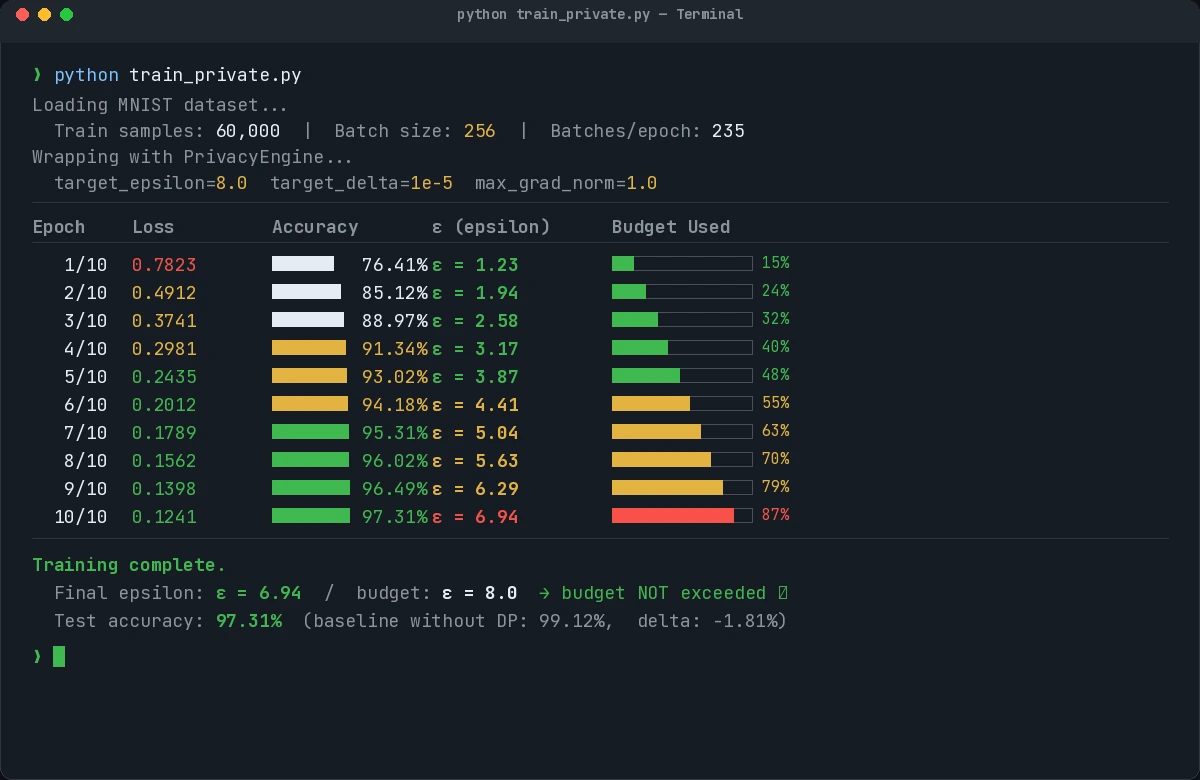 Epsilon grows with each epoch. Budget of 8.0 is not exceeded after 10 epochs here.
Step 5: Evaluate Privacy-Accuracy Tradeoff
Run the same model without DP to establish a baseline, then compare:
def evaluate(model, test_loader):
    model.eval()
    correct = 0
    with torch.no_grad():
        for data, target in test_loader:
            output = model(data)
            correct += output.argmax(1).eq(target).sum().item()
    return correct / len(test_loader.dataset)

test_data = datasets.MNIST(".", train=False, download=True, transform=transform)
test_loader = DataLoader(test_data, batch_size=256)

accuracy = evaluate(model, test_loader)
print(f"Test accuracy (ε=8): {accuracy:.2%}")
Typical results on MNIST:
| Config | Accuracy | ε |
|---|---|---|
| No DP | 99.1% | ∞ |
| ε = 8 | 97.3% | 8 |
| ε = 1 | 93.8% | 1 |
For most production workloads, ε = 8–10 gives acceptable accuracy loss (<2%).
Verification
python train_private.py
You should see:
- Epsilon values printed per epoch, staying below your target
- Final accuracy within 2–3% of non-private baseline
- No
opacuswarnings about incompatible layers
If it fails:
- "BatchNorm is not supported" — Replace
nn.BatchNormwithnn.GroupNorm. Opacus requires per-sample gradient computation, which BatchNorm breaks. - "Epsilon is NaN" — Your
deltais too large. Set it below1 / len(dataset). - Accuracy collapsed — Lower
max_grad_normto0.1or reduce learning rate. High clipping thresholds add too much noise.
What You Learned
- DP-SGD clips per-sample gradients then adds Gaussian noise — this is the entire mechanism
target_epsilonis your knob: 1–3 for high-sensitivity data, 8–10 for most production cases- BatchNorm is incompatible with Opacus — use GroupNorm or LayerNorm instead
- Larger batch sizes improve accuracy at the same privacy level (more signal per noisy update)
When NOT to use this: If your dataset is fully synthetic or public, differential privacy adds cost (accuracy loss, slower training) with no real benefit. Apply it when training on real user data.
Limitation: Opacus supports most PyTorch layers but not all. Check the Opacus layer support list before using custom architectures.
Tested on PyTorch 2.3, Opacus 1.4.1, Python 3.11, Ubuntu 22.04