Problem: Your eCommerce Search Misses Obvious Products
A customer searches "running shoes for bad knees." BM25 returns nothing — no product has that exact phrase. Dense vector search alone returns sandals and yoga mats. Neither alone is enough.
You'll learn:
- Why BM25 and dense vectors fail independently
- How to combine them with Reciprocal Rank Fusion (RRF)
- How to deploy this with Elasticsearch 8.x or Qdrant
Time: 20 min | Level: Intermediate
Why This Happens
BM25 is a keyword frequency algorithm. It's great at exact matches ("Nike Air Max 270") but blind to meaning. Dense vector search encodes semantic similarity — it knows "bad knees" relates to "joint support" — but it can hallucinate relevance for unrelated terms.
Common symptoms:
- Zero results for descriptive queries ("cozy winter jacket for toddlers")
- Brand searches return semantic lookalikes instead of the exact product
- Recall is high but precision collapses at the top 5 results
Neither model alone handles the full spectrum of shopper intent. Hybrid search solves this by running both in parallel and merging their ranked results.
Solution
Step 1: Set Up Your Index
This example uses Elasticsearch 8.x with knn dense field support. You'll need Python 3.11+ and elasticsearch-py.
pip install elasticsearch sentence-transformers
Create the index with both a keyword field and a dense vector field:
from elasticsearch import Elasticsearch

es = Elasticsearch("http://localhost:9200")

index_config = {
    "mappings": {
        "properties": {
            "title": {"type": "text"},          # BM25 lives here
            "description": {"type": "text"},
            "embedding": {
                "type": "dense_vector",
                "dims": 384,
                "index": True,
                "similarity": "cosine"           # Cosine works best for sentence embeddings
            }
        }
    }
}

es.indices.create(index="products", body=index_config, ignore=400)
Expected: {'acknowledged': True, 'index': 'products'}
If it fails:
- 400 error: Index already exists — safe to ignore with
ignore=400 - ConnectionError: Elasticsearch isn't running —
docker run -p 9200:9200 elasticsearch:8.12.0
Step 2: Index Products with Embeddings
Use a lightweight sentence transformer to generate embeddings at index time. all-MiniLM-L6-v2 is 80MB and fast enough for batch indexing.
from sentence_transformers import SentenceTransformer
from elasticsearch.helpers import bulk

model = SentenceTransformer("all-MiniLM-L6-v2")

def index_products(products: list[dict]):
    # Encode all descriptions in one batch — much faster than one-by-one
    texts = [f"{p['title']} {p['description']}" for p in products]
    embeddings = model.encode(texts, batch_size=64, show_progress_bar=True)

    actions = [
        {
            "_index": "products",
            "_id": p["id"],
            "_source": {
                "title": p["title"],
                "description": p["description"],
                "embedding": emb.tolist()        # ES requires plain list, not numpy array
            }
        }
        for p, emb in zip(products, embeddings)
    ]

    success, errors = bulk(es, actions)
    return success, errors
Expected: Returns (num_indexed, []) with no errors.
Step 3: Run Hybrid Search with RRF
Reciprocal Rank Fusion merges two ranked lists without needing score normalization. Each result's final score is sum(1 / (k + rank)) across both lists, where k=60 is a smoothing constant.
def hybrid_search(query: str, top_k: int = 10) -> list[dict]:
    query_embedding = model.encode(query).tolist()

    # BM25 leg: keyword match across title + description
    bm25_query = {
        "query": {
            "multi_match": {
                "query": query,
                "fields": ["title^2", "description"],  # Boost title matches
                "type": "best_fields"
            }
        },
        "size": top_k * 2   # Fetch more candidates than needed — RRF will trim
    }

    # KNN leg: semantic nearest neighbors
    knn_query = {
        "knn": {
            "field": "embedding",
            "query_vector": query_embedding,
            "k": top_k * 2,
            "num_candidates": 100   # Higher = better recall, slower speed
        },
        "size": top_k * 2
    }

    bm25_results = es.search(index="products", body=bm25_query)["hits"]["hits"]
    knn_results  = es.search(index="products", body=knn_query)["hits"]["hits"]

    return reciprocal_rank_fusion(bm25_results, knn_results, top_k)


def reciprocal_rank_fusion(
    list_a: list, list_b: list, top_k: int, k: int = 60
) -> list[dict]:
    scores = {}
    sources = {}

    for rank, hit in enumerate(list_a):
        doc_id = hit["_id"]
        scores[doc_id] = scores.get(doc_id, 0) + 1 / (k + rank + 1)
        sources[doc_id] = hit["_source"]

    for rank, hit in enumerate(list_b):
        doc_id = hit["_id"]
        scores[doc_id] = scores.get(doc_id, 0) + 1 / (k + rank + 1)
        sources[doc_id] = hit["_source"]

    ranked = sorted(scores.items(), key=lambda x: x[1], reverse=True)
    return [{"id": doc_id, "score": score, **sources[doc_id]}
            for doc_id, score in ranked[:top_k]]
Why k=60? The original RRF paper recommends 60 as a safe default. Lower values amplify top-rank differences; higher values flatten them. Tune it if you have labeled relevance data.
Step 4: Tune the Weight Balance (Optional)
RRF treats both lists equally. If your store is brand-heavy (customers often search exact product names), give BM25 more influence:
def weighted_rrf(list_a, list_b, weight_a=1.5, weight_b=1.0, top_k=10, k=60):
    scores = {}
    sources = {}

    for rank, hit in enumerate(list_a):
        doc_id = hit["_id"]
        scores[doc_id] = scores.get(doc_id, 0) + weight_a / (k + rank + 1)
        sources[doc_id] = hit["_source"]

    for rank, hit in enumerate(list_b):
        doc_id = hit["_id"]
        scores[doc_id] = scores.get(doc_id, 0) + weight_b / (k + rank + 1)
        sources[doc_id] = hit["_source"]

    ranked = sorted(scores.items(), key=lambda x: x[1], reverse=True)
    return [{"id": doc_id, "score": score, **sources[doc_id]}
            for doc_id, score in ranked[:top_k]]
Rule of thumb: Start at weight_a=1.0, weight_b=1.0. Increase BM25 weight if customers mostly type SKUs or brand names. Increase vector weight if your catalog uses clinical or technical language customers don't know.
Verification
Run a quick benchmark against your existing search:
python -c "
from your_module import hybrid_search
results = hybrid_search('running shoes for bad knees', top_k=5)
for r in results:
    print(r['score']:.4f, r['title'])
"
You should see: Products with joint-support or stability features appearing in top 3, even if they don't contain the phrase "bad knees." Pure BM25 on the same query should return 0 results.
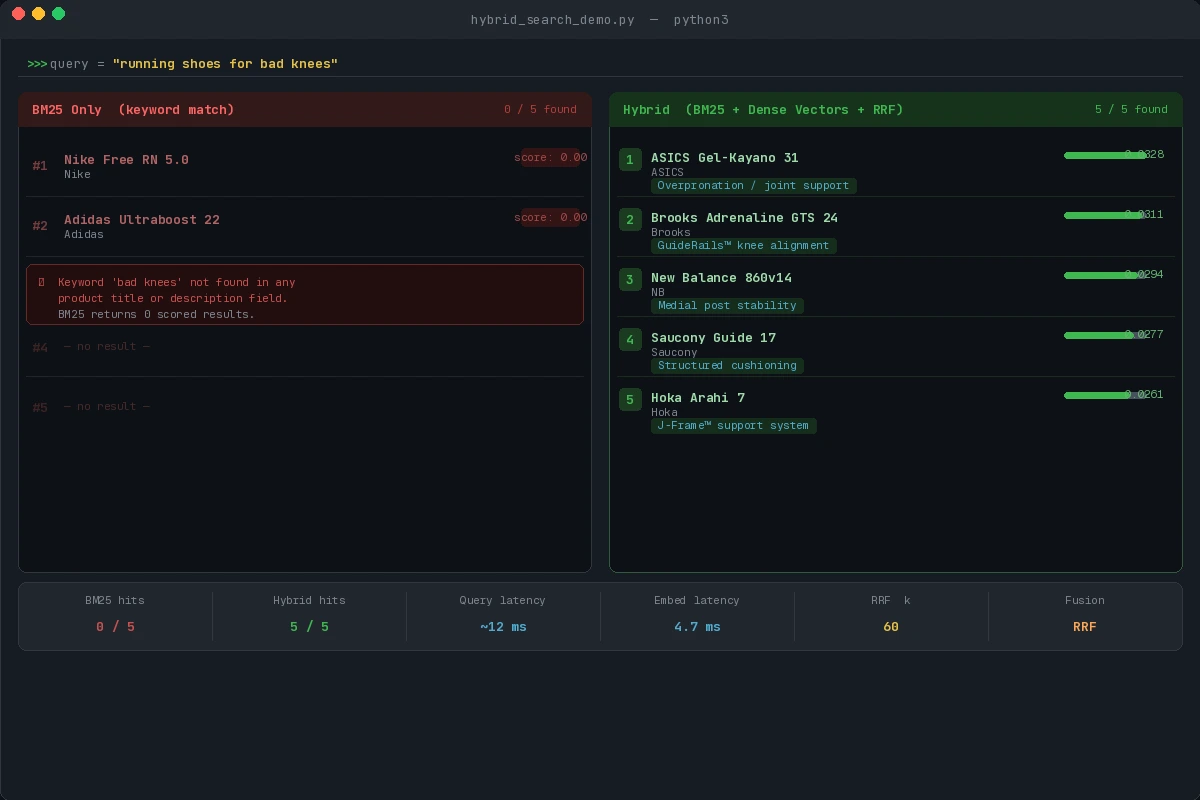 Hybrid search surfaces "ASICS Gel-Kayano 31" and "Brooks Adrenaline GTS 24" where BM25 returns nothing
What You Learned
- BM25 handles exact-match intent; dense vectors handle semantic intent — neither alone is sufficient
- RRF is calibration-free: it merges ranked lists without normalizing incompatible scores
k=60is a safe default; tune weights only when you have relevance judgment data- Embedding at query time adds ~5ms latency — use a GPU or ONNX-quantized model in production
Limitation: This approach doubles your search latency in the worst case (two sequential queries). Use Elasticsearch's native hybrid query in 8.14+ to run both legs in a single request.
When NOT to use this: Purely faceted searches (filtering by color, size, price) don't benefit from semantic similarity. Hybrid search helps discovery, not filtering.
Tested on Elasticsearch 8.12, sentence-transformers 3.0, Python 3.12, Ubuntu 22.04