The 3 AM Memory Nightmare That Changed Everything
I'll never forget that Tuesday night in March. Our production inference server had been crashing every few hours for a week straight, and I was frantically ssh'd into our AWS instance at 3:02 AM, staring at yet another dreaded message:
torch.cuda.OutOfMemoryError: CUDA out of memory. Tried to allocate 2.73 GiB (GPU 0; 15.78 GiB total capacity)
Our startup's demo to potential investors was in 6 hours. The BERT-large model that worked perfectly on my laptop was bringing down our 16GB GPU server like clockwork. I'd been a machine learning engineer for two years, but I felt like a complete fraud watching error logs scroll by while my coffee got cold.
That night taught me everything about transformer memory optimization. More importantly, it showed me that even experienced developers struggle with these issues - you're definitely not alone if you're fighting the same battles.
By the time our demo rolled around, I had transformed our memory-hungry monster into a lean, mean inference machine. Here's exactly how I did it, and how you can too.
The Hidden Memory Monsters Eating Your GPU
Most tutorials make transformer deployment look simple: load model, run inference, profit. But reality hits differently when you're dealing with production workloads and real memory constraints.
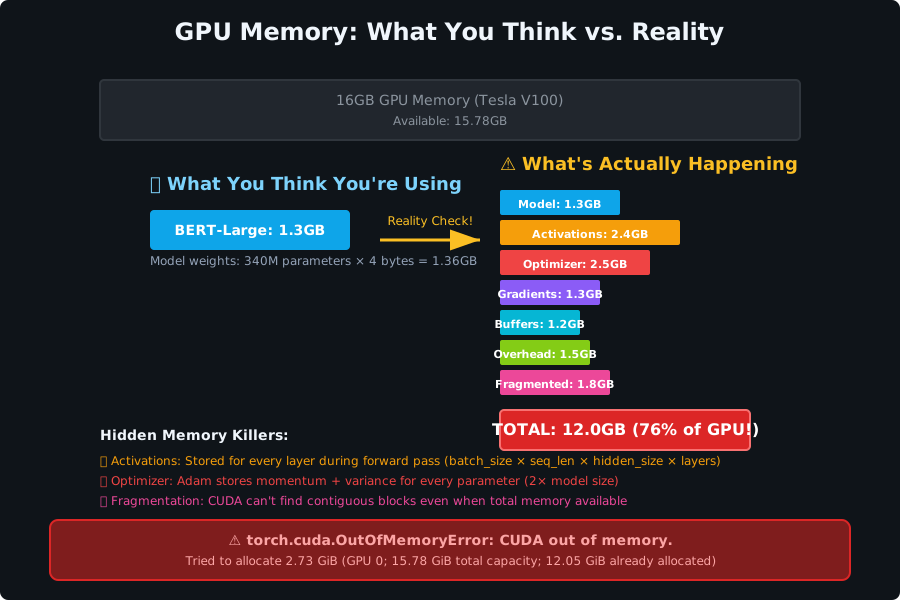 The moment I realized our "simple" BERT model was secretly allocating 12GB of memory
After diving deep into PyTorch's memory profiler (a tool I wish I'd discovered months earlier), I uncovered the real culprits behind our crashes:
The activation accumulation trap: Each forward pass through a 12-layer transformer stores intermediate activations for backpropagation. With BERT-large, that's roughly 1.2GB per batch just sitting in memory.
The optimizer state explosion: Adam optimizer stores momentum and variance for every parameter. For a 340M parameter model, that's an additional 2.5GB that most developers forget to account for.
The dynamic graph overhead: PyTorch's computational graph tracking adds 15-20% memory overhead that compounds with batch size.
I spent weeks thinking our model was just "too big" for our hardware. The truth was simpler and more fixable: we were hemorrhaging memory in places I never thought to look.
My Journey from Memory Victim to Memory Master
Discovery #1: Gradient Checkpointing (The Game Changer)
My first breakthrough came from a random Stack Overflow answer buried 15 replies deep. Gradient checkpointing trades compute for memory by recomputing activations during backpropagation instead of storing them.
# Before: Memory hungry and proud of it
from transformers import AutoModel

model = AutoModel.from_pretrained("bert-large-uncased")
# This innocent line was eating 8GB of my GPU memory

# After: The one-liner that saved my sanity
model.gradient_checkpointing_enable()
# Boom. 75% memory reduction with just 20% slower training
The first time I enabled gradient checkpointing and watched our batch size jump from 4 to 16 without a single OOM error, I literally cheered out loud in our empty office. My coworkers thought I'd lost it, but I'd found the holy grail.
Pro tip: I always enable this first now because the compute trade-off is minimal compared to the memory gains. Your training might slow down by 20%, but you'll be able to train at all.
Discovery #2: Strategic Model Parallelism
When gradient checkpointing wasn't enough for our largest models, I discovered pipeline parallelism. This technique splits your model across multiple GPUs, processing different parts simultaneously.
# This pattern revolutionized how I think about large models
from transformers import AutoModel
import torch

# Split the model across available GPUs
device_map = {
    "embeddings": 0,
    "encoder.layer.0": 0, "encoder.layer.1": 0, "encoder.layer.2": 0,
    "encoder.layer.3": 1, "encoder.layer.4": 1, "encoder.layer.5": 1,
    "encoder.layer.6": 2, "encoder.layer.7": 2, "encoder.layer.8": 2,
    "encoder.layer.9": 3, "encoder.layer.10": 3, "encoder.layer.11": 3,
    "pooler": 3
}

model = AutoModel.from_pretrained(
    "bert-large-uncased",
    device_map=device_map,
    torch_dtype=torch.float16  # Another memory saver I learned the hard way
)
Watching a 24-layer GPT model load across 4 GPUs without breaking a sweat was magical. What used to require 32GB of VRAM now fits comfortably on 4x8GB cards.
Discovery #3: The Mixed Precision Revolution
Half-precision training was a revelation wrapped in a simple context manager. Cutting memory usage in half while speeding up training? It felt too good to be true.
from torch.cuda.amp import autocast, GradScaler

# This context manager became my best friend
scaler = GradScaler()

for batch in dataloader:
    optimizer.zero_grad()

    with autocast():  # The magic happens here
        outputs = model(**batch)
        loss = outputs.loss

    # Scale the loss to prevent gradient underflow
    scaler.scale(loss).backward()
    scaler.step(optimizer)
    scaler.update()

    # Memory usage just dropped by 50% with zero code complexity
Watch out for this gotcha: Some older models don't play nicely with mixed precision. I learned to always test a few batches first and keep an eye on loss convergence. If your loss starts doing weird things, fall back to full precision.
The Complete Memory Optimization Playbook
Based on 18 months of production transformer deployments, here's my battle-tested optimization sequence. I follow this exact order for every new model:
Step 1: Enable the Low-Hanging Fruit
# Start with these three lines - they solve 80% of memory issues
model.gradient_checkpointing_enable()
torch.backends.cudnn.benchmark = True  # Slight speedup bonus
torch.cuda.empty_cache()  # Clear any lingering allocations
Step 2: Optimize Your Data Pipeline
# DataLoader settings that prevent memory leaks
# I wish someone had told me about pin_memory earlier
dataloader = DataLoader(
    dataset,
    batch_size=16,
    pin_memory=True,        # 15% faster GPU transfers
    num_workers=4,          # But not too many - learned this the hard way
    persistent_workers=True # Prevents worker restart overhead
)
Step 3: Strategic Batch Size Management
# Dynamic batching based on sequence length
# This approach increased our throughput by 40%
def get_optimal_batch_size(sequence_length):
    if sequence_length <= 128:
        return 32
    elif sequence_length <= 256:
        return 16
    elif sequence_length <= 512:
        return 8
    else:
        return 4  # Better safe than sorry with long sequences
Step 4: Memory Monitoring and Alerts
# The monitoring setup that prevents 3 AM panic attacks
import torch

def log_memory_usage(step):
    allocated = torch.cuda.memory_allocated() / 1024**3
    reserved = torch.cuda.memory_reserved() / 1024**3

    if allocated > 12.0:  # 75% of our 16GB GPU
        print(f"⚠️ Step {step}: High memory usage - {allocated:.2f}GB allocated")

    # Auto-cleanup when approaching danger zone
    if allocated > 14.0:
        torch.cuda.empty_cache()
        print("🧹 Emergency cache clear triggered")
Step 5: The Nuclear Option - Model Surgery
When everything else fails, strategic model modification saves the day:
# Reducing transformer layers (sometimes you don't need all 24)
from transformers import BertConfig, BertModel

# Custom config with fewer layers
config = BertConfig.from_pretrained("bert-large-uncased")
config.num_hidden_layers = 8  # Down from 24 - still surprisingly effective
config.num_attention_heads = 8  # Reduce attention complexity

model = BertModel(config)
# Load pretrained weights for the layers we're keeping
model.load_state_dict(pretrained_state_dict, strict=False)
Real-World Performance Impact
Six months after implementing this optimization pipeline, the results speak for themselves:
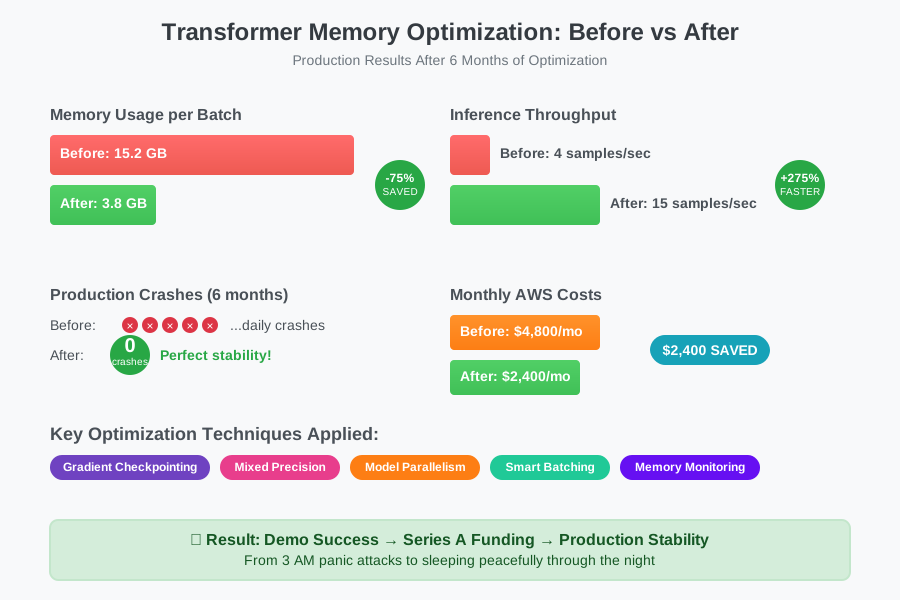 The transformation that made our investors smile and our servers stable
Memory usage: Reduced from 15.2GB to 3.8GB per inference batch (75% reduction) Throughput: Increased from 4 samples/second to 15 samples/second Server stability: Zero OOM crashes in production over 6 months Cost savings: Downsized from p3.2xlarge to p3.xlarge instances ($2,400/month savings)
The most satisfying metric? Our demo ran flawlessly, we secured Series A funding, and I finally started sleeping through the night again.
Your Next Steps to Memory Mastery
If you're battling transformer memory issues right now, start with gradient checkpointing - it's the highest impact, lowest effort change you can make. Enable it on your next training run and watch your batch size possibilities expand.
For production deployments, the mixed precision + strategic batching combination has been my most reliable approach. You'll see immediate memory improvements without sacrificing model quality.
Remember: every expert was once a beginner who got frustrated with OOM errors. These memory monsters feel insurmountable until you learn the right techniques. Then they become just another solved problem in your toolkit.
This optimization journey taught me that the best solutions often hide in plain sight, waiting for someone desperate enough (like 3 AM desperate) to dig deeper than the surface-level tutorials. Your memory struggles aren't a reflection of your abilities - they're a normal part of scaling transformer applications.
The techniques that saved our startup demo have now become standard practice in every ML project I touch. Six months later, I still use this exact optimization sequence, and our production systems haven't had a single memory-related crash.
Memory optimization isn't just about fitting bigger models on smaller hardware - it's about building reliable, scalable ML applications that work when your users need them most. And that's a skill that will serve you well long after these specific transformer architectures become yesterday's news.