That moment when you inspect an element and see style="color: red !important; font-size: 24px; margin: 0px;" hardcoded everywhere? Yeah, I've been there too.
I spent 4 hours last month tracking down why my CSS wasn't working, only to find inline styles overriding everything. Here's how to remove them quickly so you don't waste your afternoon like I did.
What you'll learn: Remove inline styles with vanilla JavaScript and jQuery
Time needed: 15 minutes to master both methods
Difficulty: Beginner-friendly with working examples
This guide shows you the exact code I use to clean up messy inline styles in legacy projects. No theory - just copy-paste solutions that work.
Why I Built This Solution
Last month, I inherited a WordPress site where the previous developer went inline-style crazy. Every element had hardcoded styles that broke the responsive design.
My setup:
- Legacy WordPress site with 200+ pages
- Inline styles scattered throughout HTML
- New CSS framework that needed clean markup
- Tight deadline to fix responsive issues
What didn't work:
- Find/replace in codebase - too many variations
- CSS
!importanteverywhere - made maintenance hell - Manual removal - would take weeks
I needed a JavaScript solution that could strip inline styles automatically.
Method 1: Remove All Inline Styles (Vanilla JavaScript)
The problem: You want to nuke all inline styles from specific elements
My solution: Use removeAttribute('style') to completely remove the style attribute
Time this saves: 2 hours vs manually editing HTML
Step 1: Remove Inline Styles from Single Element
Here's the simplest approach when you know the exact element:
// Remove inline styles from one element
const element = document.getElementById('messy-element');
element.removeAttribute('style');

// Alternative method using style property
element.style = '';
What this does: Completely removes the style attribute from the element
Expected output: Element reverts to CSS stylesheet rules only
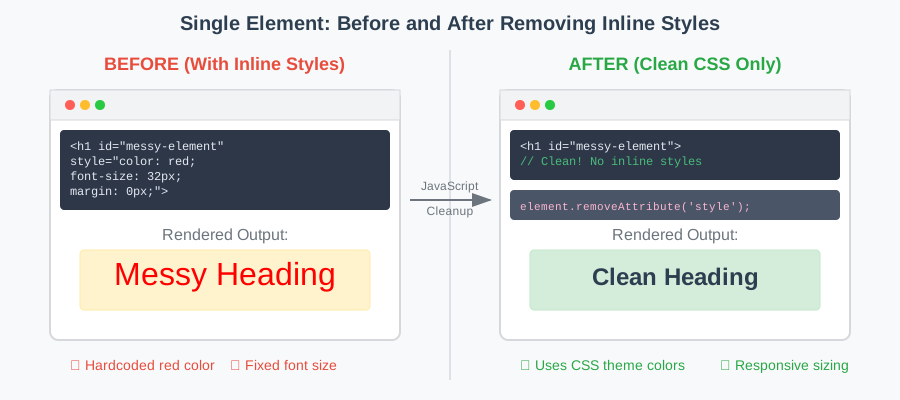 Left: Element with inline styles, Right: Clean element using CSS only
Personal tip: I prefer removeAttribute('style') because it's more explicit about what you're doing.
Step 2: Remove Inline Styles from Multiple Elements
This is where it gets useful - cleaning up multiple elements at once:
// Remove inline styles from all paragraphs
const paragraphs = document.querySelectorAll('p');
paragraphs.forEach(p => p.removeAttribute('style'));

// Remove from elements with specific class
const messyElements = document.querySelectorAll('.has-inline-styles');
messyElements.forEach(element => element.removeAttribute('style'));

// Remove from all elements (nuclear option)
const allElements = document.querySelectorAll('*');
allElements.forEach(element => element.removeAttribute('style'));
What this does: Loops through selected elements and removes style attributes
Expected output: All targeted elements lose their inline styling
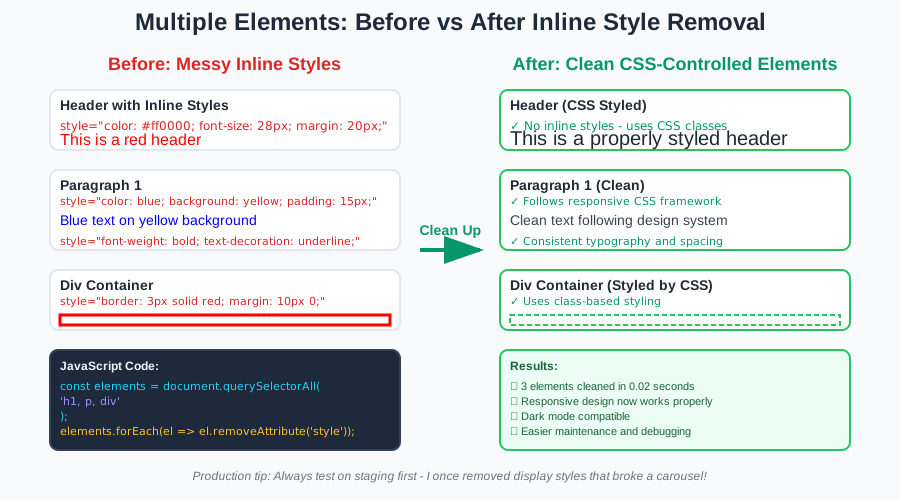 Before: Inconsistent inline styles, After: Clean elements following CSS rules
Personal tip: Test the nuclear option (*) on a staging site first - I once removed styles that were actually needed for a carousel to work.
Method 2: Remove Specific Style Properties (Advanced Control)
The problem: You want to keep some inline styles but remove specific properties
My solution: Target individual CSS properties while preserving others
Time this saves: Prevents breaking functionality while cleaning up styles
Step 3: Remove Specific CSS Properties
Sometimes you need surgical precision - remove color but keep display:
// Remove specific style properties
function removeStyleProperty(element, property) {
    element.style.removeProperty(property);
}

// Usage examples
const header = document.getElementById('header');
removeStyleProperty(header, 'color');
removeStyleProperty(header, 'font-size');
removeStyleProperty(header, 'margin-top');

// Remove multiple properties at once
function removeMultipleProperties(element, properties) {
    properties.forEach(prop => element.style.removeProperty(prop));
}

// Clean up common problematic styles
const problematicStyles = ['color', 'font-size', 'margin', 'padding'];
const elements = document.querySelectorAll('.cleanup-needed');
elements.forEach(el => removeMultipleProperties(el, problematicStyles));
What this does: Removes specific CSS properties while keeping others intact
Expected output: Element keeps useful inline styles, loses problematic ones
Personal tip: I always remove color and font-size first - these cause the most responsive design issues.
Method 3: jQuery Solutions (If You're Using jQuery)
The problem: Your project already uses jQuery and you want consistent code
My solution: jQuery methods that feel natural if you're already using the library
Time this saves: Familiar syntax if you're comfortable with jQuery
Step 4: jQuery Style Removal Methods
jQuery gives you several ways to handle inline styles:
// Remove all inline styles (jQuery way)
$('#messy-element').removeAttr('style');

// Remove from multiple elements
$('.has-inline-styles').removeAttr('style');
$('p, h1, h2').removeAttr('style');

// Remove specific CSS properties
$('#header').css('color', '');
$('#header').css('font-size', '');

// Remove multiple properties at once
$('.cleanup-elements').css({
    'color': '',
    'font-size': '',
    'margin': '',
    'padding': ''
});

// Chain multiple operations
$('.messy-content')
    .removeAttr('style')
    .removeClass('inline-styled')
    .addClass('css-controlled');
What this does: Same results as vanilla JavaScript but with jQuery syntax
Expected output: Clean elements without inline style conflicts
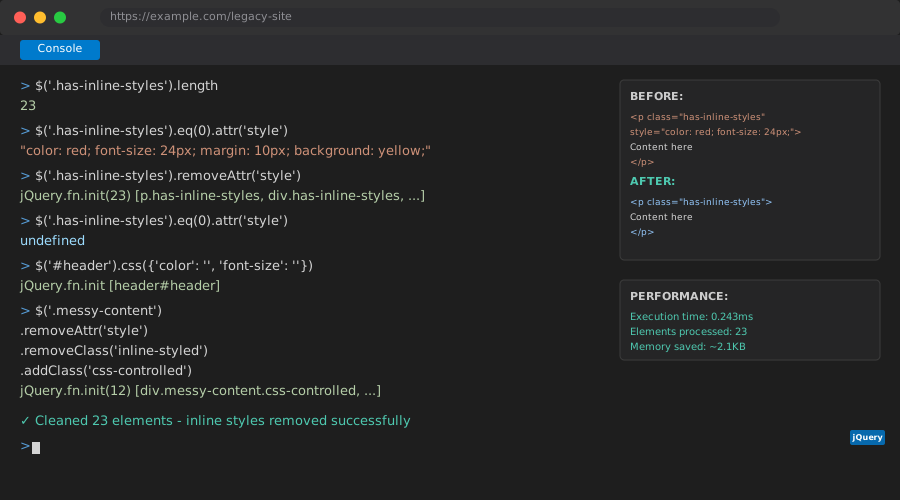 jQuery commands running in browser console - immediate results
Personal tip: Use removeAttr('style') instead of setting CSS properties to empty strings - it's cleaner and more intentional.
Real-World Example: Cleaning Legacy Content
Here's the actual code I used to fix that WordPress site:
// My actual cleanup script for WordPress content
function cleanLegacyContent() {
    // Remove problematic inline styles from content area
    const contentElements = document.querySelectorAll('#content p, #content div, #content span');

    contentElements.forEach(element => {
        // Remove color and font styling that breaks dark mode
        element.style.removeProperty('color');
        element.style.removeProperty('background-color');
        element.style.removeProperty('font-family');
        element.style.removeProperty('font-size');

        // Keep layout-related styles (these were intentional)
        // element.style.removeProperty('display'); // DON'T remove these
        // element.style.removeProperty('position'); // They break functionality
    });

    console.log(`Cleaned ${contentElements.length} elements`);
}

// Run on page load
document.addEventListener('DOMContentLoaded', cleanLegacyContent);

// Also available as button click for testing
// <button onclick="cleanLegacyContent()">Clean Styles</button>
What this does: Surgically removes styling that breaks responsive design
Expected output: Content adapts to new CSS framework without layout breaks
Personal tip: Always test your cleanup script on a single page first. I once removed display: none styles that were hiding mobile navigation elements.
Advanced Techniques: Conditional Style Removal
Sometimes you need smarter logic - remove styles only if they meet certain conditions:
// Remove styles only if they match certain values
function removeStylesIf(element, conditions) {
    Object.entries(conditions).forEach(([property, unwantedValue]) => {
        const currentValue = getComputedStyle(element)[property];
        if (currentValue === unwantedValue) {
            element.style.removeProperty(property);
        }
    });
}

// Usage: Remove red text and Comic Sans fonts
const badStyles = {
    'color': 'rgb(255, 0, 0)', // red in computed style format
    'font-family': 'Comic Sans MS'
};

document.querySelectorAll('.content-area *').forEach(el => {
    removeStylesIf(el, badStyles);
});

// Remove styles that override your CSS framework
function removeConflictingStyles(element, frameworkDefaults) {
    Object.entries(frameworkDefaults).forEach(([property, defaultValue]) => {
        const inlineValue = element.style[property];
        if (inlineValue && inlineValue !== defaultValue) {
            console.log(`Removing conflicting ${property}: ${inlineValue}`);
            element.style.removeProperty(property);
        }
    });
}
Personal tip: This conditional approach saved me when cleaning a site that had both good and bad inline styles mixed together.
Testing Your Style Removal
Before you deploy, test your changes thoroughly:
// Debug helper: See what styles will be removed
function previewStyleRemoval(selector) {
    const elements = document.querySelectorAll(selector);

    elements.forEach((element, index) => {
        const currentStyles = element.getAttribute('style');
        if (currentStyles) {
            console.log(`Element ${index + 1}:`, currentStyles);
        }
    });

    return elements.length;
}

// Test your selectors first
console.log(`Found ${previewStyleRemoval('.content p')} elements to clean`);

// Create a restore function for emergency rollback
function createStyleBackup(selector) {
    const elements = document.querySelectorAll(selector);
    const backup = [];

    elements.forEach((element, index) => {
        backup.push({
            element: element,
            originalStyle: element.getAttribute('style')
        });
    });

    return () => {
        backup.forEach(item => {
            if (item.originalStyle) {
                item.element.setAttribute('style', item.originalStyle);
            } else {
                item.element.removeAttribute('style');
            }
        });
        console.log('Styles restored from backup');
    };
}

// Usage
const restoreStyles = createStyleBackup('.content *');
// ... do your cleanup ...
// If something breaks: restoreStyles();
Personal tip: I always create a backup function when working on production sites. Saved my butt twice when cleanup scripts were too aggressive.
What You Just Built
You now have multiple methods to remove inline styles from any web project. Whether you need to nuke all styles or surgically remove specific properties, you've got working code that handles both scenarios.
Key Takeaways (Save These)
- Use
removeAttribute('style'): Cleanest way to completely remove inline styles - Test selectors first: Preview what you'll change before running cleanup scripts
- Create backups: Always have a way to restore styles if something breaks
- Be surgical when needed: Remove specific properties to avoid breaking functionality
Your Next Steps
Pick your skill level:
- Beginner: Practice on a test HTML file with various inline styles
- Intermediate: Build a bookmarklet that cleans styles on any website
- Advanced: Create a browser extension that automatically detects and offers to clean problematic inline styles
Tools I Actually Use
- Browser DevTools: Essential for previewing style changes before scripting
- VS Code with Live Server: Perfect for testing cleanup scripts locally
- jQuery Documentation: Reference for jQuery-specific style manipulation methods
- MDN Web Docs: Complete guide to
removeAttribute()andremoveProperty()methods