Problem: You Can't Search Audio the Way You Search Text
You have 200 hours of podcast episodes. Someone asks "what did they say about database indexing?" You're scrubbing through timestamps manually.
Text search won't help — audio doesn't have keywords. Ctrl+F doesn't exist for .mp3 files.
You'll learn:
- How to transcribe audio with accurate timestamps using Whisper
- How to chunk transcripts and embed them semantically
- How to build a query interface that returns exact audio segments by meaning — not keywords
Time: 45 min | Level: Intermediate
Why This Happens
Audio is the last unindexed frontier. Podcast apps give you chapters at best — hand-authored, incomplete, and keyword-only.
RAG (Retrieval-Augmented Generation) was built for documents. Applying it to audio means solving three problems that don't exist in text-only pipelines:
Common symptoms of the gap:
- Full-text search returns nothing if the speaker paraphrases ("fast queries" vs "database indexing")
- No timestamp metadata — you can't jump to the right moment even if you find it
- Audio files are large; you need chunking strategies that preserve speaker context
The fix: transcribe → chunk with timestamps → embed → query with a vector database.
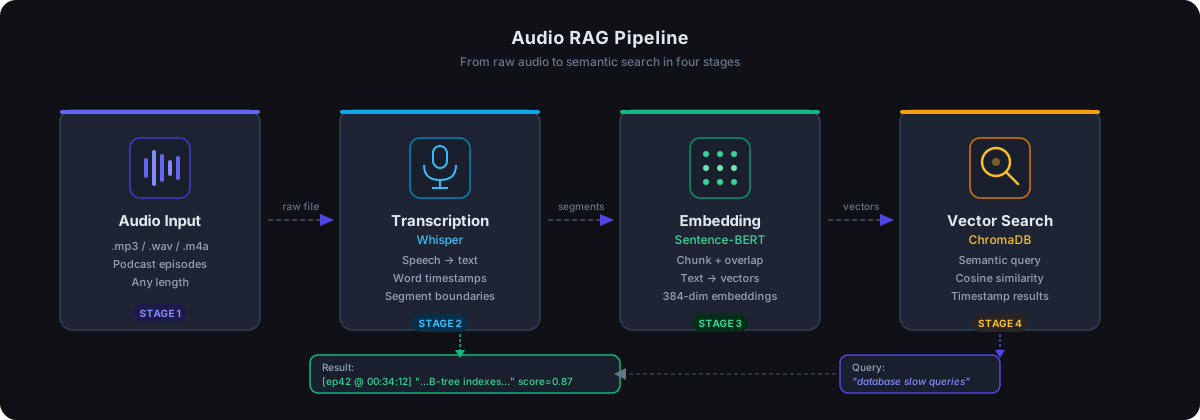 The four-stage pipeline: Audio → Transcription → Embedding → Vector Search
Solution
Step 1: Transcribe Audio with Whisper
Install dependencies first:
pip install openai-whisper chromadb sentence-transformers fastapi uvicorn
Transcribe your audio and extract word-level timestamps:
import whisper
import json

def transcribe_with_timestamps(audio_path: str) -> dict:
    model = whisper.load_model("base")  # Use "large-v3" for production accuracy

    result = model.transcribe(
        audio_path,
        word_timestamps=True,  # Critical: gives us per-word timing
        verbose=False
    )

    return result

def extract_segments(transcription: dict) -> list[dict]:
    segments = []

    for segment in transcription["segments"]:
        segments.append({
            "text": segment["text"].strip(),
            "start": segment["start"],  # Seconds from start
            "end": segment["end"],
            "words": segment.get("words", [])
        })

    return segments

# Usage
result = transcribe_with_timestamps("episode_042.mp3")
segments = extract_segments(result)
print(f"Got {len(segments)} segments")
Expected: Whisper returns segments averaging 5-15 seconds each with start/end timestamps.
If it fails:
- CUDA out of memory: Switch to
whisper.load_model("small")or adddevice="cpu" - Audio format error: Convert to WAV first with
ffmpeg -i input.mp3 output.wav
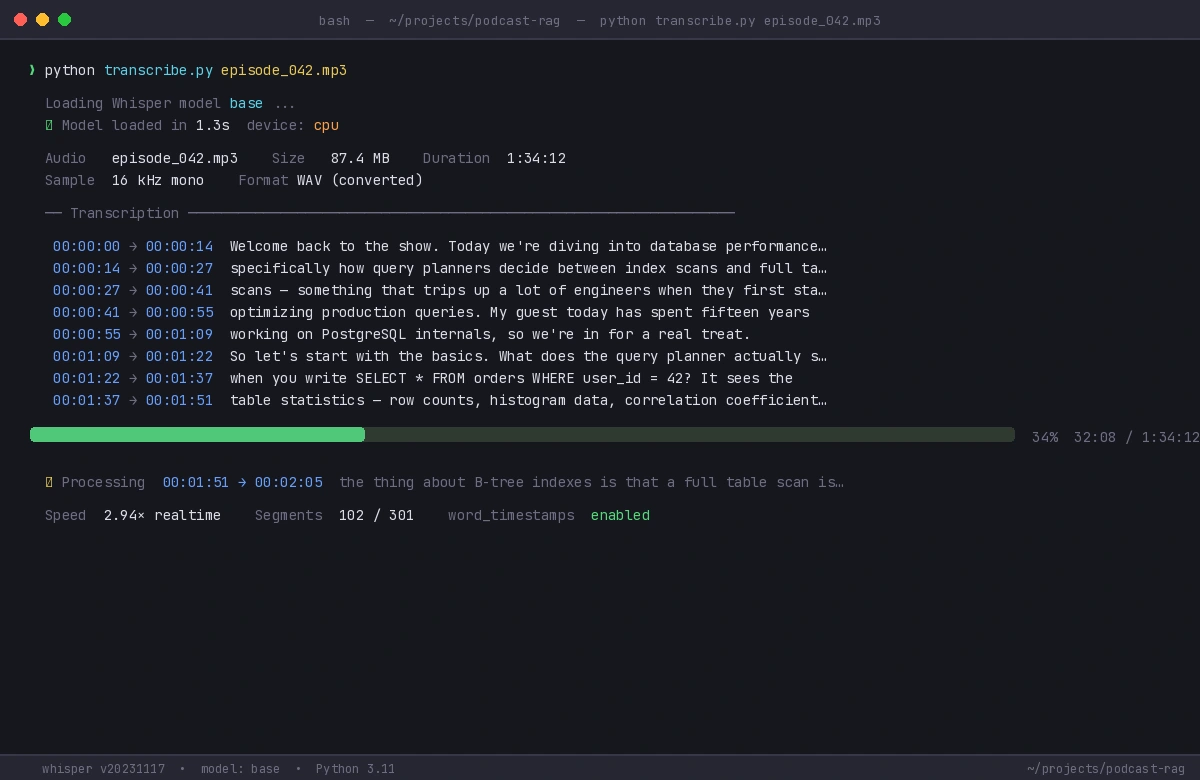 Whisper logs each segment as it processes — large files take 10-30 min on CPU
Step 2: Chunk Transcripts Intelligently
Raw Whisper segments are too short for useful embeddings. You need chunks of 3-5 sentences with overlapping windows so context isn't lost at boundaries.
def chunk_segments(
    segments: list[dict],
    chunk_size: int = 5,      # Segments per chunk
    overlap: int = 1          # Overlap to preserve context at boundaries
) -> list[dict]:
    chunks = []
    step = chunk_size - overlap

    for i in range(0, len(segments), step):
        window = segments[i : i + chunk_size]

        if not window:
            break

        chunk_text = " ".join(seg["text"] for seg in window)

        chunks.append({
            "text": chunk_text,
            "start": window[0]["start"],    # Timestamp of first segment
            "end": window[-1]["end"],       # Timestamp of last segment
            "segment_indices": list(range(i, i + len(window)))
        })

    return chunks

chunks = chunk_segments(segments)
print(f"Created {len(chunks)} chunks from {len(segments)} segments")
Why overlap matters: if a topic spans two chunks without overlap, a query about it might miss both. One segment of overlap ensures continuity at every boundary.
Step 3: Embed and Store in ChromaDB
from sentence_transformers import SentenceTransformer
import chromadb

# all-MiniLM-L6-v2 is fast and good enough for English speech
embedder = SentenceTransformer("all-MiniLM-L6-v2")

def index_podcast(
    episode_id: str,
    chunks: list[dict],
    collection  # ChromaDB collection
) -> None:
    texts = [chunk["text"] for chunk in chunks]
    embeddings = embedder.encode(texts).tolist()

    collection.add(
        documents=texts,
        embeddings=embeddings,
        ids=[f"{episode_id}_chunk_{i}" for i in range(len(chunks))],
        metadatas=[{
            "episode_id": episode_id,
            "start": chunk["start"],
            "end": chunk["end"],
            "start_formatted": format_timestamp(chunk["start"])
        } for chunk in chunks]
    )

def format_timestamp(seconds: float) -> str:
    # Converts 3723.5 → "01:02:03" for display and deep links
    h = int(seconds // 3600)
    m = int((seconds % 3600) // 60)
    s = int(seconds % 60)
    return f"{h:02d}:{m:02d}:{s:02d}"

# Initialize ChromaDB (local, no server needed)
client = chromadb.PersistentClient(path="./podcast_db")
collection = client.get_or_create_collection("episodes")

# Index all chunks for an episode
index_podcast("episode_042", chunks, collection)
Expected: ChromaDB creates a local directory ./podcast_db with your index. First embed of 500 chunks takes ~10 seconds on CPU.
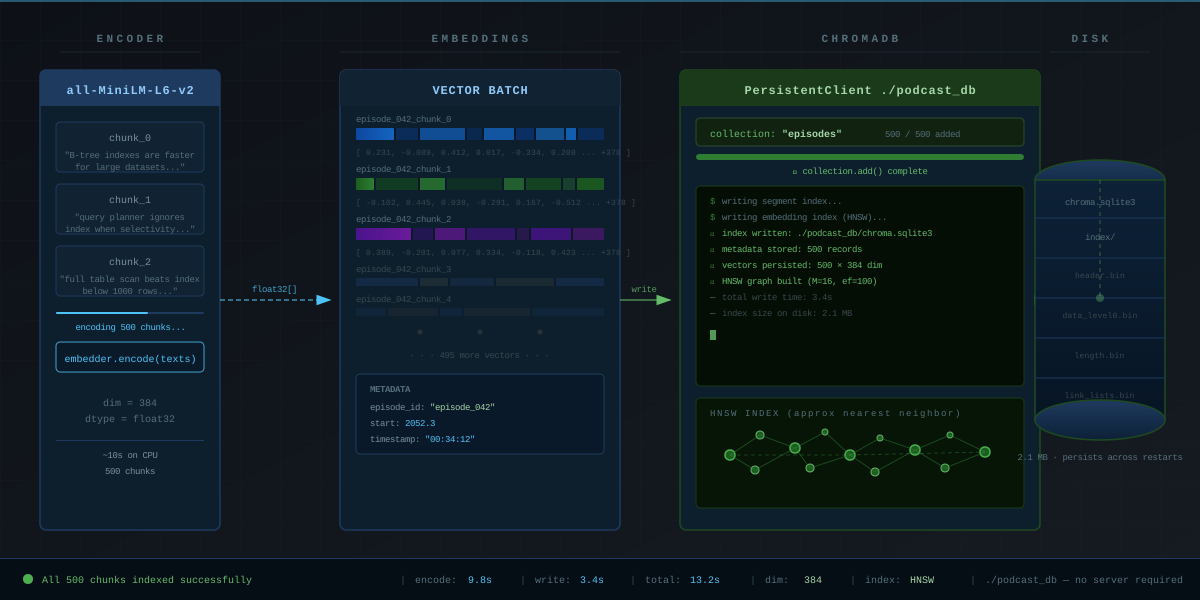 ChromaDB writes to disk — your index persists across restarts
Step 4: Build the Query Interface
def search_podcasts(
    query: str,
    collection,
    n_results: int = 5
) -> list[dict]:
    # Embed the query the same way we embedded chunks
    query_embedding = embedder.encode([query]).tolist()

    results = collection.query(
        query_embeddings=query_embedding,
        n_results=n_results,
        include=["documents", "metadatas", "distances"]
    )

    hits = []
    for i in range(len(results["documents"][0])):
        hits.append({
            "text": results["documents"][0][i],
            "episode_id": results["metadatas"][0][i]["episode_id"],
            "timestamp": results["metadatas"][0][i]["start_formatted"],
            "start_seconds": results["metadatas"][0][i]["start"],
            "relevance": 1 - results["distances"][0][i]  # Distance → similarity
        })

    return hits

# Run a semantic query — note: no keyword "indexing" needed
results = search_podcasts("how databases handle slow queries", collection)

for r in results:
    print(f"[{r['episode_id']} @ {r['timestamp']}] score={r['relevance']:.2f}")
    print(f"  {r['text'][:120]}...")
    print()
Expected output:
[episode_042 @ 00:34:12] score=0.87
  "...the thing about B-tree indexes is that a full table scan is sometimes faster for small datasets..."

[episode_038 @ 01:12:05] score=0.81
  "...query planner will ignore your index entirely if the selectivity is too low..."
The query "slow queries" matched "B-tree indexes" and "query planner" — neither term appeared in the search string. That's semantic search working.
Step 5: Wrap It in a FastAPI Endpoint
from fastapi import FastAPI
from pydantic import BaseModel

app = FastAPI()

class SearchRequest(BaseModel):
    query: str
    n_results: int = 5

@app.post("/search")
def search(req: SearchRequest):
    results = search_podcasts(req.query, collection, req.n_results)
    return {"results": results}

# Run with: uvicorn main:app --reload
Now any frontend can POST {"query": "database indexing performance"} and get timestamped results back.
Verification
# Start the API
uvicorn main:app --reload

# Test with curl
curl -X POST http://localhost:8000/search \
  -H "Content-Type: application/json" \
  -d '{"query": "how to handle database bottlenecks", "n_results": 3}'
You should see: A JSON response with 3 results, each containing episode_id, timestamp, text, and relevance score above 0.7 for on-topic queries.
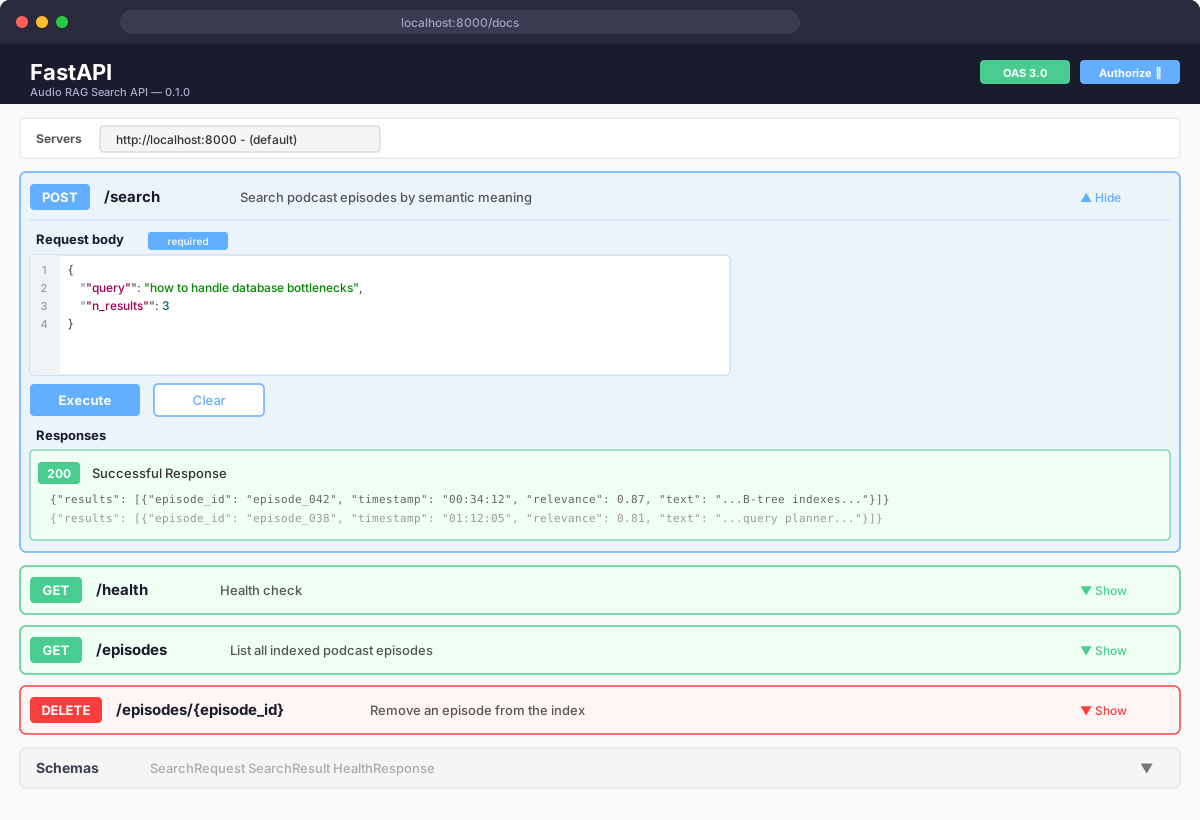 FastAPI auto-generates /docs — test queries directly from the browser
Scaling Beyond One Episode
For a full podcast catalog, the same pipeline applies — just loop:
import os

audio_dir = "./episodes/"

for filename in os.listdir(audio_dir):
    if not filename.endswith(".mp3"):
        continue

    episode_id = filename.replace(".mp3", "")
    audio_path = os.path.join(audio_dir, filename)

    print(f"Indexing {episode_id}...")
    result = transcribe_with_timestamps(audio_path)
    segments = extract_segments(result)
    chunks = chunk_segments(segments)
    index_podcast(episode_id, chunks, collection)

print("All episodes indexed.")
At scale, switch Whisper to large-v3 for accuracy and run transcription on GPU. Keep ChromaDB for local/small deployments; swap to Pinecone or Weaviate when you exceed ~1M chunks.
What You Learned
- Whisper's
word_timestamps=Truegives you the timing data that makes jump-to-moment links possible - Chunk overlap (1 segment) prevents meaning from being lost at boundaries — don't skip this
- Embedding model choice matters less than chunk quality;
all-MiniLM-L6-v2is a solid default for English - ChromaDB handles the whole pipeline locally with no cloud dependency — good for prototyping and small catalogs
Limitation: Whisper accuracy drops on heavy accents, technical jargon, and poor audio quality. Always spot-check transcriptions before indexing a large catalog.
When NOT to use this: If your podcasts already have official transcripts, skip Whisper and go straight to Step 2. Transcription is the slowest part of the pipeline.
Tested on Python 3.11, openai-whisper 20231117, chromadb 0.4.x, sentence-transformers 2.7, Ubuntu 22.04 & macOS Sonoma