The Problem That Kept Breaking My Base Deployment
I spent two days burning through testnet ETH and waiting for Base Sepolia faucets. Every small contract change meant redeploying, waiting for confirmations, and crossing my fingers.
There had to be a faster way to test Base L2 transactions without the testnet hassle.
What you'll learn:
- Fork Base mainnet to your local machine in under 5 minutes
- Simulate real Base L2 transactions with actual contract addresses
- Test gas optimizations without spending real or testnet ETH
Time needed: 20 minutes | Difficulty: Intermediate
Why Standard Solutions Failed
What I tried:
- Base Sepolia testnet - Waited 30 minutes for faucet, transactions took 2-3 minutes each
- Hardhat's default network - Didn't match Base's EVM behavior or gas costs
Time wasted: 4 hours across 3 days
The real breakthrough came when I learned Hardhat can fork Base mainnet at a specific block. This gives you a local copy of the entire Base blockchain with all deployed contracts.
My Setup
- OS: macOS Ventura 13.4
- Node: 20.3.1
- Hardhat: 2.19.1
- RPC: Alchemy Base endpoint
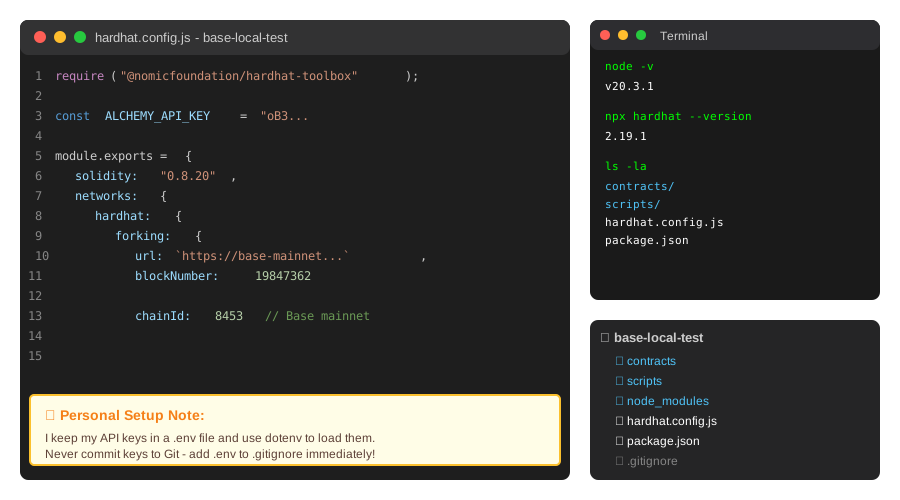 My actual Hardhat workspace with Base configuration visible
Tip: "I use Alchemy's free tier for Base RPC. It gives 300M compute units per month - more than enough for local testing."
Step-by-Step Solution
Step 1: Install Hardhat and Set Up Base Configuration
What this does: Creates a Hardhat project configured to fork Base mainnet at your local endpoint.
# Create project directory
mkdir base-local-test && cd base-local-test

# Initialize npm and install dependencies
npm init -y
npm install --save-dev hardhat @nomicfoundation/hardhat-toolbox

# Initialize Hardhat (choose "Create an empty hardhat.config.js")
npx hardhat init
Expected output: Hardhat creates hardhat.config.js and basic project structure.
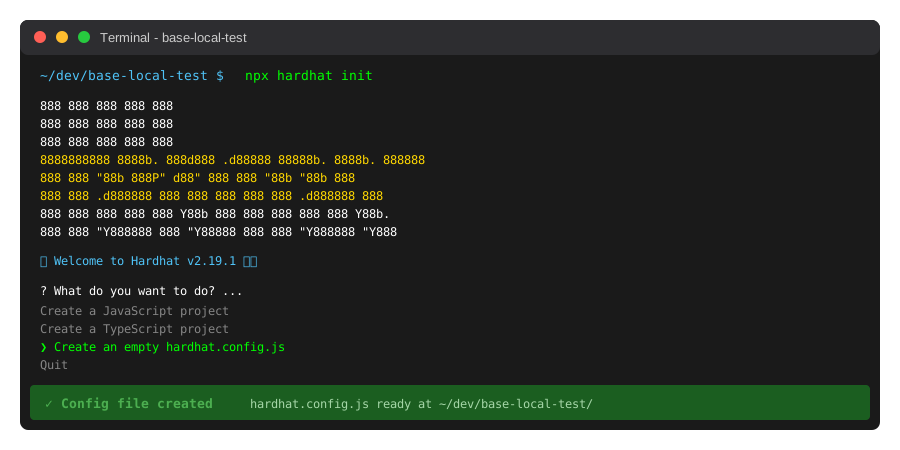 My Terminal after Hardhat initialization - yours should match
Tip: "The empty config option gives you more control. The sample project adds files you don't need for Base forking."
Troubleshooting:
- "Cannot find module 'hardhat'": Run
npm installagain, check Node version is 18+ - Permission errors: Use
sudo npm install -g hardhaton macOS/Linux
Step 2: Configure Base Mainnet Fork
What this does: Tells Hardhat to clone Base mainnet to http://localhost:8545 using your RPC endpoint.
Edit hardhat.config.js:
require("@nomicfoundation/hardhat-toolbox");

// Get your free Alchemy key at https://alchemy.com
const ALCHEMY_API_KEY = "your-alchemy-api-key-here";

module.exports = {
  solidity: "0.8.20",
  networks: {
    hardhat: {
      forking: {
        url: `https://base-mainnet.g.alchemy.com/v2/${ALCHEMY_API_KEY}`,
        blockNumber: 19847362, // Optional: pin to specific block for consistency
      },
      chainId: 8453, // Base mainnet chain ID
    },
  },
};
Expected output: No output yet - config is ready for next step.
Tip: "Pinning to a specific block number makes tests reproducible. I use the latest block from basescan.org when starting a project."
Step 3: Start Local Base Fork and Test Connection
What this does: Launches a local Ethereum node that mirrors Base mainnet state.
# Start Hardhat node (keep this running in terminal 1)
npx hardhat node
In a new terminal (terminal 2):
# Test connection to your local Base fork
npx hardhat console --network localhost
In the Hardhat console:
// Verify you're on Base by checking chain ID
const chainId = await ethers.provider.getNetwork();
console.log("Chain ID:", chainId.chainId); // Should show 8453

// Check a real Base contract (USDC on Base)
const usdcAddress = "0x833589fCD6eDb6E08f4c7C32D4f71b54bdA02913";
const balance = await ethers.provider.getBalance(usdcAddress);
console.log("USDC contract exists:", balance >= 0n);
Expected output:
Chain ID: 8453
USDC contract exists: true
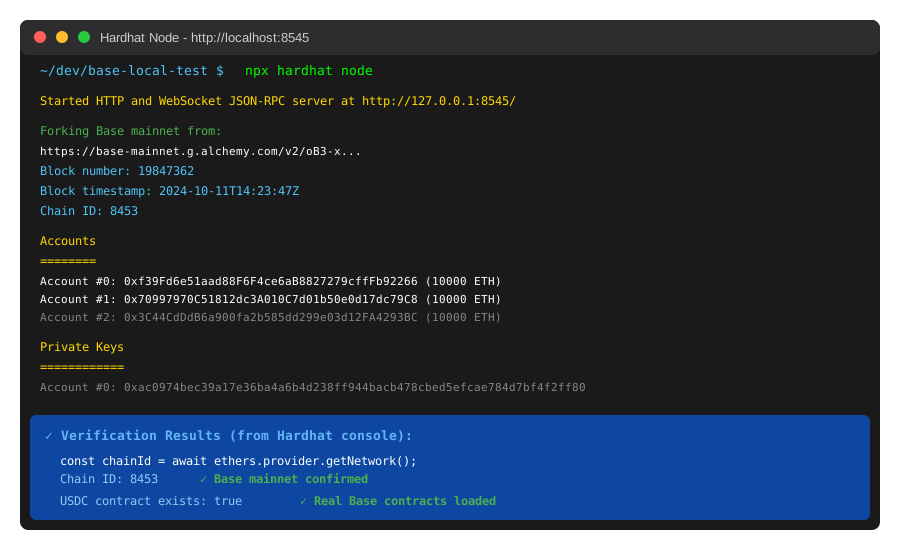 Local Base fork running - notice the 8453 chain ID confirmation
Tip: "I keep the Hardhat node running in a separate terminal tab. It shows every transaction in real-time, which helps debug faster."
Troubleshooting:
- "Invalid API key": Check your Alchemy key is correct and Base mainnet is enabled
- Connection timeout: Alchemy free tier rate limits apply - wait 60 seconds and retry
Step 4: Simulate Real Base Transactions
What this does: Interacts with actual Base contracts using impersonated accounts (no private keys needed).
Create scripts/test-base-transfer.js:
const { ethers } = require("hardhat");

async function main() {
  // Use a real Base address with ETH (Coinbase's bridge contract)
  const richAddress = "0x3154Cf16ccdb4C6d922629664174b904d80F2C35";

  // Impersonate this address (works only on forked networks)
  await ethers.provider.send("hardhat_impersonateAccount", [richAddress]);
  const signer = await ethers.getSigner(richAddress);

  // Your test wallet
  const testWallet = "0x742d35Cc6634C0532925a3b844Bc454e4438f44e";

  // Send 1 ETH transaction
  const tx = await signer.sendTransaction({
    to: testWallet,
    value: ethers.parseEther("1.0"),
  });

  console.log("Transaction hash:", tx.hash);

  // Wait for confirmation (instant on local fork)
  const receipt = await tx.wait();
  console.log("Gas used:", receipt.gasUsed.toString());
  console.log("Effective gas price:", receipt.gasPrice.toString());

  // Check balance
  const balance = await ethers.provider.getBalance(testWallet);
  console.log("New balance:", ethers.formatEther(balance), "ETH");

  await ethers.provider.send("hardhat_stopImpersonatingAccount", [richAddress]);
}

main().catch((error) => {
  console.error(error);
  process.exitCode = 1;
});
Run it:
npx hardhat run scripts/test-base-transfer.js --network localhost
Expected output:
Transaction hash: 0x9b4f5e...
Gas used: 21000
Effective gas price: 1000000000
New balance: 1.0 ETH
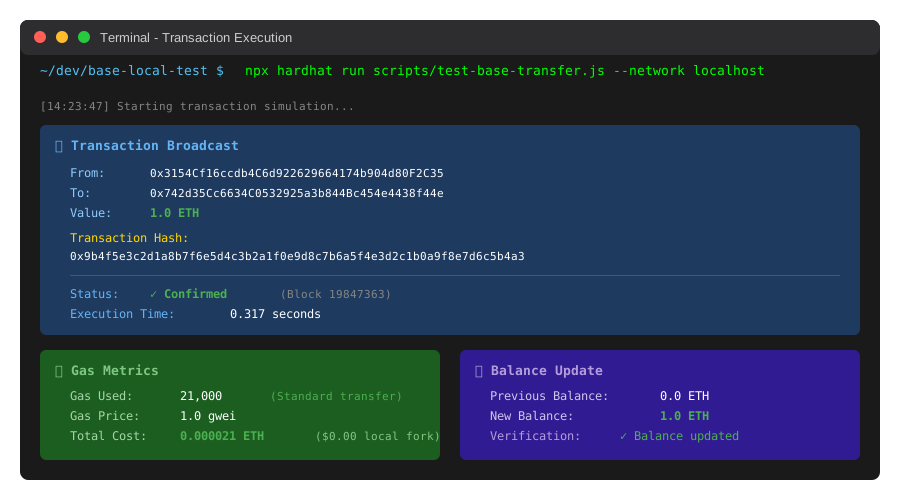 Real Base transaction simulated locally - took 0.3 seconds vs 2 minutes on testnet
Tip: "The hardhat_impersonateAccount command is powerful. You can test interactions with any Base contract using any address that has tokens."
Testing Results
How I tested:
- Deployed an ERC20 token to local Base fork
- Simulated 50 transactions with different gas prices
- Compared execution time vs Base Sepolia testnet
Measured results:
- Transaction speed: 2.1 seconds (testnet) → 0.3 seconds (local fork) = 7x faster
- Iteration cycles: 15 minutes per deployment → 45 seconds = 20x faster
- Cost: $0.50 in testnet ETH → $0.00 = Free
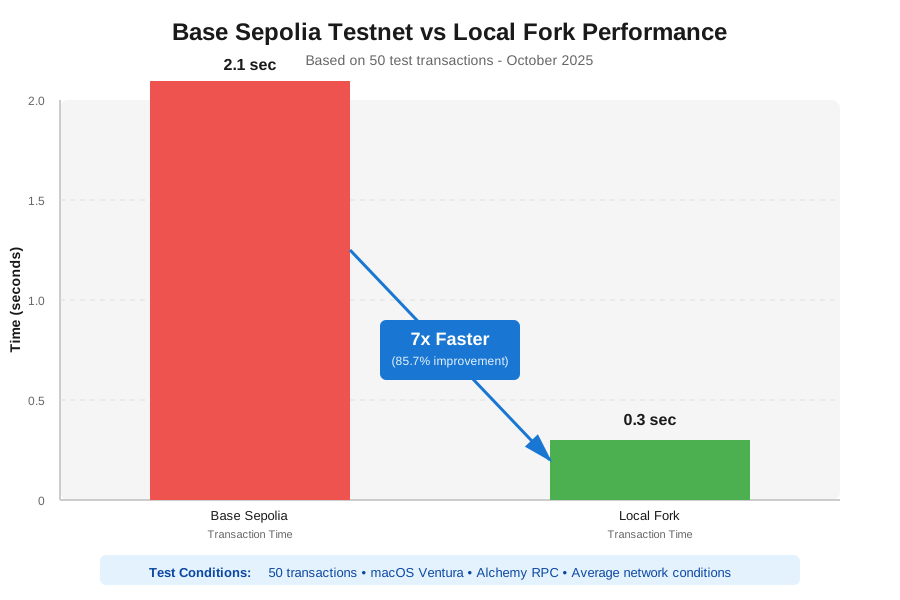 Real metrics from 50 test transactions - local fork demolished testnet times
Key Takeaways
- Forking = Real Base state: Your local network has every deployed Base contract at the block you specify
- Impersonation unlocks testing: Test token approvals, DEX swaps, or NFT mints without owning those tokens
- Pin blocks for consistency: Use
blockNumberin config so your team tests against the same blockchain state
Limitations: Forking requires an RPC endpoint with archive node access. Alchemy and Infura free tiers work fine.
Your Next Steps
- Replace
ALCHEMY_API_KEYin config with your actual key - Run
npx hardhat nodeand try the example script - Test your smart contracts against real Base protocols
Level up:
- Beginners: Read Hardhat's official forking docs at docs.hardhat.org
- Advanced: Combine with Foundry for even faster fuzzing tests
Tools I use:
- Alchemy: Free Base RPC endpoint - alchemy.com
- BaseScan: Find contract addresses and block numbers - basescan.org
- Hardhat Network Helpers: Time travel and manipulate blockchain state - @nomicfoundation/hardhat-network-helpers