Problem: Your Robot Grabs in the Wrong Place
Your camera sees the object. Your robot moves. But it misses — by 5mm, 10mm, sometimes more. The root cause is almost always a poorly calibrated hand-eye transform.
You'll learn:
- The difference between eye-in-hand and eye-to-hand configurations
- How to run AX=XB calibration with OpenCV and the
easy_handeyeROS package - How to verify calibration quality and diagnose common failure modes
Time: 45 min | Level: Advanced
Why This Happens
Hand-eye calibration computes the rigid transform between your camera frame and your robot's tool or base frame. Without it, the robot has no way to convert pixel coordinates into robot workspace coordinates.
There are two configurations, and mixing them up is a frequent source of confusion:
- Eye-in-hand (camera mounted on robot wrist): You need the transform from camera to end-effector (
T_camera_ee). The camera moves with the robot. - Eye-to-hand (camera fixed to world/table): You need the transform from camera to robot base (
T_camera_base). The camera is stationary.
Both solve the same AX = XB matrix equation, but the poses you feed into the solver differ.
Common symptoms:
- Consistent positional offset in one axis (bad translation estimate)
- Errors that grow larger at the workspace edges (bad rotation estimate)
- Calibration looks fine in simulation but fails on hardware (extrinsic drift)
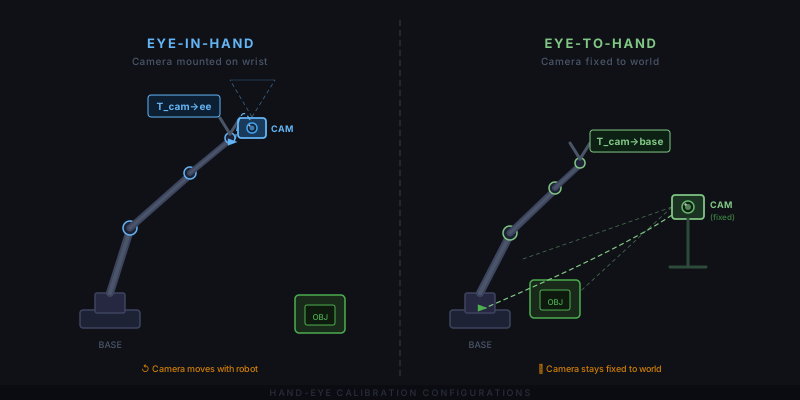 Left: eye-in-hand — camera moves with the wrist. Right: eye-to-hand — camera is fixed to the world.
Solution
Step 1: Calibrate Your Camera Intrinsics First
Hand-eye calibration is only as good as your intrinsics. Run a standard checkerboard calibration and aim for reprojection error below 0.5px.
import cv2
import numpy as np
import glob

# Checkerboard dimensions (inner corners, not squares)
BOARD = (8, 6)
SQUARE_SIZE = 0.025  # meters

objp = np.zeros((BOARD[0] * BOARD[1], 3), np.float32)
objp[:, :2] = np.mgrid[0:BOARD[0], 0:BOARD[1]].T.reshape(-1, 2)
objp *= SQUARE_SIZE

obj_points, img_points = [], []

for fname in glob.glob("calibration_images/*.png"):
    img = cv2.imread(fname)
    gray = cv2.cvtColor(img, cv2.COLOR_BGR2GRAY)
    ret, corners = cv2.findChessboardCorners(gray, BOARD)

    if ret:
        # Refine to sub-pixel accuracy — critical for good hand-eye results
        criteria = (cv2.TERM_CRITERIA_EPS + cv2.TERM_CRITERIA_MAX_ITER, 30, 0.001)
        corners = cv2.cornerSubPix(gray, corners, (11, 11), (-1, -1), criteria)
        obj_points.append(objp)
        img_points.append(corners)

ret, K, dist, rvecs, tvecs = cv2.calibrateCamera(
    obj_points, img_points, gray.shape[::-1], None, None
)

print(f"Reprojection error: {ret:.4f}px")  # Target: < 0.5px
np.save("camera_matrix.npy", K)
np.save("dist_coeffs.npy", dist)
Expected: Reprojection error printed to console, two .npy files saved.
If it fails:
- Error > 1.0px: Use more images (20–50), ensure the board fills the frame edges in some shots
findChessboardCornersreturns False: Check lighting — avoid glare directly on the board
Step 2: Collect Calibration Poses
Move your robot to at least 15–20 distinct configurations. Each pose must include a rotation component — pure translations won't constrain the full 6-DOF transform.
For each pose, record:
- The robot's end-effector pose in the base frame (
T_base_eefrom forward kinematics) - The checkerboard pose in the camera frame (
T_cam_boardfromsolvePnP)
def get_board_pose_in_camera(image, K, dist, board_shape, square_size):
    """Returns 4x4 homogeneous transform: board in camera frame."""
    gray = cv2.cvtColor(image, cv2.COLOR_BGR2GRAY)
    ret, corners = cv2.findChessboardCorners(gray, board_shape)

    if not ret:
        return None

    objp = np.zeros((board_shape[0] * board_shape[1], 3), np.float32)
    objp[:, :2] = np.mgrid[0:board_shape[0], 0:board_shape[1]].T.reshape(-1, 2)
    objp *= square_size

    criteria = (cv2.TERM_CRITERIA_EPS + cv2.TERM_CRITERIA_MAX_ITER, 30, 0.001)
    corners = cv2.cornerSubPix(gray, corners, (11, 11), (-1, -1), criteria)

    _, rvec, tvec = cv2.solvePnP(objp, corners, K, dist)

    R, _ = cv2.Rodrigues(rvec)
    T = np.eye(4)
    T[:3, :3] = R
    T[:3, 3] = tvec.ravel()
    return T
Pose diversity matters more than pose count. Collect poses with the board in all quadrants of the image, at varying distances (0.3m–1.0m), and with the wrist rotated across its range.
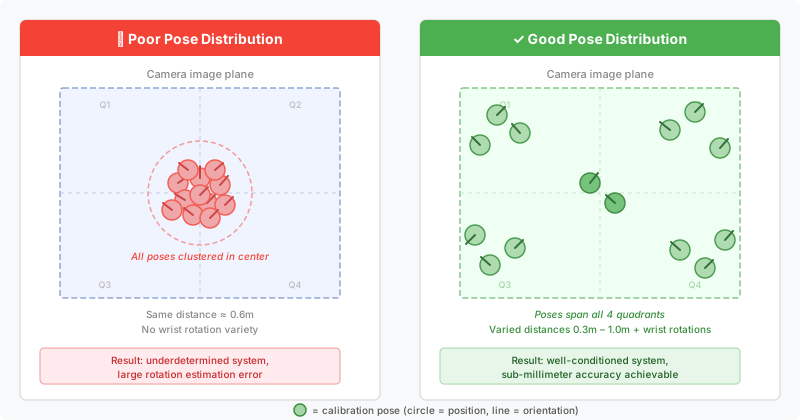 Spread poses across the full workspace — avoid clustering in one region.
Step 3: Run the AX=XB Solver
With your pose lists ready, run the calibration. OpenCV 4.x includes calibrateHandEye with multiple solvers. The Tsai method is fast; ANDREFF or DANIILIDIS are more robust with noisy data.
import cv2

# R_gripper2base, t_gripper2base: end-effector pose in robot base frame
# R_target2cam, t_target2cam: board pose in camera frame
# Collected for each of the N poses

R_cam2gripper, t_cam2gripper = cv2.calibrateHandEye(
    R_gripper2base=R_gripper2base_list,
    t_gripper2base=t_gripper2base_list,
    R_target2cam=R_target2cam_list,
    t_target2cam=t_target2cam_list,
    method=cv2.CALIB_HAND_EYE_TSAI  # Also try DANIILIDIS for noisy setups
)

# Build 4x4 transform
T_cam2gripper = np.eye(4)
T_cam2gripper[:3, :3] = R_cam2gripper
T_cam2gripper[:3, 3] = t_cam2gripper.ravel()

print("Camera to gripper transform:")
print(T_cam2gripper)
np.save("T_cam2gripper.npy", T_cam2gripper)
For eye-to-hand: Swap gripper and base — pass T_gripper2ee as the robot motion and solve for T_cam2base instead.
If it fails:
- Singular matrix error: Not enough rotation in your pose set — add more wrist rotations
- Wild translation values (> 1m): Intrinsics are wrong — recheck camera calibration
Step 4: Verify With a Hold-Out Pose
Don't trust RMS residuals alone. Move to a new pose not in your calibration set, pick a known point, and measure the physical error.
def verify_calibration(T_cam2gripper, T_base2gripper, point_in_cam):
    """
    Project a camera-space point to robot base frame.
    Compare result to physically measured ground truth.
    """
    T_gripper2base = np.linalg.inv(T_base2gripper)

    # Chain: camera → gripper → base
    T_cam2base = T_gripper2base @ T_cam2gripper

    point_h = np.append(point_in_cam, 1.0)  # Homogeneous
    point_in_base = T_cam2base @ point_h

    return point_in_base[:3]

# Expected: physical measurement matches within your tolerance
# < 1mm for precision assembly, < 3mm for general pick-and-place
You should see: Predicted vs. measured error below your application's tolerance. For most industrial pick-and-place, < 2mm is acceptable. For precision assembly, target < 0.5mm.
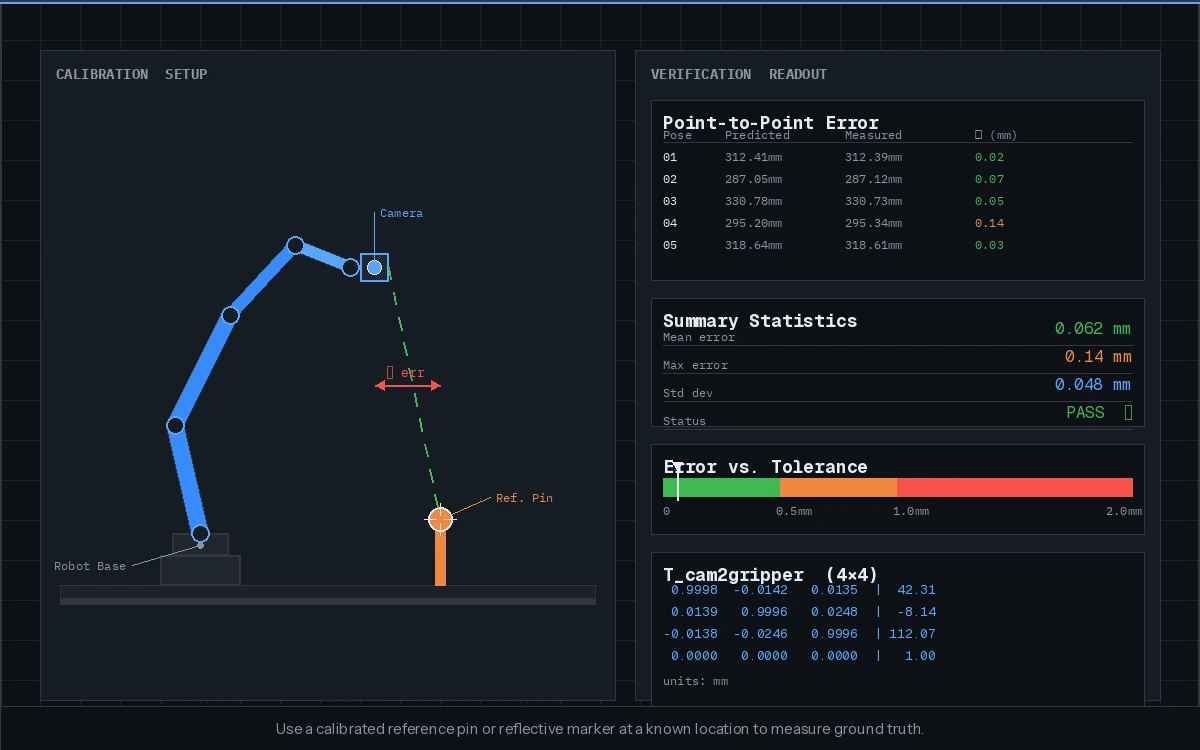 Use a calibrated reference pin or reflective marker at a known location to measure ground truth.
Verification
Run this script to compute mean reprojection error across all calibration poses:
errors = []

for R_g2b, t_g2b, R_t2c, t_t2c in zip(
    R_gripper2base_list, t_gripper2base_list,
    R_target2cam_list, t_target2cam_list
):
    T_g2b = pose_to_matrix(R_g2b, t_g2b)
    T_t2c = pose_to_matrix(R_t2c, t_t2c)

    # Reconstruct board in base frame via both paths, check consistency
    T_b2g = np.linalg.inv(T_g2b)
    predicted = T_b2g @ T_cam2gripper @ T_t2c
    errors.append(np.linalg.norm(predicted[:3, 3]))

print(f"Mean consistency error: {np.mean(errors)*1000:.2f}mm")
You should see: Consistency error below 2mm on a well-calibrated system.
Using easy_handeye in ROS 2
If you're in a ROS 2 environment, easy_handeye2 handles pose collection and solving in a GUI:
# Install
sudo apt install ros-humble-easy-handeye2

# Launch (eye-in-hand example)
ros2 launch easy_handeye2 calibrate.launch.py \
  eye_in_hand:=true \
  robot_base_frame:=base_link \
  robot_effector_frame:=tool0 \
  tracking_base_frame:=camera_color_optical_frame
Move the robot through your pose set using the GUI's "Take sample" button. The package handles the AX=XB solve and publishes the result as a TF static transform.
Tip: Save the result to a YAML and load it in your bringup launch file rather than re-running calibration every session.
What You Learned
- Eye-in-hand and eye-to-hand are different configurations requiring different pose inputs to the same solver
- Camera intrinsic quality is a hard ceiling on hand-eye accuracy — sub-0.5px reprojection error is the target
- Pose diversity (especially rotation spread) matters more than raw pose count
- Always validate with physical ground truth, not just solver residuals
Limitation: This guide covers static calibration. If your robot has joint flexibility or the camera mount flexes under load, online/dynamic calibration methods (e.g., using ArUco markers continuously) may be necessary.
When NOT to use this: If you're using a depth camera and doing point-cloud-based localization, ICP registration can absorb small calibration errors — a rough hand-eye transform may be sufficient.
Tested with OpenCV 4.9, Python 3.11, ROS 2 Humble on Ubuntu 22.04. Robot poses validated on a UR5e.