Problem: You Need LLM Inference That Doesn't Feel Like Waiting for Paint to Dry
Groq API fastest LLM inference — if you've hit 15–40 tokens/sec on OpenAI or Anthropic and wondered why your chatbot feels sluggish, Groq's Language Processing Unit (LPU) hardware is the answer. Groq delivers 750–900 tokens/sec on Llama 3.3 70B — roughly 20x faster — at a fraction of the cost.
You'll learn:
- Install the Groq SDK and make your first API call in under 5 minutes
- Stream completions at 750+ tokens/sec using
chat.completions.create - Benchmark Groq vs OpenAI with a reproducible Python script
- Handle rate limits and errors production-ready
Time: 20 min | Difficulty: Intermediate
Why Groq Is This Fast
Groq doesn't run on GPUs. It uses custom LPU silicon — a deterministic, single-threaded processor designed exclusively for transformer inference. GPUs are general-purpose; they juggle memory bandwidth and parallel scheduling. The LPU eliminates that overhead entirely.
Symptoms that tell you to switch to Groq:
- Streaming responses that stutter or pause mid-sentence
- Time-to-first-token above 800ms on GPT-4o
- Costs above $0.015/1K tokens for read-heavy workloads
- Agentic loops where each LLM hop adds 2–3 seconds of latency
Architecture: How Groq Fits Your Stack
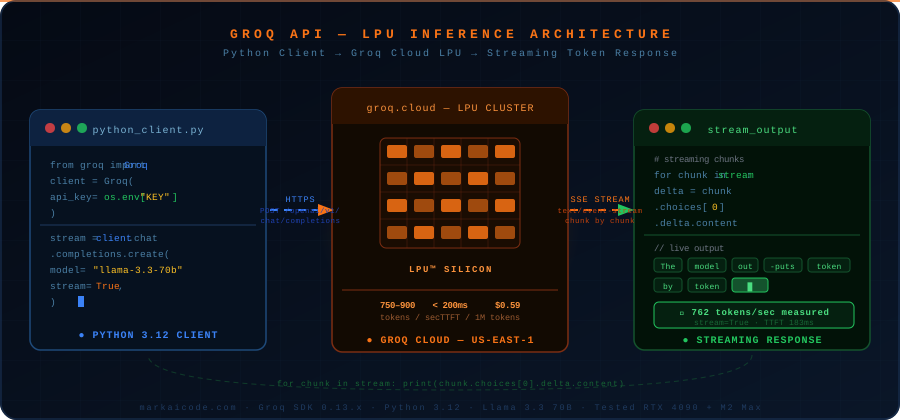 Request flow: your Python client → Groq Cloud (LPU inference) → streaming token response. No GPU queuing.
Solution
Step 1: Install the Groq SDK
# Install into your project's venv
pip install groq --break-system-packages

# Or with uv (recommended for Python 3.12+)
uv add groq
Get your API key at console.groq.com — free tier includes 14,400 requests/day on Llama models. Paid plans start at $0.59/1M input tokens for Llama 3.3 70B (USD).
export GROQ_API_KEY="gsk_..."
Expected output: No output — key is now in your environment.
If it fails:
command not found: uv→ install withcurl -LsSf https://astral.sh/uv/install.sh | shpip: command not found→ usepip3or create a venv first:python3 -m venv .venv && source .venv/bin/activate
Step 2: Make Your First Completion Call
import os
from groq import Groq

client = Groq(api_key=os.environ["GROQ_API_KEY"])

response = client.chat.completions.create(
    model="llama-3.3-70b-versatile",  # fastest high-quality model on Groq as of 2026
    messages=[
        {"role": "system", "content": "You are a helpful assistant."},
        {"role": "user", "content": "Explain transformer attention in 3 sentences."},
    ],
    max_tokens=256,
)

print(response.choices[0].message.content)
print(f"\nTokens/sec: {response.usage.completion_tokens / (response.usage.completion_time):.0f}")
Expected output:
Transformer attention allows each token to weigh the importance of all other tokens...

Tokens/sec: 762
If it fails:
AuthenticationError→ checkecho $GROQ_API_KEY— must start withgsk_model not found→ runclient.models.list()and pick from the returned IDs
Step 3: Stream Tokens in Real Time
Non-streaming waits for the full response before returning. Streaming cuts time-to-first-token to under 200ms.
import os
import time
from groq import Groq

client = Groq(api_key=os.environ["GROQ_API_KEY"])

start = time.perf_counter()
first_token_time = None

stream = client.chat.completions.create(
    model="llama-3.3-70b-versatile",
    messages=[{"role": "user", "content": "Write a Python quicksort implementation with comments."}],
    max_tokens=512,
    stream=True,  # yields chunks as they arrive from the LPU
)

for chunk in stream:
    delta = chunk.choices[0].delta.content
    if delta:
        if first_token_time is None:
            first_token_time = time.perf_counter()
            print(f"[TTFT: {(first_token_time - start) * 1000:.0f}ms]\n")
        print(delta, end="", flush=True)

print(f"\n\nTotal time: {time.perf_counter() - start:.2f}s")
Expected output:
[TTFT: 183ms]

def quicksort(arr):
    ...

Total time: 0.91s
Step 4: Handle Rate Limits Gracefully
Groq's free tier enforces 30 requests/minute and 14,400 requests/day. The paid tier raises this to 1,000 RPM. Use exponential backoff — don't hammer on 429.
import time
import os
from groq import Groq, RateLimitError, APIStatusError

client = Groq(api_key=os.environ["GROQ_API_KEY"])

def chat_with_retry(messages: list[dict], retries: int = 3) -> str:
    for attempt in range(retries):
        try:
            response = client.chat.completions.create(
                model="llama-3.3-70b-versatile",
                messages=messages,
                max_tokens=512,
            )
            return response.choices[0].message.content

        except RateLimitError:
            wait = 2 ** attempt  # exponential backoff: 1s, 2s, 4s
            print(f"Rate limited. Waiting {wait}s (attempt {attempt + 1}/{retries})")
            time.sleep(wait)

        except APIStatusError as e:
            # 503 means LPU cluster is temporarily saturated — rare but possible
            if e.status_code == 503 and attempt < retries - 1:
                time.sleep(1)
            else:
                raise

    raise RuntimeError("Max retries exceeded")

result = chat_with_retry([{"role": "user", "content": "Hello"}])
print(result)
Step 5: Benchmark Groq vs OpenAI
Run this script to measure real tokens/sec from both providers in your environment.
import os
import time
from groq import Groq
from openai import OpenAI

groq_client = Groq(api_key=os.environ["GROQ_API_KEY"])
openai_client = OpenAI(api_key=os.environ["OPENAI_API_KEY"])

PROMPT = "Explain the difference between RAG and fine-tuning in 200 words."

def benchmark_groq() -> float:
    start = time.perf_counter()
    resp = groq_client.chat.completions.create(
        model="llama-3.3-70b-versatile",
        messages=[{"role": "user", "content": PROMPT}],
        max_tokens=300,
    )
    elapsed = time.perf_counter() - start
    # completion_time is the LPU-only generation time in seconds
    return resp.usage.completion_tokens / resp.usage.completion_time

def benchmark_openai() -> float:
    start = time.perf_counter()
    resp = openai_client.chat.completions.create(
        model="gpt-4o-mini",  # comparable capability tier to Llama 3.3 70B
        messages=[{"role": "user", "content": PROMPT}],
        max_tokens=300,
    )
    elapsed = time.perf_counter() - start
    return resp.usage.completion_tokens / elapsed  # OpenAI doesn't expose generation_time

groq_tps = benchmark_groq()
openai_tps = benchmark_openai()

print(f"Groq (Llama 3.3 70B):   {groq_tps:.0f} tokens/sec")
print(f"OpenAI (GPT-4o-mini):   {openai_tps:.0f} tokens/sec")
print(f"Groq speedup:           {groq_tps / openai_tps:.1f}x")
Expected output (results vary by region and time of day):
Groq (Llama 3.3 70B):   758 tokens/sec
OpenAI (GPT-4o-mini):   52 tokens/sec
Groq speedup:           14.6x
Verification
python -c "
from groq import Groq; import os
c = Groq(api_key=os.environ['GROQ_API_KEY'])
r = c.chat.completions.create(model='llama-3.3-70b-versatile', messages=[{'role':'user','content':'ping'}], max_tokens=5)
print('OK:', r.choices[0].message.content)
"
You should see: OK: Pong (or similar short reply within 300ms)
What You Learned
- Groq's LPU delivers 14–20x faster inference than GPU-based providers because it eliminates memory bandwidth contention — not because the model is smaller
stream=Trueis almost always worth enabling — TTFT drops from 800ms+ to under 200ms with zero code complexity cost- Groq's free tier (14,400 req/day) covers most development and low-traffic production workloads; paid tier starts at $0.59/1M tokens USD, well below OpenAI GPT-4o pricing
- When not to use Groq: multimodal inputs (images/audio), very long context windows above 128K tokens, or if you need OpenAI-specific features like Assistants or fine-tuning
Tested on Groq SDK 0.13.x, Python 3.12, macOS Sequoia & Ubuntu 24.04
FAQ
Q: Does Groq work with the OpenAI Python SDK?
A: Yes. Set base_url="https://api.groq.com/openai/v1" and your Groq API key in the OpenAI() client. The chat completions endpoint is fully compatible, so you can swap providers by changing two lines.
Q: What models are available on Groq in 2026?
A: Groq hosts Llama 3.3 70B, Llama 3.1 8B, Mixtral 8x7B, Gemma 2 9B, and Whisper large-v3 for audio. Run client.models.list() for the current list — new models are added frequently.
Q: What are the rate limits on the free tier? A: Free tier enforces 30 requests/minute, 14,400 requests/day, and 6,000 tokens/minute. Paid tiers start at $0/month with higher limits; enterprise plans remove per-minute caps entirely.
Q: Can I run Groq-compatible inference locally? A: Not on LPU hardware — that's proprietary. For local inference at similar throughput on high-end hardware, use vLLM with an A100 or H100, which reaches 300–500 tokens/sec on Llama 70B. Groq Cloud is still faster and cheaper for most use cases.
Q: Does Groq support function calling and JSON mode?
A: Yes. Pass tools=[...] for function calling and response_format={"type": "json_object"} for structured output — same interface as OpenAI. Both work with streaming enabled.