Problem: Standard RAG Misses Relationships Between Facts
You've built a RAG pipeline. Retrieval works. But the model still gives wrong answers when the question requires connecting multiple facts — like "which companies did the same person lead before joining Acme?" or "what caused the Q3 revenue drop given the supply chain issues?"
Standard vector search retrieves semantically similar chunks. It doesn't know that Person A worked at Company B, which partnered with Company C. GraphRAG fixes this.
You'll learn:
- Why vector search alone fails on multi-hop questions
- How knowledge graphs add relationship context
- How to wire them together with a working Python example
Time: 20 min | Level: Intermediate
Why This Happens
Vector search finds documents that are similar to your query. Similarity is about words and meaning — not structure or relationships.
A knowledge graph stores facts as edges: (Person)-[WORKED_AT]->(Company). When you query it, you traverse those edges. That's a fundamentally different operation.
Common symptoms of missing relationships:
- Model says "I don't have enough information" despite the answer being in your docs
- Multi-hop questions get partially correct answers
- Summaries skip causal chains ("X happened because of Y because of Z")
GraphRAG runs both retrieval methods and merges the context before sending it to the LLM.
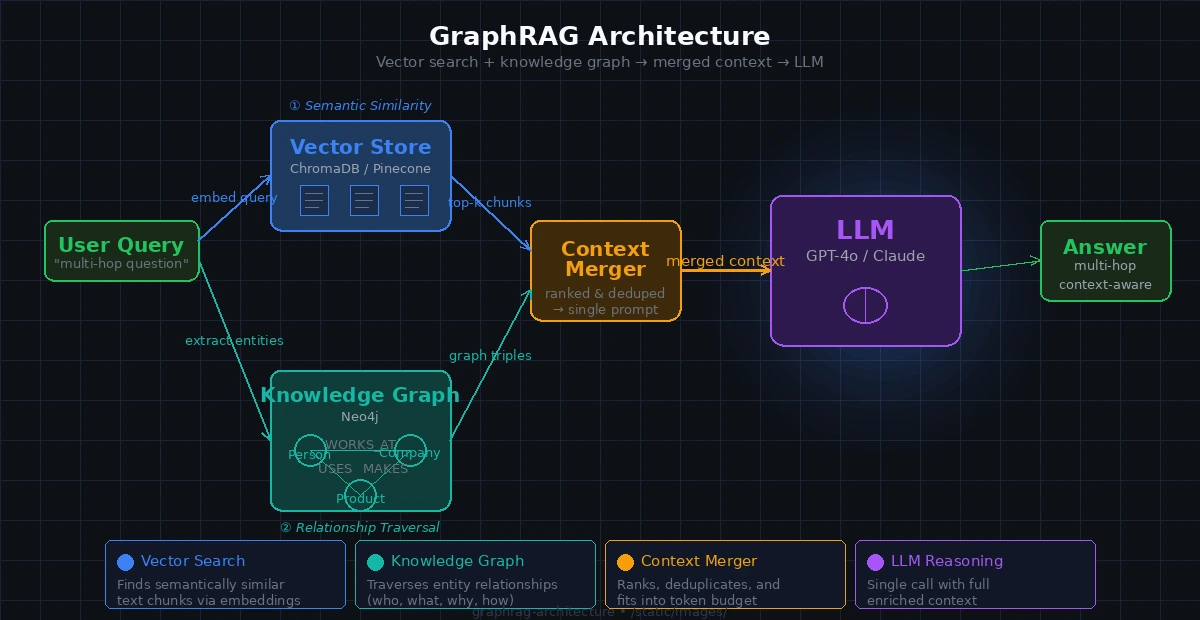 Both retrieval paths feed into a single merged context before the LLM call
Solution
Step 1: Set Up Your Environment
pip install langchain langchain-openai neo4j sentence-transformers chromadb
You'll need a running Neo4j instance. The fastest way:
docker run -d \
  --name neo4j \
  -p 7474:7474 -p 7687:7687 \
  -e NEO4J_AUTH=neo4j/password \
  neo4j:5.18
Expected: Neo4j browser accessible at http://localhost:7474
Step 2: Build the Knowledge Graph
Extract entities and relationships from your documents and load them into Neo4j.
from langchain_openai import ChatOpenAI
from neo4j import GraphDatabase
import json

llm = ChatOpenAI(model="gpt-4o-mini")

EXTRACT_PROMPT = """
Extract entities and relationships from the text below.
Return JSON only:
{
  "entities": [{"id": "string", "type": "string", "name": "string"}],
  "relationships": [{"from": "id", "to": "id", "type": "VERB_FORM"}]
}

Text: {text}
"""

def extract_graph(text: str) -> dict:
    response = llm.invoke(EXTRACT_PROMPT.format(text=text))
    # Strip markdown fences if present
    content = response.content.strip().strip("```json").strip("```")
    return json.loads(content)

def load_into_neo4j(graph_data: dict, driver):
    with driver.session() as session:
        for entity in graph_data["entities"]:
            session.run(
                "MERGE (n {id: $id}) SET n.name = $name, n.type = $type",
                id=entity["id"], name=entity["name"], type=entity["type"]
            )
        for rel in graph_data["relationships"]:
            # rel["type"] is always VERB_FORM per prompt — safe for dynamic Cypher
            session.run(
                f"MATCH (a {{id: $from_id}}), (b {{id: $to_id}}) "
                f"MERGE (a)-[:{rel['type']}]->(b)",
                from_id=rel["from"], to_id=rel["to"]
            )

driver = GraphDatabase.driver("bolt://localhost:7687", auth=("neo4j", "password"))
Why MERGE not CREATE: MERGE is idempotent — reprocessing the same doc won't duplicate nodes.
Step 3: Set Up Vector Search
from langchain_community.vectorstores import Chroma
from langchain_community.embeddings import HuggingFaceEmbeddings
from langchain.text_splitter import RecursiveCharacterTextSplitter

embeddings = HuggingFaceEmbeddings(model_name="all-MiniLM-L6-v2")
splitter = RecursiveCharacterTextSplitter(chunk_size=500, chunk_overlap=50)

def index_documents(docs: list[str]) -> Chroma:
    chunks = []
    for doc in docs:
        chunks.extend(splitter.split_text(doc))

    return Chroma.from_texts(
        texts=chunks,
        embedding=embeddings,
        persist_directory="./chroma_db"
    )
Step 4: Wire Both Retrievers Into One Context
This is the GraphRAG core — fetch from both sources and merge before calling the LLM.
def graph_retrieve(query: str, driver, top_k: int = 5) -> str:
    """Find entities in the query and fetch their neighbors from the graph."""
    with driver.session() as session:
        # Full-text search on entity names — requires Neo4j full-text index
        result = session.run(
            """
            CALL db.index.fulltext.queryNodes('entity_names', $query)
            YIELD node, score
            WITH node LIMIT $top_k
            MATCH (node)-[r]-(neighbor)
            RETURN node.name AS entity, type(r) AS rel, neighbor.name AS related
            """,
            query=query, top_k=top_k
        )
        rows = result.data()
        if not rows:
            return ""

        lines = [f"{r['entity']} {r['rel']} {r['related']}" for r in rows]
        return "Graph context:\n" + "\n".join(lines)

def graphrag_query(question: str, vectorstore: Chroma, driver) -> str:
    # 1. Vector retrieval — semantic similarity
    vector_docs = vectorstore.similarity_search(question, k=4)
    vector_context = "\n\n".join(d.page_content for d in vector_docs)

    # 2. Graph retrieval — relationship traversal
    graph_context = graph_retrieve(question, driver)

    # 3. Merge both into one context window
    merged_context = f"{vector_context}\n\n{graph_context}".strip()

    # 4. Single LLM call with enriched context
    prompt = f"""Answer the question using only the context below.
If the answer isn't in the context, say so.

Context:
{merged_context}

Question: {question}"""

    response = llm.invoke(prompt)
    return response.content
Why merge, not separate calls: One LLM call with merged context is cheaper and gives the model a chance to reason across both sources simultaneously.
 GraphRAG correctly links two entities through the relationship graph
Step 5: Create the Full-Text Index in Neo4j
GraphRAG needs fast entity lookup. Run this once after loading your graph:
CREATE FULLTEXT INDEX entity_names IF NOT EXISTS
FOR (n) ON EACH [n.name]
Run it from the Neo4j browser or with the Python driver:
with driver.session() as session:
    session.run(
        "CREATE FULLTEXT INDEX entity_names IF NOT EXISTS "
        "FOR (n) ON EACH [n.name]"
    )
If it fails:
- "Index already exists": You're fine, ignore it
- "Procedure not found": Your Neo4j version is below 4.3 — upgrade to 5.x
Verification
python -c "
from your_module import graphrag_query, index_documents, driver
vs = index_documents(['Alice founded Acme Corp in 2018. Acme acquired BetaCo in 2022.'])
print(graphrag_query('What did Alice found and what did it later acquire?', vs, driver))
"
You should see: An answer that connects Alice → Acme → BetaCo, which standard vector search alone would likely split across unrelated chunks.
What You Learned
- Vector search retrieves by similarity; graphs retrieve by relationship — they solve different problems
- GraphRAG runs both and merges context before the LLM call — one round trip, richer answer
- Entity extraction quality is the biggest variable;
gpt-4o-miniworks well for most domains - Limitation: Graph extraction adds latency at index time (~1–2s per chunk). Not suitable for real-time indexing without a queue
- When NOT to use this: If your questions are purely semantic ("summarize this doc"), standard RAG is faster and cheaper. Add GraphRAG when you see multi-hop failures
Tested on Python 3.12, Neo4j 5.18, LangChain 0.3.x, macOS & Ubuntu 24.04