GraphRAG knowledge graph retrieval solves the biggest failure mode in standard RAG: isolated chunk lookup that misses relationships between facts. Instead of embedding text chunks and doing cosine similarity search, GraphRAG stores entities and their connections in a knowledge graph, then traverses that graph at query time to answer multi-hop questions that plain vector search gets wrong.
This guide walks you through building a working GraphRAG pipeline using Neo4j, LangChain, and Python 3.12. You'll extract entities from documents, store them as graph nodes and edges, and wire up a GraphCypherQAChain that generates Cypher queries on the fly.
You'll learn:
- Why standard vector RAG fails on relational and multi-hop questions
- How to extract entities and relationships with an LLM and load them into Neo4j
- How to build a
GraphCypherQAChainthat converts natural language to Cypher - How to combine vector and graph retrieval in a hybrid pipeline
Time: 25 min | Difficulty: Intermediate
Why Standard RAG Fails on Relational Questions
Standard RAG breaks documents into chunks, embeds each chunk, and retrieves by cosine similarity. That works well when the answer lives in a single passage. It fails when the question requires combining facts from multiple places — what researchers call multi-hop reasoning.
Example: "Which medications prescribed to patients in the cardiology unit interact with Drug X?" A vector search might find chunks mentioning Drug X and chunks listing cardiology prescriptions, but it has no mechanism to connect those two sets. It returns chunks, not answers.
Symptoms of standard RAG failure:
- Correct documents retrieved, wrong answer generated
- Model hallucinates links between entities that weren't in retrieved chunks
- Multi-step questions like "who manages the team that built product Y" return partial or irrelevant passages
- Queries involving time sequences or causal chains fail silently
GraphRAG stores the structure — entities, their types, and typed edges between them — so the retriever can traverse relationships directly.
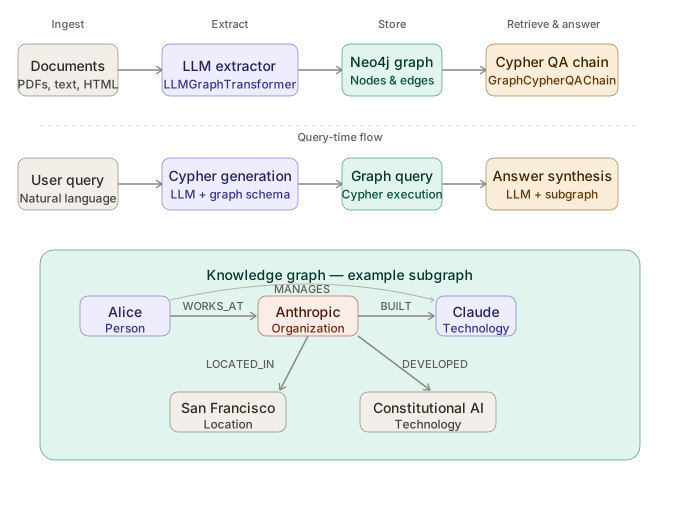 GraphRAG pipeline: entities and relationships extracted at ingest time; traversed at query time via auto-generated Cypher.
Architecture Overview
A GraphRAG system has four stages:
- Ingestion — Load documents and split into passages
- Entity extraction — LLM identifies named entities and relationships; structured output written to Neo4j
- Retrieval — At query time,
GraphCypherQAChaingenerates a Cypher query, executes it against Neo4j, and passes the subgraph to the LLM - Generation — LLM synthesizes an answer from the graph context
You can layer a standard vector retriever on top (hybrid mode) so single-fact questions still get fast chunk-level answers.
Prerequisites
# Python 3.12+ required — older versions lack tomllib used by uv
python --version   # Python 3.12.x

# Neo4j 5.x — run locally via Docker
docker run \
  --name neo4j \
  -p 7474:7474 -p 7687:7687 \
  -e NEO4J_AUTH=neo4j/password123 \
  neo4j:5.18
Install dependencies with uv (faster than pip, lockfile-aware):
uv pip install \
  langchain==0.3.7 \
  langchain-community==0.3.7 \
  langchain-openai==0.2.6 \
  neo4j==5.24.0 \
  python-dotenv==1.0.1
Set your environment variables:
# .env
OPENAI_API_KEY=sk-...
NEO4J_URI=bolt://localhost:7687
NEO4J_USERNAME=neo4j
NEO4J_PASSWORD=password123
Step 1: Connect to Neo4j and Clear the Graph
import os
from dotenv import load_dotenv
from langchain_community.graphs import Neo4jGraph

load_dotenv()

graph = Neo4jGraph(
    url=os.getenv("NEO4J_URI"),
    username=os.getenv("NEO4J_USERNAME"),
    password=os.getenv("NEO4J_PASSWORD"),
)

# Clear existing data during development — remove in production
graph.query("MATCH (n) DETACH DELETE n")
print("Graph cleared.")
Expected output: Graph cleared.
If it fails:
ServiceUnavailable: Connection refused→ Docker container isn't running. Rundocker start neo4jand wait 10 seconds for Neo4j to initialize.AuthError→ Credentials mismatch. CheckNEO4J_AUTHin yourdocker runcommand matches.env.
Step 2: Extract Entities and Relationships with LLMGraphTransformer
LangChain's LLMGraphTransformer sends each document to the LLM with a structured output schema. The LLM returns a list of (subject, predicate, object) triples, which the transformer writes into Neo4j as nodes and directed edges.
from langchain_core.documents import Document
from langchain_experimental.graph_transformers import LLMGraphTransformer
from langchain_openai import ChatOpenAI

llm = ChatOpenAI(
    model="gpt-4o",
    temperature=0,   # deterministic extraction — randomness creates inconsistent entity names
)

transformer = LLMGraphTransformer(
    llm=llm,
    allowed_nodes=["Person", "Organization", "Product", "Location", "Technology"],
    allowed_relationships=["WORKS_AT", "MANAGES", "BUILT", "USES", "LOCATED_IN"],
    # Constraining types prevents the LLM from inventing vague relationship names
)

# Sample documents — replace with your loader (PDFLoader, WebBaseLoader, etc.)
documents = [
    Document(page_content="Alice is an engineer at Anthropic. She leads the Claude team."),
    Document(page_content="Anthropic is an AI safety company based in San Francisco."),
    Document(page_content="Claude uses Constitutional AI developed by Anthropic."),
]

graph_documents = transformer.convert_to_graph_documents(documents)
graph.add_graph_documents(
    graph_documents,
    baseEntityLabel=True,   # adds __Entity__ label to all nodes for fast indexed lookup
    include_source=True,    # stores source document text on each node for hybrid retrieval
)

print(f"Loaded {len(graph_documents)} graph documents.")
graph.refresh_schema()      # updates the schema cache used by GraphCypherQAChain
Expected output: Loaded 3 graph documents.
Open Neo4j Browser at http://localhost:7474 and run MATCH (n) RETURN n LIMIT 50 to visualize the graph. You should see nodes for Alice, Anthropic, Claude, Constitutional AI, and San Francisco with labeled edges between them.
Step 3: Build the GraphCypherQAChain
GraphCypherQAChain does two LLM calls per query: one to generate Cypher from the user's question, and one to synthesize an answer from the Cypher result. The schema refreshed in Step 2 is passed as context so the LLM knows which node labels and relationship types exist.
from langchain.chains import GraphCypherQAChain

chain = GraphCypherQAChain.from_llm(
    llm=llm,
    graph=graph,
    verbose=True,        # prints generated Cypher — essential for debugging wrong answers
    validate_cypher=True, # re-prompts LLM to fix syntax errors before executing
    top_k=10,            # max graph results passed to the answer LLM
    return_intermediate_steps=True,  # exposes generated Cypher in the response dict
)

response = chain.invoke({"query": "Who leads the Claude team and where does their employer operate?"})
print(response["result"])
Expected output:
Alice leads the Claude team. Her employer, Anthropic, is an AI safety company located in San Francisco.
The verbose=True output will show the intermediate Cypher, something like:
MATCH (p:Person)-[:MANAGES]->(t:Technology)<-[:BUILT]-(o:Organization)
MATCH (o)-[:LOCATED_IN]->(l:Location)
WHERE t.id = 'Claude'
RETURN p.id, o.id, l.id
This is the multi-hop traversal that plain vector RAG cannot do.
Step 4: Add Vector Retrieval for Hybrid Mode
For questions that are best answered by document chunks (exact quotes, long explanations), add a vector index alongside the graph. Neo4j 5.x supports native vector indexing — no separate Chroma or Qdrant instance needed.
from langchain_community.vectorstores import Neo4jVector
from langchain_openai import OpenAIEmbeddings

embeddings = OpenAIEmbeddings(model="text-embedding-3-small")

vector_store = Neo4jVector.from_existing_graph(
    embedding=embeddings,
    graph=graph,
    node_label="Document",          # embeds the source document nodes created in Step 2
    text_node_properties=["text"],  # property that holds the chunk text
    embedding_node_property="embedding",
    index_name="document_embeddings",
)

# Hybrid retrieval: graph for relationships, vector for content
vector_retriever = vector_store.as_retriever(search_kwargs={"k": 4})
For a given query, run both retrievers and merge context before generating:
def hybrid_rag(query: str) -> str:
    # Graph path — handles multi-hop relational questions
    graph_result = chain.invoke({"query": query})["result"]

    # Vector path — handles direct content questions
    vector_docs = vector_retriever.invoke(query)
    vector_context = "\n".join(d.page_content for d in vector_docs)

    # Merge: graph answer takes precedence; vector context fills gaps
    merged_prompt = f"""Graph answer: {graph_result}

Supporting context:
{vector_context}

Synthesize a final answer using both sources. If the graph answer is complete, use it directly."""

    return llm.invoke(merged_prompt).content

print(hybrid_rag("What technology does Alice's employer use?"))
Step 5: Production Hardening
Schema constraints prevent duplicate nodes
CREATE CONSTRAINT person_id IF NOT EXISTS
FOR (p:Person) REQUIRE p.id IS UNIQUE;

CREATE CONSTRAINT org_id IF NOT EXISTS
FOR (o:Organization) REQUIRE o.id IS UNIQUE;
Run these once at startup. Without uniqueness constraints, repeated ingestion creates duplicate nodes and corrupted graph traversals.
Ingestion cost estimate
Entity extraction makes one gpt-4o call per document chunk. At ~500 tokens per chunk (input + output), 1,000 documents costs roughly $7.50 USD at current gpt-4o pricing ($15/M input tokens). Use gpt-4o-mini at ~10× lower cost if extraction accuracy tolerates it — test on a 50-document sample first.
AWS deployment
For production on AWS us-east-1, run Neo4j on an r6i.xlarge instance (30GB RAM, ~$0.252/hr). Enable Neo4j's backup to S3 for the graph database. Store your OpenAI key in AWS Secrets Manager and inject via environment variable — never hardcode it.
Verification
# Confirm graph has nodes and relationships
schema = graph.get_schema
print(schema)

# Run a test multi-hop query
test = chain.invoke({"query": "What AI technique was developed by the company Alice works at?"})
print(test["result"])
# Expected: "Constitutional AI was developed by Anthropic, where Alice works."
If the Cypher chain returns empty results, check verbose=True output. The most common causes are entity name mismatches (e.g., "OpenAI" vs "Open AI") — fix by normalizing entity names during extraction or adding MERGE instead of CREATE in your Neo4j writes.
GraphRAG vs Vector RAG: When to Use Which
| Vector RAG | GraphRAG | |
|---|---|---|
| Best for | Single-fact lookup, summaries, semantic similarity | Multi-hop questions, relationship queries, structured domains |
| Setup cost | Low — embed and index | Higher — entity extraction + graph schema design |
| Latency | ~100–300ms | ~500–1500ms (two LLM calls + Cypher execution) |
| Accuracy on relational Q&A | Low–Medium | High |
| Self-hosted (Docker) | ✅ | ✅ Neo4j Community Edition free |
| Pricing | Embedding API only | Embedding + extraction LLM calls |
Choose GraphRAG if: Your domain has structured relationships — medical records, org charts, codebases, legal documents, knowledge bases with named entities.
Choose Vector RAG if: You need sub-300ms latency, your questions are primarily semantic similarity, or your documents are unstructured prose without clear entities.
Choose Hybrid if: You have both use cases and can afford the extra latency.
What You Learned
- Standard RAG fails on multi-hop questions because it retrieves chunks, not relationships — GraphRAG solves this by storing entity graphs
LLMGraphTransformerwith constrained node and relationship types produces cleaner, more traversable graphs than open-ended extractionGraphCypherQAChainauto-generates Cypher but requiresrefresh_schema()after every ingestion batch — skipping this causes the LLM to generate queries against stale schema- Hybrid mode (graph + vector in the same Neo4j instance) avoids running two separate databases
Tested on Neo4j 5.18, LangChain 0.3.7, Python 3.12.3, gpt-4o-2024-08-06, macOS Sequoia & Ubuntu 24.04
FAQ
Q: Does GraphRAG work with local LLMs instead of OpenAI?
A: Yes. Swap ChatOpenAI for ChatOllama (e.g., llama3.2:70b) in both the transformer and the chain. Extraction quality drops with smaller models — use a model with at least 70B parameters for reliable structured output.
Q: What is the difference between LLMGraphTransformer and Microsoft's GraphRAG library?
A: Microsoft's GraphRAG does global community summarization across the entire corpus using Leiden clustering — expensive but great for document-level themes. LLMGraphTransformer does local entity extraction per chunk — cheaper and better for precise relationship lookups. They solve different problems.
Q: Minimum RAM for Neo4j in production? A: 8GB RAM handles graphs up to ~1M nodes. For larger corpora, provision 16–32GB. Neo4j Community Edition is free; Enterprise (required for clustering) starts at custom pricing USD.
Q: Can GraphRAG handle PDFs and not just plain text?
A: Yes. Use PyPDFLoader from langchain-community to load PDFs into Document objects, then pass them into LLMGraphTransformer.convert_to_graph_documents() exactly as shown in Step 2.
Q: How do I handle entity disambiguation (same entity, different names)?
A: Pass a node_properties=["aliases"] argument to LLMGraphTransformer and instruct the LLM in your system prompt to normalize common variants. For production, add a post-processing step using fuzzy string matching (rapidfuzz) to merge near-duplicate nodes before adding to the graph.