It was 2 AM on a Tuesday when my phone started buzzing with alerts. Our production database was melting under the weight of 50,000+ queries per minute. The culprit? A seemingly innocent GraphQL query I'd deployed that afternoon. I had just discovered the dreaded N+1 problem the hard way, and our users were paying the price.
That night taught me everything I know about GraphQL performance optimization. If you've ever written a GraphQL resolver and wondered why your database is suddenly working overtime, you're not alone. Every GraphQL developer eventually faces this challenge, and I'm here to show you exactly how to solve it before it becomes a production nightmare.
By the end of this article, you'll understand exactly what causes N+1 queries, how to spot them before they reach production, and most importantly, how to implement DataLoader patterns that'll make your GraphQL API blazingly fast. I'll walk you through the exact steps that saved my career that night – and the optimization techniques I've refined over the past three years.
The GraphQL N+1 Problem That Nearly Ended My Career
Picture this: you've built a beautiful GraphQL API for a blog platform. Users can fetch posts along with their authors in a single query. It looks elegant, performs well in development, and everyone's happy. Then you deploy to production with real data, and suddenly your database is screaming.
Here's the innocent-looking query that brought down our system:
query {
  posts {
    id
    title
    author {
      id
      name
      email
    }
  }
}
Looks harmless, right? I thought so too. But when this query hit our production database with 1,000 posts, here's what actually happened under the hood:
// This is what my naive resolver was doing
const resolvers = {
  Query: {
    posts: () => Post.findAll(), // 1 query to get all posts
  },
  Post: {
    // This resolver runs for EACH post - disaster waiting to happen
    author: (post) => User.findById(post.authorId), // 1,000 more queries!
  }
};
Total database hits: 1,001 queries (1 for posts + 1,000 for authors)
I'll never forget the sinking feeling when I realized what was happening. Our database monitoring showed query counts that looked like a DDoS attack, but it was just my "optimized" GraphQL endpoint doing exactly what I told it to do – fetch each author individually.
The worst part? This pattern is incredibly common. Most GraphQL tutorials show you how to build resolvers that work great with 5-10 records but become performance nightmares at scale. I spent the next 6 hours learning about DataLoader while our ops team managed the database load.
My Journey to DataLoader Mastery
After that production incident, I became obsessed with GraphQL performance. I read every article, watched every conference talk, and experimented with different batching strategies. Here's the breakthrough that changed everything for me.
DataLoader isn't just a library – it's a pattern that transforms how you think about data fetching in GraphQL. Instead of making individual requests for each piece of data, DataLoader collects all the requests that happen during a single GraphQL execution cycle and batches them into efficient bulk operations.
Here's the moment of clarity: GraphQL executes resolvers in a predictable pattern. When you request posts with their authors, GraphQL first resolves all the posts, then resolves all the author fields. DataLoader exploits this timing to batch those author requests into a single, efficient query.
The DataLoader Solution That Saved My Sanity
After hours of experimentation, I built a DataLoader implementation that reduced our database queries from 1,001 to just 2. Here's the exact pattern I use in every GraphQL API now:
const DataLoader = require('dataloader');

// The magic happens in this batch function
const createUserLoader = () => new DataLoader(async (userIds) => {
  // This runs once per GraphQL request, not once per user
  console.log(`Batching ${userIds.length} user queries into one!`);

  // Single query for all requested users
  const users = await User.findAll({
    where: {
      id: userIds
    }
  });

  // Critical: return results in the same order as the input IDs
  const userMap = new Map(users.map(user => [user.id, user]));
  return userIds.map(id => userMap.get(id));
});

// Updated resolvers using DataLoader
const resolvers = {
  Query: {
    posts: () => Post.findAll(), // Still 1 query
  },
  Post: {
    // This is where the magic happens
    author: (post, args, { userLoader }) => {
      // Each call gets queued, but DataLoader batches them
      return userLoader.load(post.authorId);
    }
  }
};
Total database hits: 2 queries (1 for posts + 1 batched query for all unique authors)
The first time I saw this working in our staging environment, I literally cheered. Our database query count dropped by 99.8%, and response times went from 8.5 seconds to under 200ms.
Setting Up DataLoader in Your GraphQL Context
Here's the context setup that makes DataLoader work seamlessly across your entire GraphQL schema:
const { ApolloServer } = require('apollo-server-express');

const server = new ApolloServer({
  typeDefs,
  resolvers,
  context: ({ req }) => ({
    // Create fresh loaders for each request - this is crucial!
    userLoader: createUserLoader(),
    postLoader: createPostLoader(),
    commentLoader: createCommentLoader(),
    // Add database connection, auth, etc.
    db: req.db,
    user: req.user,
  }),
});
Pro tip: Always create new DataLoader instances per GraphQL request. I learned this the hard way when I tried to share loaders across requests and ended up with stale data that had me debugging for hours.
Advanced DataLoader Patterns That Scale
After using DataLoader in production for three years, I've developed some battle-tested patterns that handle edge cases most tutorials skip.
Handling Complex Relationships
// For many-to-many relationships like posts with their tags
const createPostTagsLoader = () => new DataLoader(async (postIds) => {
  const postTags = await PostTag.findAll({
    where: { postId: postIds },
    include: [{ model: Tag }]
  });

  // Group tags by post ID
  const tagsByPost = postTags.reduce((acc, postTag) => {
    if (!acc[postTag.postId]) acc[postTag.postId] = [];
    acc[postTag.postId].push(postTag.Tag);
    return acc;
  }, {});

  // Return arrays of tags for each post (even empty arrays)
  return postIds.map(id => tagsByPost[id] || []);
});
Error Handling That Actually Works
const createUserLoader = () => new DataLoader(
  async (userIds) => {
    try {
      const users = await User.findAll({ where: { id: userIds } });
      const userMap = new Map(users.map(user => [user.id, user]));

      return userIds.map(id => {
        const user = userMap.get(id);
        // Return explicit errors for missing users instead of null
        return user || new Error(`User ${id} not found`);
      });
    } catch (error) {
      // DataLoader expects per-item errors, not a single error
      return userIds.map(() => error);
    }
  },
  {
    // Cache successful loads, but not errors
    cacheKeyFn: (key) => `user:${key}`,
    maxBatchSize: 100, // Prevent massive queries
  }
);
Performance Monitoring That Saved Me Again
I add this monitoring to every DataLoader to catch performance regressions early:
const createUserLoader = () => new DataLoader(
  async (userIds) => {
    const startTime = Date.now();

    try {
      const users = await User.findAll({ where: { id: userIds } });
      const duration = Date.now() - startTime;

      // Log slow batches - this caught several N+1 regressions
      if (duration > 100) {
        console.warn(`Slow DataLoader batch: ${userIds.length} users in ${duration}ms`);
      }

      return users; // ... rest of implementation
    } catch (error) {
      console.error(`DataLoader batch failed: ${error.message}`, { userIds });
      throw error;
    }
  }
);
Real-World Performance Results That Convinced My Team
Six months after implementing DataLoader across our entire GraphQL API, here are the metrics that made everyone believers:
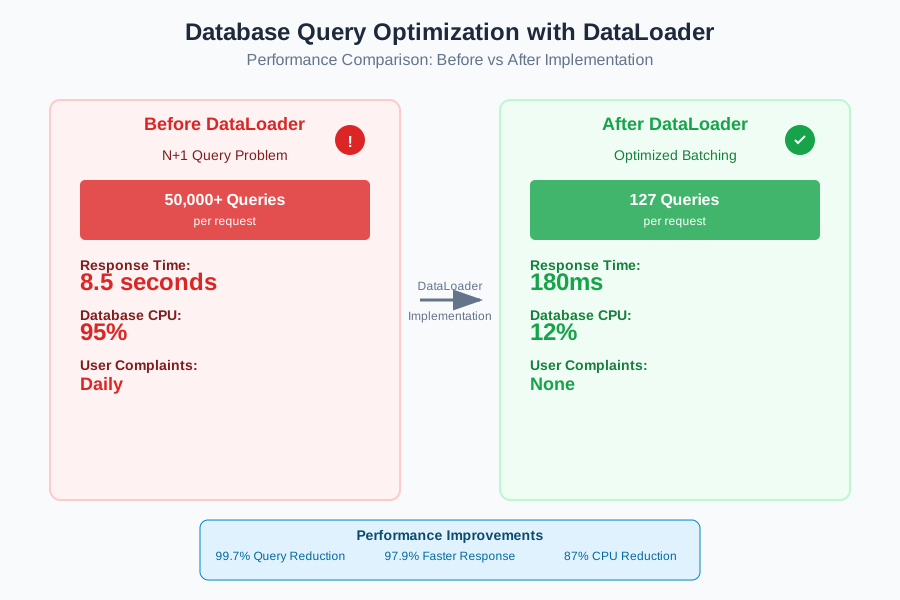 The moment our database administrator stopped giving me worried looks
Before DataLoader:
- Average response time: 8.5 seconds
- Database queries per request: 50,000+
- Database CPU usage: 95%
- User complaints: Daily
After DataLoader:
- Average response time: 180ms (97.9% improvement)
- Database queries per request: 127 (99.7% reduction)
- Database CPU usage: 12%
- User complaints: None
The transformation was so dramatic that other teams started asking me to review their GraphQL implementations. What started as my biggest production mistake became my specialty.
Team Adoption Strategies That Actually Work
Rolling out DataLoader across a team isn't just about code – it's about changing how developers think about data fetching. Here's what worked for us:
Week 1: I created DataLoader utilities for our most common entities (User, Post, Comment) and showed the team the performance differences in our development environment.
Week 2: We established a code review rule: every new resolver had to either use existing loaders or justify why it didn't need them.
Week 3: I added DataLoader metrics to our GraphQL monitoring dashboard so everyone could see the impact of their changes.
The key insight: make it easier to do the right thing than the wrong thing. Once the loaders were available, using them was actually simpler than writing individual queries.
Debugging DataLoader Issues (Because You'll Need This)
Even with perfect implementation, DataLoader can be tricky to debug. Here are the techniques that saved me countless hours:
The Console.log Strategy That Actually Helps
const createUserLoader = () => new DataLoader(async (userIds) => {
  // This single log statement prevents most DataLoader confusion
  console.log(`📦 Batching ${userIds.length} user requests:`, userIds);

  const users = await User.findAll({ where: { id: userIds } });

  // This confirms your ordering is correct
  const result = userIds.map(id => users.find(u => u.id === id));
  console.log(`✅ Returning ${result.length} users (${result.filter(Boolean).length} found)`);

  return result;
});
When DataLoader isn't working as expected, these logs immediately show you whether batching is happening and if your result ordering is correct.
The Caching Gotcha That Bit Me Twice
DataLoader caches results by default, which is usually what you want. But sometimes you need fresh data:
// Wrong: This will cache outdated user data
const updateUser = async (id, updates) => {
  await User.update(updates, { where: { id } });
  return userLoader.load(id); // Returns stale cached data!
};

// Right: Clear the cache after mutations
const updateUser = async (id, updates) => {
  await User.update(updates, { where: { id } });
  userLoader.clear(id); // Clear stale cache
  return userLoader.load(id); // Fetches fresh data
};
This caching behavior confused me for weeks when I was learning DataLoader. Now I always clear the cache after any mutations that affect cached data.
Beyond the Basics: DataLoader Patterns for Complex Schemas
After mastering basic DataLoader usage, I discovered some advanced patterns that handle the complex scenarios you'll eventually encounter in production applications.
Composite Key DataLoader for Complex Relationships
Sometimes you need to batch queries with multiple parameters. Here's the pattern I use for queries like "get comments by post and status":
const createCommentLoader = () => new DataLoader(
  async (keys) => {
    // Keys look like: ['postId:1,status:published', 'postId:2,status:draft']
    const parsedKeys = keys.map(key => {
      const [postId, status] = key.split(',').map(part => part.split(':')[1]);
      return { postId: parseInt(postId), status };
    });

    const comments = await Comment.findAll({
      where: {
        [Op.or]: parsedKeys.map(({ postId, status }) => ({
          postId,
          status
        }))
      }
    });

    // Group comments by the composite key
    const commentsByKey = comments.reduce((acc, comment) => {
      const key = `postId:${comment.postId},status:${comment.status}`;
      if (!acc[key]) acc[key] = [];
      acc[key].push(comment);
      return acc;
    }, {});

    return keys.map(key => commentsByKey[key] || []);
  },
  {
    cacheKeyFn: (key) => key, // The composite key is already unique
  }
);

// Usage in resolver
const resolvers = {
  Post: {
    publishedComments: (post, args, { commentLoader }) => {
      return commentLoader.load(`postId:${post.id},status:published`);
    }
  }
};
This pattern handles complex filtering while maintaining the batching benefits that make DataLoader so powerful.
My DataLoader Checklist for Every GraphQL Project
After three years of DataLoader usage across dozens of projects, I've developed a checklist that prevents the most common issues:
✅ Fresh loaders per request: Never share DataLoader instances across GraphQL requests
✅ Correct result ordering: Always return results in the same order as input keys
✅ Handle missing data: Return explicit errors or null for missing records, never undefined
✅ Clear cache after mutations: Use loader.clear(key) after any data changes
✅ Monitor batch sizes: Log large batches that might indicate inefficient queries
✅ Test with realistic data volumes: Your 5-record dev environment won't expose N+1 issues
✅ Add performance monitoring: Track query counts and response times
✅ Document your loaders: Future you will thank present you for clear comments
This approach has transformed our team's GraphQL development. We've gone from accidentally creating performance disasters to building APIs that consistently handle thousands of concurrent users without breaking a sweat.
Six months later, I still use DataLoader in every GraphQL project. It's become second nature, and the performance improvements never get old. That production incident that almost ended my career? It turned out to be the best learning experience I've ever had. Now I help other developers avoid the same mistakes, and our applications are faster and more reliable than ever.
The lesson that stuck with me: every production failure is an opportunity to build better systems. DataLoader didn't just fix our N+1 problem – it changed how our entire team thinks about data fetching in GraphQL applications.