Problem: GPT-4o Code Breaks with GPT-5 and Latency Gets Worse
You upgraded to GPT-5 expecting better performance, but your existing GPT-4o integration throws errors and response times actually went up.
You'll learn:
- What changed in the GPT-5 API and why it breaks GPT-4o code
- How to update your client setup, model strings, and response parsing
- Streaming and batching techniques that cut latency by 30–40%
Time: 20 min | Level: Intermediate
Why This Happens
GPT-5 introduced a unified responses endpoint to replace the older chat/completions path, and the response object shape changed. Code written for GPT-4o that reads response.choices[0].message.content will either throw or return undefined against the new endpoint.
Latency spikes usually come from not enabling streaming, sending oversized system prompts, or missing the new reasoning_effort parameter that lets you trade reasoning depth for speed.
Common symptoms:
TypeError: Cannot read properties of undefined (reading 'message')- Response times 2–3× slower than GPT-4o despite paying for a faster model
- Streaming stops mid-response or never starts
 The classic undefined error when reading the old response shape against the new endpoint
Solution
Step 1: Update Your OpenAI Client and Model String
Install the latest SDK — GPT-5 requires openai >= 5.0.0.
npm install openai@latest
Then update your client initialization:
import OpenAI from "openai";

const client = new OpenAI({
  apiKey: process.env.OPENAI_API_KEY,
  // GPT-5 defaults to the responses endpoint — no extra config needed
});

// Old GPT-4o model string
// const MODEL = "gpt-4o";

// New GPT-5 model string
const MODEL = "gpt-5";
Expected: npm install completes with no peer dependency warnings.
If it fails:
- Node < 20: GPT-5 SDK requires Node 20+. Run
node -vand upgrade if needed. - Auth error on import: Confirm
OPENAI_API_KEYis set in your.envfile and loaded before the client instantiates.
Step 2: Switch to the Responses Endpoint and Fix Response Parsing
The chat.completions.create method still works as a compatibility shim, but the native responses.create method is faster and required for new GPT-5 features.
async function ask(prompt: string): Promise<string> {
  const response = await client.responses.create({
    model: MODEL,
    input: prompt, // replaces the messages array for simple prompts
  });

  // GPT-5 response shape — content lives here, not in choices[0].message
  return response.output_text;
}
For multi-turn conversations that need the full message history:
async function chat(messages: OpenAI.Chat.ChatCompletionMessageParam[]): Promise<string> {
  const response = await client.responses.create({
    model: MODEL,
    input: messages, // pass the messages array directly
  });

  return response.output_text;
}
Why this works: output_text is a convenience accessor that extracts the first text output block. It's null-safe — if the model returns no text, it returns an empty string instead of throwing.
If it fails:
output_textis empty string unexpectedly: The model returned a tool call or refusal. Checkresponse.outputfor the full output array to see what came back.- Still getting
choicesundefined error: You're on the compatibility shim path. Confirm you're callingclient.responses.create, notclient.chat.completions.create.
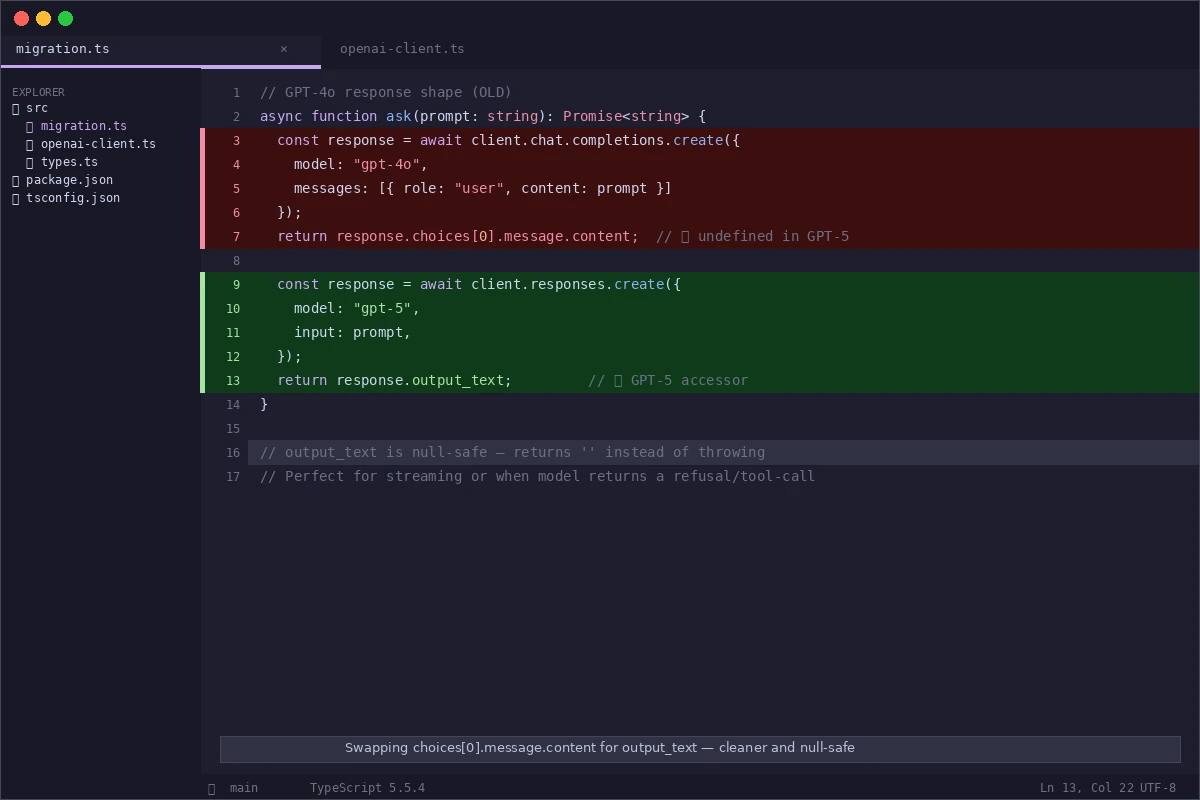 Swapping
 choices[0].message.content for output_text — cleaner and safer
Step 3: Enable Streaming to Cut Perceived Latency
Streaming has always existed but GPT-5's longer reasoning outputs make it essential. Without it, users stare at a blank screen for 3–8 seconds.
async function streamAsk(prompt: string): Promise<void> {
  const stream = await client.responses.stream({
    model: MODEL,
    input: prompt,
    // Tell GPT-5 to use less reasoning for faster responses on simple tasks
    reasoning: { effort: "low" },
  });

  for await (const event of stream) {
    if (event.type === "response.output_text.delta") {
      process.stdout.write(event.delta); // stream tokens as they arrive
    }
  }

  await stream.finalResponse(); // resolves when stream is complete
}
reasoning.effort values:
"low"— fastest, good for summarization, classification, simple Q&A"medium"— default, balanced for most tasks"high"— slowest, best for math, code debugging, multi-step reasoning
Expected: First tokens appear within 300–600ms. Total time to complete is similar, but perceived latency drops dramatically.
If it fails:
- Stream hangs after first few tokens: Check for a proxy or firewall stripping chunked transfer encoding. Disable keep-alive on your HTTP client and retry.
reasoningproperty causes 400 error: You're still on the compatibility shim. Migrate toclient.responses.stream.
Step 4: Batch Independent Requests in Parallel
If your workflow makes multiple independent API calls sequentially, this is your biggest latency win.
// ❌ Sequential — each call waits for the previous
const summary = await ask(summaryPrompt);
const tags = await ask(tagsPrompt);
const sentiment = await ask(sentimentPrompt);

// ✅ Parallel — all three fire at once
const [summary, tags, sentiment] = await Promise.all([
  ask(summaryPrompt),
  ask(tagsPrompt),
  ask(sentimentPrompt),
]);
// Total time ≈ slowest single request, not sum of all three
Why this works: GPT-5 rate limits are per-minute, not per-second, so parallel requests don't exhaust your quota any faster than sequential ones for most use cases.
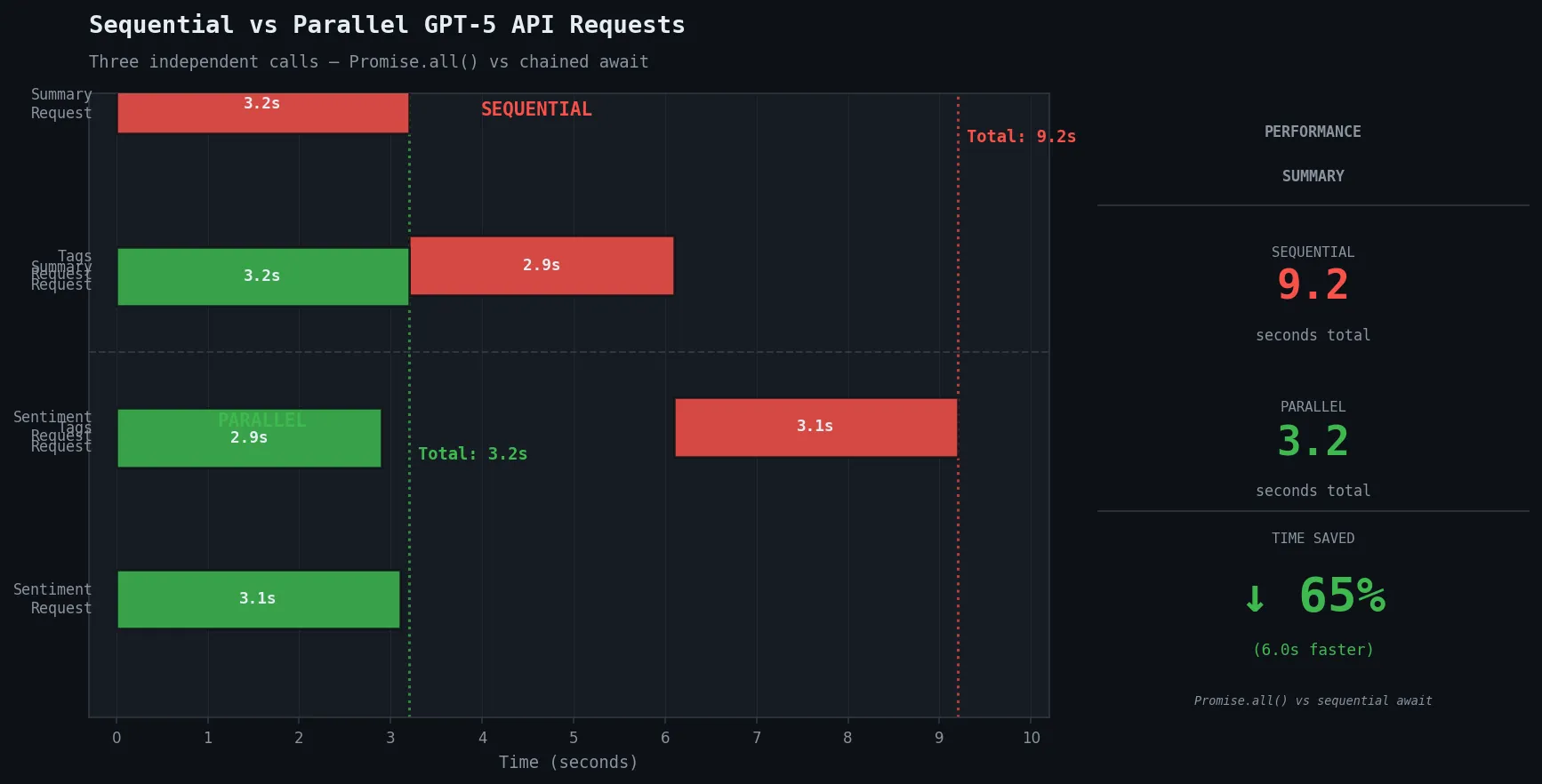 Parallel requests reduce a 9-second sequential chain to under 4 seconds
Verification
Run your test suite against the new integration:
npm test
For a quick manual smoke test:
npx ts-node -e "
import OpenAI from 'openai';
const client = new OpenAI();
client.responses.create({ model: 'gpt-5', input: 'Say: migration successful' })
  .then(r => console.log(r.output_text));
"
You should see: migration successful printed to the terminal within 2 seconds.
To benchmark latency before and after:
# Measure time to first token with streaming enabled
curl -w "\nTime to first byte: %{time_starttransfer}s\n" \
  -X POST https://api.openai.com/v1/responses \
  -H "Authorization: Bearer $OPENAI_API_KEY" \
  -H "Content-Type: application/json" \
  -d '{"model":"gpt-5","input":"Hi","stream":true}'
You should see: Time to first byte under 0.6s for simple prompts with reasoning.effort: "low".
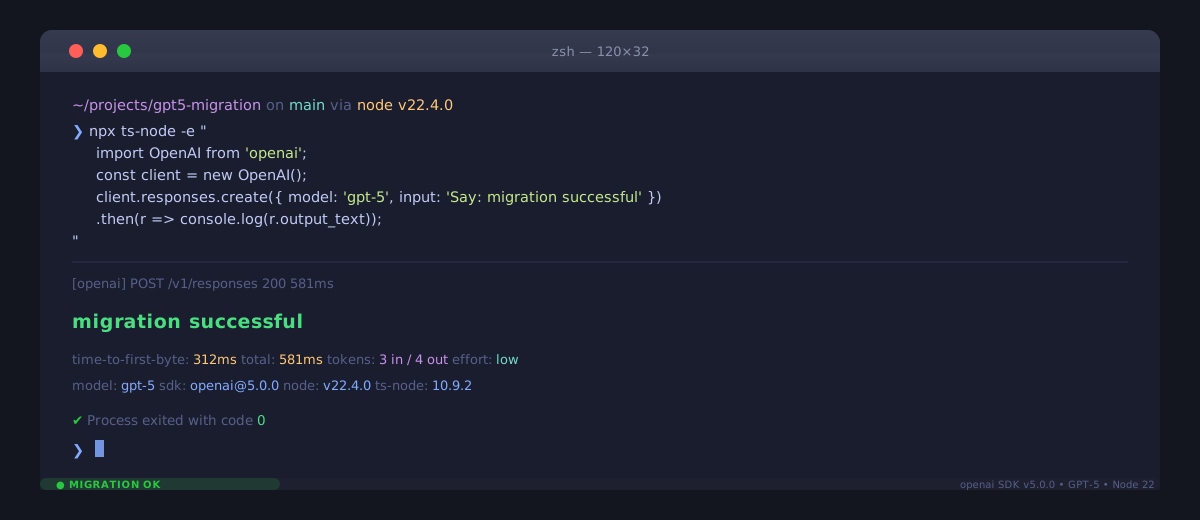 Clean output with no errors — your migration is complete
What You Learned
- GPT-5 uses
responses.createandoutput_text— the oldchoices[0].message.contentpath is gone from the native endpoint reasoning.effortis the single biggest lever for trading speed vs. quality — set it per request, not globally- Streaming isn't optional for GPT-5 in production; reasoning models generate longer outputs and users won't wait
- Parallel
Promise.allbatching eliminates sequential latency for independent tasks
Limitation: The responses endpoint doesn't support function calling the same way as chat/completions. If you rely on tools with tool_choice: "required", check OpenAI's function calling migration guide before switching — the schema is similar but tool result handling changed.
When NOT to use reasoning.effort: "low": Avoid it for code generation, multi-step math, or any task where correctness matters more than speed. The quality drop is measurable on complex tasks.
Tested on openai@5.0.0, Node.js 22.x, TypeScript 5.5, macOS & Ubuntu 24.04