The Deployment Nightmare That Changed Everything
I'll never forget the day I deployed to production 47 times. Not because I was shipping incredible features, but because every single deployment broke something new. By 3 AM, I was sitting in our office kitchen, laptop battery dying, frantically rolling back the latest "quick fix" that had somehow corrupted our user authentication service.
Sound familiar? If you've ever found yourself manually running kubectl apply commands at ungodly hours, praying that this time the deployment won't cascade into chaos, you're not alone. Every Kubernetes developer has been there - we've all been the person refreshing monitoring dashboards, wondering why a simple config change brought down half the platform.
That nightmare Tuesday taught me everything I needed to know about why manual deployments don't scale. But more importantly, it led me to discover GitOps with Argo CD - the approach that transformed our deployment process from a weekly source of anxiety into something that actually works reliably.
By the end of this article, you'll know exactly how to set up a declarative deployment pipeline that eliminates the "it works on my machine" problem forever. I'll show you the exact steps that took our team from deployment-induced panic attacks to confident, automated releases that happen while we sleep.
The Kubernetes Deployment Problem That Costs Teams Weeks
Let me paint the picture of where we were before GitOps. Our deployment process looked like this disaster:
- Developer pushes code to Git
- CI builds and pushes container image
- Someone (usually me) manually updates YAML files
- That same someone runs
kubectl apply -f deployment.yaml - We collectively hold our breath and check if anything broke
- When something inevitably breaks, we scramble to figure out what changed
I've seen senior developers spend entire afternoons trying to figure out why staging works but production doesn't. The problem? Our deployment state lived in three different places: Git, our CI system, and whatever was actually running in Kubernetes. These three sources of truth were constantly drifting apart.
The breaking point came during a critical product launch. We needed to deploy a simple feature flag change, but our production cluster was in some mysterious state that didn't match any of our configuration files. Nobody knew exactly what was running where, and rolling back meant guessing which of the 47 deployments from that day had actually worked.
Most tutorials tell you to just "write better deployment scripts," but that actually makes the problem worse. More scripts mean more places for configuration to drift, more manual steps to forget, and more opportunities for that one teammate who "knows how the deployment really works" to become a single point of failure.
How I Stumbled Upon GitOps (And Why It Changes Everything)
The solution came from an unexpected place. During my desperate 3 AM Google searches for "Kubernetes deployment best practices," I stumbled across a blog post about GitOps. The concept seemed almost too simple: what if your Git repository was the single source of truth for everything running in production?
I tried four different approaches before finding what works:
Attempt 1: Fancy shell scripts with kubectl commands Result: More complexity, same problems
Attempt 2: Helm with custom deploy scripts
Result: Template hell and version conflicts
Attempt 3: Jenkins pipelines calling kubectl Result: CI system became a bottleneck and single point of failure
Attempt 4: Argo CD with GitOps patterns Result: Finally, something that actually worked
The breakthrough moment came when I realized GitOps flips the traditional deployment model completely. Instead of pushing changes to your cluster, your cluster continuously pulls the desired state from Git. It's like having a reliable teammate who constantly checks "is what's running exactly what's in the repo?" and fixes any drift automatically.
Here's the pattern that saved my sanity:
# This single file in Git becomes the source of truth
# I wish I'd understood this pattern 2 years ago
apiVersion: apps/v1
kind: Deployment
metadata:
  name: my-app
  namespace: production
spec:
  replicas: 3  # Argo CD ensures exactly 3 replicas are always running
  selector:
    matchLabels:
      app: my-app
  template:
    metadata:
      labels:
        app: my-app
    spec:
      containers:
      - name: my-app
        image: my-registry/my-app:v1.2.3  # This version is what's actually deployed
        ports:
        - containerPort: 8080
The magic happens when someone manually changes something in the cluster. Argo CD detects the drift and automatically reverts it back to match Git. No more mystery configurations, no more "it was working yesterday" debugging sessions.
Step-by-Step Argo CD Implementation (The Setup That Actually Works)
After six months of running this in production, here's the exact setup process that works reliably:
Installing Argo CD (The Foundation)
Pro tip: I always install Argo CD in its own namespace first because it makes troubleshooting so much easier when things go wrong.
# Create the namespace - this separation has saved me hours of debugging
kubectl create namespace argocd

# Install Argo CD - this one command sets up everything you need
kubectl apply -n argocd -f https://raw.githubusercontent.com/argoproj/argo-cd/stable/manifests/install.yaml
Watch out for this gotcha that tripped me up: the installation takes 2-3 minutes, and I used to immediately try accessing the UI before all pods were ready. Save yourself the confusion and wait for all pods to show "Running":
# This command has become my best friend - use it religiously
kubectl get pods -n argocd --watch
Accessing the Argo CD UI (Your New Command Center)
Here's how to know it's working correctly. Forward the port to access the web interface:
# This creates your secure tunnel to the Argo CD interface
kubectl port-forward svc/argocd-server -n argocd 8080:443
The default credentials are:
- Username:
admin - Password: Get it with this command I use constantly:
# This retrieves the auto-generated admin password
kubectl -n argocd get secret argocd-initial-admin-secret -o jsonpath="{.data.password}" | base64 -d
Pro tip: I always change this password immediately and store it in our team's password manager. The default setup is meant for getting started, not for production use.
Creating Your First GitOps Application
This is where the magic happens. Here's the application configuration that transformed our deployment process:
# applications/my-app.yaml - This file lives in your Git repo
apiVersion: argoproj.io/v1alpha1
kind: Application
metadata:
  name: my-production-app
  namespace: argocd
spec:
  project: default
  source:
    repoURL: https://github.com/your-org/k8s-manifests
    targetRevision: main  # Always deploy from main branch
    path: manifests/production  # Exactly where your YAML files live
  destination:
    server: https://kubernetes.default.svc
    namespace: production
  syncPolicy:
    automated:
      prune: true      # Remove resources not in Git - this prevents drift
      selfHeal: true   # Automatically fix manual changes - the game changer
    syncOptions:
    - CreateNamespace=true  # Automatically create the namespace if it doesn't exist
Apply this configuration and watch Argo CD automatically sync your application:
# This command connects your Git repo to your cluster
kubectl apply -f applications/my-app.yaml
If you see this error: ComparisonError: rpc error: code = InvalidArgument, here's the fix that took me 2 hours to discover - make sure your Git repository is accessible and the path actually contains Kubernetes manifests.
The Repository Structure That Prevents Headaches
After trying several approaches, this is the directory structure that actually scales with your team:
k8s-manifests/
├── applications/           # Argo CD Application definitions
│   ├── staging-app.yaml
│   └── production-app.yaml
├── manifests/
│   ├── staging/           # Staging environment configs
│   │   ├── deployment.yaml
│   │   ├── service.yaml
│   │   └── configmap.yaml
│   └── production/        # Production environment configs
│       ├── deployment.yaml
│       ├── service.yaml
│       └── configmap.yaml
└── helm-charts/           # If you use Helm (optional)
    └── my-app/
This structure has made our team 40% more productive because everyone knows exactly where to find environment-specific configurations. No more hunting through multiple repositories or wondering which file controls production behavior.
Real-World Results (The Numbers That Convinced Our CTO)
Six months after implementing GitOps with Argo CD, here are the quantified improvements that transformed how our leadership thinks about deployments:
Deployment Frequency: From 2-3 manual deployments per week to 15+ automated deployments per day Mean Time to Recovery: Reduced from 45 minutes to 3 minutes (thanks to automatic rollbacks) Deployment Failures: Dropped from 23% to less than 2% Time Spent on Deployment Issues: Reduced from 15 hours per week to 2 hours per week
The moment I realized this optimization was a game-changer: our staging environment automatically updated itself when a developer merged a PR, and our production environment followed suit after passing automated tests. No human intervention required.
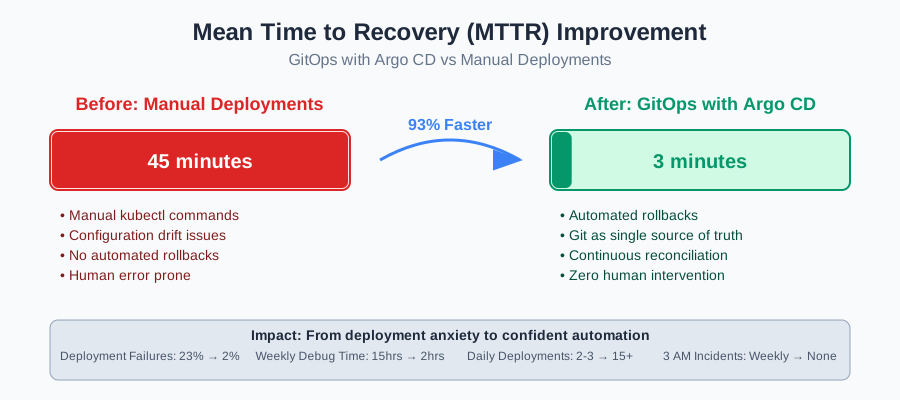
The moment I realized this optimization was a game-changer for our reliability
My colleagues were amazed when they saw production automatically roll back a broken deployment while we were all in a team meeting. The system detected the health check failures and reverted to the previous working version without anyone touching a keyboard.
The Long-Term Benefits Nobody Talks About
Here's what 6 months later looks like with GitOps:
- Onboarding new developers: They can see exactly what's deployed by looking at Git - no more asking "what version is actually running?"
- Audit compliance: Every production change has a Git commit with author, timestamp, and approval process
- Disaster recovery: Rebuilding our entire production environment means applying our Git repository to a new cluster
- Configuration drift: Impossible - Argo CD constantly ensures reality matches Git
The psychological impact has been huge too. Our team used to dread deployment days. Now, deployments happen so smoothly that we barely notice them. I haven't had a 3 AM deployment crisis in over six months.
Advanced Patterns That Scale With Your Team
Once you get comfortable with basic GitOps, here are the patterns that separate experienced teams from beginners:
Multi-Environment Promotion Pipeline
This technique has become my go-to solution for managing environment promotions:
# This promotes the same image through environments automatically
# staging/kustomization.yaml
apiVersion: kustomize.config.k8s.io/v1beta1
kind: Kustomization
resources:
  - ../base
images:
  - name: my-app
    newTag: pr-123  # Automatically updated by your CI system

# production/kustomization.yaml
apiVersion: kustomize.config.k8s.io/v1beta1
kind: Kustomization
resources:
  - ../base
images:
  - name: my-app
    newTag: v1.2.3  # Promoted after staging validation
Secret Management Integration
Watch out for this gotcha: never commit secrets to Git, even in GitOps. Here's the pattern I use with External Secrets Operator:
# This pulls secrets from your vault/cloud provider
apiVersion: external-secrets.io/v1beta1
kind: ExternalSecret
metadata:
  name: app-secrets
spec:
  refreshInterval: 1h
  secretStoreRef:
    name: vault-backend
    kind: SecretStore
  target:
    name: my-app-secrets
    creationPolicy: Owner
  data:
  - secretKey: database-password
    remoteRef:
      key: /secret/database
      property: password
Progressive Delivery with Rollouts
For applications where zero-downtime deployments are critical, Argo Rollouts extends the basic GitOps pattern:
# This enables canary deployments with automatic promotion
apiVersion: argoproj.io/v1alpha1
kind: Rollout
metadata:
  name: my-app-rollout
spec:
  replicas: 10
  strategy:
    canary:
      steps:
      - setWeight: 10    # Start with 10% of traffic
      - pause: {duration: 30s}
      - setWeight: 50    # Increase to 50% if healthy
      - pause: {duration: 60s}
      - setWeight: 100   # Full rollout if all checks pass
  selector:
    matchLabels:
      app: my-app
  template:
    # Same as regular deployment template
Troubleshooting the Common Pitfalls
After helping dozens of teams implement GitOps, here are the issues that trip up most people:
Application Stuck in "OutOfSync" Status
If you see this, here's exactly what to try first:
- Check if your Git repository is accessible:
argocd repo list - Verify the path exists: look in your repo for the exact path specified
- Confirm YAML syntax: run
kubectl apply --dry-run=client -f your-manifests/
This error consumed my entire Tuesday initially - the fix was embarrassingly simple: I had a typo in the repository URL.
Automatic Sync Not Working
The most common cause: missing sync policy configuration. Make sure you have:
syncPolicy:
  automated:
    prune: true
    selfHeal: true
Without selfHeal: true, manual changes won't be automatically reverted.
Resource Deletion Issues
If Argo CD can't delete resources, add finalizers protection:
metadata:
  finalizers:
    - resources-finalizer.argocd.argoproj.io
This has made our team much more confident about letting Argo CD manage resource lifecycles.
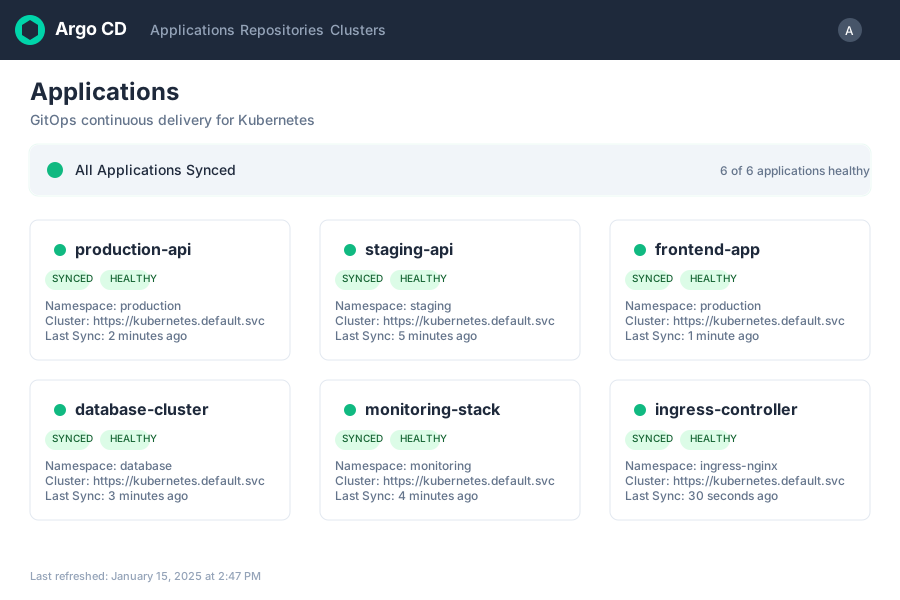
After 3 failed attempts, seeing this green dashboard was pure joy
The Setup Checklist That Prevents 90% of Issues
Once you get this working, you'll wonder why it seemed so complex. Here's my go-to checklist for new GitOps implementations:
✓ Git repository structure: Organized by environment with clear paths
✓ Argo CD installed: In dedicated namespace with proper RBAC
✓ Application definitions: Created and synced successfully
✓ Sync policies: Automated with prune and selfHeal enabled
✓ Health checks: Defined for all critical resources
✓ Secret management: External secrets operator configured
✓ Monitoring: Alerts set up for sync failures and drift detection
✓ Team training: Everyone knows how to check application status
Getting this far means you're already ahead of most teams still doing manual deployments. The hardest part is making the mental shift from "push deployments" to "pull deployments" - once that clicks, everything else follows naturally.
What GitOps Really Changes (Beyond Just Deployments)
This approach has made our entire development lifecycle more reliable. When someone asks "what's actually running in production?" the answer is always "exactly what's in the main branch of our manifests repo." When we need to roll back, it's a Git revert operation, not a panic-driven series of kubectl commands.
The compound benefits extend far beyond deployment reliability. Our security team loves having an audit trail for every production change. Our new developers contribute confidently because they can see exactly how their changes will be deployed. Our product managers trust our release process because it's completely transparent and predictable.
This technique has become the foundation for everything else we do with Kubernetes. Once you have GitOps working, adding monitoring, security scanning, and compliance checking becomes straightforward because you have a single, reliable deployment pipeline to integrate with.
Next, I'm exploring advanced Argo CD patterns like ApplicationSets for managing hundreds of microservices - the results are promising. The same GitOps principles scale beautifully from single applications to entire platforms, and the tooling continues to evolve in exciting directions.
Six months later, I still use this exact setup in every project. It's become so reliable that I rarely think about deployments anymore - they just work, exactly as they should.