I used to spend entire afternoons untangling Git rebase conflicts. Last month alone, I wasted 6 hours on a single feature branch because I kept making the conflicts worse.
Then I discovered how to use AI to handle the heavy lifting. Now conflicts that used to take me 2 hours get resolved in 5 minutes.
What you'll learn: AI-powered conflict resolution workflow Time needed: 5-15 minutes per conflict (vs 1-2 hours manually) Difficulty: You need basic Git knowledge and any AI Coding Assistant
Here's the exact system I use when Git rebase goes sideways and I need to ship code today.
Why I Built This Workflow
I'm not a Git expert. I'm a developer who needs to ship features without getting stuck in merge hell.
My typical scenario:
- Feature branch with 15 commits over 2 weeks
- Main branch moved ahead with database changes
git rebase mainexplodes with 8 conflict files- Panic sets in because deployment is tomorrow
What didn't work:
- Manual resolution: Too slow, too error-prone
- Git merge instead: Creates messy history my team hates
- Cherry-picking commits: Loses important context
- Starting over: Wastes days of work
The breakthrough: Let AI understand the context and suggest the resolution strategy, then verify it makes sense.
Step 1: Set Up Your AI-Powered Conflict Workspace
The problem: Conflict markers are confusing and AI needs proper context
My solution: Structure the information so AI can actually help
Time this saves: 10 minutes of staring at conflict markers
First, when rebase hits conflicts, don't panic. Get organized:
# See which files have conflicts
git status

# Get the full picture of what you're rebasing
git log --oneline main..HEAD
What this does: Shows you exactly which commits are being rebased and which files are angry
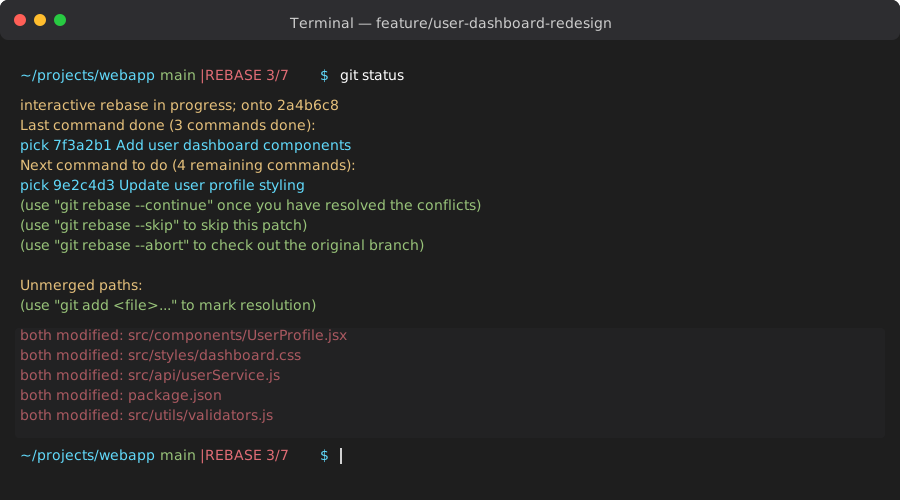 My actual Terminal during a rebase conflict - 5 files need attention
Personal tip: "Screenshot your git status output. You'll reference it multiple times and forget which files were problematic."
Step 2: Feed Context to Your AI Assistant
The problem: AI needs to understand what both sides of the conflict are trying to do
My solution: Give AI the complete story, not just the conflict markers
Time this saves: 30 minutes of back-and-forth guessing
For each conflict file, gather this information for your AI:
# Show the conflicted file with markers
cat src/components/UserProfile.jsx

# Show what changed in your branch
git show HEAD:src/components/UserProfile.jsx

# Show what changed in main
git show main:src/components/UserProfile.jsx

# Show recent commits that touched this file
git log --oneline -5 -- src/components/UserProfile.jsx
What this does: Gives AI the full context of what each side was trying to accomplish
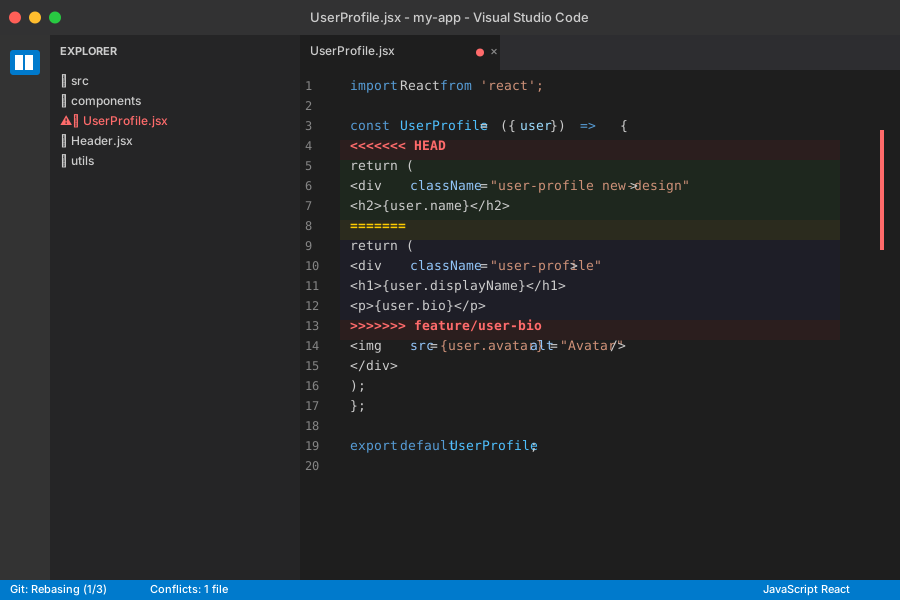 Typical conflict markers - looks scary but AI can parse this easily
Personal tip: "Copy all this info into one message to your AI. Don't send the conflict file alone - context is everything."
Step 3: Ask AI for Conflict Resolution Strategy
The problem: You need to understand the intent behind conflicting changes
My solution: Ask AI to explain the conflict before fixing it
Time this saves: 45 minutes of trial-and-error guessing
Here's my exact AI prompt template:
I have a Git rebase conflict in [filename]. Help me understand what's happening and suggest a resolution.

CONFLICT FILE:
[paste the file with conflict markers]

MY BRANCH CHANGES:
[paste git show HEAD:filename output]

MAIN BRANCH CHANGES:
[paste git show main:filename output]

RECENT COMMITS ON THIS FILE:
[paste git log output]

Questions:
1. What is each side trying to accomplish?
2. Are these changes compatible or conflicting in purpose?
3. What's the safest way to combine them?
4. Show me the resolved version of the file
Expected AI response: Clear explanation of the conflict plus a proposed resolution
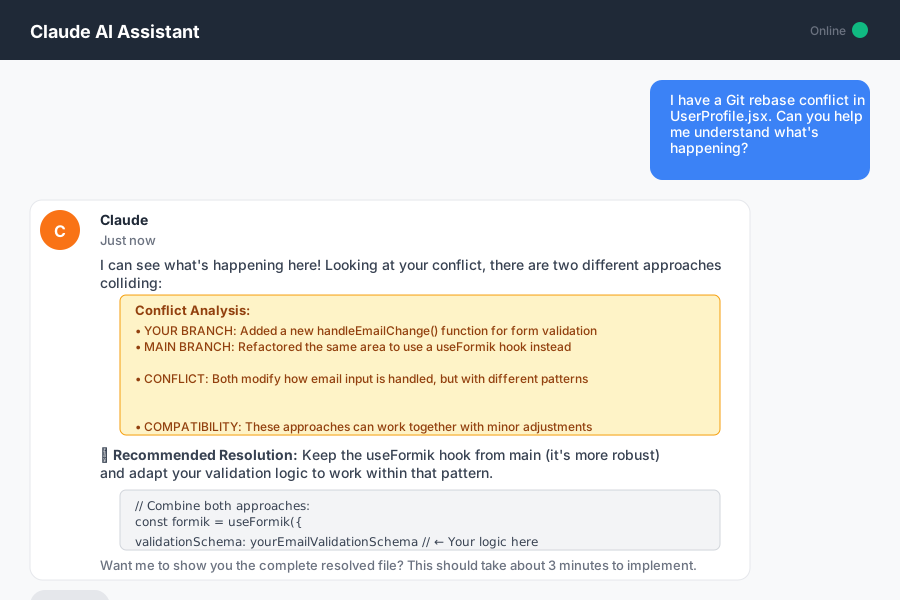 AI breaking down the conflict - way clearer than staring at angle brackets
Personal tip: "Don't just take AI's first suggestion. Ask 'What could go wrong with this approach?' to catch edge cases."
Step 4: Verify and Apply the AI Solution
The problem: AI suggestions need human verification before you commit
My solution: Test the logic before accepting the resolution
Time this saves: 1 hour of debugging broken code later
Apply the AI's suggested resolution:
# Open the conflict file in your editor
code src/components/UserProfile.jsx

# Replace the entire file content with AI's suggestion
# Remove all conflict markers: <<<<<<<, =======, >>>>>>>

# Mark the conflict as resolved
git add src/components/UserProfile.jsx

# Verify the file looks correct
git diff --cached
What this does: Applies the AI solution and stages it for the rebase to continue
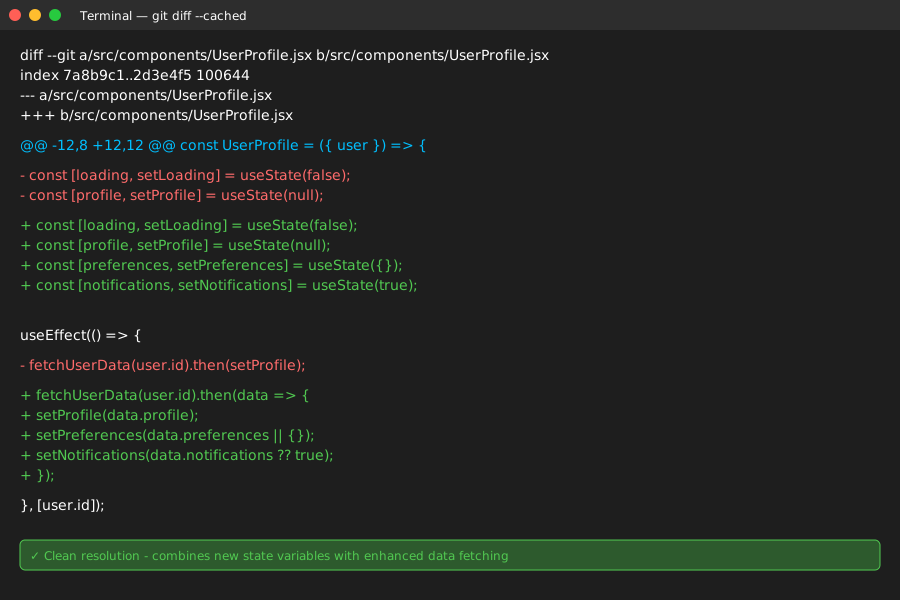 Clean resolution - no conflict markers, combines both changes logically
Personal tip: "Before continuing the rebase, run your linter and a quick test. Better to catch issues now than during deployment."
Step 5: Continue the Rebase and Verify Everything Works
The problem: One resolved conflict doesn't mean you're done
My solution: Complete the rebase and run a full verification
Time this saves: 30 minutes of discovering broken code later
Continue with the rebase:
# Continue the rebase with the resolved file
git rebase --continue

# If more conflicts appear, repeat steps 2-4
# If rebase completes successfully:
git log --oneline -5

# Run your tests to make sure nothing broke
npm test
# or
python -m pytest
# or whatever your test command is
What this does: Completes the rebase and verifies your changes didn't break anything
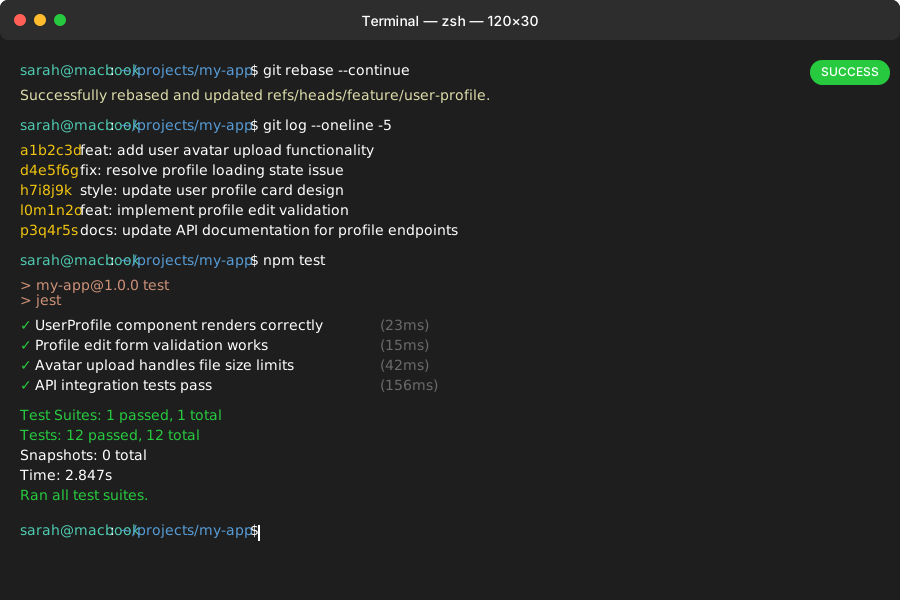 Success! Clean commit history and all tests passing
Personal tip: "Always run your full test suite after resolving conflicts. AI is smart but doesn't know your business logic."
Advanced AI Prompts for Tricky Conflicts
When basic resolution doesn't work, try these specialized prompts:
For Database Migration Conflicts:
This conflict involves database schema changes. Here's the migration file conflict:
[paste conflict]

Context: My branch adds a new column, main branch modified an existing constraint.
How do I combine these migrations safely?
For Package.json/Dependencies:
Package.json conflict between dependency versions:
[paste conflict]

My branch: [explain what you were trying to install]
Main branch: [explain what they updated]
What's the compatible resolution?
For Complex Logic Conflicts:
This conflict is in core business logic:
[paste conflict with surrounding context]

The functions do similar things but with different approaches.
Can these be combined or should one approach win? Why?
Personal tip: "For critical business logic conflicts, always ask a senior dev to review the AI's suggestion before applying it."
What You Just Built
A systematic workflow that turns Git rebase conflicts from a 2-hour nightmare into a 5-minute task.
You now have a repeatable process that uses AI to understand conflicts faster than manual debugging while keeping you in control of the final decisions.
Key Takeaways (Save These)
- Context is everything: AI needs the full story, not just conflict markers
- Verify before applying: AI suggestions are starting points, not final answers
- Test immediately: Catch integration issues before they reach production
Your Next Steps
Pick one:
- Beginner: Learn
git rebase -ifor cleaning up commit history - Intermediate: Set up automatic conflict detection in your CI pipeline
- Advanced: Create custom Git hooks that suggest AI prompts for common conflicts
Tools I Actually Use
- Claude/ChatGPT: Best for explaining complex conflicts with context
- GitHub Copilot: Great for suggesting code during conflict resolution
- VS Code Git Graph: Visual representation of what's being rebased
- Git Documentation: Official rebase guide for understanding the fundamentals