GGUF quantization after fine-tuning is the step most tutorials skip — they show you how to train, then assume you know how to ship. This guide covers the exact llama.cpp workflow to convert a Hugging Face fine-tuned model to GGUF and quantize it to a size that runs on consumer hardware.
You'll learn:
- How to merge LoRA adapters into a base model before conversion
- How to convert the merged model to GGUF using
convert_hf_to_gguf.py - How to quantize to Q4_K_M, Q5_K_M, or Q8_0 using
llama-quantize - Which quantization level to pick for your RAM/quality target
Time: 25 min | Difficulty: Intermediate
Why GGUF Conversion Breaks After Fine-Tuning
Most fine-tuning runs produce a LoRA adapter, not a standalone model. You end up with two directories: the original base weights and a small adapter_model.safetensors. Feed that adapter directly into llama.cpp's converter and it will error immediately — the converter expects full model weights, not a delta.
Even when you do have full weights (a merged or full-param fine-tune), subtle config differences — a renamed tokenizer_config.json key, a missing rope_scaling field, a non-standard chat template — silently produce malformed GGUF files that crash at inference with no obvious error.
Symptoms:
KeyError: 'rope_scaling'during conversionllama_model_load: error loading modelat runtime- Garbled output or repetition loop — quantization ran but config wasn't embedded correctly
ValueError: Unrecognized modelwhenconvert_hf_to_gguf.pyhits a custom architecture
Solution
Step 1: Merge LoRA Adapters into the Base Model
Skip this step only if you ran a full parameter fine-tune (no PEFT/LoRA). Otherwise, merge first.
# merge_lora.py
# Merges adapter weights into base — required before GGUF conversion
from peft import PeftModel
from transformers import AutoModelForCausalLM, AutoTokenizer
import torch

BASE_MODEL = "meta-llama/Llama-3.1-8B-Instruct"   # or your local path
ADAPTER_PATH = "./checkpoints/lora-adapter"
OUTPUT_PATH = "./merged-model"

tokenizer = AutoTokenizer.from_pretrained(BASE_MODEL)
base = AutoModelForCausalLM.from_pretrained(
    BASE_MODEL,
    torch_dtype=torch.float16,   # float16 keeps disk size manageable before quantization
    device_map="cpu",            # CPU merge avoids VRAM limits on large models
)

model = PeftModel.from_pretrained(base, ADAPTER_PATH)
model = model.merge_and_unload()   # collapses LoRA A/B matrices into base weights

model.save_pretrained(OUTPUT_PATH)
tokenizer.save_pretrained(OUTPUT_PATH)
print("Merged model saved to", OUTPUT_PATH)
python merge_lora.py
Expected output: Merged model saved to ./merged-model
If it fails:
ValueError: adapter_config.json not found→ checkADAPTER_PATHpoints to the folder, not a file- OOM on GPU → set
device_map="cpu"(already set above — confirm it wasn't overridden) AttributeError: 'LlamaForCausalLM' has no attribute 'merge_and_unload'→ runpip install -U peft --break-system-packages
Step 2: Clone llama.cpp and Build the Tools
git clone https://github.com/ggerganov/llama.cpp
cd llama.cpp

# Build with CUDA support (remove -DGGML_CUDA=ON for CPU-only)
cmake -B build -DGGML_CUDA=ON
cmake --build build --config Release -j$(nproc)
Expected output: [100%] Built target llama-quantize and llama-cli in ./build/bin/
If it fails:
nvcc not found→ installcuda-toolkit-12or drop-DGGML_CUDA=ONfor CPU buildcmake: command not found→sudo apt install cmake --break-system-packages(Ubuntu 24)
Install Python deps for the converter:
pip install -r requirements.txt --break-system-packages
# Key packages: transformers, sentencepiece, numpy, gguf
Step 3: Convert the Merged Model to GGUF (F16)
Always convert to F16 first. Quantize in the next step — going directly to Q4 in one pass skips the high-precision intermediate that llama-quantize needs.
python convert_hf_to_gguf.py \
  ../merged-model \
  --outfile ../merged-model/model-f16.gguf \
  --outtype f16
# --outtype f16 preserves full weight precision before lossy quantization
Expected output:
Model successfully exported to ../merged-model/model-f16.gguf
If it fails:
KeyError: 'rope_scaling'→ openconfig.jsonand add"rope_scaling": null— some fine-tuning configs drop this fieldUnrecognized model type→ your base model architecture may need a custom conversion script; checkllama.cpp/examples/convert_legacy_llama.py- Converter hangs on large model → add
--vocab-onlyfirst to validate tokenizer, then rerun without it
Step 4: Quantize to Your Target Format
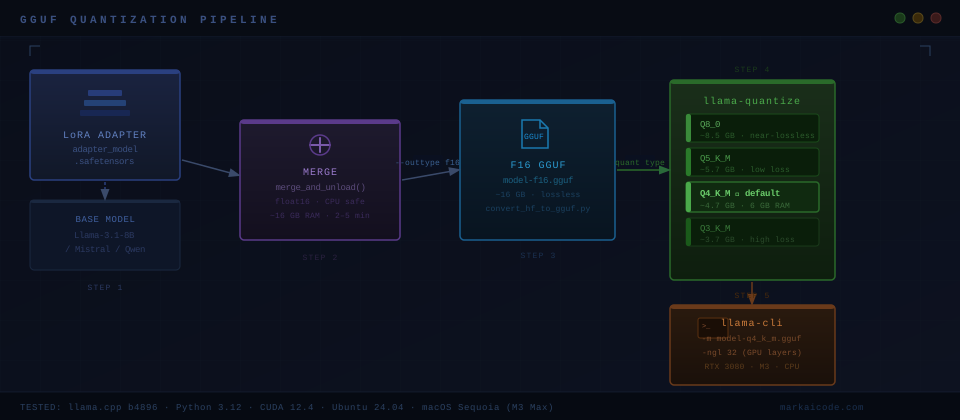 End-to-end pipeline: LoRA adapter merge → F16 GGUF conversion → lossy quantization → local inference
# Q4_K_M — best default: 4-bit with mixed precision on attention layers
./build/bin/llama-quantize \
  ../merged-model/model-f16.gguf \
  ../merged-model/model-q4_k_m.gguf \
  Q4_K_M

# Q5_K_M — +15% size, noticeably better on reasoning and code tasks
./build/bin/llama-quantize \
  ../merged-model/model-f16.gguf \
  ../merged-model/model-q5_k_m.gguf \
  Q5_K_M

# Q8_0 — near-lossless, ~2× size of Q4_K_M, use when VRAM allows
./build/bin/llama-quantize \
  ../merged-model/model-f16.gguf \
  ../merged-model/model-q8_0.gguf \
  Q8_0
Expected output per run:
[  0/ 32] blk.0.attn_norm.weight - [ 4096,     1,     1,     1], type =    f32, size =    0.016 MB
...
llama_model_quantize_internal: model size  = 15246.07 MB
llama_model_quantize_internal: quant size  =  4685.32 MB
If it fails:
invalid magic→ the F16 GGUF is corrupt; rerun Step 3quantize: failed to load model→ llama.cpp version mismatch between convert and quantize steps; rebuild after pulling latest
Step 5: Test Inference with the Quantized Model
./build/bin/llama-cli \
  -m ../merged-model/model-q4_k_m.gguf \
  -p "Explain gradient checkpointing in one paragraph." \
  -n 200 \
  --temp 0.7 \
  -ngl 32   # 32 layers offloaded to GPU — adjust to your VRAM
Expected output: Coherent generation in under 5 seconds on an RTX 3080.
Quantization Format Comparison
| Format | Size (8B model) | Quality loss | RAM needed | Best for |
|---|---|---|---|---|
| F16 | ~16 GB | None | 18 GB+ | Intermediate only |
| Q8_0 | ~8.5 GB | Minimal | 10 GB | High accuracy, 12 GB VRAM |
| Q5_K_M | ~5.7 GB | Low | 8 GB | Balanced quality/size |
| Q4_K_M | ~4.7 GB | Moderate | 6 GB | Best default |
| Q3_K_M | ~3.7 GB | High | 5 GB | Edge / low RAM only |
| Q2_K | ~2.9 GB | Very high | 4 GB | Last resort |
Q4_K_M uses the _K_M "K-quant" method, which quantizes most layers to 4-bit but keeps attention and output layers at higher precision. For most fine-tuned chat and instruction models, quality versus Q8_0 is indistinguishable in casual use and measurably close on standard benchmarks.
Verification
Run a quick perplexity check against a reference text to catch catastrophic quantization failure:
./build/bin/llama-perplexity \
  -m ../merged-model/model-q4_k_m.gguf \
  -f /path/to/wikitext-2-raw/wiki.test.raw \
  --chunks 10
You should see: Perplexity within ~0.5–1.5 points of the F16 baseline. A jump of 3+ points means the conversion or quantization step has an error worth investigating.
What You Learned
- LoRA adapters must be merged into base weights before GGUF conversion — the converter requires full model weights
- Always produce F16 GGUF first, then quantize in a second step using
llama-quantize - Q4_K_M is the right default for 8B models on consumer hardware — 6 GB RAM, minimal quality loss
- Config fields dropped by fine-tuning frameworks (like
rope_scaling) silently break conversion; patchconfig.jsonbefore converting
Tested on llama.cpp commit b4896, Python 3.12, CUDA 12.4, Ubuntu 24.04 and macOS Sequoia (M3 Max)
FAQ
Q: Can I skip the merge step if I just want to test the adapter quickly?
A: No — convert_hf_to_gguf.py does not support PEFT adapters. You must merge first. The merge takes 2–5 minutes on CPU for an 8B model and uses ~16 GB RAM.
Q: What is the difference between Q4_K_M and Q4_K_S?
A: The _M (medium) variant uses higher precision on more sensitive layers than _S (small). Q4_K_M is ~3% larger than Q4_K_S but scores better on reasoning benchmarks. Use _M unless you are tightly constrained on disk space.
Q: Does GGUF quantization work on Mistral, Qwen, and Gemma fine-tunes?
A: Yes. llama.cpp supports all major architectures. If conversion fails with Unrecognized model, check that your llama.cpp checkout is recent — architecture support is updated frequently.
Q: Minimum VRAM to run a quantized 8B model at Q4_K_M?
A: 6 GB VRAM with -ngl 32 (full GPU offload). On 4 GB VRAM, reduce to -ngl 20 and accept partial CPU offload — generation will be ~2–3× slower.
Q: Can I upload the GGUF to Hugging Face directly?
A: Yes. Create a repo, then huggingface-cli upload your-org/model-name model-q4_k_m.gguf. Users with Ollama can pull it via a custom Modelfile pointing to the uploaded GGUF.