Problem: Building Real-Time Voice AI Is Harder Than It Should Be
Most voice AI setups involve a messy chain: speech-to-text → LLM → text-to-speech, each with its own latency hit. The result feels robotic — because it is.
Google's Gemini Live API takes a different approach. It's a stateful WebSocket connection that streams audio in and out natively, letting you build conversation apps that feel genuinely responsive.
You'll learn:
- How the Live API works and which model to use
- How to stream mic audio and receive spoken responses in Python
- How to handle barge-in, VAD, and function calling
- When to use server-to-server vs. client-to-server architecture
Time: 20 min | Level: Intermediate
Why This Works Differently
Traditional voice pipelines are three separate models stitched together. Gemini's native audio model processes and generates audio directly — no intermediate transcription step. This cuts latency significantly and preserves acoustic cues like tone and pacing.
The key model: gemini-2.5-flash-native-audio-preview-12-2025
This model is what powers the Live API for voice. It supports:
- Continuous audio streaming (input: 16kHz PCM mono, output: 24kHz)
- Barge-in — users can interrupt the model mid-response
- Voice Activity Detection (VAD) built in
- Function calling for integrating external tools
- Session memory across a single conversation (up to 10 minutes default)
Common symptoms of the old approach:
- 2–4 second delays between utterances
- Model doesn't react to interruptions
- Emotion and tone get lost in transcription
Solution
Step 1: Set Up Your Environment
pip install google-genai pyaudio
You'll also need portaudio at the system level:
# macOS
brew install portaudio

# Ubuntu / Debian
sudo apt-get install portaudio19-dev
Get your API key from Google AI Studio and export it:
export GOOGLE_API_KEY="your-key-here"
Expected: pip install completes with no errors.
If it fails:
- PyAudio build error on macOS: Run
brew install portaudiofirst, then retry - Permission error on Linux: Use
pip install --useror a virtualenv
Step 2: Stream Mic Audio and Get Spoken Responses
This is the minimal working example — mic in, speaker out.
import asyncio
from google import genai
import pyaudio

client = genai.Client()

# Audio format constants — don't change these
# The Live API requires 16kHz PCM mono input and outputs 24kHz
FORMAT = pyaudio.paInt16
CHANNELS = 1
SEND_SAMPLE_RATE = 16000
RECEIVE_SAMPLE_RATE = 24000
CHUNK_SIZE = 1024

pya = pyaudio.PyAudio()

MODEL = "gemini-2.5-flash-native-audio-preview-12-2025"
CONFIG = {
    "response_modalities": ["AUDIO"],
    "system_instruction": "You are a helpful assistant. Keep responses concise.",
}

audio_out_queue = asyncio.Queue()
audio_in_queue = asyncio.Queue(maxsize=5)


async def capture_mic():
    """Capture mic audio and push to input queue."""
    mic_info = pya.get_default_input_device_info()
    stream = await asyncio.to_thread(
        pya.open,
        format=FORMAT,
        channels=CHANNELS,
        rate=SEND_SAMPLE_RATE,
        input=True,
        input_device_index=mic_info["index"],
        frames_per_buffer=CHUNK_SIZE,
    )
    while True:
        chunk = await asyncio.to_thread(
            stream.read, CHUNK_SIZE, exception_on_overflow=False
        )
        await audio_in_queue.put(chunk)


async def play_audio():
    """Read from output queue and play through speakers."""
    stream = await asyncio.to_thread(
        pya.open,
        format=FORMAT,
        channels=CHANNELS,
        rate=RECEIVE_SAMPLE_RATE,
        output=True,
    )
    while True:
        chunk = await audio_out_queue.get()
        await asyncio.to_thread(stream.write, chunk)


async def run():
    async with client.aio.live.connect(model=MODEL, config=CONFIG) as session:
        async def send_audio():
            while True:
                chunk = await audio_in_queue.get()
                await session.send_realtime_input(audio=chunk)

        async def receive_audio():
            async for response in session.receive():
                if response.data:
                    # Raw PCM audio from the model — queue it for playback
                    await audio_out_queue.put(response.data)

        # Run all three tasks concurrently
        await asyncio.gather(
            capture_mic(),
            play_audio(),
            send_audio(),
            receive_audio(),
        )


if __name__ == "__main__":
    asyncio.run(run())
Expected: You'll hear the model respond after you speak. There's a short ramp-up delay on first connection (~1 second), then it feels near-instant.
If it fails:
- No audio device found: Check
pya.get_default_input_device_info()— you may need to pass a specific device index - Connection refused: Verify
GOOGLE_API_KEYis set and has Live API access enabled in AI Studio
Step 3: Add Function Calling
This is where voice apps get interesting. You can give the model tools to call — weather, search, database lookups — and it decides when to trigger them mid-conversation.
import json

# Define your tool
tools = [
    {
        "name": "get_weather",
        "description": "Get current weather for a city",
        "parameters": {
            "type": "object",
            "properties": {
                "city": {"type": "string", "description": "City name"}
            },
            "required": ["city"],
        },
    }
]

CONFIG = {
    "response_modalities": ["AUDIO"],
    "tools": [{"function_declarations": tools}],
    "system_instruction": "You are a helpful assistant with weather access.",
}


def handle_tool_call(name: str, args: dict) -> str:
    """Execute the tool and return a result string."""
    if name == "get_weather":
        city = args.get("city", "unknown")
        # Replace with real API call
        return json.dumps({"city": city, "temp": "22°C", "condition": "sunny"})
    return json.dumps({"error": "unknown tool"})


async def receive_with_tools(session):
    """Handle model responses, including function call turns."""
    async for response in session.receive():
        if response.data:
            await audio_out_queue.put(response.data)

        # Check for function calls in the response
        if response.tool_call:
            for call in response.tool_call.function_calls:
                result = handle_tool_call(call.name, dict(call.args))
                # Send the result back so the model can respond
                await session.send_tool_response(
                    function_responses=[
                        {"id": call.id, "name": call.name, "response": result}
                    ]
                )
Why this works: The model decides when to call a tool based on conversation context. It pauses its audio output, calls your function, gets the result, and continues speaking — all automatically.
Step 4: Choose Your Architecture
Two approaches, each with real tradeoffs:
Server-to-server (recommended for production): Your client sends audio to your backend, which proxies it to the Live API. Keeps your API key off the client.
Browser/App → Your Server → Live API WebSocket
Client-to-server (faster to build, fine for prototypes): Your frontend connects directly to the Live API using ephemeral tokens. Slightly lower latency.
Browser/App → Live API WebSocket (via ephemeral token)
Generate ephemeral tokens server-side with a short TTL:
# On your server — never expose your main API key to clients
token_response = client.auth_tokens.create(
    ttl_seconds=60,  # Token expires in 60 seconds
    uses=1,          # Single-use only
)
ephemeral_token = token_response.token
# Send this token to the client, then let the client connect directly
Use server-to-server when: You're building production apps, need to log or moderate conversations, or are integrating with internal services. Use client-to-server when: You're prototyping, or latency is your top priority.
Verification
Run your script and speak a question:
python voice_app.py
You should see: No errors on startup. After speaking, the model responds in under 2 seconds in typical conditions.
To test barge-in, start speaking while the model is mid-response. It should stop immediately and listen. If it doesn't, check that VAD is enabled (it's on by default — you'd have to explicitly disable it to lose this behavior).
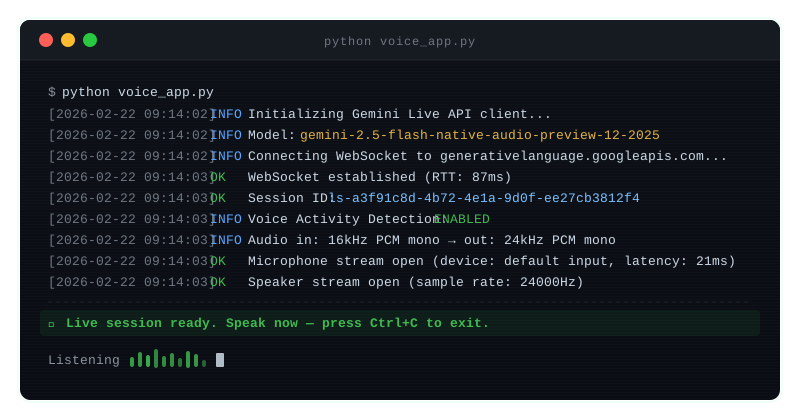 Clean connection log — the session ID confirms your WebSocket is live
What You Learned
- The Live API uses WebSockets with a persistent session — not a request/response cycle
- Audio format matters: 16kHz PCM in, 24kHz out. Wrong format = garbled or silent output
- Native audio models skip the STT/TTS pipeline, which is why latency is so much lower
- Session length caps at 10 minutes by default — build reconnection logic for longer use cases
- Function calling works mid-conversation with no extra orchestration needed
When NOT to use this: The Live API is stateful and session-based. For short, one-off voice queries (like a voice search bar), a standard generate + TTS approach is simpler and cheaper. Use the Live API when you need multi-turn conversation.
Limitation to know: Sessions max out at 10 minutes. For longer conversations, implement session handoff — save context and reconnect.
Tested with google-genai 1.x, Python 3.11+, gemini-2.5-flash-native-audio-preview-12-2025, macOS & Ubuntu