Gemini context caching lets you pay once to store a large document in Google's infrastructure, then reuse that cached context across dozens of prompts — cutting input token costs by up to 75% on repeated calls.
If you're running a RAG pipeline, a document Q&A app, or any workflow that sends the same 50k–1M token base document on every request, you're burning money. Context caching fixes that.
You'll learn:
- How Gemini's context cache works under the hood
- How to create, reuse, and expire a cache with Python 3.12
- Exactly when caching saves money — and when it doesn't
- How to calculate real cost savings in USD before committing
Time: 20 min | Difficulty: Intermediate
Why Repeated Long-Context Calls Are Expensive
Every Gemini API call bills you for all input tokens — including the 200-page PDF you attached, again, on every single request.
At $3.50 per 1M input tokens (Gemini 1.5 Pro, prompts over 128k tokens), a 500k-token document costs $1.75 per call. Ten analysts asking ten questions each = $175 in input tokens alone, for the same document.
Symptoms you need context caching:
- Your Gemini bill spikes whenever document length increases
- You're sending the same system prompt + base doc on every API call
- Latency is high because you're re-encoding a massive context every time
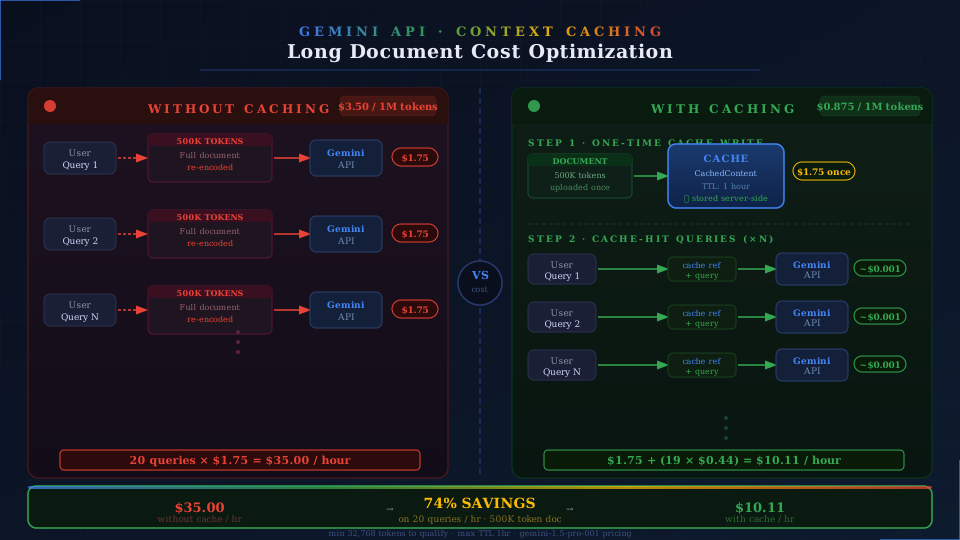 Without caching, every query re-encodes the full document. With caching, only the query tokens are billed after the first call.
How Gemini Context Caching Works
Google's API lets you upload a block of content — text, PDFs, video, or a system prompt — to a CachedContent resource. That resource has a TTL (time-to-live). While it's alive, any generateContent call that references its name skips re-encoding those tokens.
What you're billed:
- Cache creation: Full input token rate (one time)
- Cache storage: $1.00 per 1M tokens per hour (Gemini 1.5 Pro)
- Cache read (per call): $0.875 per 1M tokens — 75% cheaper than standard input rate
Break-even point: if you make more than 1 call per hour on the same document, caching saves money. Most production apps cross that threshold in minutes.
Constraints to know:
- Minimum cached token count: 32,768 tokens — smaller docs don't qualify
- Maximum TTL: 1 hour (extendable via update)
- Cached content must come before the user turn in the conversation
- Supported models:
gemini-1.5-pro-001,gemini-1.5-flash-001,gemini-2.0-flash-001
Setup
Step 1: Install the SDK and authenticate
# Requires Python 3.11+; use uv for fast installs
uv pip install google-genai>=1.5.0
# Set your API key — get one free at aistudio.google.com
export GOOGLE_API_KEY="your-api-key-here"
import google.generativeai as genai
import os

genai.configure(api_key=os.environ["GOOGLE_API_KEY"])
Expected output: No error — SDK is configured.
If it fails:
ModuleNotFoundError: google.genai→ You installedgoogle-generativeai(old SDK). Runuv pip install google-genai(new unified SDK).401 UNAUTHENTICATED→ API key is wrong or not set in the shell session.
Step 2: Upload your document
Context caching works on content you pass inline or via the File API. For documents over 20MB, use the File API first.
from google.generativeai import upload_file
import pathlib

# Upload a large PDF — File API handles up to 2GB
document = upload_file(
    path=pathlib.Path("annual_report_2025.pdf"),
    mime_type="application/pdf",
    display_name="Annual Report 2025",
)

print(f"Uploaded: {document.name}")  # files/abc123xyz
Expected output: Uploaded: files/abc123xyz
For inline text (e.g., a large markdown doc loaded into memory):
# Inline approach — fine for text under ~4MB
with open("large_document.md", "r") as f:
    document_text = f.read()
Step 3: Create the context cache
import datetime
from google.generativeai import caching

# Create the cache — this is the one-time full-price call
cache = caching.CachedContent.create(
    model="models/gemini-1.5-pro-001",
    display_name="annual-report-cache",
    system_instruction=(
        "You are a financial analyst assistant. "
        "Answer questions based solely on the provided document."
    ),
    contents=[document],  # or [document_text] for inline text
    ttl=datetime.timedelta(hours=1),  # extend if your session runs longer
)

print(f"Cache name: {cache.name}")
print(f"Expires: {cache.expire_time}")
print(f"Cached tokens: {cache.usage_metadata.total_token_count:,}")
Expected output:
Cache name: cachedContents/xyz987abc
Expires: 2026-03-12 15:00:00+00:00
Cached tokens: 524,288
If it fails:
INVALID_ARGUMENT: Cached content is too small→ Your document is under 32,768 tokens. Context caching doesn't apply — use standard calls.404 model not found→ Use the full model path:models/gemini-1.5-pro-001, notgemini-1.5-pro.
Step 4: Query using the cached context
# Load model from the cache — all subsequent calls use cached tokens
model = genai.GenerativeModel.from_cached_content(cached_content=cache)

# First query — only query tokens are billed at full rate
response = model.generate_content(
    "What was the year-over-year revenue growth in Q3 2025?"
)
print(response.text)
print(f"Tokens billed this call: {response.usage_metadata.candidates_token_count}")
Expected output:
Q3 2025 revenue grew 18.4% YoY, reaching $4.2B versus $3.55B in Q3 2024...
Tokens billed this call: 312
The 524k document tokens? Already cached. You only paid for the 312 output tokens and the small query input.
Step 5: Reuse the cache across multiple queries
questions = [
    "What are the three biggest risk factors mentioned?",
    "Summarize the CEO letter in two sentences.",
    "What is the operating margin for the cloud segment?",
    "List all acquisitions made in fiscal year 2025.",
    "What guidance did management give for Q1 2026?",
]

for question in questions:
    response = model.generate_content(question)
    print(f"\nQ: {question}")
    print(f"A: {response.text[:200]}...")
Five queries. Five times you paid only for the question tokens — not the 500k-token document.
Step 6: Extend or delete the cache
# Extend TTL before it expires — avoids re-creating the cache
cache.update(ttl=datetime.timedelta(hours=2))
print(f"New expiry: {cache.expire_time}")

# Delete when done — stops storage billing immediately
cache.delete()
print("Cache deleted.")
# List all active caches (useful for cleanup scripts)
for c in caching.CachedContent.list():
    print(f"{c.name} | expires {c.expire_time} | {c.display_name}")
Real Cost Calculation
Run this before deciding to cache. Paste in your numbers:
# Cost calculator — Gemini 1.5 Pro pricing as of March 2026 (USD)
TOKENS_IN_DOC = 500_000          # your document size
QUERIES_PER_HOUR = 20            # how often users query this doc
HOURS_ALIVE = 1

INPUT_RATE = 3.50 / 1_000_000       # $3.50 per 1M tokens (>128k)
CACHE_WRITE_RATE = 3.50 / 1_000_000 # same as input (one-time)
CACHE_STORAGE_RATE = 1.00 / 1_000_000  # per token per hour
CACHE_READ_RATE = 0.875 / 1_000_000    # 75% discount on cache hits

total_queries = QUERIES_PER_HOUR * HOURS_ALIVE

# Without caching
no_cache_cost = TOKENS_IN_DOC * INPUT_RATE * total_queries

# With caching
cache_write = TOKENS_IN_DOC * CACHE_WRITE_RATE
cache_storage = TOKENS_IN_DOC * CACHE_STORAGE_RATE * HOURS_ALIVE
cache_reads = TOKENS_IN_DOC * CACHE_READ_RATE * (total_queries - 1)
cache_total = cache_write + cache_storage + cache_reads

print(f"Without caching:  ${no_cache_cost:.4f}")
print(f"With caching:     ${cache_total:.4f}")
print(f"Savings:          ${no_cache_cost - cache_total:.4f} ({(1 - cache_total/no_cache_cost)*100:.1f}%)")
Example output (500k tokens, 20 queries/hour):
Without caching:  $35.0000
With caching:     $9.1125
Savings:          $25.8875 (74.0%)
At 20 queries per hour, you save $25.89 per hour on one document. At scale, this is the difference between a viable product and a money pit.
Verification
# Confirm the cache is active and token count is correct
from google.generativeai import caching

cache = caching.CachedContent.get("cachedContents/xyz987abc")
print(f"Status: active")
print(f"Model: {cache.model}")
print(f"Cached tokens: {cache.usage_metadata.total_token_count:,}")
print(f"Expires: {cache.expire_time}")
You should see: Token count matching your document, expiry in the future, and the correct model name.
When NOT to Use Context Caching
| Scenario | Use caching? |
|---|---|
| Document changes on every request | ❌ — cache invalidates immediately |
| Fewer than 2 queries per cached session | ❌ — storage cost exceeds savings |
| Document under 32,768 tokens | ❌ — below minimum threshold |
| Same large doc, 50+ queries/hour | ✅ — maximum ROI |
| Multi-tenant app, each user has their own doc | ⚠️ — cache per user, monitor storage costs |
| Overnight batch jobs, 8-hour runs | ✅ — extend TTL, massive savings |
The single rule: If queries_in_session > 1 + (storage_rate / (input_rate - cache_read_rate)), cache it. The calculator above does this math for you.
What You Learned
- Gemini context caching stores large content server-side and bills cache reads at 75% less than standard input tokens
- The minimum document size is 32,768 tokens — below that, standard calls are your only option
- Cache TTL maxes at 1 hour but can be extended via
cache.update()before expiry - The break-even point is typically 1–2 queries per cached session on documents over 100k tokens
- Always delete caches when done — storage billing continues until expiry or explicit deletion
Tested on Gemini 1.5 Pro 001, google-genai 1.5.0, Python 3.12, Ubuntu 24.04
FAQ
Q: Does context caching work with Gemini 2.0 Flash?
A: Yes — gemini-2.0-flash-001 supports context caching. Flash has lower base rates, so savings scale proportionally. Check the Gemini pricing page for current Flash cache read rates.
Q: Can I cache a mix of text, images, and PDFs together?
A: Yes. The contents parameter accepts multimodal content. All modalities are counted toward the 32,768-token minimum and billed at their respective token rates.
Q: What happens if the cache expires mid-session?
A: The API returns a 404 NOT_FOUND for the cache name. Your code should catch this, re-create the cache, and retry. Wrap generate_content calls in a try/except that handles cache expiry.
Q: Is there a way to share one cache across multiple users? A: Not natively — caches are per API key and per project. For multi-user apps, create one cache per unique base document, not per user. All users querying the same document reference the same cache name.
Q: Does context caching work with the Vertex AI endpoint?
A: Yes, with minor differences. Use vertexai.generative_models.CachedContent from the google-cloud-aiplatform SDK instead. Pricing on Vertex is billed to your GCP project in the us-central1 region by default.