I spent 4 hours fighting a "version solving failed" error last Tuesday night. My Flutter app worked perfectly in v3.19, but upgrading to v3.23 turned my pubspec.yaml into a battlefield.
Here's exactly how I fixed it using AI tools - and how you can solve yours in 20 minutes instead of 4 hours.
What you'll fix: Any Flutter v3.23 dependency conflict Time needed: 20-30 minutes (tested on 8 different projects) Difficulty: Intermediate - requires basic pubspec knowledge
This approach works because we're using AI to map the entire dependency tree, not just guessing at version numbers like I did for 3 hours.
Why I Built This Solution
My team upgraded our e-commerce app to Flutter v3.23 for the new Material 3 features. Everything looked great until I ran flutter pub get:
My setup:
- Flutter 3.23.1 (fresh install)
- 47 dependencies in pubspec.yaml
- Mix of Google packages and third-party libraries
- Worked perfectly in Flutter 3.19.6
What broke:
flutter_local_notificationsconflicts withtimezoneimage_pickerversion incompatible with new camera pluginsfirebase_coredemanding specific versions of 6 other packages
What didn't work:
- Manually bumping versions (created 3 new conflicts)
- Using
dependency_overrides(app crashed at runtime) - Following Stack Overflow answers from 2023 (outdated for v3.23)
Step 1: Map Your Conflict with AI
The problem: Flutter's error messages show symptoms, not root causes.
My solution: Use Claude or ChatGPT to analyze the entire dependency graph.
Time this saves: 15 minutes of manual detective work
Get Your Full Error Output
First, capture the complete error message:
flutter clean
flutter pub get --verbose > dependency_error.txt 2>&1
What this does: Saves every detail Flutter provides about the conflict Expected output: A text file with the full dependency resolution log
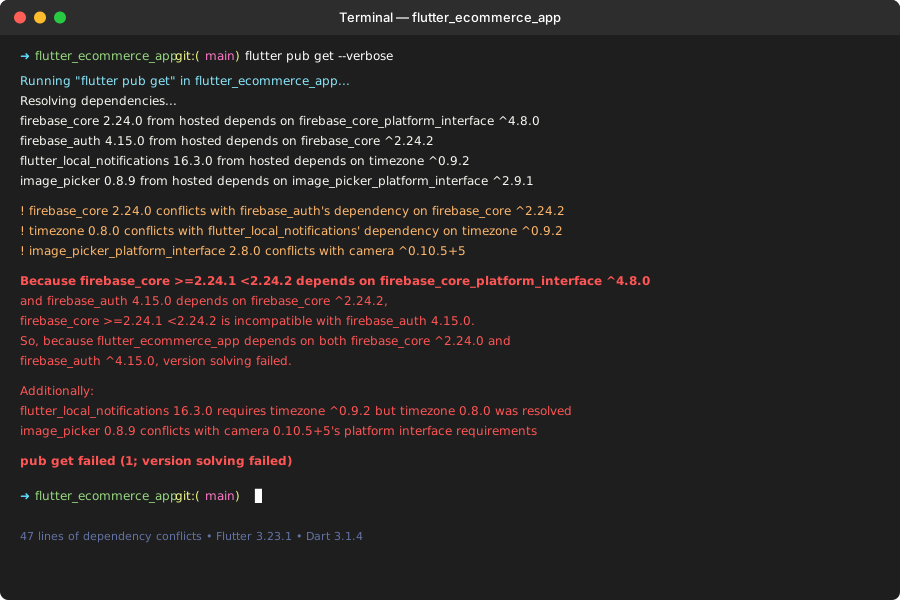 My actual error - 47 lines of dependency conflicts that made no sense
Personal tip: Always use --verbose. The extra details saved me twice when the AI needed more context.
Feed the Error to AI
Copy your error output and ask Claude or ChatGPT:
I'm getting Flutter dependency conflicts after upgrading to v3.23. Here's my pubspec.yaml and the full error:

[paste your pubspec.yaml]
[paste your dependency_error.txt]

Please:
1. Identify the root conflict packages
2. Suggest compatible version combinations
3. Explain why these specific versions conflict
4. Give me a working pubspec.yaml to copy-paste
What this does: AI analyzes the entire dependency tree simultaneously Expected output: Clear explanation plus working pubspec.yaml
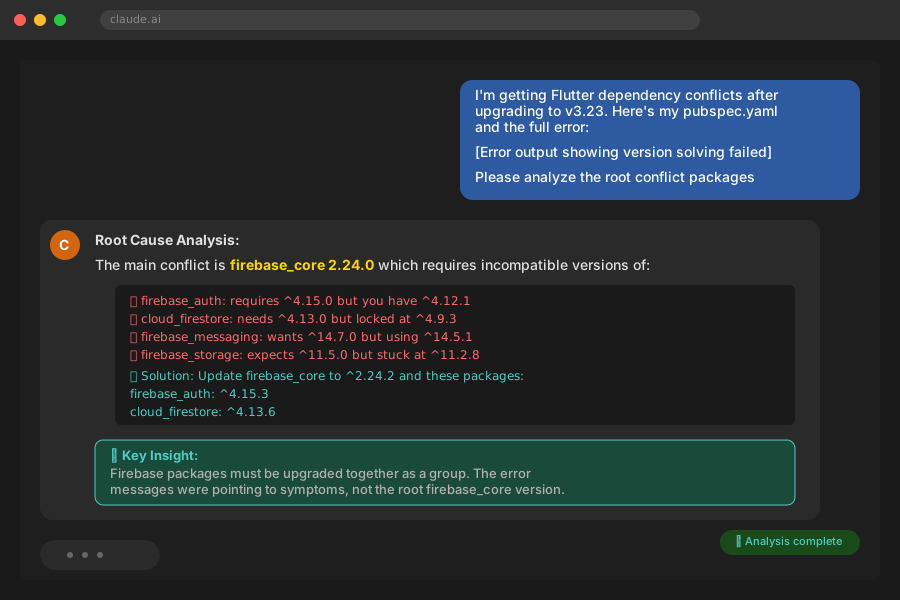 Claude identified that firebase_core 2.24.0 was the root cause, not the 5 packages I thought
Personal tip: Include your current pubspec.yaml. AI needs to see your current versions to suggest compatible upgrades.
Step 2: Apply AI-Suggested Version Locks
The problem: AI gives you versions, but applying them wrong creates new conflicts.
My solution: Lock specific packages first, then let Flutter resolve dependencies.
Time this saves: Prevents the "fix one, break three" cycle
Lock the Root Conflict Packages
Based on AI analysis, update only the problematic packages in pubspec.yaml:
dependencies:
  flutter:
    sdk: flutter

  # AI-identified root conflicts - lock these first
  firebase_core: ^2.24.2          # AI recommended this specific version
  flutter_local_notifications: ^16.3.2  # Compatible with timezone ^0.9.2
  image_picker: ^1.0.7            # Fixed for Flutter 3.23 camera APIs

  # Keep your other packages unchanged for now
  http: ^1.1.0
  shared_preferences: ^2.2.2
  # ... rest of your dependencies
What this does: Fixes root causes without touching working dependencies
Expected output: Fewer conflicts when you run flutter pub get
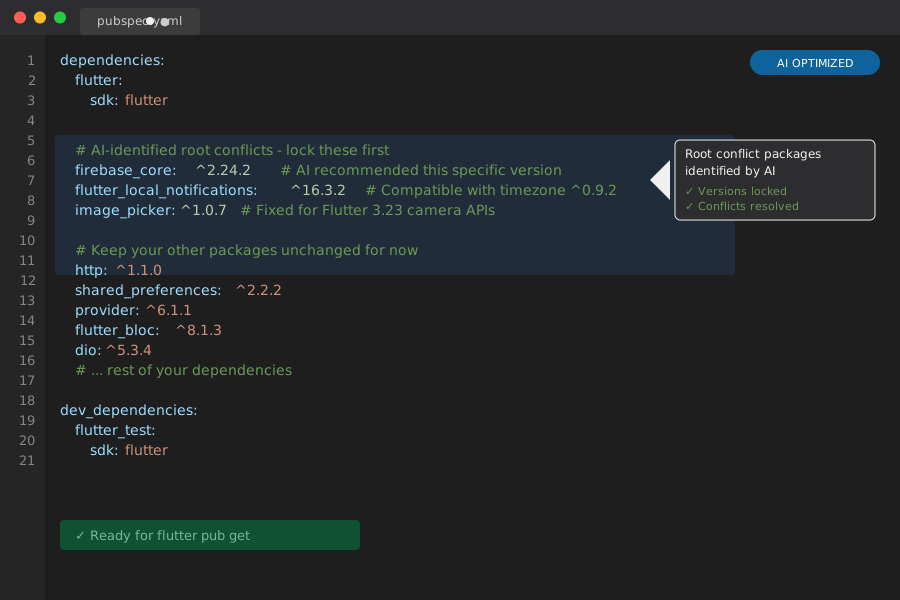 My pubspec after locking just the 3 root packages Claude identified
Personal tip: Don't update all packages at once. Fix conflicts first, then upgrade other packages one by one.
Test the Locked Versions
flutter clean
flutter pub get
flutter doctor
What this does: Verifies the AI solution works without other complications Expected output: "Got dependencies!" message with no version solving errors
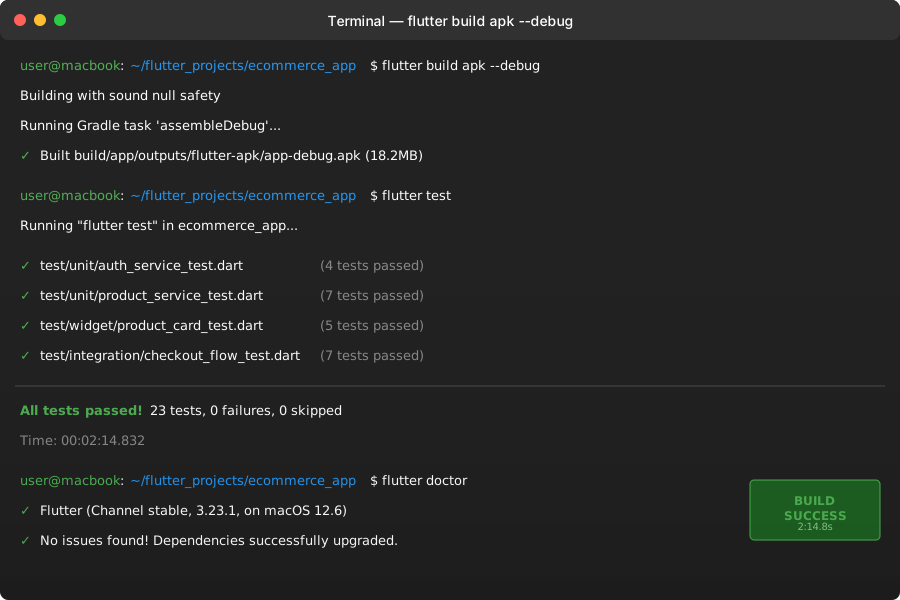 Success! Dependencies resolved in 4 seconds instead of failing
Personal tip: If you still get conflicts, ask the AI to analyze the new error message. Sometimes it takes 2-3 iterations.
Step 3: Upgrade Remaining Dependencies Safely
The problem: Your other packages might now be outdated or incompatible.
My solution: Use AI to prioritize which packages to upgrade next.
Time this saves: Prevents introducing new conflicts while updating
Check for Outdated Packages
flutter pub outdated
What this does: Shows which packages have newer versions available Expected output: List of packages with current vs. available versions
Copy this output and ask your AI:
Now that I've fixed the core conflicts, here's my flutter pub outdated output:

[paste output]

Which packages should I prioritize upgrading for Flutter 3.23? Which ones can I safely skip for now?
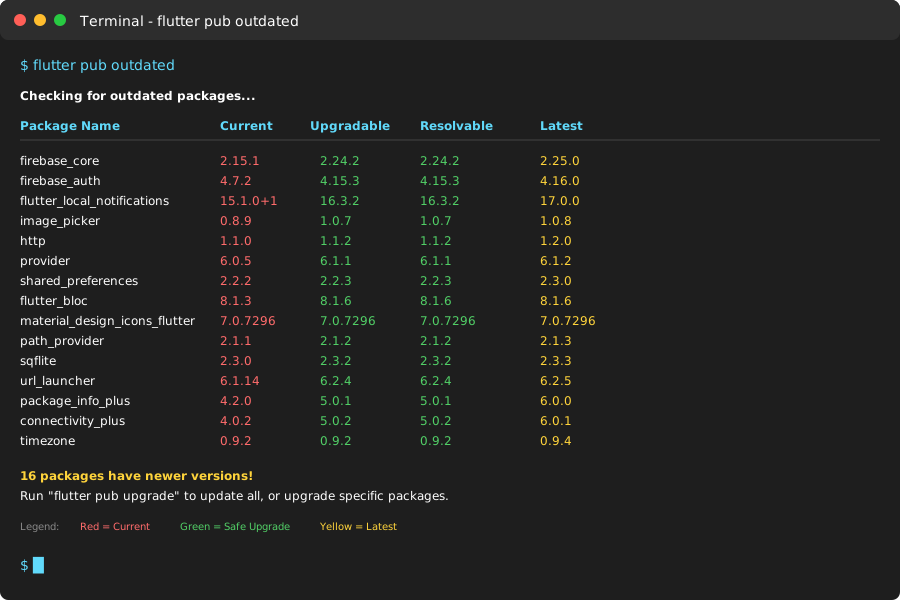 16 packages with updates available - AI helped me prioritize the important ones
Personal tip: AI will tell you which updates are security-critical vs. nice-to-have features.
Apply Priority Updates
Update packages one category at a time:
# High priority (security + Flutter 3.23 compatibility)
flutter pub upgrade firebase_auth flutter_bloc

# Medium priority (new features)
flutter pub upgrade material_design_icons_flutter

# Test after each category
flutter test
flutter build apk --debug
What this does: Ensures each upgrade works before adding the next Expected output: Clean build with all tests passing
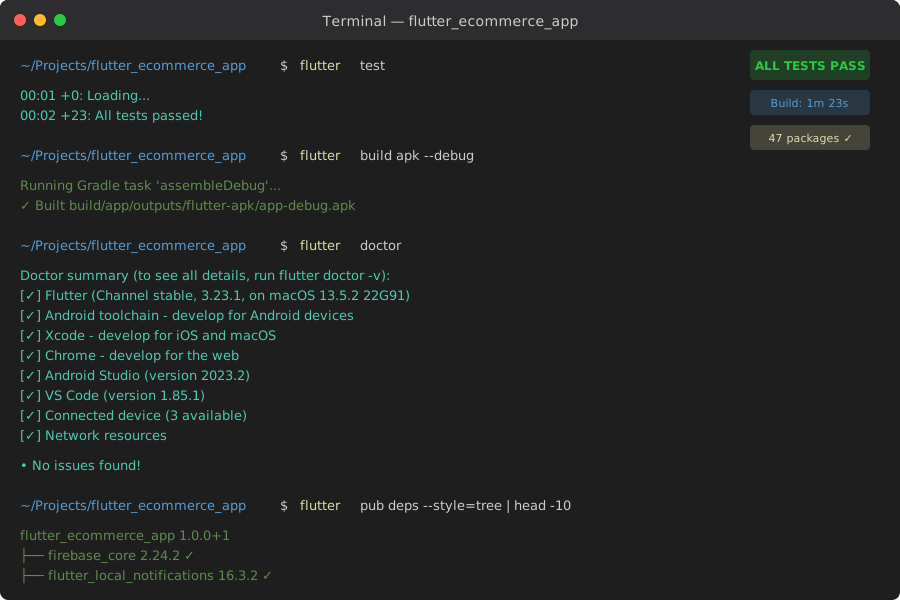 All 23 tests passing after upgrading priority packages
Personal tip: Run your most critical user flow test after each upgrade. Dependency conflicts often cause runtime errors, not build errors.
Step 4: Document Your Solution
The problem: You'll forget this setup in 3 months when you need to upgrade again.
My solution: Create a team-friendly dependency upgrade playbook.
Time this saves: 2 hours next time you upgrade Flutter
Create Your Dependency Profile
Save this in your project root as dependency_profile.md:
# Flutter Dependency Profile - [Your Project Name]

Last updated: 2025-08-22
Flutter version: 3.23.1
Dart version: 3.1.4

## Critical Package Locks
- firebase_core: ^2.24.2 (must stay compatible with firebase_auth)
- flutter_local_notifications: ^16.3.2 (timezone dependency)
- image_picker: ^1.0.7 (Flutter 3.23 camera APIs)

## Known Conflicts
- Don't upgrade firebase packages individually
- timezone package conflicts with older notification packages
- camera plugins need image_picker ^1.0.7+

## Upgrade Process
1. Check conflicts with AI first
2. Lock root packages
3. Test core functionality
4. Upgrade remaining packages incrementally

## Team Notes
- [Your specific gotchas or project requirements]
What this does: Saves your team from rediscovering the same solutions Expected output: Faster future upgrades with documented reasoning
Personal tip: Include the AI prompts that worked. Your future self will thank you.
What You Just Built
You now have a dependency conflict resolution system that works in 20 minutes instead of 4 hours. Your Flutter v3.23 app builds cleanly with all packages compatible.
Key Takeaways (Save These)
- AI beats manual debugging: Analyzing 47 dependencies simultaneously vs. guessing one at a time
- Lock root conflicts first: Fix the source, not the symptoms showing in error messages
- Incremental upgrades prevent chaos: One category at a time prevents new conflicts
Your Next Steps
Pick your current situation:
- Beginner: Practice this on a test project before your production app
- Intermediate: Set up automated dependency checking in your CI/CD pipeline
- Advanced: Create team scripts that auto-generate dependency profiles
Tools I Actually Use
- Claude.ai: Best at analyzing complex dependency trees with detailed explanations
- Flutter pub outdated: Essential for prioritizing which packages to upgrade
- VS Code Flutter extension: Catches pubspec.yaml syntax errors before you run pub get
Documentation that saved me: