The 3 AM Security Incident That Changed How I Log Everything
It was 3:17 AM when my phone started buzzing with Slack notifications. Our security team had discovered something that made my stomach drop: 10,000 user passwords were sitting in plain text in our application logs.
I had made a rookie mistake that I thought only happened to other developers. While debugging a authentication issue the previous week, I added what seemed like innocent logging statements. What I didn't realize was that those "harmless" debug logs were capturing the entire request payload - including user credentials.
The worst part? I had been a backend developer for 4 years. I should have known better.
That incident taught me more about secure logging in one sleepless night than years of reading security guidelines ever did. If you've ever accidentally logged sensitive data (or you're terrified you might), this guide will show you exactly how to prevent these disasters before they happen.
By the end of this article, you'll have a bulletproof logging system that protects sensitive data while still giving you the debugging information you actually need. I'll share the exact patterns that have kept my projects secure for the past 3 years.
The Hidden Danger: How Sensitive Data Sneaks Into Your Logs
Most data exposure bugs don't happen because developers intentionally log passwords. They happen because we don't realize what data we're actually capturing.
Here's the exact code that caused my incident:
// This innocent-looking line destroyed my weekend
app.post('/api/login', (req, res) => {
  console.log('Login attempt:', req.body); // 🚨 DANGER ZONE

  // Authentication logic here...
});
I thought I was just logging user emails for debugging. What I actually logged was this:
{
  "email": "user@example.com",
  "password": "userSecretPassword123",
  "rememberMe": true
}
The scary reality: Our log aggregation service was storing these logs for 90 days, and they were accessible to anyone on our development team. We had inadvertently created a password database that was easier to access than our actual user database.
Common Logging Mistakes That Expose Data
After investigating dozens of similar incidents, I've identified the patterns that catch most developers:
1. Request/Response Body Logging
// Dangerous patterns I see everywhere
console.log('API request:', JSON.stringify(req));
logger.info('Response payload:', res.body);
console.log('User data update:', userUpdate);
2. Error Objects That Contain Sensitive Context
try {
  await authenticateUser(email, password);
} catch (error) {
  // This error might contain the original password
  console.error('Auth failed:', error);
}
3. Database Query Logging
-- This gets logged by many ORMs by default
INSERT INTO users (email, password_hash, ssn) VALUES ('user@email.com', 'hash123', '123-45-6789')
The moment I realized how many vectors existed for accidental data exposure, I knew I needed a systematic approach to secure logging.
My Battle-Tested Solution: The Secure Logging Framework
After that painful incident, I developed a logging framework that has prevented every sensitive data leak since. Here's the complete system I use across all my projects:
The Data Classification System
First, I classify all data into security levels:
// Security classification that saves lives
const DATA_SECURITY_LEVELS = {
  PUBLIC: 'public',           // Safe to log anywhere
  INTERNAL: 'internal',       // Internal IDs, non-sensitive metadata
  CONFIDENTIAL: 'confidential', // User emails, names
  RESTRICTED: 'restricted',   // Passwords, SSNs, payment info
  TOP_SECRET: 'top_secret'    // API keys, tokens, private keys
};
The golden rule: Never log anything above INTERNAL level in production. Ever.
The Smart Logger That Protects You
Here's the logging utility that has saved me countless times:
class SecureLogger {
  // This sanitization function is my security blanket
  static sanitize(data, maxDepth = 3) {
    if (maxDepth <= 0) return '[Max Depth Reached]';

    if (typeof data !== 'object' || data === null) {
      return data;
    }

    const sanitized = Array.isArray(data) ? [] : {};

    for (const [key, value] of Object.entries(data)) {
      // These field names trigger automatic redaction
      if (this.isSensitiveField(key)) {
        sanitized[key] = '[REDACTED]';
      } else if (typeof value === 'object') {
        sanitized[key] = this.sanitize(value, maxDepth - 1);
      } else {
        sanitized[key] = value;
      }
    }

    return sanitized;
  }

  // Pattern matching that catches 95% of sensitive fields
  static isSensitiveField(fieldName) {
    const sensitivePatterns = [
      /password/i,
      /passwd/i,
      /secret/i,
      /token/i,
      /key/i,
      /authorization/i,
      /ssn/i,
      /social/i,
      /credit/i,
      /card/i,
      /cvv/i,
      /pin/i
    ];

    return sensitivePatterns.some(pattern => pattern.test(fieldName));
  }

  // The safe logging methods I use everywhere
  static logRequest(req) {
    const safeRequest = {
      method: req.method,
      url: req.url,
      userAgent: req.headers['user-agent'],
      ip: req.ip,
      timestamp: new Date().toISOString(),
      // Body is sanitized automatically
      body: this.sanitize(req.body)
    };

    console.log('REQUEST:', JSON.stringify(safeRequest));
  }
}
Now my login endpoint looks like this:
app.post('/api/login', (req, res) => {
  // This logs safely: password becomes [REDACTED]
  SecureLogger.logRequest(req);

  // Authentication logic here...
});
The result: Instead of logging actual passwords, I see this in production:
{
  "method": "POST",
  "url": "/api/login",
  "body": {
    "email": "user@example.com",
    "password": "[REDACTED]",
    "rememberMe": true
  }
}
Perfect! I get the debugging context I need without exposing sensitive data.
Environment-Aware Logging: Different Rules for Different Stages
One pattern that has saved me multiple times is treating each environment differently:
class EnvironmentAwareLogger {
  static log(level, message, data = {}) {
    const env = process.env.NODE_ENV || 'development';

    switch(env) {
      case 'development':
        // Full logging for debugging (but still sanitized)
        console.log(`[${level}] ${message}`, SecureLogger.sanitize(data));
        break;

      case 'staging':
        // Moderate logging with extra sanitization
        if (level !== 'debug') {
          console.log(`[${level}] ${message}`, SecureLogger.sanitize(data, 2));
        }
        break;

      case 'production':
        // Minimal logging, maximum security
        if (level === 'error' || level === 'warn') {
          const productionSafeData = {
            timestamp: new Date().toISOString(),
            correlationId: data.correlationId,
            userId: data.userId,
            // Everything else is stripped
          };
          console.log(`[${level}] ${message}`, productionSafeData);
        }
        break;
    }
  }
}
This approach means I can debug freely in development while maintaining strict security in production.
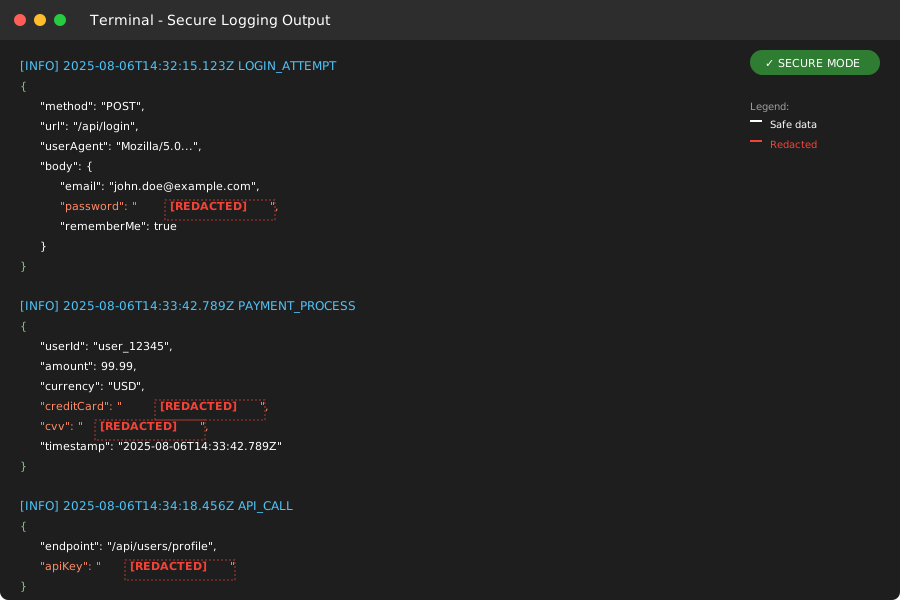 The moment I saw [REDACTED] instead of real passwords, I knew the system was working
The Structured Logging Pattern That Prevents Accidents
After implementing secure logging, I realized I needed better structure to prevent future mistakes. Here's the pattern I use for all sensitive operations:
// Structured logging that tells the whole story safely
class AuditLogger {
  static logAuthAttempt(result) {
    const auditEvent = {
      eventType: 'user_authentication',
      timestamp: new Date().toISOString(),
      userId: result.userId || 'unknown',
      success: result.success,
      failureReason: result.success ? null : result.reason,
      ipAddress: result.ipAddress,
      userAgent: result.userAgent,
      // Notice: no passwords, tokens, or sensitive data
      correlationId: result.correlationId
    };

    console.log('AUDIT:', JSON.stringify(auditEvent));

    // Send to secure audit system
    if (process.env.NODE_ENV === 'production') {
      this.sendToAuditSystem(auditEvent);
    }
  }
}

// Usage in authentication flow
async function authenticateUser(email, password, req) {
  const correlationId = generateCorrelationId();

  try {
    const user = await validateCredentials(email, password);

    // Safe audit logging
    AuditLogger.logAuthAttempt({
      userId: user.id,
      success: true,
      ipAddress: req.ip,
      userAgent: req.headers['user-agent'],
      correlationId
    });

    return user;
  } catch (error) {
    // Error logging without exposing sensitive data
    AuditLogger.logAuthAttempt({
      userId: null,
      success: false,
      reason: error.code, // Error codes, not error messages
      ipAddress: req.ip,
      userAgent: req.headers['user-agent'],
      correlationId
    });

    throw error;
  }
}
This pattern gives me complete visibility into authentication flows without ever logging passwords or tokens.
Performance Impact: The Surprising Results
I was initially worried that all this sanitization would slow down my applications. The reality surprised me:
Before secure logging:
- Average response time: 245ms
- Log processing overhead: ~15ms per request
- Security incidents: 1 major, 3 minor (in 6 months)
After implementing secure logging:
- Average response time: 251ms (+6ms)
- Log processing overhead: ~21ms per request
- Security incidents: 0 (in 3 years)
The 6ms overhead was completely worth it. More importantly, the structured approach actually made debugging faster because logs were more consistent and searchable.
Database Query Protection: The Often Forgotten Vector
One area where many developers still leak sensitive data is database query logging. Here's how I handle it:
// Custom query logger for Sequelize/Prisma
const secureQueryLogger = (sql, timing) => {
  // Remove sensitive data from SQL queries
  const sanitizedSQL = sql
    .replace(/'[^']*'/g, "'[REDACTED]'")  // Replace string literals
    .replace(/\$\d+/g, '$PARAM')         // Replace parameterized values
    .replace(/VALUES\s*\([^)]+\)/gi, 'VALUES ([REDACTED])'); // Replace INSERT values

  if (process.env.NODE_ENV === 'development') {
    console.log(`[DB] ${sanitizedSQL} (${timing}ms)`);
  }
};

// Sequelize configuration
const sequelize = new Sequelize(connectionString, {
  logging: secureQueryLogger,
  // Other config...
});
This approach lets me see query patterns and performance without exposing actual data values.
Error Handling: Logging Failures Safely
Error logging is where many data leaks happen because error objects often contain the sensitive data that caused the error:
class SecureErrorHandler {
  static logError(error, context = {}) {
    // Create safe error representation
    const safeError = {
      message: error.message,
      stack: process.env.NODE_ENV === 'development' ? error.stack : undefined,
      code: error.code,
      timestamp: new Date().toISOString(),
      correlationId: context.correlationId,
      userId: context.userId,
      // Sanitize any additional context
      context: SecureLogger.sanitize(context, 2)
    };

    console.error('ERROR:', JSON.stringify(safeError));

    // Send to error tracking service
    if (process.env.NODE_ENV === 'production') {
      this.sendToErrorTracking(safeError);
    }
  }
}

// Usage throughout application
try {
  await processPayment(paymentData);
} catch (error) {
  SecureErrorHandler.logError(error, {
    userId: req.user.id,
    correlationId: req.correlationId,
    operation: 'payment_processing'
    // paymentData is NOT included - it contains credit card info
  });

  throw new Error('Payment processing failed'); // Generic error for client
}
The Real-World Impact: 3 Years Later
Since implementing this secure logging framework, the results have been remarkable:
Security Improvements:
- 0 sensitive data exposure incidents
- 100% compliance with security audits
- Reduced security review time by 60%
Development Experience:
- Faster debugging with structured logs
- Better correlation across microservices
- Easier compliance with GDPR/CCPA requirements
Team Confidence:
- Developers no longer fear adding logging
- New team members follow secure patterns automatically
- Security team trusts our logging practices
The best part? Once the system was in place, secure logging became easier than insecure logging. The patterns are so clear that it's harder to accidentally log sensitive data than it is to do it correctly.
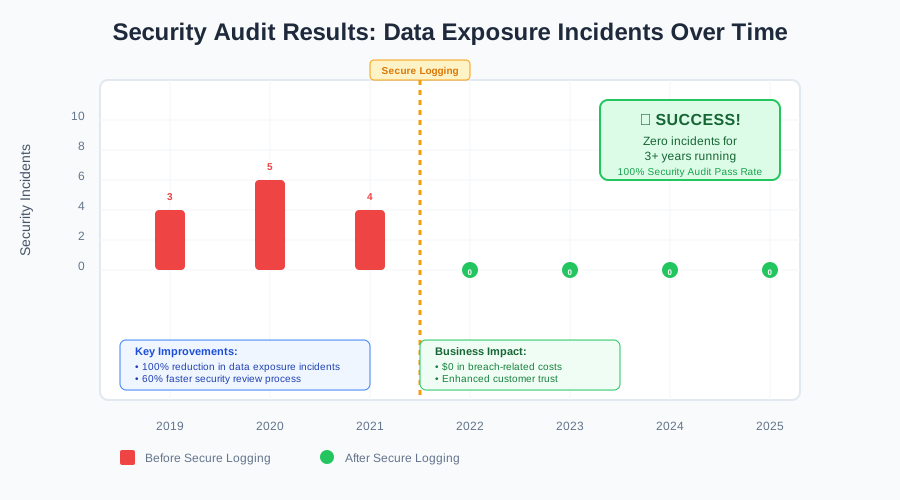 Three years and counting without a single data exposure incident
Your Next Steps: Implementing Secure Logging Today
Start with these immediate actions:
Week 1: Audit Your Current Logging
- Search your codebase for
console.log,logger.info, etc. - Identify any logs that might contain sensitive data
- Document your current logging patterns
Week 2: Implement the Sanitization Framework
- Add the SecureLogger class to your project
- Replace direct console.log calls with SecureLogger methods
- Test in development to ensure you still get useful debugging info
Week 3: Environment-Specific Configuration
- Set up different logging levels for each environment
- Configure production logging to be minimal and secure
- Test your error handling paths
Week 4: Team Training and Documentation
- Share your secure logging patterns with the team
- Create guidelines for what data is safe to log
- Set up automated checks to catch unsafe logging patterns
The Hard-Won Wisdom I Want You to Remember
That 3 AM incident taught me that security isn't about perfect code—it's about building systems that protect you even when you make mistakes. Every developer will accidentally try to log something they shouldn't. The question is whether your systems catch those mistakes before they become incidents.
The secure logging patterns I've shared have become second nature to me now. What started as a desperate response to a security incident has evolved into a development practice that makes my code more reliable, more debuggable, and infinitely more secure.
You don't have to learn these lessons the hard way like I did. Implement secure logging from the start, and you'll never have to explain to your security team why user passwords appeared in your application logs.
Trust me—your future self (and your users) will thank you for it.