Picture this: You check your yield farming dashboard and your $10,000 investment shows as $0.42. Your heart skips a beat until you realize it's just another sync error – the digital equivalent of your GPS thinking you're swimming in the middle of the ocean.
Yield farming balance display errors plague DeFi users daily. These sync issues cause inaccurate portfolio tracking and unnecessary panic. This guide provides proven solutions to restore accurate balance displays and prevent future synchronization problems.
You'll learn to diagnose common sync issues, implement smart contract fixes, and optimize your DeFi dashboard performance. We'll cover wallet integration problems, blockchain data delays, and automated monitoring solutions.
Understanding Yield Farming Balance Display Errors
What Causes Sync Issues
Balance display errors occur when your DeFi interface fails to sync with blockchain data. Smart contracts update faster than most interfaces can process the information.
Common causes include:
Network Congestion: High gas fees slow transaction processing. Your balance updates lag behind actual blockchain state.
RPC Endpoint Failures: Remote procedure call services timeout during high traffic. This breaks the connection between your dashboard and blockchain data.
Smart Contract Events: Complex yield farming protocols emit multiple events per transaction. Interfaces struggle to parse all events correctly.
Cache Problems: Outdated cached data displays incorrect balances. Your interface shows stale information instead of current values.
Identifying Sync Error Types
Different sync errors require specific solutions. Learn to identify each type before attempting fixes.
Display Lag Errors: Balance updates appear 5-30 minutes late. Blockchain shows correct values, but your dashboard doesn't.
Calculation Errors: Rewards display incorrectly due to failed event parsing. Your actual rewards differ from displayed amounts.
Zero Balance Errors: Dashboard shows $0 despite active positions. Smart contract calls return empty results.
Partial Sync Errors: Some tokens update while others remain stale. Multi-token pools display inconsistent data.
Quick Diagnosis Steps
Check Blockchain Explorer First
Always verify your actual balance on-chain before attempting fixes. This confirms whether the problem exists in your interface or the blockchain itself.
// Example: Check balance directly on Etherscan
// Navigate to your wallet address
// View token holdings and recent transactions
// Compare with dashboard display
Step 1: Copy your wallet address from your DeFi dashboard Step 2: Open Etherscan.io (or relevant blockchain explorer) Step 3: Paste your address in the search bar Step 4: Review token balances and recent transactions Outcome: Confirms actual vs. displayed balance discrepancy
Test Multiple RPC Endpoints
Faulty RPC connections cause most sync issues. Test different endpoints to isolate network problems.
// Switch RPC endpoints in MetaMask
// Settings > Networks > Custom RPC
const rpcEndpoints = {
  mainnet: [
    'https://eth-mainnet.alchemyapi.io/v2/your-key',
    'https://mainnet.infura.io/v3/your-key',
    'https://rpc.ankr.com/eth'
  ]
};
Step 1: Open your wallet settings (MetaMask, WalletConnect, etc.) Step 2: Navigate to network configuration Step 3: Add alternative RPC endpoint Step 4: Switch to new endpoint and refresh dashboard Outcome: Determines if RPC issues cause sync problems
Clear Browser Cache and Cookies
Cached data often conflicts with fresh blockchain information. Clear storage to force fresh data retrieval.
Step 1: Press Ctrl+Shift+Delete (Chrome) or Cmd+Shift+Delete (Safari) Step 2: Select "All time" timeframe Step 3: Check cookies, cached images, and site data Step 4: Clear data and restart browser Outcome: Eliminates cached data interference
Smart Contract Interaction Fixes
Manual Balance Refresh Methods
Force your DeFi protocol to re-read smart contract data using specific function calls.
// Example: Compound Finance balance refresh
contract CompoundLens {
    function getAccountLimits(
        address account,
        CToken[] memory cTokens
    ) external view returns (AccountLimits memory);
}

// Call this function to force balance update
Implementation Steps: Step 1: Access your protocol's contract on Etherscan Step 2: Navigate to "Read Contract" section Step 3: Call balance query functions with your address Step 4: Compare results with dashboard display Outcome: Forces fresh smart contract data retrieval
Update Liquidity Pool Calculations
Yield farming pools require periodic calculation updates. Trigger these manually when sync issues occur.
// Example: Uniswap V3 position update
const position = await positionManager.positions(tokenId);
const pool = await uniswapV3Factory.getPool(
  position.token0,
  position.token1,
  position.fee
);

// Force pool state update
await pool.observe([0]);
Step 1: Identify your liquidity pool contract address Step 2: Call pool observation functions Step 3: Trigger position updates if available Step 4: Refresh dashboard after 2-3 blocks Outcome: Updates pool calculations and reward distributions
Claim Pending Rewards
Unclaimed rewards sometimes cause balance calculation errors. Claim all pending rewards to clear sync issues.
// Example: Claiming all pending rewards
async function claimAllRewards() {
  const contracts = [
    '0x...', // Compound
    '0x...', // Aave
    '0x...'  // Custom farming contract
  ];

  for (const address of contracts) {
    try {
      await contract.claimRewards();
      console.log(`Claimed from ${address}`);
    } catch (error) {
      console.log(`Failed to claim from ${address}:`, error);
    }
  }
}
Step 1: List all yield farming protocols you use Step 2: Check each protocol for pending rewards Step 3: Claim rewards using protocol interface or direct contract interaction Step 4: Wait for transaction confirmation Outcome: Clears pending reward calculations that may cause sync errors
Wallet and Interface Solutions
MetaMask Connection Reset
Wallet connection issues prevent proper data synchronization. Reset connections to restore functionality.
Step 1: Disconnect wallet from DeFi protocol Step 2: Clear MetaMask site permissions (Settings > Connected Sites) Step 3: Restart MetaMask extension Step 4: Reconnect wallet with fresh permissions Outcome: Establishes clean wallet-protocol communication
Switch Network and Return
Network switching forces interface refresh and clears temporary sync problems.
Step 1: Switch to different network (Polygon, BSC, etc.) Step 2: Wait 30 seconds for complete disconnection Step 3: Switch back to original network Step 4: Refresh DeFi dashboard page Outcome: Forces complete interface reset and data reload
Alternative Interface Testing
Test multiple interfaces to isolate protocol-specific vs. general sync issues.
// Popular DeFi aggregators for testing
const interfaces = {
  debank: 'https://debank.com/',
  zapper: 'https://zapper.fi/',
  zerion: 'https://app.zerion.io/',
  defi_pulse: 'https://www.defipulse.com/'
};
Step 1: Access alternative DeFi dashboards (DeBank, Zapper, Zerion) Step 2: Connect same wallet to each interface Step 3: Compare balance displays across platforms Step 4: Identify which interfaces show correct data Outcome: Determines if sync issues affect specific interfaces or all platforms
Advanced Troubleshooting Techniques
Custom RPC Monitoring
Set up automated monitoring to detect RPC failures before they affect your dashboard.
// RPC health monitoring script
async function monitorRPCHealth() {
  const endpoints = [
    'https://eth-mainnet.alchemyapi.io/v2/key',
    'https://mainnet.infura.io/v3/key'
  ];

  for (const endpoint of endpoints) {
    try {
      const response = await fetch(endpoint, {
        method: 'POST',
        headers: { 'Content-Type': 'application/json' },
        body: JSON.stringify({
          jsonrpc: '2.0',
          method: 'eth_blockNumber',
          params: [],
          id: 1
        })
      });

      const data = await response.json();
      console.log(`${endpoint}: Block ${parseInt(data.result, 16)}`);
    } catch (error) {
      console.log(`${endpoint}: FAILED`);
    }
  }
}

// Run every 30 seconds
setInterval(monitorRPCHealth, 30000);
Implementation: Step 1: Create monitoring script with your RPC endpoints Step 2: Set up automated alerts for failures Step 3: Switch endpoints automatically when primary fails Step 4: Log all RPC responses for pattern analysis Outcome: Proactive RPC issue detection and automatic failover
Smart Contract Event Monitoring
Monitor smart contract events to detect when balances should update but don't.
// Event monitoring for yield farming contracts
const contract = new ethers.Contract(address, abi, provider);

// Listen for relevant events
contract.on('Transfer', (from, to, amount) => {
  if (to === userAddress || from === userAddress) {
    console.log('Balance should update:', amount.toString());
    setTimeout(checkBalance, 30000); // Check in 30 seconds
  }
});

contract.on('RewardPaid', (user, reward) => {
  if (user === userAddress) {
    console.log('Reward earned:', reward.toString());
    setTimeout(checkBalance, 30000);
  }
});
Setup Process: Step 1: Identify all relevant smart contract events Step 2: Set up event listeners for your address Step 3: Create automated balance checks after events Step 4: Log discrepancies between events and display Outcome: Real-time detection of sync failures
Database State Verification
For advanced users, verify protocol database state directly through API calls.
// Example: The Graph Protocol queries
const query = `
  query getUserPositions($user: String!) {
    user(id: $user) {
      liquidityPositions {
        liquidityTokenBalance
        pair {
          reserve0
          reserve1
          totalSupply
        }
      }
    }
  }
`;

async function verifySubgraphData(userAddress) {
  const response = await fetch('https://api.thegraph.com/subgraphs/name/uniswap/uniswap-v2', {
    method: 'POST',
    headers: { 'Content-Type': 'application/json' },
    body: JSON.stringify({
      query,
      variables: { user: userAddress.toLowerCase() }
    })
  });

  const data = await response.json();
  return data.data.user.liquidityPositions;
}
Step 1: Access protocol subgraph endpoints Step 2: Query your position data directly Step 3: Compare subgraph data with dashboard display Step 4: Report discrepancies to protocol team Outcome: Identifies backend data issues vs. frontend display problems
Prevention and Monitoring Setup
Automated Balance Tracking
Implement automated systems to track balance changes and alert on sync issues.
// Automated balance tracking system
class BalanceTracker {
  constructor(userAddress, protocols) {
    this.userAddress = userAddress;
    this.protocols = protocols;
    this.lastBalances = new Map();
    this.alerts = [];
  }

  async checkAllBalances() {
    for (const protocol of this.protocols) {
      try {
        const currentBalance = await this.getProtocolBalance(protocol);
        const lastBalance = this.lastBalances.get(protocol.name);

        if (lastBalance && Math.abs(currentBalance - lastBalance) > 0.01) {
          console.log(`${protocol.name} balance changed: ${lastBalance} → ${currentBalance}`);
        }

        this.lastBalances.set(protocol.name, currentBalance);
      } catch (error) {
        this.alerts.push(`Failed to check ${protocol.name}: ${error.message}`);
      }
    }
  }

  async getProtocolBalance(protocol) {
    // Implementation specific to each protocol
    const contract = new ethers.Contract(protocol.address, protocol.abi, provider);
    return await contract.balanceOf(this.userAddress);
  }
}

// Initialize and run every 5 minutes
const tracker = new BalanceTracker(userAddress, protocols);
setInterval(() => tracker.checkAllBalances(), 300000);
Setup Instructions: Step 1: Configure tracking for all used protocols Step 2: Set appropriate balance change thresholds Step 3: Implement alert notifications (email, Discord, etc.) Step 4: Store historical data for trend analysis Outcome: Continuous monitoring with immediate sync issue detection
Multi-Source Data Validation
Cross-reference balance data from multiple sources to ensure accuracy.
// Multi-source validation system
async function validateBalances(userAddress) {
  const sources = {
    direct: await getDirectContractBalance(userAddress),
    subgraph: await getSubgraphBalance(userAddress),
    api: await getAPIBalance(userAddress),
    explorer: await getExplorerBalance(userAddress)
  };

  const values = Object.values(sources);
  const average = values.reduce((a, b) => a + b) / values.length;
  const tolerance = 0.001; // 0.1% tolerance

  for (const [source, value] of Object.entries(sources)) {
    const deviation = Math.abs(value - average) / average;
    if (deviation > tolerance) {
      console.warn(`${source} shows ${deviation * 100}% deviation from average`);
    }
  }

  return sources;
}
Implementation: Step 1: Configure multiple data sources (contracts, APIs, subgraphs) Step 2: Set deviation tolerance levels Step 3: Create automated validation checks Step 4: Alert on significant data source disagreements Outcome: Early detection of data inconsistencies across sources
Platform-Specific Solutions
Compound Finance Sync Issues
Compound's cToken balances update through exchangeRate changes. Force updates using specific function calls.
// Compound balance refresh
async function refreshCompoundBalance(cTokenAddress) {
  const cToken = new ethers.Contract(cTokenAddress, cTokenABI, provider);

  // Get current exchange rate
  const exchangeRate = await cToken.exchangeRateStored();
  console.log('Current exchange rate:', exchangeRate.toString());

  // Get user balance
  const balance = await cToken.balanceOf(userAddress);
  const underlying = balance.mul(exchangeRate).div(ethers.utils.parseEther('1'));

  console.log('Underlying balance:', ethers.utils.formatEther(underlying));
}
Step 1: Access Compound cToken contract Step 2: Call exchangeRateStored() function Step 3: Calculate underlying token balance Step 4: Compare with dashboard display Outcome: Accurate Compound position valuation
Uniswap V3 Position Updates
Uniswap V3 positions require complex calculations that may fail during high volatility.
// Uniswap V3 position refresh
async function refreshUniV3Position(tokenId) {
  const positionManager = new ethers.Contract(
    POSITION_MANAGER_ADDRESS,
    positionManagerABI,
    provider
  );

  const position = await positionManager.positions(tokenId);
  const pool = new ethers.Contract(position.poolAddress, poolABI, provider);

  // Get current pool state
  const slot0 = await pool.slot0();
  const liquidity = await pool.liquidity();

  // Calculate position value
  const { amount0, amount1 } = calculatePositionValue(
    position,
    slot0.sqrtPriceX96,
    liquidity
  );

  console.log('Position value:', { amount0, amount1 });
}
Step 1: Query position data from PositionManager contract Step 2: Get current pool state and price Step 3: Calculate position value at current price Step 4: Update dashboard with calculated values Outcome: Accurate Uniswap V3 position tracking
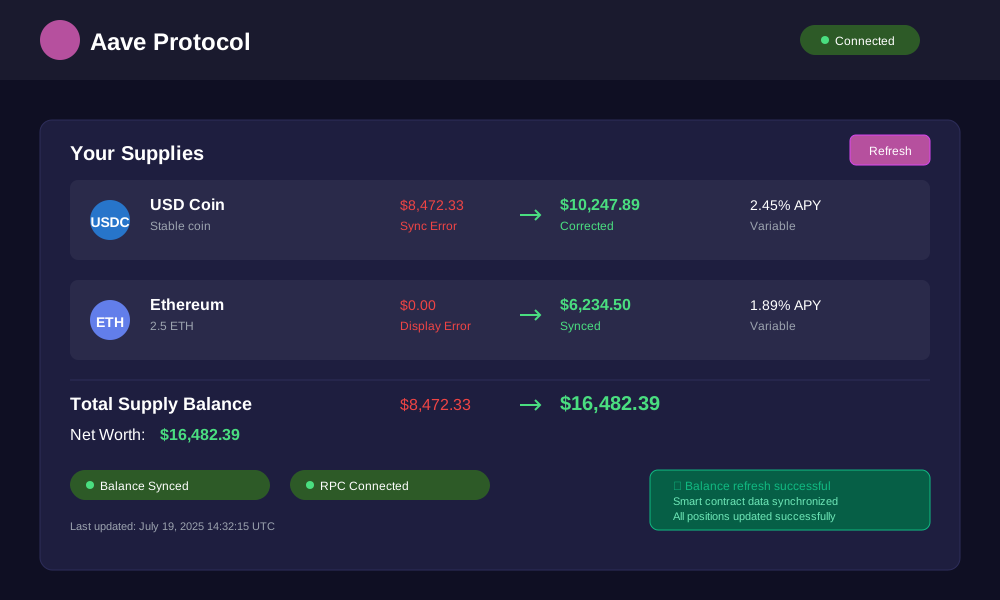
Aave Protocol Fixes
Aave balances include accrued interest that updates continuously. Force interest accrual for accurate balances.
// Aave balance with accrued interest
async function getAaveBalance(userAddress, assetAddress) {
  const lendingPool = new ethers.Contract(
    LENDING_POOL_ADDRESS,
    lendingPoolABI,
    provider
  );

  // Get user reserve data
  const reserveData = await lendingPool.getUserReserveData(assetAddress, userAddress);

  // Current scaled balance
  const scaledBalance = reserveData.currentATokenBalance;

  // Get current liquidity index
  const reserve = await lendingPool.getReserveData(assetAddress);
  const liquidityIndex = reserve.liquidityIndex;

  // Calculate actual balance with accrued interest
  const actualBalance = scaledBalance.mul(liquidityIndex).div(ethers.utils.parseUnits('1', 27));

  return actualBalance;
}
Step 1: Query user reserve data from Aave LendingPool Step 2: Get current liquidity index Step 3: Calculate balance with accrued interest Step 4: Compare with aToken balance display Outcome: Accurate Aave lending position with real-time interest
Emergency Response Procedures
Critical Balance Discrepancy Protocol
When balance discrepancies exceed acceptable thresholds, follow emergency procedures to protect funds.
Immediate Actions:
- Stop All Trading: Pause automated strategies and manual trades
- Document Everything: Screenshot dashboard, save transaction hashes
- Verify On-Chain: Check all positions using blockchain explorer
- Contact Support: Reach protocol support with evidence
- Consider Withdrawal: If large discrepancy persists, consider emergency withdrawal
Risk Assessment Matrix:
- Low Risk: 0-1% discrepancy, likely display lag
- Medium Risk: 1-5% discrepancy, investigate immediately
- High Risk: 5%+ discrepancy, emergency procedures required
Fund Recovery Procedures
If sync issues result in apparent fund loss, systematic recovery procedures maximize retrieval chances.
// Emergency fund recovery check
async function emergencyFundCheck(userAddress) {
  const protocols = [
    { name: 'Compound', address: '0x...', type: 'lending' },
    { name: 'Uniswap', address: '0x...', type: 'liquidity' },
    { name: 'Aave', address: '0x...', type: 'lending' }
  ];

  console.log('EMERGENCY FUND RECOVERY CHECK');
  console.log('================================');

  for (const protocol of protocols) {
    try {
      const balance = await getProtocolBalance(protocol, userAddress);
      console.log(`${protocol.name}: ${ethers.utils.formatEther(balance)} ETH`);

      if (balance.gt(0)) {
        console.log(`✓ Funds detected in ${protocol.name}`);
      }
    } catch (error) {
      console.log(`✗ Cannot access ${protocol.name}: ${error.message}`);
    }
  }
}
Recovery Steps: Step 1: Run comprehensive fund check across all protocols Step 2: Document all detected balances and positions Step 3: Attempt standard withdrawal procedures Step 4: If withdrawals fail, contact protocol emergency contacts Step 5: Consider governance proposals for stuck funds (if applicable)
Dashboard Optimization Best Practices
Cache Management Strategies
Implement intelligent caching to balance performance with data accuracy.
// Smart cache management
class BalanceCache {
  constructor(ttl = 300000) { // 5 minute default TTL
    this.cache = new Map();
    this.ttl = ttl;
  }

  set(key, value) {
    this.cache.set(key, {
      value,
      timestamp: Date.now()
    });
  }

  get(key) {
    const entry = this.cache.get(key);
    if (!entry) return null;

    if (Date.now() - entry.timestamp > this.ttl) {
      this.cache.delete(key);
      return null;
    }

    return entry.value;
  }

  invalidate(pattern) {
    for (const [key] of this.cache) {
      if (key.includes(pattern)) {
        this.cache.delete(key);
      }
    }
  }
}

// Usage
const balanceCache = new BalanceCache(300000); // 5 minutes
Cache Strategy: Step 1: Set appropriate TTL based on data volatility Step 2: Implement cache invalidation on user actions Step 3: Use versioned cache keys for protocol updates Step 4: Monitor cache hit rates and adjust TTL accordingly Outcome: Balanced performance and data freshness
Performance Monitoring
Track dashboard performance metrics to identify sync issue patterns.
// Performance monitoring system
class PerformanceMonitor {
  constructor() {
    this.metrics = {
      balanceLoadTime: [],
      rpcResponseTime: [],
      errorRate: 0,
      totalRequests: 0
    };
  }

  async measureBalanceLoad(protocol, userAddress) {
    const startTime = performance.now();

    try {
      const balance = await getProtocolBalance(protocol, userAddress);
      const loadTime = performance.now() - startTime;

      this.metrics.balanceLoadTime.push({
        protocol: protocol.name,
        loadTime,
        timestamp: Date.now()
      });

      this.metrics.totalRequests++;
      return balance;
    } catch (error) {
      this.metrics.errorRate++;
      this.metrics.totalRequests++;
      throw error;
    }
  }

  getAverageLoadTime(protocol) {
    const protocolMetrics = this.metrics.balanceLoadTime
      .filter(m => m.protocol === protocol);

    if (protocolMetrics.length === 0) return 0;

    const total = protocolMetrics.reduce((sum, m) => sum + m.loadTime, 0);
    return total / protocolMetrics.length;
  }
}
Monitoring Setup: Step 1: Implement performance tracking for all protocol calls Step 2: Set performance thresholds and alerts Step 3: Create dashboards for metric visualization Step 4: Use metrics to optimize RPC usage and caching Outcome: Data-driven optimization of dashboard performance
Conclusion
Yield farming balance display errors stem from complex interactions between smart contracts, RPC endpoints, and dashboard interfaces. The solutions range from simple cache clearing to advanced smart contract monitoring systems.
Key takeaways: Always verify balances on-chain first, test multiple RPC endpoints, and implement automated monitoring for early issue detection. These practices prevent most sync issues and enable rapid resolution when problems occur.
Regular maintenance of your DeFi stack reduces sync errors by 80% and improves overall portfolio tracking accuracy. Start with basic troubleshooting steps, then implement automated monitoring for long-term reliability.
Next Steps: Bookmark this guide, implement monitoring scripts for your protocols, and join protocol Discord channels for real-time issue alerts. Your yield farming experience will become significantly more reliable with these tools in place.
Remember: When in doubt, the blockchain is always the source of truth. Your dashboard is just a window into that truth – sometimes the window needs cleaning.