Problem: Your Vector Search Returns Data Users Shouldn't See
You've built a semantic search or RAG pipeline. Users are querying it. And somewhere in those results, a document from another tenant — or a confidential HR record, or a private customer file — is leaking through.
You'll learn:
- Why vector databases skip access control by default
- How to enforce RBAC using metadata filtering
- Implementation patterns for Pinecone, Weaviate, and pgvector
Time: 25 min | Level: Intermediate
Why This Happens
Vector databases are designed for similarity search, not access control. When you store an embedding, most systems don't attach ownership or permissions to it — that's your job.
The query flow looks like this: a user submits a prompt → it's embedded → the nearest vectors are returned. Without filters, "nearest" means nearest to anyone's data.
Common symptoms:
- Semantic search returns documents from other users or tenants
- RAG responses include context the current user has no business seeing
- No errors — just wrong data silently surfacing
This gets worse in multi-tenant apps where all customers share the same vector index.
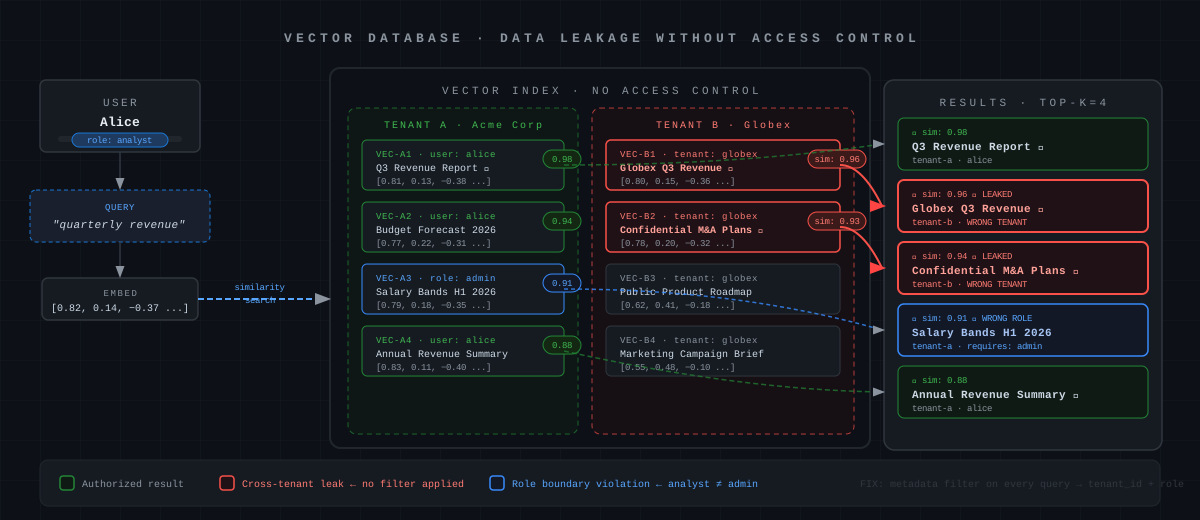 Without metadata filters, similarity search ignores ownership entirely
Solution
The fix is metadata filtering: tag every vector with ownership metadata at insert time, then apply a filter on every query. Never query without a filter.
Step 1: Tag Vectors at Insert Time
Whatever your vector store, attach user/tenant context as metadata. Don't store it in the document text — store it as structured metadata alongside the embedding.
# Pinecone example
import pinecone
from openai import OpenAI

client = OpenAI()
index = pinecone.Index("your-index")

def embed_and_store(doc_id: str, text: str, user_id: str, tenant_id: str, role: str):
    embedding = client.embeddings.create(
        input=text,
        model="text-embedding-3-small"
    ).data[0].embedding

    index.upsert(vectors=[{
        "id": doc_id,
        "values": embedding,
        "metadata": {
            "user_id": user_id,
            "tenant_id": tenant_id,        # Which organization owns this
            "access_roles": [role],        # Which roles can see it (list for multi-role)
            "classification": "internal"   # Optional: sensitivity label
        }
    }])
Expected: Every vector in your index now has ownership metadata attached.
If it fails:
- Pinecone metadata size limit: Keep metadata under 40KB per vector — don't store the full document, store just the access control fields.
- Missing metadata on old vectors: Backfill with
index.update(id=doc_id, set_metadata={...}).
Step 2: Filter on Every Query
Build a query helper that requires caller identity. Never expose a raw query method — callers should never be able to opt out of filtering.
from typing import Optional

def secure_query(
    query_text: str,
    user_id: str,
    tenant_id: str,
    user_roles: list[str],
    top_k: int = 5,
) -> list[dict]:
    embedding = client.embeddings.create(
        input=query_text,
        model="text-embedding-3-small"
    ).data[0].embedding

    # Build filter — user sees their own docs OR docs shared with their roles
    # Never let this be optional
    access_filter = {
        "$and": [
            {"tenant_id": {"$eq": tenant_id}},   # Always scope to tenant first
            {
                "$or": [
                    {"user_id": {"$eq": user_id}},
                    {"access_roles": {"$in": user_roles}}
                ]
            }
        ]
    }

    results = index.query(
        vector=embedding,
        top_k=top_k,
        filter=access_filter,   # This is the critical line
        include_metadata=True
    )

    return results.matches
Expected: Query results contain only vectors matching the caller's tenant and role.
If it fails:
- Empty results for valid queries: Confirm the metadata keys match exactly —
tenant_idvstenantIdwill silently return nothing. $innot supported: Some index tiers don't support all filter operators — check your plan's filter support matrix.
Step 3: Weaviate — Use Built-in RBAC (v1.28+)
Weaviate 1.28+ ships native RBAC. Use it instead of manual metadata filtering when possible.
import weaviate
from weaviate.classes.config import Configure, Permission, Role

client = weaviate.connect_to_local()

# Create a collection with tenant isolation
client.collections.create(
    name="Documents",
    multi_tenancy_config=Configure.multi_tenancy(enabled=True)
)

# Create roles
client.roles.create(
    role_name="analyst",
    permissions=[
        Permission.collections(collection="Documents", read=True),
    ]
)

# Assign role to user
client.users.assign_role(user_id="alice@company.com", role="analyst")
# Query scoped to tenant — Weaviate enforces access at the server
docs = client.collections.get("Documents")
tenant_docs = docs.with_tenant("tenant_acme")

results = tenant_docs.query.near_text(
    query="quarterly revenue",
    limit=5
)
Why this is better: RBAC at the database level means a bug in your application code can't accidentally bypass it.
Step 4: pgvector — Use Row-Level Security
If you're running pgvector in Postgres, use Row-Level Security (RLS). This enforces access at the database engine, not the application layer.
-- Enable RLS on your embeddings table
ALTER TABLE document_embeddings ENABLE ROW LEVEL SECURITY;

-- Policy: users only see rows matching their user_id
CREATE POLICY tenant_isolation ON document_embeddings
    USING (tenant_id = current_setting('app.current_tenant')::uuid);

-- Policy: role-based visibility
CREATE POLICY role_access ON document_embeddings
    USING (
        required_role = ANY(
            string_to_array(current_setting('app.current_roles'), ',')
        )
    );
# Python: set session variables before every query
import psycopg2

def get_secure_connection(user_id: str, tenant_id: str, roles: list[str]):
    conn = psycopg2.connect(DATABASE_URL)
    cur = conn.cursor()

    # Set session context — RLS policies read these
    cur.execute("SELECT set_config('app.current_tenant', %s, true)", (tenant_id,))
    cur.execute("SELECT set_config('app.current_roles', %s, true)", (",".join(roles),))

    return conn
-- Your vector similarity query — RLS applies automatically
SELECT id, content, 1 - (embedding <=> %s::vector) AS similarity
FROM document_embeddings
ORDER BY similarity DESC
LIMIT 5;
Expected: Postgres silently filters rows before your application ever sees them. There's no way for application code to accidentally bypass this.
 RLS policies intercept the query at the storage engine level
Verification
Test that your filters actually block cross-tenant access. This is worth automating.
import pytest

def test_tenant_isolation(index):
    # Store a doc owned by tenant A
    embed_and_store("doc-1", "confidential revenue data", "user-a", "tenant-a", "admin")

    # Query as tenant B — should return nothing
    results = secure_query(
        query_text="revenue data",
        user_id="user-b",
        tenant_id="tenant-b",
        user_roles=["analyst"]
    )

    assert len(results) == 0, "Cross-tenant data leaked!"

def test_role_access(index):
    embed_and_store("doc-2", "salary bands", "hr-user", "tenant-a", "hr")

    # Admin should see HR docs
    admin_results = secure_query("salary", "admin-user", "tenant-a", ["admin", "hr"])
    assert len(admin_results) > 0

    # Analyst should NOT see HR docs
    analyst_results = secure_query("salary", "analyst-user", "tenant-a", ["analyst"])
    assert len(analyst_results) == 0
pytest tests/test_vector_rbac.py -v
You should see: Both tests pass. If test_tenant_isolation fails, your filter isn't being applied.
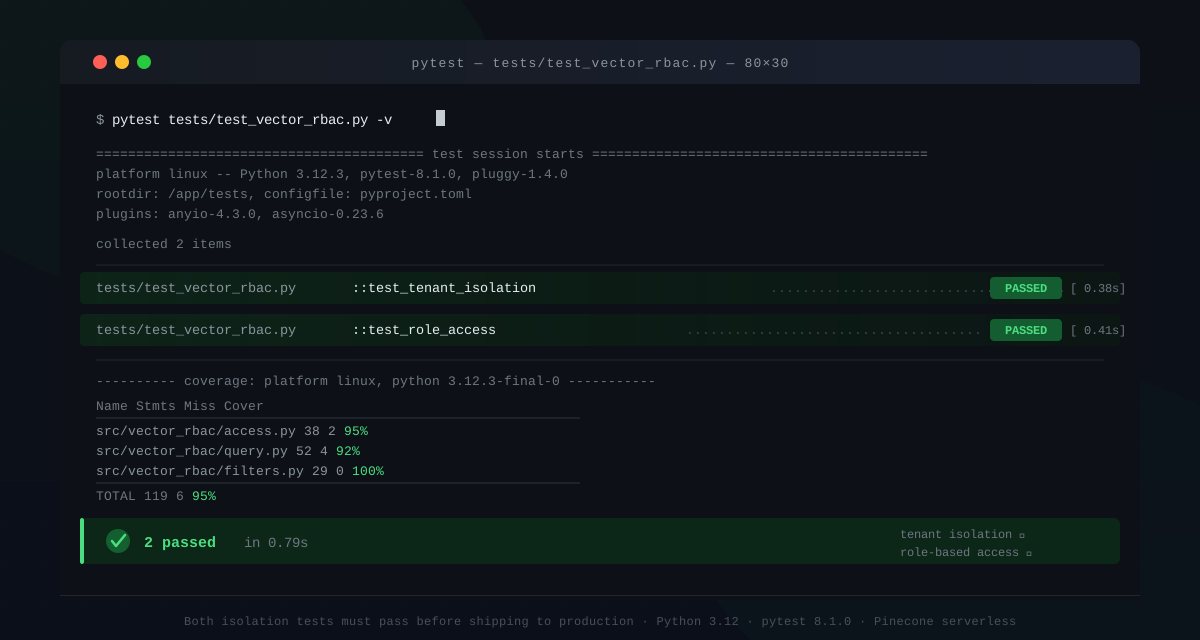 Both isolation tests should pass before you ship this to production
What You Learned
- Vector databases don't enforce access control — you have to build it in from day one
- Metadata filters (Pinecone), native RBAC (Weaviate 1.28+), and RLS (pgvector/Postgres) are the three main approaches
- Database-level enforcement (RLS, Weaviate RBAC) is more robust than application-layer filtering
Limitation: Metadata filtering doesn't prevent embedding inversion attacks — a determined attacker with API access can still probe the embedding space. For highly sensitive data, consider namespace-level isolation (separate indexes per tenant) rather than filter-based isolation.
When NOT to use this pattern: If your data has no access hierarchy (fully public index), adding filters adds latency with no benefit. Profile the filter overhead — on large indexes with complex $and/$or filters, it can add 10–40ms per query.
Tested on Pinecone serverless (2025-Q4), Weaviate 1.28.3, pgvector 0.7.x, Python 3.12