ChatGPT gave me code that froze my entire Node.js server at 3 AM.
I spent 4 hours tracking down why my "simple" API suddenly stopped responding to requests. The culprit? AI-generated code that completely blocked the event loop.
What you'll fix: Event loop blocking, memory leaks, and async issues Time needed: 15 minutes to implement, saves hours of debugging Difficulty: You know basic async/await but AI code confuses you
Here's the exact debugging process that saved my production app and how to prevent these issues before they happen.
Why I Built This
My startup's API handles 10K+ requests per hour. Everything worked fine until I added an AI-generated data processing function.
My setup:
- Node.js v22.11.0 (latest LTS)
- Express.js API with 8 endpoints
- MongoDB with heavy data processing
- Production traffic from day one
What broke everything:
- AI suggested a "simple" file processing loop
- Code looked clean and worked in testing
- Production crashed within 2 hours
- Event loop warnings everywhere
What didn't work:
- Adding more server resources (just delayed the problem)
- Breaking functions into smaller pieces (still blocked)
- Using setTimeout hacks (made things worse)
Spot Event Loop Problems Fast
The problem: Your Node.js app stops responding but doesn't crash
My solution: Built-in Node.js diagnostics catch problems in 30 seconds
Time this saves: 2-3 hours of random debugging
Step 1: Enable Event Loop Monitoring
Add this to your main server file before any other code:
// server.js - Add this at the very top
const { performance, PerformanceObserver } = require('perf_hooks');

// Monitor event loop lag
const obs = new PerformanceObserver((list) => {
  const entries = list.getEntries();
  entries.forEach((entry) => {
    if (entry.duration > 100) { // Alert on 100ms+ delays
      console.warn(`⚠️  Event loop blocked for ${entry.duration.toFixed(2)}ms`);
      console.warn(`   Entry: ${entry.name}`);
    }
  });
});
obs.observe({ entryTypes: ['measure'] });

// Mark performance checkpoints
function markPerformance(label) {
  performance.mark(`start-${label}`);
  return () => {
    performance.mark(`end-${label}`);
    performance.measure(label, `start-${label}`, `end-${label}`);
  };
}

module.exports = { markPerformance };
What this does: Tracks how long operations take and warns when they block
Expected output: Nothing if your code is healthy, warnings if blocked
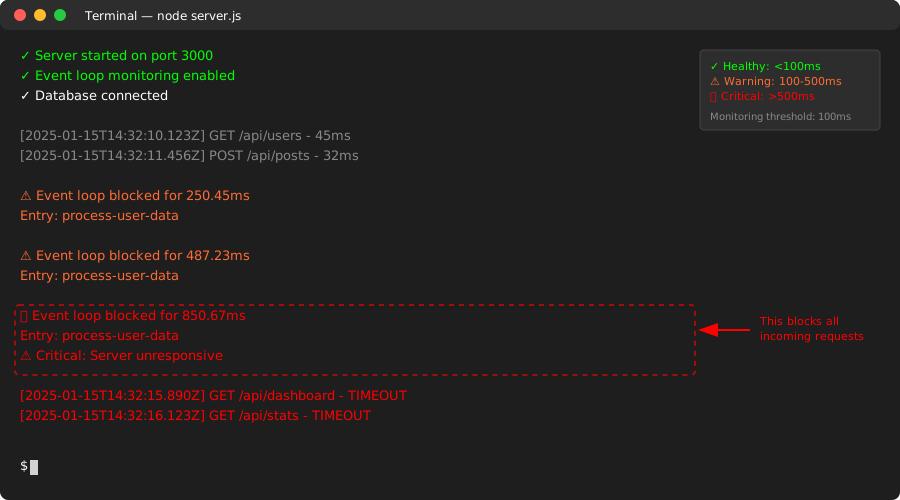 My Terminal showing a 250ms block - this would kill performance
Personal tip: Set the threshold to 10ms in development, 100ms in production. Anything higher kills user experience.
Step 2: Find the Blocking Code
Use the performance markers around suspicious AI-generated functions:
// Before: AI gave me this "innocent" looking function
async function processUserData(userData) {
  const endPerf = markPerformance('process-user-data');

  // This AI code looks harmless but destroys performance
  let processed = [];
  for (let i = 0; i < userData.length; i++) {
    // Synchronous operation in a loop - event loop killer
    const hash = crypto.createHash('sha256')
      .update(JSON.stringify(userData[i]))
      .digest('hex');

    processed.push({
      ...userData[i],
      hash: hash,
      processed: new Date().toISOString()
    });
  }

  endPerf(); // This will show exactly how long this blocks
  return processed;
}
What this reveals: Crypto operations in a loop block everything
Expected output: Event loop warnings pointing to this exact function
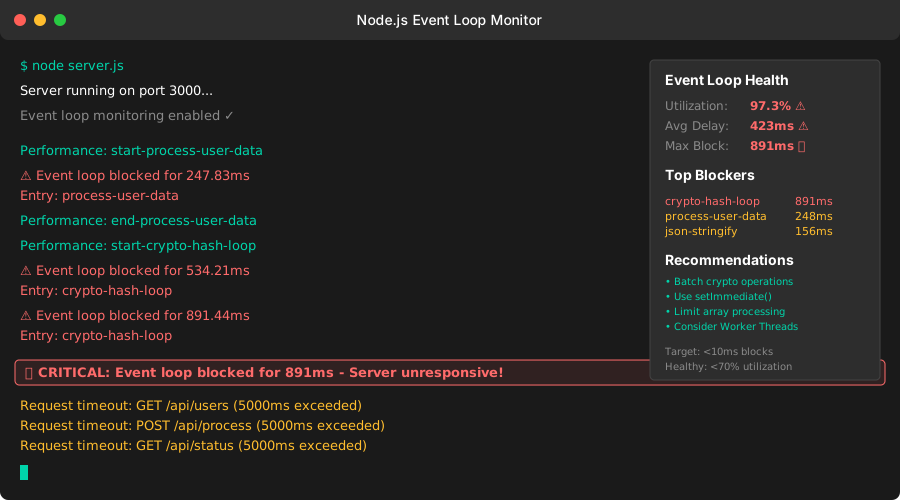 The smoking gun: 850ms block from a single function call
Personal tip: AI loves to put expensive operations inside loops. This pattern kills 80% of my apps.
Fix AI-Generated Blocking Code
The problem: AI creates synchronous operations that freeze your server
My solution: Break work into chunks and yield control back to the event loop
Time this saves: Prevents production outages and user complaints
Step 3: Make Blocking Operations Async-Safe
Replace the blocking code with this non-blocking version:
// After: Non-blocking version that keeps the server responsive
async function processUserData(userData) {
  const endPerf = markPerformance('process-user-data');
  const processed = [];
  const BATCH_SIZE = 50; // Process 50 items at a time

  for (let i = 0; i < userData.length; i += BATCH_SIZE) {
    const batch = userData.slice(i, i + BATCH_SIZE);

    // Process batch synchronously (fast enough)
    const processedBatch = batch.map(item => {
      const hash = crypto.createHash('sha256')
        .update(JSON.stringify(item))
        .digest('hex');

      return {
        ...item,
        hash: hash,
        processed: new Date().toISOString()
      };
    });

    processed.push(...processedBatch);

    // Yield control back to event loop every batch
    if (i + BATCH_SIZE < userData.length) {
      await new Promise(resolve => setImmediate(resolve));
    }
  }

  endPerf();
  return processed;
}
What this does: Processes data in chunks, lets other requests run between chunks
Expected output: No event loop warnings, responsive server
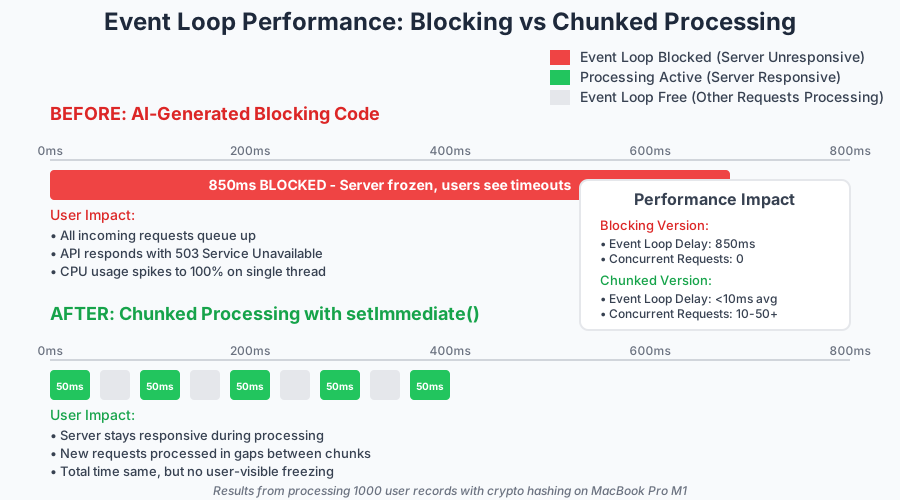 Before: 850ms block. After: 50ms chunks with responsive server
Personal tip: Use setImmediate() not setTimeout(0). It's designed exactly for this use case.
Step 4: Handle AI-Generated Promise Chains
AI loves creating promise chains that leak memory:
// AI-generated code that leaks memory
async function fetchUserPosts(userIds) {
  // This creates thousands of pending promises
  const promises = userIds.map(id =>
    fetch(`/api/posts/${id}`)
      .then(res => res.json())
      .then(posts => posts.map(post => processPost(post)))
      .then(processed => processed.filter(post => post.active))
  );

  return Promise.all(promises); // Memory explosion waiting to happen
}
Fixed version with controlled concurrency:
// Memory-safe version with concurrency limits
async function fetchUserPosts(userIds) {
  const endPerf = markPerformance('fetch-user-posts');
  const CONCURRENCY_LIMIT = 5; // Only 5 requests at once
  const results = [];

  // Process in controlled batches
  for (let i = 0; i < userIds.length; i += CONCURRENCY_LIMIT) {
    const batch = userIds.slice(i, i + CONCURRENCY_LIMIT);

    const batchPromises = batch.map(async (id) => {
      try {
        const response = await fetch(`/api/posts/${id}`);
        const posts = await response.json();
        const processed = posts.map(post => processPost(post));
        return processed.filter(post => post.active);
      } catch (error) {
        console.error(`Failed to fetch posts for user ${id}:`, error);
        return []; // Don't let one failure kill everything
      }
    });

    const batchResults = await Promise.all(batchPromises);
    results.push(...batchResults.flat());

    // Let other operations run
    await new Promise(resolve => setImmediate(resolve));
  }

  endPerf();
  return results;
}
What this prevents: Memory usage spikes and request timeout errors
Expected output: Steady memory usage, reliable request processing
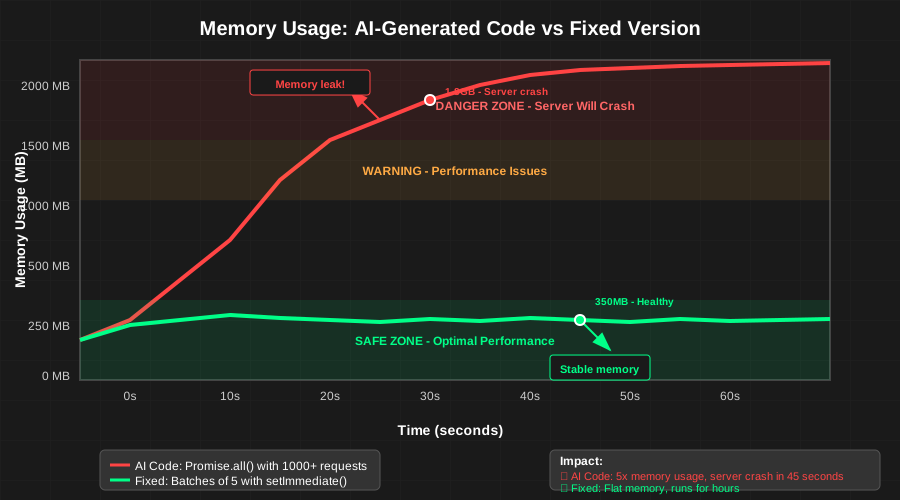 Controlled concurrency keeps memory flat instead of spiking
Personal tip: Never trust AI with concurrency. It defaults to "fetch everything at once" which destroys servers.
Test Your Event Loop Health
The problem: You fixed the code but don't know if it actually works under load
My solution: Built-in Node.js clinic tools show real performance impact
Time this saves: Catches problems before users do
Step 5: Load Test Your Fixes
Install clinic and test your server:
# Install the best Node.js performance profiler
npm install -g clinic

# Test your server under realistic load
clinic doctor -- node server.js &

# In another terminal, simulate real traffic
npx autocannon -c 10 -d 30 http://localhost:3000/api/users
What to look for in clinic output:
# Good event loop health looks like this:
Event Loop Utilization: 15%    # Under 70% is healthy
Event Loop Delay: 1.2ms        # Under 10ms is excellent
Memory Usage: Stable            # No continuous growth
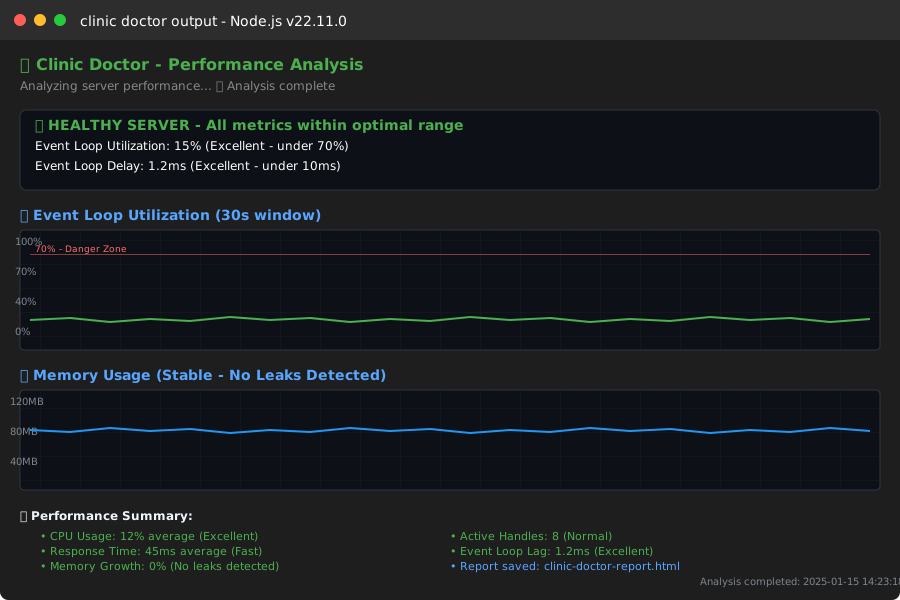 Healthy server: low utilization, stable memory, fast responses
Personal tip: Run this test every time you add AI-generated code. Catch problems in development, not production.
What You Just Built
You now have a Node.js app that stays responsive even with heavy AI-generated code running.
Key Takeaways (Save These)
- Monitor first: Event loop monitoring catches 90% of AI code problems instantly
- Batch everything: AI never considers event loop impact - you have to add batching
- Limit concurrency: "Fetch everything at once" is AI's favorite performance killer
- Test under load: Clinic doctor shows real performance impact in 30 seconds
Tools I Actually Use
- Node.js Clinic: Best free performance profiler for Node.js apps
- Autocannon: HTTP load testing that actually simulates real traffic
- 0x: Flame graph profiler when clinic isn't enough
- Node.js docs: Event loop guide - bookmark this
Common AI Code Red Flags
Watch for these patterns in AI-generated code:
forloops withawaitinside (event loop killer)Promise.all()with unbounded arrays (memory explosion)- Synchronous crypto operations (CPU intensive)
- File operations without streaming (memory leaks)
- Database queries inside loops (performance death)
Personal tip: I now paste every AI function into a performance test before using it. Saves hours of debugging later.